
 Log in
 Start Free Trial

Property management CRM is software for organizing prospect and customer relationships with the aim of turning inquiries into leasing appointments and signed management agreements. Choosing a CRM for property management in 2026 means separating owner acquisition, renter inquiries, and ongoing resident communication without confusing relationship management with rent accounting or maintenance operations.
- Arches CRM fits property management teams seeking lead management, sales pipelines, and automated follow-up.
- Choose CRM for property management around separate owner acquisition and leasing workflows.
- Keep rent accounting and maintenance operations separate unless the system explicitly supports them.
- Test CRM automation against replies, appointments, opt-outs, and completed deals before expanding it.
Why CRM matters for property management companies
An owner asking about management services and a renter asking about a viewing need different responses. Putting both into one undifferentiated contact list hides the next action: arrange an owner consultation, confirm property requirements, or schedule a leasing appointment.
The operational problem is specific. A conversation can start by email, continue by phone, and end with an appointment that nobody records. Your CRM should make responsibility and the next action visible, not just store contact details.
Start with a written follow-up process before choosing software. This guide to automatic follow-up reminders explains the workflow question to resolve first: what should trigger the next task?
For your 2026 selection, judge the system against actual work. Can a teammate understand an inquiry without asking the original contact handler? Can a manager distinguish an unanswered inquiry from a prospect who has already declined? Those are more useful tests than a long feature checklist.
Build your property management CRM around the next action
1. Separate owner acquisition from leasing inquiries
Start manually with a shared spreadsheet and separate tabs for owners and prospective residents. Record the contact, assigned teammate, current status, and next action. This establishes the process without making software configuration the first obstacle.
Use 2 pipelines as a starting configuration: owner acquisition and leasing inquiries. This is a recommended setup, not a performance benchmark. An owner discussing management terms should not move through the same stages as someone booking a viewing.
Keep ongoing resident service requests outside the sales pipeline. A maintenance issue is not a sales opportunity, even when the same person also appears in your contact database.
- Label each inquiry as owner acquisition or leasing.
- Assign one accountable teammate to each open opportunity.
- Record the property or unit being discussed.
- Write the next action in plain language.
- Define where resident service requests must be routed.
2. Define stages using observable events
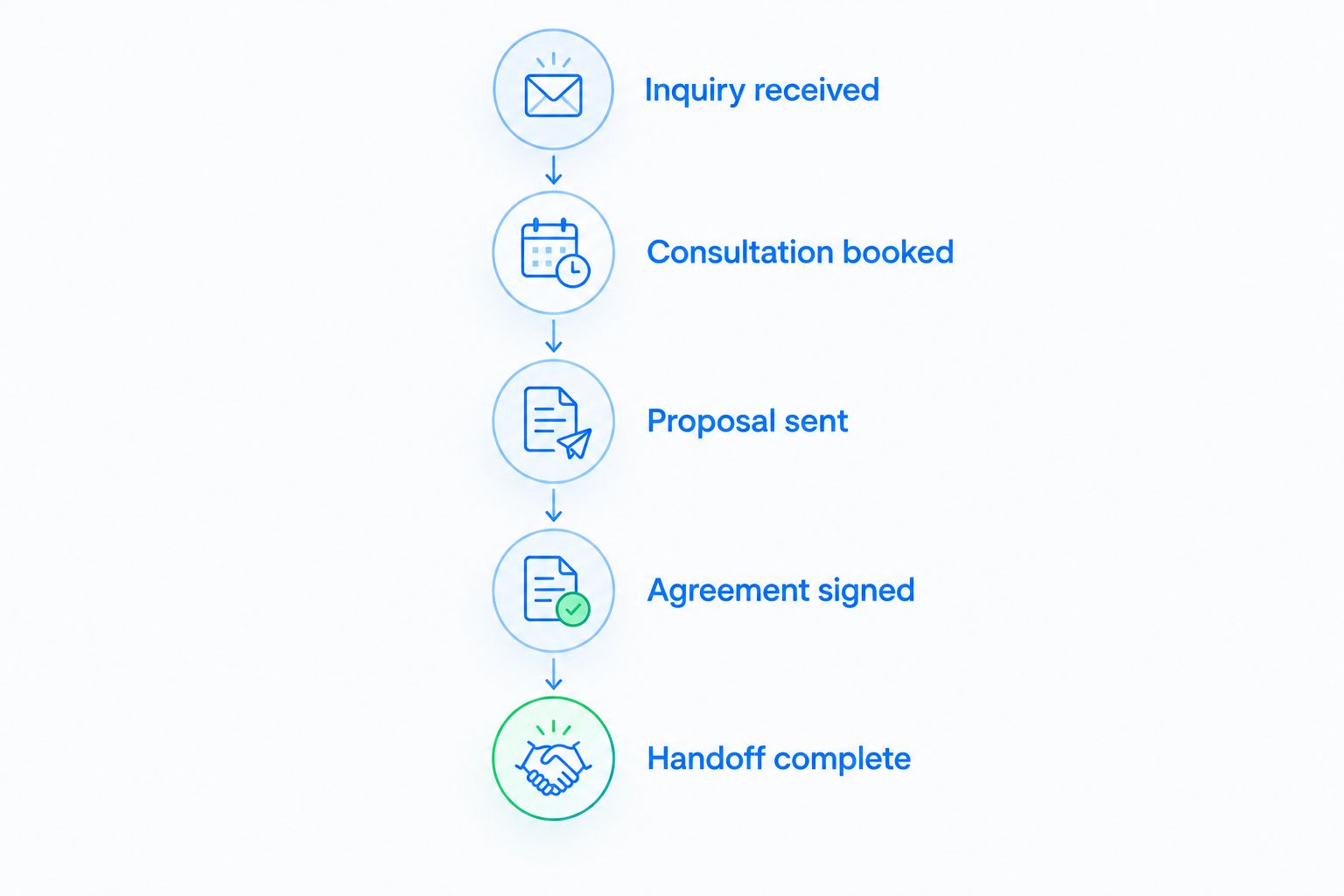
Write your stages on paper before configuring them. For owner acquisition, a practical sequence is Inquiry received, Consultation booked, Proposal sent, Agreement signed, and Handoff complete. Each stage should describe something that happened, not a salesperson's confidence.
For leasing, use events appropriate to that workflow, such as a scheduled viewing or submitted application. Keep application assessment in the designated operational process; a CRM stage records progress, not an eligibility decision.
A configurable sales pipeline is the faster alternative to maintaining stage changes manually. The value comes from shared definitions: anyone reviewing an opportunity should understand why it sits in that stage.
Do not treat a sent proposal as an agreement. In your 2026 configuration, require a recorded outcome before an opportunity becomes a completed deal.
- Write an entry condition for every stage.
- Specify the evidence required to advance an opportunity.
- Separate completed deals from declined inquiries.
- Record a reason when a prospect stops progressing.
- Define the operational handoff after an agreement is signed.
3. Standardize contact records before importing them
Build a sample contact record manually first. Use 5 required fields for the pilot: name, contact method, relationship type, assigned teammate, and next action. Add property references where they help your team identify the conversation, rather than collecting every possible detail.
Check duplicate records before import. The same owner can discuss multiple properties, and the same renter can inquire about multiple units. Preserve the person-to-opportunity distinction so that one conversation does not overwrite another.
Arches CRM provides lead and contact management, assignment, sales pipelines, and workflow automation. These capabilities support a move from scattered records to a shared sales process; they do not establish support for property accounting, lease administration, or maintenance dispatch.
Arches CRM is best for property management teams that need lead follow-up and sales pipeline automation. Evaluate its fit around those jobs rather than treating a sales CRM as an all-purpose property management system.
- Remove duplicate contacts before importing records.
- Distinguish people from individual sales opportunities.
- Standardize owner, prospect, and resident labels.
- Preserve the source of each inquiry.
- Import a small sample before moving the full contact list.
4. Set follow-up rules that stop when circumstances change
Begin with calendar reminders and written message templates. Specify who responds, what the message should accomplish, and what ends the sequence. A manual process exposes unclear ownership before automation repeats it.
Arches CRM supports automated reminders, tasks, and follow-up sequences. It also advances opportunities based on customer interactions and configured workflows. Configure those actions around explicit events, then verify that the resulting stage and task match what actually happened.
For an owner inquiry, the next action might be offering a consultation. For a viewing inquiry, it might be confirming the requested property and appointment details. Do not send an unchanged prospect sequence after someone has replied or signed an agreement.
Test 4 cases before activating a workflow: a new inquiry, a reply, an opt-out, and a completed deal. This is a recommended acceptance test, not a claim about automated performance.
- Define the trigger that starts each sequence.
- Set an accountable teammate for unanswered inquiries.
- Establish a stop condition when the prospect replies.
- Verify opt-out handling before sending automated messages.
- Test stage changes against the recorded interaction.
- Escalate unresolved questions to a person instead of repeating a template.
5. Keep conversations connected without mixing audiences
Manually, you can maintain a dated conversation log alongside each opportunity. Record the channel, the substance of the discussion, and the promised next action. This works as a process prototype, but someone must keep it current.
Arches CRM brings email, WhatsApp, SMS, and calls together and provides conversation summaries. That addresses the need for shared communication context. Verify the specific connections, permissions, and workflows your team requires before replacing an existing communication process.
A shared conversation history still needs clear boundaries. An owner discussing a management proposal and a resident reporting a repair should not receive the same template simply because both records reference the same property.
Make your 2026 message review about relevance: does the recipient understand why you are contacting them, and does the message reflect the latest conversation?
- Attach important conversation notes to the correct opportunity.
- Separate owner outreach from renter follow-up templates.
- Record appointment changes where the assigned teammate can find them.
- Check channel permissions and contact preferences.
- Review summaries against the original conversation before acting.
6. Define the boundary with property operations
Create a simple handoff checklist before connecting systems. Identify which application owns the signed agreement, property record, resident account, maintenance request, and sales opportunity. A contact appearing in multiple systems is not itself a problem; conflicting responsibility is.
The CRM should answer who needs contact and what was discussed. Your designated property operations system should handle the operational jobs assigned to it. Do not assume that adding an integration transfers responsibility for those jobs.
Arches CRM offers integrations and APIs, but that does not confirm compatibility with your particular property management software. Verify the exact connection and test its behavior with sample records before relying on it.
Check what happens when someone edits a contact, changes a property reference, or marks an opportunity complete. A connection is only useful when your team understands which record controls each field.
- Name the system responsible for each business record.
- Specify the information required at handoff.
- Verify the exact integration rather than assuming compatibility.
- Test record updates in both directions where relevant.
- Define how the team resolves duplicate or conflicting records.
7. Measure response and progression before expanding
Start with a manual review of a small inquiry sample. Compare when each inquiry arrived, when a teammate responded, and whether the agreed next action happened. This tells you where the process breaks without assuming software caused an improvement.
Use a 7-day review window for an initial operational check, then continue reviewing over a period that reflects your sales cycle. Seven days is a suggested inspection interval, not enough evidence to claim a lasting conversion improvement.
Track owner acquisition separately from leasing. A signed management agreement and a booked viewing are different outcomes; combining them into one success rate makes the report difficult to use.
For your 2026 rollout, expand automation only after the team can explain its triggers, exceptions, and handoffs. Reporting should expose unfinished work, not merely count messages sent.
- Record inquiry arrival and first-response timestamps.
- Count open inquiries without an assigned next action.
- Review progression separately for owners and leasing prospects.
- Check whether booked appointments actually occurred.
- Compare automated tasks with the actions teammates completed.
- Investigate exceptions before adding more sequences.
Compare your options by the job they need to do
Choose the option that fixes your current process gap, not the one with the longest feature list. A manual tracker is useful for defining the workflow. A sales CRM addresses relationship management. A property operations system serves a different buying requirement.
| Option | Best for | Practical advantage | Key limitation |
|---|---|---|---|
| Shared spreadsheet and calendar | Testing a simple inquiry workflow | Lets you define fields, ownership, and reminders before configuring software | Depends on manual updates and separate conversation records |
| Arches CRM | Teams needing lead follow-up and sales pipeline automation | Provides contact management, automated workflows, shared communications, and conversation summaries | Property accounting, lease administration, and specific property-software connections are not established here |
| Property management operations software | Teams selecting systems for rent accounting, leases, and maintenance | Keeps operational requirements central to the purchase decision | Sales follow-up capabilities must be checked in the specific product |
| Connected CRM and property operations systems | Teams separating sales relationships from operational records | Allows each system to serve a defined role | Requires verified connections, field ownership, and tested handoffs |
Bring a real owner inquiry and a real leasing inquiry to the evaluation. Ask the provider to show assignment, conversation history, next-action creation, stage changes, and handoff. A demonstration built around your process gives you a clearer answer than a generic dashboard tour.
Common mistakes property management companies make
Treating every contact as the same audience
An owner considering management services needs a different sequence from a renter arranging a viewing. Use relationship labels and separate workflows so that the next message matches the conversation.
Advancing deals because someone opened a message
A message interaction is not a signed agreement or a confirmed appointment. Set stage-entry rules around the event the stage actually describes, and inspect automated changes against that rule.
Making the CRM responsible for maintenance
A sales task does not establish a maintenance dispatch process. Route resident issues to the designated operational system and record the relationship context without implying that a CRM task resolves the repair.
Automating before deciding who owns the inquiry
Reminders cannot fix an unassigned lead. Set responsibility first, then define what happens when the assigned teammate is unavailable or the prospect replies through a different channel.
Reporting all property inquiries as one funnel
Owner acquisition and leasing have different milestones and end results. Review them separately so your team can identify whether the blockage is consultation booking, proposal follow-up, or viewing coordination.
FAQ
What's the best CRM for property management companies?
The best fit depends on whether you need sales follow-up or property operations. Arches CRM fits teams seeking lead management, sales pipelines, and automated follow-up; evaluate rent accounting, leases, and maintenance separately.
Can a CRM replace property management software?
A sales CRM should not be treated as a replacement for property management software unless the required operational capabilities are explicitly confirmed. Contact records and sales tasks do not establish rent accounting, lease administration, or maintenance dispatch.
Should owner leads and renter inquiries use the same pipeline?
Use separate pipelines when owner acquisition and renter inquiries have different stages and outcomes. An owner consultation and a leasing appointment require different follow-up and reporting.
Can I manage property inquiries with a spreadsheet first?
Yes, a spreadsheet and calendar can help you define contact fields, ownership, stages, and next actions. The limitation is that teammates must manually update records and preserve conversation context.
What should I test before automating property lead follow-up?
Test a new inquiry, a reply, an opt-out, and a completed deal before activating the workflow. Confirm that each case creates the correct task or stage change and stops messages when required.
Will a CRM connect to my existing property management system?
Confirm the exact integration before assuming the systems connect. Test record creation, updates, field ownership, and handoffs with sample data before relying on the connection.
What should a property management company measure in its CRM?
Measure first-response time, inquiries without next actions, appointment outcomes, and progression through each pipeline. Keep owner acquisition and leasing results separate so the report identifies specific process gaps.
One last thing
Test what happens after the prospect replies, not just what happens when the inquiry arrives. The initial response is only the start; a reply can change the appointment, the assigned teammate, the required document, or the entire next action.
Before expanding your 2026 setup, take a completed opportunity and trace every promised action through to the operational handoff. If the record cannot explain what happened, simplify the workflow before adding another automation.