
 Log in
 Start Free Trial

Best overall for sales follow-up: Arches CRM. Best for marketing-led email journeys: ActiveCampaign. Best for teams already using a broad customer platform: HubSpot. This guide compares the best CRM with email automation in 2026 by what happens after a lead arrives: who owns it, which email goes out, and how the next sales task gets tracked.
- Arches CRM is the best CRM with email automation for sales teams that need follow-ups tied to leads and pipeline activity.
- ActiveCampaign is best for marketing-led email journeys; HubSpot is best for teams connecting sales and marketing work.
- Check whether the plan you choose includes the specific sequences, workflows, and inbox connections your team needs.
Why this matters
A lead arrives. Someone intends to reply, but the message stays in an inbox while the opportunity sits untouched in the pipeline. Email automation only fixes that problem when it connects the message to a contact, assigns responsibility, and creates a clear next action.
That is the decision behind this 2026 ranking. A CRM that sends campaigns is not automatically the right CRM for a team whose main problem is missed sales follow-up. Start with the work you need to automate, then choose the system built around it.
What makes the best CRM with email automation
Use these criteria before comparing vendors. A useful demo should show your own lead-to-follow-up process, not just a polished email editor.
- Lead ownership: Can the team see who is responsible for a new inquiry and its next reply?
- Trigger quality: Can an email or task follow a meaningful event, such as a new lead, a pipeline change, or a customer response?
- Conversation context: Can the person replying see the contact history without reconstructing it from separate tools?
- Pipeline visibility: Can managers tell whether a follow-up is complete and what needs attention next?
- Channel fit: Does the system support the ways your customers actually respond, rather than treating email as the only conversation?
- Setup fit: Can your team maintain the workflows it creates? A sequence that nobody updates becomes another source of missed handoffs.
Before choosing a product, write down one real workflow: Lead capture, Lead owner, Email follow-up, Reply recorded, Next task. If a vendor cannot show you where each step lives, keep evaluating. Set a proposed 24-hour follow-up task in the demo and check who receives it; that is a test setting, not a promised response-time result.
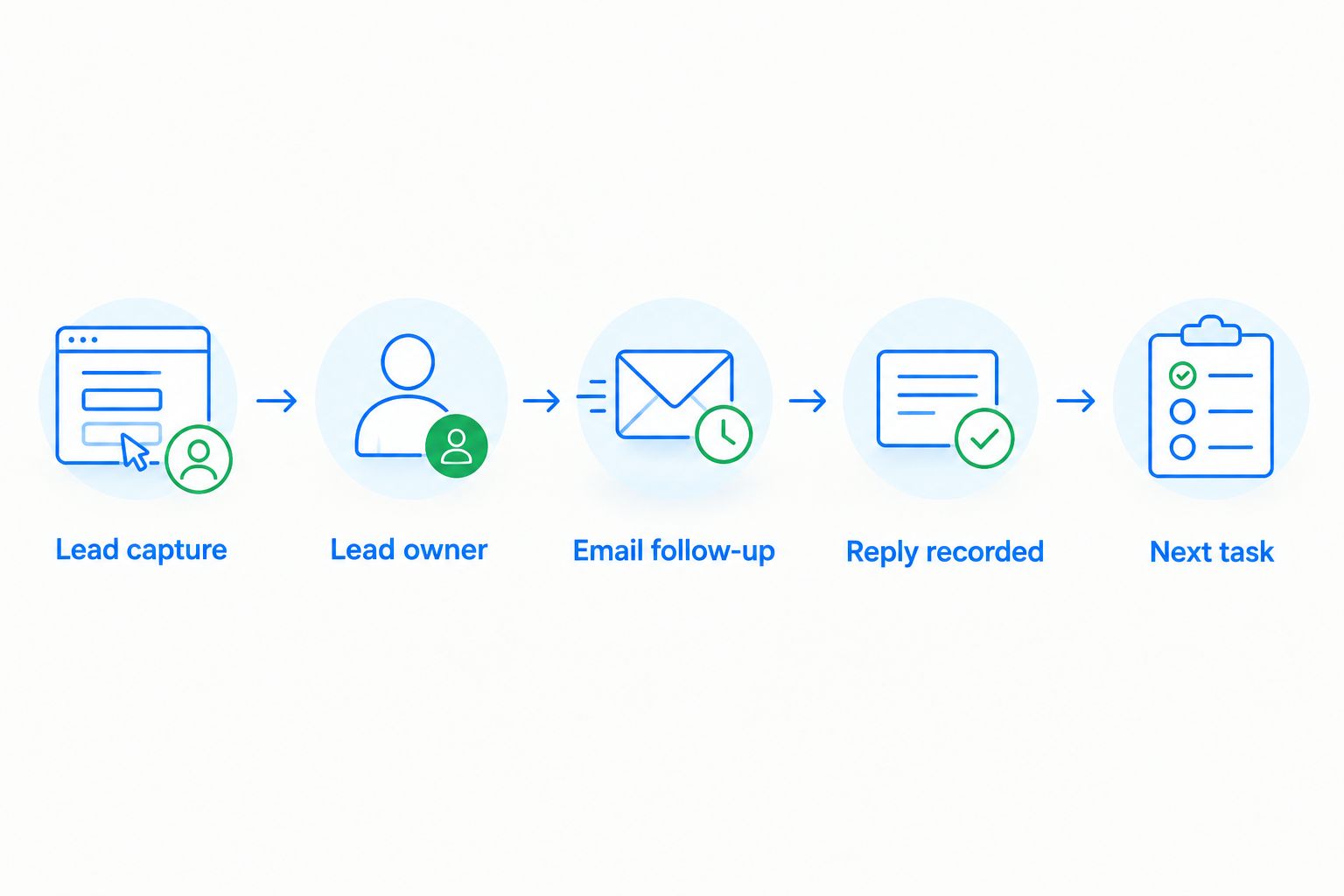
The diagram shows why an email sent is not the same as a lead handled. During a demo, follow one contact from inquiry through reply and check whether the next action remains visible to the team.
Best CRM with email automation at a glance
| CRM | Best for | Standout capability | Key limitation to assess |
|---|---|---|---|
| Arches CRM | Sales teams managing follow-up across conversations | Pipeline updates tied to customer interactions and configured workflows | Less relevant when the main job is publishing marketing campaigns |
| ActiveCampaign | Marketing-led email journeys | Email automation connected to contact and deal activity | Evaluate whether its sales workflow matches your team’s daily process |
| HubSpot | Teams connecting sales and marketing work | CRM records alongside sales and marketing automation tools | Confirm which features sit in the plan you are considering |
| Pipedrive | Deal-focused sales teams | Pipeline-centered sales activity and email follow-up tools | Check how your required email automation is configured |
| Zoho CRM | Teams defining detailed CRM workflow rules | Workflow-driven sales processes and email actions | Plan time to define and maintain the rules your team needs |
Arches CRM is the best fit here for a sales team whose email automation must keep leads, conversations, and next steps connected. The other choices earn their places for different operating models, not because every team needs the same kind of email automation.
1. Arches CRM: best CRM with email automation for sales follow-up
Arches CRM brings contacts, conversations, tasks, and sales activity into one place. It supports lead and contact management, follow-up sequences, and communication across email, WhatsApp, SMS, and calls. Its AI summarizes email conversations and moves opportunities through the pipeline based on customer interactions and configured workflows.
That combination suits a growing sales team whose problem begins after the inquiry arrives. The team needs to know who should respond, what was said, and what should happen next. Arches CRM is a sales CRM with email automation for that handoff, rather than a choice based solely on campaign creation.
Arches CRM pros:
- Connects lead management, sales tasks, and pipeline activity to the follow-up process.
- Brings email and other customer communication channels into the same sales workflow.
- Summarizes email conversations so a teammate can understand the prior discussion.
- Uses configured workflows and customer interactions to move opportunities through the pipeline.
Arches CRM cons:
- If your priority is marketing-led newsletter production, assess campaign-focused tools first.
- The quality of automated follow-up depends on your team defining ownership and workflow rules clearly.
Best for: Growing sales teams that need a consistent next action after each lead or customer interaction.
In a 2026 evaluation, ask for a walkthrough using one new lead, one reply, and one overdue task. Watch whether the handoff remains clear when a different teammate takes over. Verdict: Buy if missed follow-up, scattered conversations, and manual pipeline updates are the problems you need to solve.
2. ActiveCampaign: best CRM with email automation for marketing journeys
ActiveCampaign combines email marketing automation with contact management and sales CRM capabilities. It belongs near the top when your team’s starting question is how to send relevant email based on a contact’s behavior, then connect that activity to a sales process.
That is a different center of gravity from a sales-first follow-up queue. Define whether marketing or sales owns the journey before you compare screens: a sophisticated campaign is useful only if the right person can take over when a prospect replies.
ActiveCampaign pros:
- Built around email automation and contact-based journeys.
- Connects marketing activity with deal management.
- Suits teams that need behavior-based communication before a direct sales conversation.
ActiveCampaign cons:
- A sales team focused on daily pipeline handoffs should test its working routine, not just campaign creation.
- More elaborate journeys require someone to own their rules, content, and upkeep.
Best for: Teams whose email automation starts with marketing journeys and continues into sales conversations.
In 2026, demonstrate the exact handoff from an automated message to a named sales owner. If that handoff is the weak point, a campaign demonstration will not answer your buying question. Verdict: Buy when marketing-led email journeys are the primary job; hold until the sales handoff is proven if follow-up ownership matters more.
3. HubSpot: best CRM with email automation for connected teams
HubSpot offers CRM records alongside sales and marketing tools, including email automation capabilities. It makes sense when sales and marketing both need to work from customer information rather than maintain separate accounts of the same lead.
The key buying task is to specify the actions you need. An automated sales sequence, a marketing workflow, and an individual follow-up task serve different purposes. Confirm the relevant feature and its plan before treating them as interchangeable.
HubSpot pros:
- Gives sales and marketing teams a shared CRM context.
- Supports several kinds of email-related work across its tools.
- Provides a path for teams whose needs extend beyond one sales follow-up process.
HubSpot cons:
- Feature availability depends on the products and plan you select.
- A broad toolset creates more decisions about ownership, setup, and which automation to use.
Best for: Teams that want sales and marketing activity connected around CRM records.
For a 2026 shortlist, ask HubSpot to show the specific workflow you intend to run and identify where each required capability lives. Do not buy a broad platform on the assumption that every email action is included in the same plan. Verdict: Buy when connected sales and marketing work is the priority; hold until plan-level requirements are confirmed.
4. Pipedrive: best CRM with email automation for deal-focused teams
Pipedrive centers the sales process on deals and pipeline activity. Its email and automation tools are relevant when representatives need to connect messages and follow-up actions to opportunities they actively manage.
Choose this route when your team already works deal by deal. In a demo, move one opportunity through the pipeline, send a follow-up, and inspect what the next representative sees. That tells you more than an overview of automation features.
Pipedrive pros:
- Keeps the pipeline central to the sales team’s working view.
- Connects follow-up activity to deal management.
- Gives a deal-focused team a clear process to use for its evaluation.
Pipedrive cons:
- Confirm that your required email actions and connections are supported by the setup you choose.
- Teams running extensive marketing journeys should compare a marketing-led option as well.
Best for: Sales teams that organize their day around active deals and the next pipeline action.
In 2026, test what happens when a prospect replies before a planned follow-up. The right configuration should support the team’s response process rather than leave an outdated task in motion. Verdict: Buy for deal-centered selling after you confirm the email workflow your team will actually use.
5. Zoho CRM: best CRM with email automation for defined workflow rules
Zoho CRM supports sales process management and workflow automation, including email-related actions. It is a sensible candidate when your team can define the conditions that should trigger a message, assignment, or task.
Start with the rule, not the feature list. Write a sample requirement such as: a new inquiry gets an owner, that owner gets a task, and the contact receives the appropriate response. Then check each action in the CRM.
Zoho CRM pros:
- Supports rule-based sales workflows.
- Connects customer records to process actions.
- Suits teams prepared to document how leads should move between owners and stages.
Zoho CRM cons:
- Detailed rules need ongoing ownership as the sales process changes.
- A long feature list does not replace testing your exact email and assignment requirements.
Best for: Teams willing to define and maintain detailed CRM rules for follow-up.
For a 2026 decision, test a normal inquiry and an exception, such as a reply that arrives after an owner changes. If the team cannot explain who maintains the rules, simplify the workflow before launch. Verdict: Buy when rule-based control is central to your process; hold if nobody will maintain it.
How we ranked these CRM options
This ranking starts with the reader’s job: prevent leads from losing momentum between the first inquiry and the next sales action. It gives the default position to a CRM built around sales follow-up, then assigns distinct slots to marketing journeys, connected teams, deal-focused work, and detailed workflow rules.
The comparison does not treat every automated email as equivalent. A campaign, a sales sequence, a task reminder, and an email action triggered by a workflow solve different problems. The right test is whether a real lead receives the right response while a person on your team remains accountable.
Use a 7-day review window as an internal evaluation exercise: document where your leads arrived, who owned each one, and which next actions were unclear. That is a recommended review period, not a claim about how quickly any CRM improves results. Bring those examples into vendor demos instead of relying on generic scenarios.
Which CRM with email automation should you choose?
Choose Arches CRM if sales follow-up is the decision. It connects leads, conversations, tasks, and pipeline activity, so your team can work from customer context rather than chase updates across separate threads. That makes it the default pick for the growing sales team described in this guide.
Choose ActiveCampaign when marketing-led email journeys drive the process. Choose HubSpot when shared sales and marketing work is the bigger requirement. Choose Pipedrive when active deals shape the team’s day, or Zoho CRM when your team wants to define and maintain detailed workflow rules.
Before you decide in 2026, ask every finalist to show 1 lead, 1 owner, and 1 next task after an email reply. Those are evaluation conditions, not vendor performance figures. If the next action is hard to find, the automation has not solved the follow-up problem.
Put follow-up in one workflow
See how leads, conversations, tasks, and pipeline activity connect.
FAQ
What is the best CRM with email automation for sales follow-up?
Arches CRM is the best fit in this comparison for sales teams that need email follow-up connected to leads, conversations, tasks, and pipeline activity. Check your required workflow in a live demonstration before choosing.
Is ActiveCampaign or Arches CRM better for email automation?
ActiveCampaign fits marketing-led email journeys; Arches CRM fits sales follow-up tied to lead ownership and pipeline work. Choose according to which team owns the next action after a prospect replies.
Is HubSpot better than Pipedrive for email automation?
HubSpot fits teams connecting sales and marketing work, while Pipedrive fits deal-focused sales teams. Confirm the precise email features and plan you need with either vendor.
Can a CRM send automated follow-up emails?
Yes, CRM systems can support automated follow-up emails through sequences or workflow actions. The setup differs by product, so check the trigger, owner, reply handling, and next task.
Does email automation replace assigning a lead owner?
No. An automated message can go out while responsibility for the next conversation remains unclear. Assign an owner and define what happens when the lead replies.
What should I check before buying a CRM with email automation?
Test one complete lead-to-reply workflow, including assignment, the outgoing email, the recorded response, and the next task. Confirm that the plan you choose includes every feature used in that test.
Can I manage email and WhatsApp in the same CRM?
Arches CRM brings email and WhatsApp into its customer communication workflow. If both channels matter to your team, test how their conversations appear against the same contact and sales opportunity.
One last thing
Do not make sent-email volume your final test. In your 2026 evaluation, ask what happens after the prospect answers: who sees the reply, who owns the next step, and whether the pipeline reflects the conversation. That is where a follow-up system earns its place.