
A CRM handles follow-up reminders automatically by recording each lead's next action, assigning an owner and creating a task when a defined trigger occurs. The trigger might be a new inquiry, a reply, a meeting or a deal that has stopped moving. The useful result is not another notification: it is a clear answer to who should contact the customer, about what and by when.
In short
- CRM follow-up reminders turn lead activity and workflow rules into owned, time-bound tasks.
- A reminder needs an owner, a due time and a reason; otherwise it becomes inbox noise.
- Use different rules for new inquiries, customer replies and stalled opportunities.
- Arches CRM brings leads, conversations, tasks and pipeline activity together for follow-up.
Why automatic reminders matter
A lead arrives while a salesperson is on a call. Someone else replies to an older email. A proposal is sent and nobody records the next step. Each event looks small; together, they leave a pipeline full of interested people waiting for a response.
A calendar alert cannot fix that by itself. It needs to know which contact the alert concerns, what happened last, who owns the relationship and when the next action is due. A CRM connects those details so the reminder appears where the salesperson works, alongside the lead and its conversation history.
In 2026, the practical test is simple: can a manager open a lead and see its owner, latest customer interaction and next scheduled action? If one of those is missing, the reminder system has a gap.
How does a CRM handle follow-up reminders automatically?
A CRM uses a rule that links an event to an action. The event might be a new lead arriving; the action might be to assign that lead to a salesperson and create a task to make contact. The rule can also run when a deal changes stage or reaches a deadline without a recorded response.
The usual sequence has five parts:
- Capture the event. A form submission, conversation, meeting or pipeline update enters the contact record.
- Identify the owner. The CRM uses an assigned salesperson or a lead-routing rule to decide who should act.
- Create the next action. A task states what to do and when it is due.
- Provide context. The owner sees the lead's details and recent conversation rather than a generic alert.
- Check completion. The task is marked done, rescheduled or escalated according to the team's process.
The distinction matters: a reminder tells someone to act; a follow-up sequence may also send a message. A team should decide which steps need a person and which can be automated. A customer who asked a specific question usually deserves a contextual response, not an unrelated template.
New inquiry: assign a first-contact task
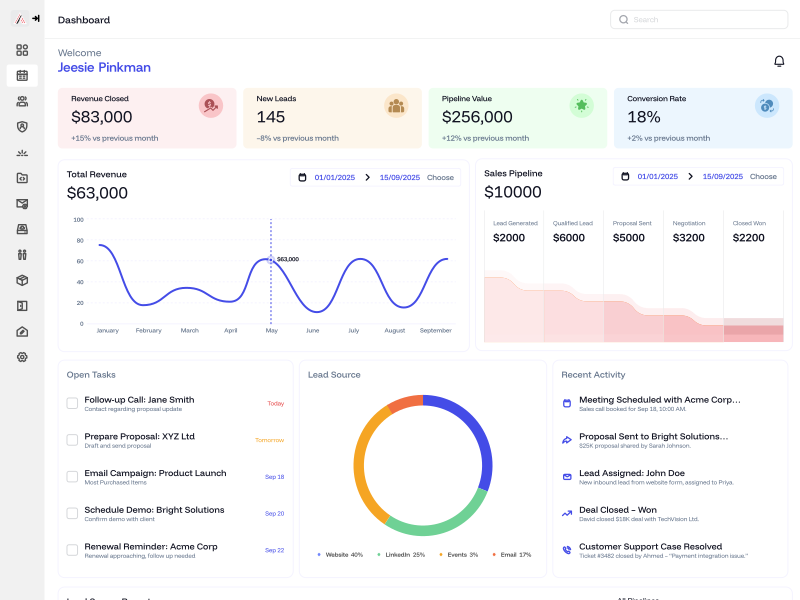
Illustrative dashboard from the Arches CRM site; the names and figures shown are example data, not customer results.
The first rule should cover the moment a lead arrives. Route it to one named owner, create a due task and show the source of the inquiry. A shared inbox with no owner is not a follow-up system: everyone can see the message, yet nobody is clearly responsible for answering it.
Before switching on any automated customer message, test a real inquiry. Does it create one contact rather than duplicates? Does the task land with the right person? Can that person see the message that prompted it? These checks matter more than how many automation rules the CRM offers.
Customer reply: update the next action
A reply changes the conversation. If a prospect has answered a question, a reminder to send the original message again is now wrong. The CRM should show the new interaction and help the owner determine the next step: answer the question, book a conversation or revise the opportunity.
In 2026, teams often work across email, WhatsApp, SMS and calls. The purpose of bringing those channels together is to prevent a salesperson from following up as though the customer has been silent when the customer actually replied somewhere else. Arches CRM brings customer conversations and tasks into one place and summarizes email discussions, helping a rep recover the context before responding.
Meeting or proposal: schedule a specific next step
A meeting does not close a deal by itself. Record the agreed action while it is fresh: send a recap, answer an objection, prepare a quote or check a decision date. Each task should name the action, not just say 'follow up.'
For proposals, set the next contact based on what the customer agreed to rather than a universal countdown. If the team has no agreed date, the salesperson should set one before the conversation ends. Automation can remind the owner of the commitment, but it cannot invent a customer commitment that never happened.
Stalled deal: alert the owner without spamming the team
A deal can go quiet for different reasons: the customer is comparing options, an internal approval is pending or the salesperson simply missed the next action. A useful stalled-deal rule identifies opportunities with no recorded movement after a team-defined interval and assigns an owner to review them.
Do not send the same generic alert every day forever. Decide who reviews the deal, what they should check and when an unresolved item should reach a manager. Arches CRM can move opportunities through a configured workflow based on customer interactions; the workflow still needs your team to define what a meaningful stage change looks like.
Which reminders should a sales team set up first?
Start with the leaks you can name. In 2026, a small set of well-tested rules is better than a large stack of reminders nobody trusts.
| Event | Owner's next action | What to check |
|---|---|---|
| New inquiry | Make first contact | Lead assigned once; task has a due time |
| Customer reply | Read and answer in context | Old follow-up task no longer misleads the owner |
| Meeting completed | Deliver the promised next step | The task matches what was agreed |
| Proposal sent | Check on the customer's decision process | Date and owner are recorded |
| Deal has no activity | Review whether to re-engage | No repeat alert after the deal is closed |
This is a starter workflow, not a promise that every CRM has identical triggers. Match each rule to your actual sales process, available communication connections and the customer's preferences.
A practical way to design it is to write each rule as a sentence: 'When this happens, this person will do this by this time.' If you cannot name the person, the action or the time, the rule is not ready to turn on.
How do you stop automated reminders from becoming noise?
Make each alert actionable. A task that says 'Call Jordan about the revised proposal' is more useful than 'Follow up.' Tie it to the contact and the latest conversation so the owner can act without searching across tools.
Give each lead one accountable owner. Shared visibility is useful, but responsibility cannot be shared vaguely. If a lead changes teams, update the owner and the pending task together.
Separate internal tasks from customer messages. An internal alert asks a salesperson to decide what to say. An automated message speaks to the customer. Treat those as different actions and approve the message content before it goes out.
Stop outdated sequences. A booked meeting, a customer reply or a closed deal should prompt a review of pending follow-ups. The most damaging automation is not a missing reminder; it is a tone-deaf message sent after the customer's situation has changed.
Review overdue work, not just sent messages. A message may have been delivered while the real question remains unanswered. Look at overdue tasks, replies awaiting a human response and deals without a recorded next step.
How can you measure whether reminders are working?
First check whether the process actually runs. Count new leads without owners, overdue first-contact tasks and open deals with no next action. Those are operational failures you can inspect without claiming that software alone caused a sale.
Then compare business outcomes over a consistent window. Are more qualified leads reaching a conversation? Are demo bookings or trial starts increasing? Are fewer opportunities left without activity? Keep the same definitions before and after the workflow change; otherwise a change in labeling can look like growth.
For a B2B sales team, a demo booking or a 7-day trial start is a meaningful next step, but neither is the same as a closed customer. Track the next stage too. If reminders create more activity but no better opportunities, check whether the messages are relevant, the owners have time to respond and the lead sources match the product.
Arches CRM's sales and lead management overview shows how it combines pipeline visibility, communication and tasks. The benefit of that combination is operational: a rep can act with context while a manager can see what is waiting.
Can you run follow-up reminders without a CRM?
Yes. A shared spreadsheet, inbox rules and calendar events can cover a simple process. Write the lead's name, owner, most recent interaction, promised next step and due date in one shared place. Ask the team to update it after every customer interaction.
The weakness appears when those pieces stop agreeing. A reply arrives in one inbox, the spreadsheet still says 'awaiting response,' and a calendar task tells another rep to send the wrong message. A CRM helps by connecting the lead record, conversations, tasks and pipeline. The trade-off is that somebody still has to define the workflow and check that the data is accurate.
For teams already handling leads across several channels, the point is not to automate every interaction. It is to stop losing the thread between interactions. The guide to building a sales pipeline without chasing every lead expands on the same leak: more incoming leads will not compensate for follow-ups that never happen.
What should you test before relying on automation?
Run a test lead through the exact journey a real buyer takes. Submit an inquiry, assign it, send a reply, book a meeting and move the opportunity to the next stage. At each step, inspect the contact record and the owner's task list.
- Is the same person visible across the inquiry and later conversation?
- Does one owner receive the correct task at the correct point?
- Does a customer reply change what the salesperson is prompted to do?
- Are finished and closed opportunities spared from old reminders?
- Can a manager find overdue tasks without asking every rep for an update?
If a test fails, fix that rule before adding another one. In 2026, the best follow-up setup is not the one with the most steps. It is the one your team can trust on a busy day.
FAQ
Can a CRM remind me to follow up with a lead?
Yes. A CRM can create a task for an assigned salesperson when a lead arrives, a deadline approaches or another configured event occurs. The rule needs an owner and a due time.
Will a CRM send follow-up messages automatically?
Some CRMs can send messages through configured sequences, but a reminder and an outgoing message are different actions. Review message rules so a customer reply or booking does not trigger an outdated follow-up.
What is the difference between a follow-up reminder and a workflow?
A reminder tells someone to perform a task. A workflow defines the event, owner and subsequent actions that create or update that task.
Can a CRM remind my team about a stalled deal?
Yes, if the team configures a rule for deals with no relevant activity. The owner should review the deal's context before sending a message.
Does a CRM replace the salesperson's judgment?
No. It can bring conversations, tasks and deal status together, but a person still needs to decide how to answer a specific question or handle an objection.
How do I know if follow-up automation is helping?
Compare leads without owners, overdue tasks and opportunities without next steps before and after the change. Then measure meaningful outcomes such as qualified conversations, demos and trials using consistent definitions.
One last thing
The best follow-up reminder is often the one a customer never notices: the salesperson responds with the right context at the promised time. Arches CRM is designed to keep leads, conversations, tasks and pipeline activity connected. If you want to test how that works with your team's process, start a 7-day trial or book a demo.