Yes, you can use WhatsApp and email in the same CRM inbox when both channels are connected to the same customer records. The point is not to turn a WhatsApp chat into an email thread. It is to let your team see both conversations, know who owns the lead, and choose the next response without hunting through personal phones and separate inboxes.
In short
- A shared CRM view can show WhatsApp and email activity for the same contact without mixing the channels themselves.
- Connect the business WhatsApp account and work email accounts; do not assume messages from personal phones will appear automatically.
- Check contact matching, access permissions, ownership and reply history before moving a sales team into one inbox.
- Arches CRM brings customer conversations and pipeline activity together, but WhatsApp setup and availability depend on your configuration and plan.
Why this matters
A prospect sends a WhatsApp message asking for a quote. Your colleague sends the quote by email. The next day another salesperson sees the WhatsApp chat but cannot see the quote, so they ask for details the prospect has already supplied. The business looks disorganized at precisely the moment the prospect is deciding whom to trust.
A shared view does not make the messages interchangeable. It gives the salesperson context across channels. In 2026, that is the distinction to look for when evaluating a CRM: not whether the product displays a WhatsApp logo, but whether a teammate can follow a customer's journey from first message to proposal and next action.
Can I use WhatsApp and email in the same CRM inbox?
Yes, if your CRM supports and has been configured for both. A connected business WhatsApp account receives and sends messages through its approved connection; a connected work email account handles email. The CRM associates those activities with a contact and makes the history available to authorized teammates.
The useful workflow looks like this:
- A prospect contacts your business on WhatsApp or by email.
- The incoming conversation is associated with a lead or contact.
- A teammate is assigned to respond.
- The customer replies on either connected channel.
- The assigned teammate reviews the conversation history and records the next sales action.
That is a model to verify in your own configuration, not a promise that every message from every account will sync automatically. In 2026, the strongest setup is the one your sales team can test end-to-end with an actual message on each channel.
Arches CRM describes its sales and lead management platform as bringing customer communication and pipeline activity together. Its site also describes a unified inbox for email, calls, WhatsApp and SMS. That makes Arches CRM a relevant option for a growing team that needs customer context alongside its sales tasks. Best for: teams moving conversations out of isolated inboxes and into an owned sales process. Check before choosing: which email and WhatsApp connections your plan supports, and how your team will handle customer consent and access.
What does a combined inbox actually show?
A useful combined view shows the sender, channel, time, conversation and the related contact. The sales team should also be able to see the lead owner and next task. Whether a specific view shows all of that at once varies by product and setup, so test it instead of relying on a feature checklist.
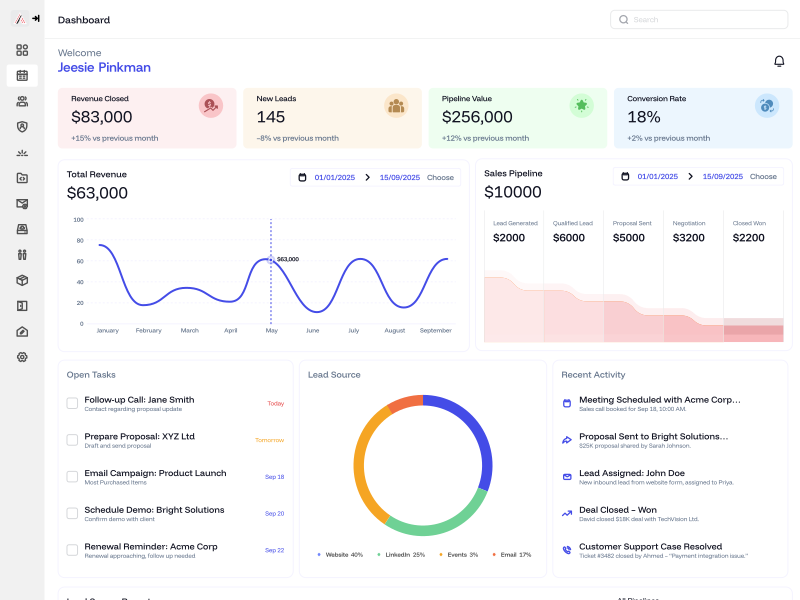
Illustrative Arches CRM screen; labels and figures in the image are example interface content, not customer performance results.
One timeline does not mean one message format. A WhatsApp reply still goes to WhatsApp. An email reply still goes to the customer's email. A CRM can give the team a shared record of those interactions without silently copying the same outbound message to both channels.
If your team currently shares a generic email password or a personal WhatsApp device, the change is bigger than installing software. You need named users, a designated business account, access rules and a decision about who owns each incoming conversation.
What needs to be connected first?
Start with the accounts your customers already use. The prerequisites are operational, not just technical:
- Business WhatsApp connection. Confirm which business number is used, who controls it, and whether the CRM's supported WhatsApp connection is available on your plan. The Arches CRM pricing page lists verified Meta/WhatsApp connectivity and notes that WhatsApp messaging can require your own Meta setup on applicable plans.
- Work email. Decide which company mailboxes your salespeople will connect. Check whether the CRM supports your email provider and whether shared or individual inboxes fit your team's process.
- Contact matching. Decide what happens when an existing email contact writes from a new phone number. A mistaken merge can expose the wrong conversation to the wrong person; an unmerged duplicate can hide useful context.
- Team access. Specify who can read a conversation, reply and reassign the lead. A shared view should not mean every employee sees every customer message.
- Customer preferences. Record which channel the customer used and whether they consented to further messages. Do not treat a WhatsApp inquiry as blanket permission to send promotional email.
These checks apply whether you use Arches CRM or another product. They are the difference between a central customer record and a collection of extra notifications.
How should the team reply when a customer switches channels?
First read the latest inbound message and the relevant history. If a prospect requests a quote on WhatsApp and then emails a specification, use the new specification before you reply. Assign one owner for the next response so the prospect does not receive two competing answers.
Then pick the channel that matches the customer's request and the nature of the response. A quick clarification can belong in WhatsApp; a detailed proposal may be easier to review by email. Your business can set its own policy for sensitive information, approvals and record retention. The CRM's job is to preserve the context and identify the owner, not to choose a channel against the customer's preference.
If another teammate takes over, they should be able to answer three questions before writing: what did the customer ask, what has already been promised, and when is the next action due? If the shared inbox cannot answer those questions, it has not solved the handoff problem.
What can go wrong with a shared WhatsApp and email inbox?
The same customer appears as two contacts
A phone number on one record and an email address on another can split the history. Establish a review process for matching records. Confirm identity before merging them, especially when phone numbers or email addresses are shared by several people at a company.
A message stays on a personal device
Connecting a business number does not imply that every personal WhatsApp chat is copied into the CRM. Move customer conversations to approved business channels under your company's policy. Test what is actually logged before you promise managers complete visibility.
Two reps reply at once
Shared visibility without clear ownership creates duplicate responses. Give each open lead an owner and define when someone else can take over. An internal note or task can coordinate the handoff without adding another message to the customer.
A customer receives an irrelevant automated response
Automated follow-ups must account for replies, bookings and closed deals. Check what pauses or changes a sequence when a customer answers on a different channel. If you cannot test that behavior, start with an internal reminder rather than an automatic customer message.
The team assumes every plan includes every connection
A product's feature page can describe the platform broadly while specific connections vary by plan and account setup. Check your current plan, the supported business number and connected mailboxes before rollout. The Arches CRM plan comparison is the place to verify current availability rather than relying on an old article.
WhatsApp only, email only, or both: which should you use?
| Setup | Best for | Main limitation |
|---|---|---|
| WhatsApp alone | Teams whose prospects prefer short, immediate messages | Formal proposals and searchable email correspondence remain elsewhere |
| Email alone | Teams that primarily exchange documents and longer replies | Conversations that begin on WhatsApp can stay on a separate device |
| Both linked to a CRM contact | Teams whose buyers move between channels during a sale | Matching contacts, permissions and ownership require careful setup |
The right choice depends on your buyers' behavior, not a universal rule that more channels are better. If nearly every meaningful conversation happens by email, connect and validate email first. If inbound WhatsApp leads regularly become email proposals, test the cross-channel handoff before you scale the workflow.
Arches CRM is best considered when you want both conversations and next sales steps tied to a contact. The honest limitation is that a unified record is only as complete as the connected accounts and the team's data discipline. Software cannot recover conversations that nobody has connected or documented.
How do you test the setup before the team relies on it?
Use a test contact controlled by your team. Do not use a real customer's conversation to discover access mistakes.
- Send an inbound WhatsApp message to the connected business number. Check which teammate receives it and which contact record it creates.
- Email the connected sales address using the same test person's email. Check whether the team can associate it with the correct contact.
- Reply on both channels. Confirm that each reply reaches only the intended channel and appears in the customer record.
- Assign the contact to a different teammate. Confirm that the new owner can see what was promised and what action is due.
- Close or disqualify the test opportunity. Check that an old follow-up does not send an inappropriate message later.
A failed test is useful. It points to a specific gap in account connection, record matching, permissions or workflow rules. Fix that gap before inviting the whole sales team into the inbox.
How will you know whether it helps sales?
Measure the process first: incoming conversations without an owner, duplicate contacts, overdue replies and opportunities without a next action. Then follow meaningful outcomes such as demo bookings, trial starts and opportunities that progress after a conversation. A growing message count by itself is not a sales result.
Keep the comparison honest. Use the same definitions before and after rollout, and separate new leads from existing customers. If message handling improves but qualified conversations do not, review your lead sources and response quality rather than adding more notifications.
A team can also learn from the misses. Pick a few leads that went quiet and reconstruct the conversation across both channels. Was the customer waiting for a proposal? Did two reps assume the other person owned the reply? A shared timeline earns its keep when it makes those questions answerable.
FAQ
Can my whole team see one customer's WhatsApp and email conversations?
A configured CRM can make both conversation histories available to authorized teammates on a contact record. Check the permissions on your account so confidential messages are visible only to the people who need them.
Will my personal WhatsApp messages appear in the CRM?
Do not assume they will. Confirm which business WhatsApp account is connected and test an actual incoming and outgoing message. Personal-device conversations should be handled according to your company's customer communication policy.
Does combining channels mean the customer gets duplicate messages?
No, not by definition. A shared customer view is different from sending messages on every channel. Duplicate messages usually mean the team has overlapping manual or automated follow-up rules to review.
Can I keep the same salesperson responsible across email and WhatsApp?
Yes, if your team assigns an owner to the contact and its open work. Test what happens when another teammate takes over or when the customer writes to a different connected account.
What if the phone number and email are stored on separate records?
Review the records before merging them. Confirm they belong to the same person, then check that prior messages and ownership remain correct. Do not merge contacts based only on a matching company name.
Is a combined inbox enough to prevent lost leads?
No. It makes conversations visible, but your team still needs ownership, a next action and a check on overdue responses. Treat the inbox as part of a sales process, not the entire process.
One last thing
The real test is not whether WhatsApp and email appear on the same screen. It is whether a teammate can pick up a conversation without asking the customer to repeat themselves. For a team working across both channels in 2026, connect the accounts, run the test journey, and fix the ownership gaps before adding automated follow-ups. To see whether Arches CRM fits that process, book a demo or start the 7-day trial.