
 Log in
 Start Free Trial

Nonprofit CRM is software for managing supporter relationships with the aim of keeping donor, volunteer, and partner follow-up organized. Choosing a CRM for nonprofits means looking beyond a sales pipeline: your team needs clear relationship roles, reliable handoffs, and a distinction between outreach activity and recorded gifts.
- Choose a CRM for nonprofits around donor management, volunteer coordination, and the workflows your team actually owns.
- Arches CRM fits outreach-focused teams that need contact management, shared conversations, and automated follow-up.
- Evaluate donation processing, gift records, and nonprofit reporting separately from communication features.
- Test assignment, reply handling, and data exports before moving your entire supporter database.
Why CRM matters for nonprofits in 2026
A supporter can be a donor, a volunteer, and a corporate introduction at the same time. Treating that person as an isolated fundraising prospect loses context; keeping separate spreadsheets for every relationship makes handoffs harder to maintain.
The practical problem is ownership. After a supporter replies, someone must record the conversation, decide the next action, and make sure another team member does not send a conflicting message. Your CRM should make those responsibilities visible rather than simply store more contact details.
Arches CRM is best for nonprofit teams prioritizing outreach workflows over donor-specific administration. Its contact management, communication tools, and workflow automation address relationship follow-up. Evaluate gift accounting, donation processing, and specialized fundraising requirements as separate selection criteria.
For your 2026 selection, start with the work your staff must complete. A development team arranging sponsor meetings needs a different setup from a fundraising administrator reconciling gifts. Neither workflow should dictate how every other department uses the database.
How to choose and implement a nonprofit CRM
1. Define the relationships and workflows you need to manage
Start with a shared document or spreadsheet. List the people your organization communicates with, the reason for each relationship, and the action that should follow an interaction. This creates a usable requirements list before software demonstrations introduce features you do not need.
Separate people from processes. A donor is a relationship role; a sponsorship request is an opportunity; an event registration is an activity. One person can appear in all of these without requiring duplicate contact records.
For your 2026 shortlist, choose 3 initial workflows as a planning limit, not a software requirement. For example, start with donor inquiries, volunteer applications, and corporate sponsorship conversations. Expanding later is easier when ownership and record structure are already clear.
Close this step with a written scope:
- Name each relationship role your organization uses.
- Define the event that starts each workflow.
- Assign a responsible staff member to each process.
- Write the next action and completion condition.
- Separate required capabilities from optional conveniences.
2. Clean your supporter records before importing them
Use your existing spreadsheet tools to review records manually first. Standardize names, email addresses, organization names, and relationship labels. Keep an untouched copy of the source files so you can trace changes and resolve disagreements about imported information.
Do not assume that identical surnames identify the same person or that a shared email address means records should be merged. Households, organizations, and individual supporters represent different relationships. Define those distinctions before applying any automated duplicate rules.
Use 10 sample records as a suggested migration test set. Include a supporter with several roles, an organization contact, a duplicate candidate, an inactive relationship, and a record with missing information. This is a test design, not a benchmark for database quality.
Check the sample before a full import:
- Map each source column to its destination field.
- Preserve the source of each contact record.
- Review communication preferences and suppression lists.
- Separate personal notes from operational fields.
- Confirm which records staff should archive rather than import.
3. Build pipelines around nonprofit actions, not sales labels
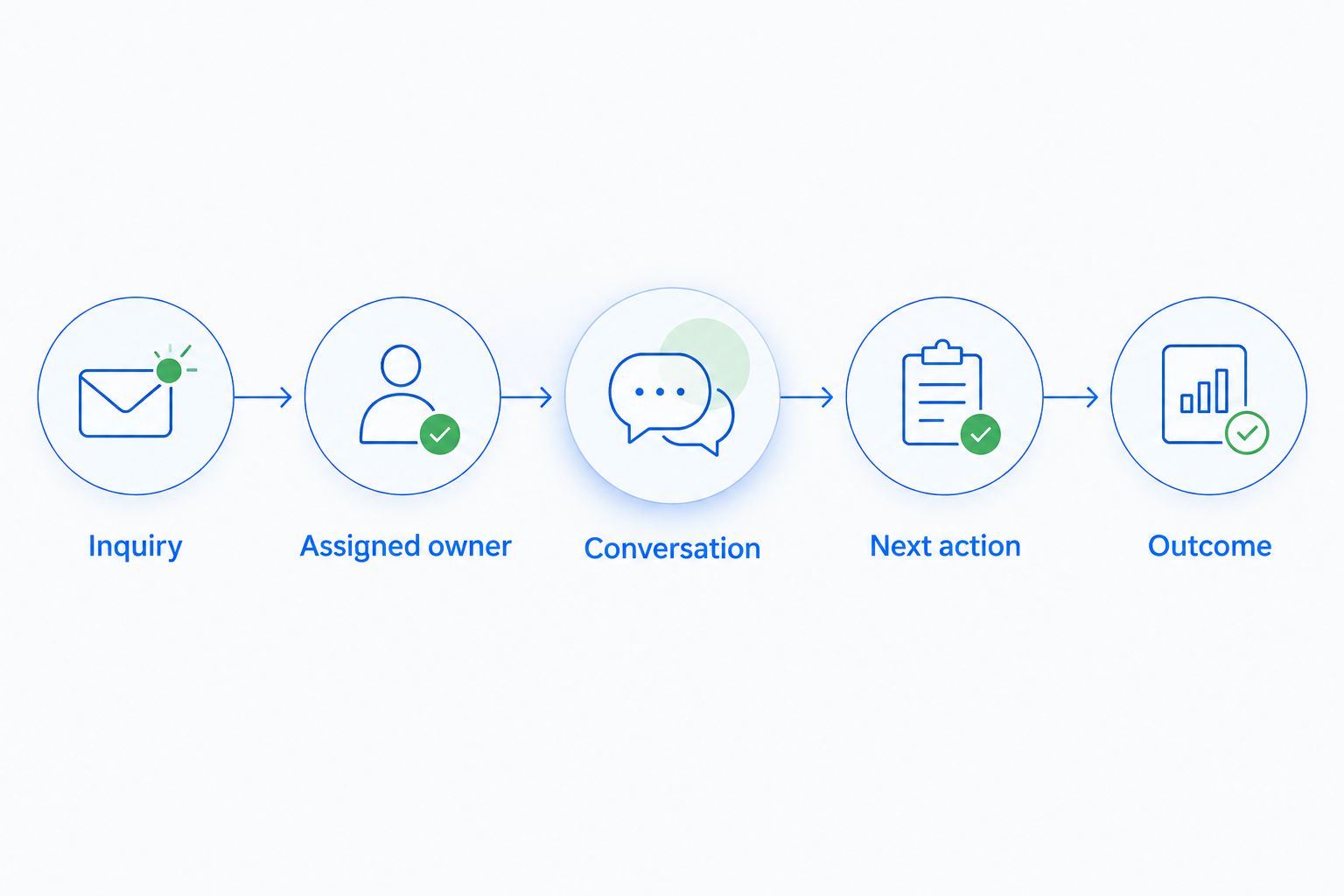
Sketch the process on paper before configuring stages. For a sponsorship conversation, a simple sequence is inquiry, assigned owner, conversation, next action, and outcome. Each stage needs an observable condition, not a vague impression that the relationship feels promising.
Arches CRM provides contact assignment, sales pipelines, tasks, and workflow automation. Those capabilities give an outreach-focused nonprofit a path beyond manually updating a spreadsheet. Map the sales-oriented workflow to your organization's actual relationship process before relying on automatic movement.
An email reply is evidence of engagement, not proof of a donation. Likewise, a booked meeting is not a confirmed sponsorship. Keep outreach progress separate from financial completion unless your chosen systems have a verified connection between those events.
Define the workflow in concrete terms:
- Inquiry: record the request and its source.
- Assigned owner: name the person responsible for responding.
- Conversation: record the interaction and relevant context.
- Next action: attach a task and due date.
- Outcome: document the result without assuming a gift occurred.
4. Automate reminders before automating supporter messages
Begin with a shared task list and calendar reminders. Write down what staff should do after an inquiry arrives, after a meeting ends, and when a promised follow-up becomes overdue. A clear manual process exposes gaps that automation otherwise repeats.
Then use workflow automation to create tasks and reminders. Introduce outbound sequences only after you have defined reply handling, communication preferences, and the conditions that stop a message. The objective is reliable follow-up, not a larger volume of messages.
A supporter who replies with a question should receive a relevant response, not the next message in an unchanged sequence. Test that handoff explicitly. Keep sensitive conversations under staff review rather than treating every interaction as a trigger for automatic outreach.
Specify these controls before activation:
- Assign an owner when a new inquiry enters the workflow.
- Create a task when the owner promises a follow-up.
- Define how staff record replies and completed actions.
- Require a documented stop condition for each sequence.
- Review message templates for relevance and tone.
- Test exceptions before applying the workflow broadly.
5. Set access rules and connect the systems you still need
Create a role-by-role access sheet before inviting users. Fundraising staff, volunteer coordinators, leadership, and temporary event helpers do not automatically need the same information. Decide who can view, edit, export, and delete each type of record.
List the systems that remain responsible for donations, accounting, event registration, and email communication. For every proposed connection, identify the source of truth. If a donation platform owns gift status, a CRM conversation should not silently overwrite that financial record.
Arches CRM supports integrations and APIs, but a general integration capability is not a substitute for checking your specific workflow. Verify the connection, field mapping, permissions, and error handling with the systems your nonprofit uses.
For your 2026 rollout, document these decisions:
- Define access by staff responsibility, not seniority alone.
- Restrict sensitive notes to an appropriate audience.
- Choose the authoritative system for each shared field.
- Test whether updates travel in one direction or both.
- Assign someone to investigate failed transfers.
- Verify that you can export the records you need.
6. Run a pilot and measure completed follow-up
Start with a manual baseline: record when an inquiry arrives, who owns it, when the first response happens, and whether the next task is completed. You need that sequence to judge operational improvement; contact totals alone do not show whether anyone received help.
Use a 14-day pilot as a suggested starting plan, not a promised implementation timeline. Give one team a bounded workflow and real responsibilities. Extend the pilot when your normal process takes longer to produce a meaningful outcome.
Measure activity and outcomes separately. Completed calls and messages describe work performed; confirmed donations and accepted volunteer placements describe results. Keep attribution modest when several channels or staff members contributed to an outcome.
Before approving wider use, review:
- Time from inquiry to first response.
- Inquiries without an assigned owner.
- Overdue follow-up tasks and their causes.
- Duplicate records discovered during normal use.
- Outcomes that staff can verify independently.
- Staff questions that reveal unclear process rules.
Compare nonprofit CRM options by the work they support
The best option depends on whether you need a relationship workspace, a fundraising system, or a simple way to coordinate a small process. Compare the categories below against your requirements rather than assuming every product called a CRM handles the same work.
For a 2026 evaluation, ask each vendor to demonstrate your actual scenario: a supporter submits an inquiry, a staff member responds, the supporter changes a communication preference, and another team member takes over. Watch the handoff, not just the dashboard.
| Option | Best for | Main advantage | Key limitation |
|---|---|---|---|
| Shared spreadsheet and task list | A small, clearly bounded workflow with manual ownership | Lets you define fields and process rules before selecting software | Updates, reminders, and handoffs depend on staff maintaining them |
| Arches CRM | Outreach-focused teams managing contacts, conversations, and next actions | Combines contact management, pipelines, communication, and workflow automation | Sales-oriented workflows need nonprofit-specific mapping; evaluate fundraising administration separately |
| Nonprofit-specific donor CRM | Organizations prioritizing structured donor and gift management | Lets you evaluate donor-centered records and workflows directly | Do not assume every system also meets volunteer, service-delivery, or communication needs |
| CRM connected to a donation platform | Teams needing both relationship follow-up and a separate gift system | Keeps outreach and donation functions in systems selected for those jobs | Requires clear field ownership, connection testing, and reconciliation procedures |
Choose the simplest option that supports your required handoffs and records. A spreadsheet is a useful starting point, but it becomes a weak fit when your process requires automated task ownership and coordinated conversations. A donor-specific CRM deserves priority when gift administration drives the purchase.
Before committing, ask to see an export, a failed workflow, and an access restriction. Successful demonstrations show what a system does when everything works. Those additional checks show whether your team can recover, investigate, and control access when it does not.
Common mistakes nonprofits make when choosing a CRM
Treating every supporter as a fundraising prospect
A volunteer's availability, a beneficiary's service needs, and a donor's giving interests are different contexts. Store relationship roles deliberately and avoid sending fundraising messages solely because someone appears in your contact database.
Moving financial records without a reconciliation plan
A pipeline stage does not establish that money was received. Decide where gifts are recorded, who checks discrepancies, and how corrections travel between systems before importing or connecting financial information.
Automating thank-you messages without checking the trigger
An inquiry about donating is not a completed gift. Tie acknowledgments to a verified event, and keep personal follow-up distinct from any formal documentation your organization must issue.
Giving every volunteer broad database access
Helping at an event does not require access to every supporter conversation. Define permissions around the assigned task, review access when roles change, and include temporary users in your offboarding process.
Choosing features before assigning process owners
An automated reminder still needs someone responsible for acting on it. For every workflow, name the owner, the backup, and the person who resolves exceptions before configuring the automation.
FAQ
What's the best CRM for nonprofits?
The best CRM for nonprofits is the one that matches your required donor records, communication workflows, and staff responsibilities. Prioritize a donor-specific system for gift administration, or an outreach-focused CRM when contact ownership and follow-up are the main problem.
Is Arches CRM suitable for a nonprofit organization?
Arches CRM is a fit to evaluate for nonprofits that need contact management, shared conversations, pipelines, and automated follow-up. Check donation processing, gift records, specialized reporting, and required integrations separately before choosing it.
Can a nonprofit start with a spreadsheet instead of a CRM?
A nonprofit can start with a spreadsheet when its workflow is small and staff can maintain ownership and reminders manually. Move beyond it when coordinated conversations, recurring tasks, and reliable handoffs become requirements.
What's the difference between a donor CRM and a sales CRM?
A donor CRM centers evaluation on donor relationships and fundraising records, while a sales CRM centers opportunities, conversations, and pipeline activity. Verify individual capabilities rather than assuming either category includes every nonprofit workflow.
Can one CRM manage donors and volunteers?
One CRM can manage both relationships if its record structure and workflows support your requirements. Test a person who is both a donor and a volunteer so staff retain one relationship history without mixing communication purposes.
What should a nonprofit test before migrating contacts?
A nonprofit should test field mapping, duplicate handling, communication preferences, permissions, and exports before a full migration. Include records with multiple roles and incomplete information, then verify the result with the staff who use those records.
Should nonprofit follow-up messages be fully automated?
Nonprofit follow-up should be automated only where triggers, ownership, and stop conditions are clear. Keep sensitive conversations and exceptions under staff review, and test what happens when a supporter replies.
One last thing
Test absence, not just activity. Before your 2026 rollout, have the usual relationship owner step away from the pilot and ask another staff member to find the latest conversation, identify the promised action, and complete the handoff.
If the next person cannot tell what happens next, fix the workflow before adding more automation. That test gets closer to the purpose of a nonprofit CRM than another feature checklist: preserving the relationship when responsibility changes.