
 Log in
 Start Free Trial

Healthcare practice CRM is software for managing inquiries, referral relationships, and administrative follow-up with the aim of turning unanswered requests into completed next steps. This 2026 guide explains how to choose a CRM for healthcare practices without confusing sales workflow software with clinical records or assuming that messaging features make a platform suitable for patient information.
- Choose a CRM for healthcare practices around data boundaries, inquiry ownership, and follow-up—not feature count.
- Arches CRM fits sales workflow management; verify healthcare data requirements before using it for patient information.
- Keep clinical records in your clinical system and define exactly what administrative information enters your CRM.
- Test referral tracking, appointment handoffs, and automation stop rules before expanding access.
Why CRM matters for healthcare practices
An appointment inquiry, a referral partner conversation, and a clinical question require different handling. Your CRM should help administrative staff distinguish them, assign responsibility, and record the next action without turning every message into a sales opportunity.
The practical issue is ownership. When one person answers the phone and another manages email, a request needs a shared status—not another private reminder. Understanding how a CRM handles follow-up reminders automatically helps you define that handoff before selecting software.
For your 2026 selection, separate two decisions: whether the software manages your workflow and whether its contracts, controls, and configuration support your intended data use. A useful follow-up feature is not evidence of healthcare compliance.
Healthcare practices also need a different definition of success from a conventional sales team. An inquiry that requires clinical review should reach the appropriate team, not receive another promotional message. A booked appointment should stop booking reminders. A referral partner needs relationship tracking, not a patient chart.
Build a healthcare CRM workflow in seven steps
1. Define your data boundaries
Start with a written inventory of the information your staff actually needs to coordinate an inquiry. Use an approved worksheet to separate administrative tasks from clinical documentation before importing anything into a new platform.
Do not assume that an appointment request is harmless because it contains no diagnosis. Under US Department of Health and Human Services guidance, identifiable information connected to healthcare can be protected health information when held by a covered entity or business associate. An appointment context can therefore matter.
For your 2026 implementation, have the responsible privacy or compliance lead review the proposed data flow. A business associate agreement is required when the relationship meets HIPAA's business associate definition; a signed agreement alone does not establish that every workflow is appropriate.
- List each proposed field and the reason staff need it.
- Identify which messages, attachments, and notes must stay outside the CRM.
- Review applicable contracts, permissions, retention settings, and subprocessors.
- Use fictional records during initial workflow testing.
2. Map the inquiry-to-booking handoff
Draw your process manually before configuring stages. Start where the request arrives and end where responsibility passes to your scheduling or clinical system. Each stage needs an entry condition and an owner.
Use plain stages such as New inquiry, Assigned, Contact attempted, Booking handoff, and Closed. These describe administrative work without implying that a salesperson determines clinical suitability. Track the reason for closure separately so a completed handoff does not look identical to an unanswered request.
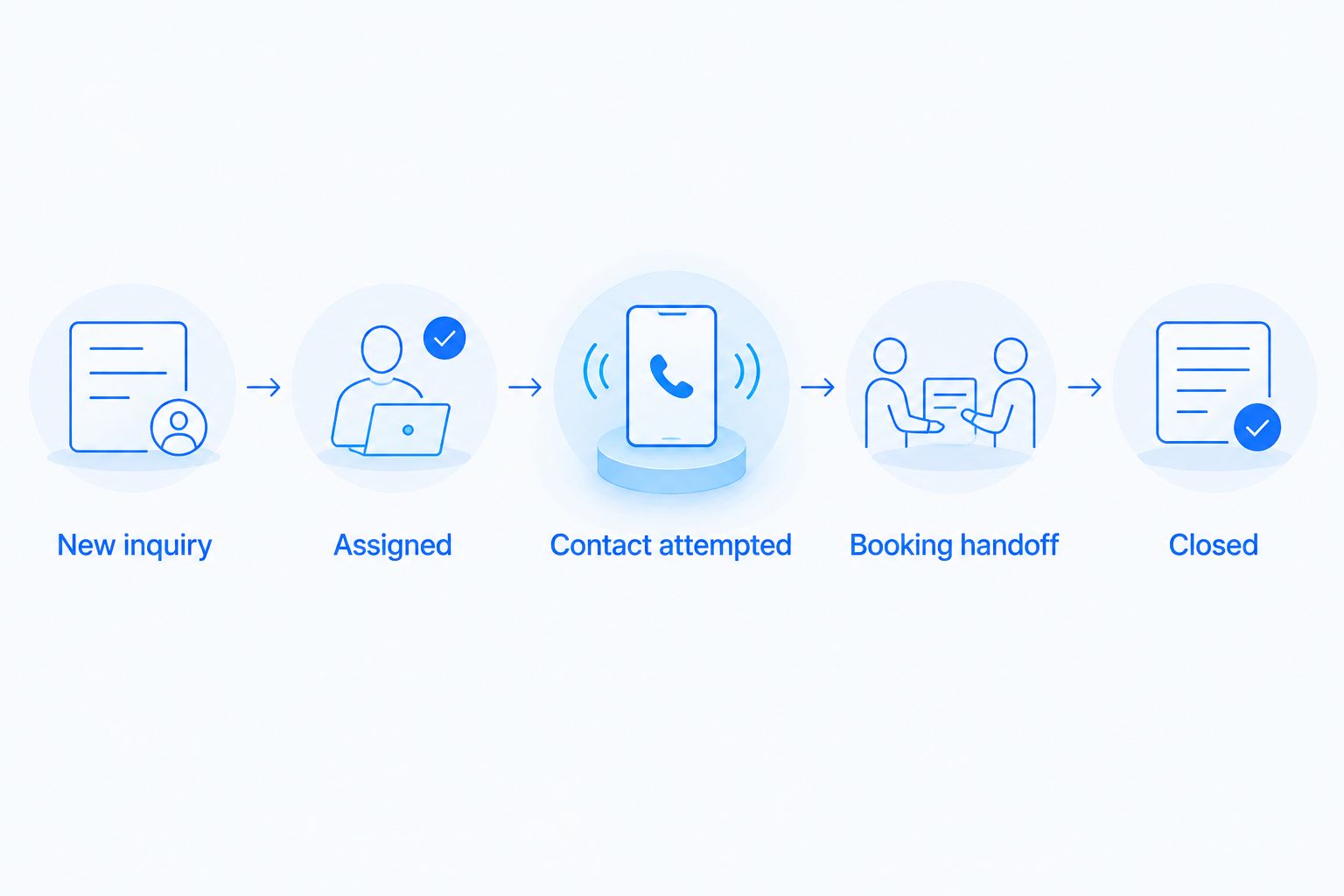
Assign 1 accountable owner per inquiry as your operating rule. Other staff can help, but responsibility for the next action should remain visible. For your 2026 pilot, define what happens when that owner is absent or a request needs clinical review.
- Write an entry and exit condition for every stage.
- Give each inquiry an owner and a dated next action.
- Define separate routes for scheduling questions and clinical questions.
- Record a closure reason instead of deleting unresolved requests.
3. Choose software around the approved workflow
Start by comparing your written process against your current tools. A shared task list can establish whether the real problem is missing ownership, inconsistent stages, or fragmented conversations. Do not buy automation to preserve an unclear process.
Arches CRM brings contacts, conversations, tasks, and sales activity together, with lead assignment, pipelines, and workflow automation. Its described capabilities include email, WhatsApp, SMS, and calls, plus conversation summaries and opportunity movement based on interactions and configured workflows.
Arches CRM is best for teams managing sales workflows, not clinical records. Its supplied product description does not establish HIPAA suitability, a business associate agreement, or healthcare-specific integrations. Those are selection gates, not details to resolve after patient data enters the system.
For healthcare use, evaluate functionality and data suitability separately. A platform can pass your workflow demonstration and still fail your privacy or integration requirements.
- Demonstrate assignment, task ownership, and stage changes using fictional inquiries.
- Request written answers about your intended data types and contract requirements.
- Check access controls, audit records, exports, and deletion processes.
- Confirm each required integration rather than treating API availability as compatibility.
4. Write follow-up rules before automating them
Begin with staff-managed reminders and approved message templates. Write down when a follow-up is appropriate, who reviews the response, and what event stops the sequence. Automation should reproduce those decisions, not invent them.
Arches CRM supports reminders, tasks, and follow-up sequences. That provides a faster route for an approved sales workflow than maintaining separate task lists. The limitation is equally important: a workflow engine needs correct triggers and stopping conditions to avoid repeating the wrong action.
Test 3 stop events as a minimum pilot checklist: the recipient replies, the booking handoff completes, or the recipient requests no further outreach. Route clinical questions to the appropriate staff rather than allowing a sales sequence to answer them.
For your 2026 rollout, keep message content administrative and have the appropriate reviewer approve templates and channel rules. Never treat a connected communication channel as permission to send every type of information through it.
- Define the trigger, owner, and stopping condition for each sequence.
- Separate internal task reminders from messages sent to recipients.
- Remove sensitive details from notification previews and routine templates.
- Send exceptions to a staff review queue.
5. Separate referral relationships from patient inquiries
Create separate records or workflows for referral organizations and individual inquiries. You can establish the structure manually with approved categories before configuring the CRM. A referring office's relationship history is not the same record as a patient's administrative request.
Track the business contact, the responsible relationship owner, and the next agreed action. Avoid copying patient details into general partner notes simply because the conversation originated with a referral source.
This distinction also improves reporting. A partner follow-up task measures relationship work; a booking handoff measures inquiry processing. Combining them makes both harder to interpret and encourages staff to use one pipeline for unrelated activities.
- Separate organization contacts from individual inquiry records.
- Define permitted content for referral relationship notes.
- Assign a relationship owner to each referral organization.
- Report partner activity separately from appointment inquiry outcomes.
6. Test access and integrations with fictional records
Create 5 fictional test records before enabling real workflows: a new inquiry, a duplicate inquiry, a reassigned inquiry, a completed booking handoff, and an opt-out request. These are recommended test cases, not a performance benchmark.
Run each record through the full process. Check what staff can see, where a message appears, how an automation stops, and what happens when a transfer fails. A successful connection does not prove that updates travel in the required direction or that duplicate records are handled correctly.
Arches CRM describes integrations and APIs, but that does not establish a connection to your particular EHR or practice management system. Require a demonstration of the exact workflow you need, including failure handling.
- Test permissions using the roles staff will actually receive.
- Confirm which system owns contact details and appointment status.
- Check duplicate handling, reassignment, and failed transfers.
- Verify that opting out prevents the relevant follow-up sequence.
7. Measure handoffs before expanding automation
Start with a manual review of inquiry timestamps, ownership, and closure reasons. You need a trustworthy baseline before a dashboard can tell you whether a workflow has improved.
For your 2026 review, distinguish first response, completed handoff, and completed appointment. These are different events, often recorded in different systems. A CRM stage change is not evidence that care occurred or that revenue was collected.
Measure median first-response time in minutes, unresolved inquiry age in days, and handoff completion rate as a percentage. Set targets from your operating hours, staffing, and observed baseline—not an unrelated sales benchmark. Review exceptions alongside totals so fast acknowledgments do not hide unresolved requests.
- Define the timestamp that starts and ends each measurement.
- Review unanswered inquiries and stalled handoffs separately.
- Segment results by inquiry source and administrative workflow.
- Expand automation only after staff can explain the recorded outcomes.
Compare healthcare practice CRM options
Choose by workflow and data requirements first. The options below serve different purposes; none eliminates the need to review permissions, contracts, and the information being processed.
| Option | Best for | Main advantage | Key limitation |
|---|---|---|---|
| Approved shared task tracker | Establishing a small administrative workflow | Makes ownership and next actions explicit without complex configuration | Staff must maintain statuses and reconcile conversations manually |
| Existing practice management system | Scheduling and established administrative operations | Keeps work within the system already used for those functions | Referral relationship and outreach capabilities depend on the system |
| General sales CRM | Business development and referral partner management | Organizes contacts, tasks, and pipeline stages | Healthcare data suitability and clinical system connections require separate verification |
| Arches CRM | Sales teams needing follow-up automation and unified conversations | Combines lead management, communication, tasks, and configured workflow automation | Its supplied description does not establish healthcare compliance or specific EHR integrations |
| Healthcare-focused CRM | Practices evaluating patient engagement workflows | Provides a category to assess against healthcare-specific requirements | A healthcare label does not prove that a particular product meets your requirements |
Use the same fictional records for every demonstration. Ask vendors to show the failed handoff and the stopped sequence, not just the successful path. A selection decision should include documented limitations, not only a feature checklist.
Common mistakes healthcare practices make
Treating the CRM as a second patient chart
Copying clinical notes into inquiry records creates another place that requires appropriate controls and oversight. Keep clinical documentation in the designated clinical system and document the approved purpose of each CRM field.
Sending booking reminders after the booking handoff
An inquiry pipeline can remain open even after scheduling takes over. Define the event that closes the administrative sequence and test how that event reaches the CRM.
Letting automation classify clinical urgency
A sales workflow should not determine clinical urgency from message content. Establish a staff-reviewed escalation process that follows your practice's clinical procedures.
Assuming every channel has the same approval
Email, SMS, WhatsApp, and calls have different operational and privacy considerations. Approve the channel, message content, recipient permissions, and vendor arrangement together rather than treating an inbox connection as blanket authorization.
Counting pipeline movement as patient outcomes
Moving an inquiry to Closed measures a workflow status. Record whether the closure represents a booking handoff, an opt-out, or another outcome before using it to assess performance.
FAQ
What's the best CRM for healthcare practices?
The best CRM for healthcare practices is the one that meets your approved data requirements and administrative workflow. Evaluate inquiry ownership, follow-up stopping rules, access controls, contracts, and required integrations before selecting it.
Is Arches CRM suitable for storing patient information?
The supplied Arches CRM description does not establish suitability for storing patient information. Verify contractual requirements, security controls, intended data use, and any required business associate agreement before entering that information.
Does a healthcare CRM replace an EHR?
A CRM does not replace an EHR. Use the CRM for approved relationship and administrative workflows, and keep clinical documentation in the designated clinical system.
Can a healthcare practice automate appointment follow-up?
A healthcare practice can automate administrative follow-up when the workflow, message content, channel, and data handling are approved. Define stop conditions for replies, booking handoffs, and opt-out requests before activating the sequence.
Do we need a business associate agreement with a CRM vendor?
A business associate agreement is required when the vendor relationship meets HIPAA's business associate definition. Have your responsible compliance lead evaluate the actual services and information involved; the agreement does not replace configuration and security review.
Can a CRM track relationships with referring offices?
A CRM can track referral organization contacts, relationship owners, tasks, and agreed next actions. Keep that business relationship workflow separate from patient-specific records and clinical information.
What should we measure after launching a healthcare CRM?
Measure first-response time, unresolved inquiry age, and completed administrative handoffs. Define each event consistently and do not treat a pipeline stage change as evidence of a completed appointment or clinical outcome.
One last thing
Test what happens after someone replies, not just what happens after someone submits a form. A workflow that sends its first message correctly but ignores the response still leaves staff with manual repair work.
Before expanding access, ask a staff member who did not configure the system to handle a fictional inquiry. If they cannot identify the owner, the last interaction, and the next action, simplify the workflow before adding another automation.