
 Log in
 Start Free Trial

Best overall: HubSpot CRM. Best for a small team's core sales process: Zoho CRM. Best for collaboration: Bitrix24. Best for self-hosted control: SuiteCRM. This 2026 guide to the best free CRM software ranks those options by how well they help you organize leads, assign follow-ups, and keep opportunities moving.
- HubSpot CRM leads this best free CRM software shortlist for straightforward contact and deal management.
- Zoho CRM suits small teams that want a structured sales process.
- Bitrix24 suits teams combining customer management with internal tasks and collaboration.
- SuiteCRM suits businesses prepared to manage a self-hosted CRM.
- Arches CRM is best for growing sales teams that need automated follow-ups and connected customer conversations.
Why this matters
A lead arrives. Someone answers, but nobody records the next action. The conversation stays in an inbox while the opportunity sits untouched.
A useful CRM prevents that handoff from disappearing. You need an owner, a record of the conversation, and a clear next step—not just somewhere to store an email address.
Arches CRM combines lead management, sales pipelines, customer conversations, and workflow automation. Use that workflow as your evaluation standard, even when your immediate shortlist focuses on free CRM software.
Choose the simplest CRM that supports your actual follow-up process. A long feature list does not compensate for a system your team leaves empty.
What makes the best free CRM software?
Use these criteria to judge a free CRM in 2026 before you import your customer records:
- Contact organization: You can find a prospect, identify the owner, and understand the relationship without opening a separate spreadsheet.
- Pipeline clarity: Each opportunity has a meaningful stage. Your team can distinguish an unanswered inquiry from an active sales conversation.
- Follow-up discipline: Tasks, reminders, and due dates make the next action explicit. Check whether the edition you select supports your required workflow.
- Conversation context: Notes and communication records let another salesperson understand what happened before taking over.
- Daily usability: Your team can update a record during ordinary sales work, rather than saving every update for an administrative session.
- Data control: You understand how to export records, manage permissions, and leave the system without rebuilding your customer history manually.
Separate essential features from conveniences. If your sales process requires automatic reminders, that requirement belongs on the essential list—not on a future wish list.
Free CRM options at a glance
The ranking prioritizes practical lead management over the length of each platform's feature catalog. Each option has a different job to do.
| Rank | CRM | Best for | Standout approach | Key limitation |
|---|---|---|---|---|
| 1 | HubSpot CRM | Straightforward contact and deal management | Connected contact, company, and deal records | Edition boundaries need checking before you design automation |
| 2 | Zoho CRM | A small team's structured sales process | Leads, contacts, accounts, and opportunities | The broader application ecosystem adds configuration choices |
| 3 | Bitrix24 | Customer management alongside team collaboration | CRM, tasks, and collaboration in one environment | The wider interface requires more onboarding |
| 4 | SuiteCRM | Self-hosted data and configuration control | Open-source CRM you can operate yourself | Your organization must arrange hosting, maintenance, and security |
Do not treat this table as proof that every feature belongs to every edition. Evaluate the exact configuration your team will use, particularly for automation, communication channels, and permissions.
1. HubSpot CRM: best free CRM for straightforward sales tracking
HubSpot CRM organizes contacts, companies, deals, and sales activity around connected records. That structure suits a team moving away from spreadsheets because it separates the person you know from the opportunity you are pursuing.
Start with your normal sales process rather than recreating every spreadsheet column. A clear contact record and a useful deal stage are more valuable than a crowded database nobody maintains.
HubSpot CRM pros:
- Contact and company records provide a recognizable starting structure.
- Deal tracking gives sales opportunities a place outside individual inboxes.
- Activity records help teammates understand the history of a relationship.
HubSpot CRM cons:
- Feature access differs across editions; check the workflow you need before building around it.
- A familiar-looking record still needs consistent ownership and data-entry rules.
Best for: A founder or small sales team that needs straightforward customer records and visible deals before adding more complex processes.
For a 2026 evaluation, enter a real sales scenario and follow it from first inquiry to the next scheduled action. If the team can explain the opportunity without searching an inbox, the basic structure is doing its job.
Verdict: Choose HubSpot CRM as the default shortlist leader for straightforward contact and deal management.
2. Zoho CRM: best free CRM for a structured small-team process
Zoho CRM organizes sales work through leads, contacts, accounts, and opportunities. Those distinctions suit a team that wants a repeatable process for deciding when an inquiry becomes an active sales opportunity.
The important choice is how your team uses those records. Define qualification and ownership before adding fields, otherwise the CRM simply gives inconsistent habits more places to hide.
Zoho CRM pros:
- Separate sales record types support a defined lead-to-opportunity process.
- Account and contact organization helps distinguish businesses from individual buyers.
- The wider Zoho application family gives you additional integration choices to evaluate.
Zoho CRM cons:
- Choosing among related applications adds setup decisions.
- Moving leads between record types requires a clear team convention.
Best for: A small team that wants consistent qualification, record ownership, and opportunity tracking.
Use Zoho CRM when the process is the priority. Write down what qualifies a lead, who accepts it, and what must happen before the opportunity moves to the next stage.
Verdict: Choose Zoho CRM when your team needs a structured sales process rather than a simple shared contact list.
3. Bitrix24: best free CRM for sales and team collaboration
Bitrix24 combines CRM functionality with tasks and collaboration tools. That makes it a distinct option for teams whose customer work involves internal assignments as well as sales conversations.
The benefit is organizational: customer management and teamwork can live in the same environment. The trade-off is attention, because a broader workspace presents more tools than a contact-focused CRM.
Bitrix24 pros:
- CRM and task management sit within the same platform.
- Collaboration tools support work that involves several teammates.
- The broader workspace suits teams coordinating customer activity and internal tasks.
Bitrix24 cons:
- The range of tools makes onboarding more involved.
- Teams need rules for what belongs in a CRM activity versus a separate task.
Best for: A team that needs customer tracking and internal collaboration together, rather than separate systems for each.
During your 2026 evaluation, test a handoff between a salesperson and another teammate. The receiving person should see the customer context and the assigned action without asking the salesperson to repeat the conversation.
Verdict: Choose Bitrix24 when collaboration is part of the customer workflow; skip it if you only need a lean sales tracker.
4. SuiteCRM: best free CRM for self-hosted control
SuiteCRM is an open-source CRM with customer records, sales opportunities, and activity management. A self-hosted deployment gives your organization responsibility for the environment in which those records live.
That responsibility is the deciding factor. Software access and system operation are different jobs, and someone must own both.
SuiteCRM pros:
- Open-source software gives technical teams access to the underlying code.
- Self-hosting lets your organization manage the deployment environment.
- Customer and opportunity records provide the foundations of a sales database.
SuiteCRM cons:
- Hosting, backups, updates, and security require an operational owner.
- Customization creates maintenance work that must survive staff changes.
Best for: A business with technical support that specifically wants a self-hosted CRM and accepts the responsibility that comes with it.
Before choosing SuiteCRM, name the person responsible for restoring data and applying updates. If that responsibility is unclear, self-hosting is not the right starting point.
Verdict: Choose SuiteCRM for deliberate self-hosted control; skip it when your team needs someone else to operate the system.
When follow-up automation becomes the deciding factor
A free CRM shortlist answers a starting question: where should your customer records and opportunities live? It does not automatically answer a harder question: what happens after a customer replies?
Arches CRM sales workflow automation supports reminders, tasks, follow-up sequences, and opportunity movement based on customer interactions and configured workflows. Arches CRM also brings email, WhatsApp, SMS, and calls together, giving teams a shared place for customer conversations.
Arches CRM is best for growing sales teams that need automated follow-ups and connected customer conversations. Treat it as an automation-focused alternative, not as a ranked free-plan recommendation.
Strengths:
- Lead capture, organization, and assignment support clear ownership.
- Configured workflows automate follow-up tasks and pipeline updates.
- Email conversation summaries help teammates recover context.
Trade-offs:
- Automated actions need explicit rules for when they should run.
- Combining channels requires agreement on who handles each conversation.
If this is your main requirement, compare CRM software with email automation before selecting a system based only on contact management.
Best for: Growing sales teams whose next priority is consistent follow-up across customer conversations.
Verdict: Evaluate Arches CRM when manual follow-up and scattered conversations are the problems you need to fix.
Test the workflow before moving your customer database
Run a small, deliberate evaluation instead of importing everything first. For your 2026 shortlist, create 10 sample leads using fictional details and define 3 pipeline stages that reflect your actual process.
These are suggested test sizes, not product limits. The goal is to expose confusing ownership and incomplete handoffs before customer records depend on the system.
Capture
Enter each lead through the method your team expects to use. Check whether the record contains enough context to act without adding a second note somewhere else.
Assign
Give every sample lead an owner. Ask another teammate to find the records assigned to them without receiving a separate list.
Follow up
Schedule the next action and create 1 overdue task deliberately. Check whether the responsible person can identify it and understand what needs doing.
Handoff
Transfer an opportunity to a teammate. The receiving person should find the conversation history, current stage, and next action in the record.
Export
Export your sample records and inspect the result. Confirm that the information you need for a future move is recognizable outside the CRM.
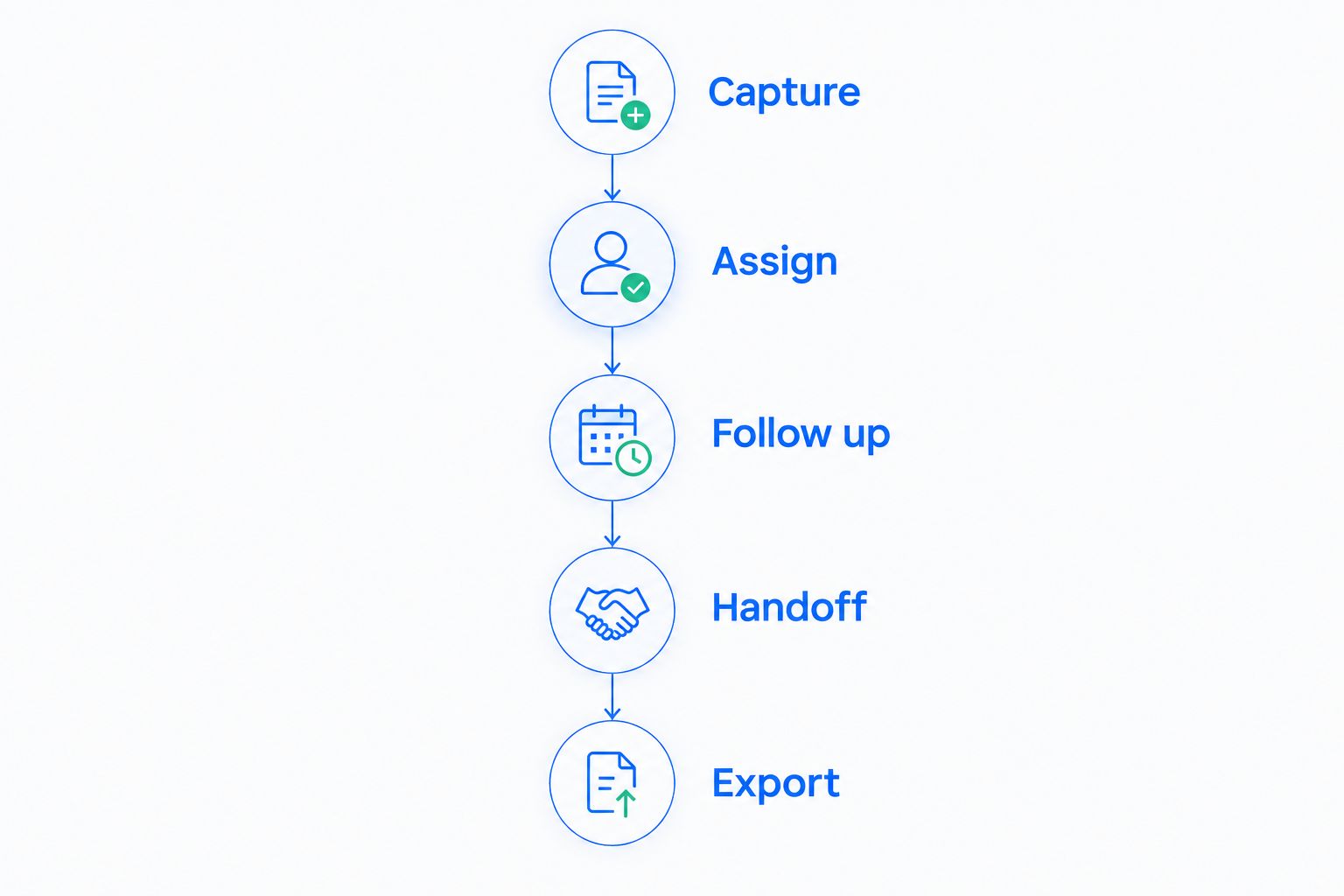
Reject a configuration that leaves the owner or next action unclear. A CRM evaluation is successful when another teammate can continue the work—not when the dashboard looks complete.
How the ranking works
This ranking uses the criteria listed above: contact organization, pipeline clarity, follow-up discipline, conversation context, daily usability, and data control. It separates use cases instead of treating a self-hosted system and a collaboration workspace as interchangeable.
HubSpot CRM leads the general shortlist. Zoho CRM emphasizes sales structure, Bitrix24 emphasizes collaboration, and SuiteCRM emphasizes self-hosted control.
This is a workflow-based buying guide, not a benchmark of conversion results. Your final choice depends on whether the edition and configuration you evaluate complete your required sales process.
Which free CRM should you choose?
Choose HubSpot CRM first if you are undecided. Start with contacts, deals, owners, and next actions; expand the setup only after those fundamentals work.
Choose Zoho CRM for a defined small-team sales process, Bitrix24 for collaboration alongside CRM work, or SuiteCRM when self-hosting is an explicit requirement. Each alternative solves a different operational problem.
For your 2026 decision, write one sentence describing the failure you need to prevent. Examples include an unassigned inquiry, an overdue follow-up, or a handoff without conversation history. Select the CRM that makes that failure visible and actionable.
FAQ
What's the best free CRM software in 2026?
HubSpot CRM is the default recommendation in this guide for straightforward contact and deal management. Choose Zoho CRM for sales structure, Bitrix24 for collaboration, or SuiteCRM for self-hosted control.
Is HubSpot CRM better than Zoho CRM for a small team?
HubSpot CRM leads this guide for straightforward tracking, while Zoho CRM suits a more structured lead-to-opportunity process. Test the same customer scenario in both and choose the configuration that makes ownership and next actions clearest.
Which CRM should I choose for team collaboration?
Bitrix24 is the collaboration-focused recommendation in this shortlist. Its combination of CRM, tasks, and collaboration suits teams coordinating customer activity with internal assignments.
Is SuiteCRM a good choice without technical support?
A self-hosted SuiteCRM deployment is not the recommended starting point without an operational owner. Someone must manage hosting, backups, updates, and security.
Can I use a CRM just to track follow-up reminders?
Yes, contact records and scheduled tasks can support a basic follow-up process. Check that the edition you select makes overdue work visible and distinguishes manual reminders from automated sequences.
What should I test before moving my leads into a CRM?
Test capture, assignment, follow-up, handoff, and export before importing your customer database. Use fictional sample records to check whether a teammate can identify the owner, conversation history, and next action.
When should I evaluate a CRM beyond this free shortlist?
Evaluate alternatives when your required workflow depends on automation or connected communication channels rather than basic records. Define the required actions first, then assess the exact system and configuration that support them.
One last thing
A populated contact record is not a completed follow-up. Before closing an opportunity record, ask whether another teammate can answer: who owns this, what happened, and what happens next?
Make that your acceptance test. If the answers are unclear, fix the workflow before adding more fields, integrations, or leads.