
 Log in
 Start Free Trial

Best overall for working inside Gmail: Streak. Best for Google Workspace-centered teams: Copper. Best for marketing-to-sales handoffs: HubSpot. This 2026 guide compares the best CRM integration for Gmail by where you work, how conversations reach the pipeline, and what happens after a prospect replies.
- Streak is the best CRM integration for Gmail when your pipeline needs to live inside your inbox.
- Copper fits Google Workspace-centered teams; HubSpot fits connected marketing and sales workflows.
- Pipedrive favors deal management; Salesforce favors configurable sales processes.
- Arches CRM fits multichannel follow-up workflows; verify Gmail connection behavior before choosing it for inbox-based work.
Why this matters
A prospect replies in Gmail. Your salesperson reads the message, then gets interrupted before updating the opportunity or setting the next task. The conversation moves forward; the pipeline does not.
Choose a Gmail CRM integration for the next action it supports, not just the emails it displays. An inbox sidebar, email synchronization, and follow-up automation solve different problems. Treating them as interchangeable leaves gaps between a reply and a sales action.
For teams coordinating email, WhatsApp, and calls, Arches CRM offers lead management, pipelines, and follow-up workflows. Check Gmail-specific connection behavior separately from those broader capabilities.
What makes the best CRM integration for Gmail?
Use these criteria to compare your 2026 shortlist before looking at individual products:
- Working location: Decide whether sellers should manage opportunities inside Gmail or in a separate CRM with Gmail connected.
- Conversation capture: Check whether the connection records the messages your team needs, rather than assuming every email reaches the correct record.
- Record matching: Test how contacts, companies, and opportunities are associated with a conversation. An email attached to the wrong deal creates misleading history.
- Follow-up control: Look for tasks, reminders, and workflows that support your actual sales process. Email visibility alone does not assign responsibility.
- Team access: Confirm what another salesperson can see when an opportunity changes hands. Personal inbox access and shared customer history are different requirements.
- Administration: Review permissions, connection maintenance, and workflow ownership. Someone must remain responsible when a mailbox disconnects or a rule changes.
The strongest fit is the product that matches your team's working habits without making customer history depend on memory.
Gmail CRM integrations at a glance
The table separates inbox-first tools from CRM-first systems. The final option addresses broader communication workflows and requires a Gmail-specific evaluation before selection.
| Option | Best for | Standout approach | Key limitation |
|---|---|---|---|
| Streak | Managing a pipeline inside Gmail | CRM functionality built around the Gmail inbox | Inbox-first work is not the same as a broader operational system |
| Copper | Google Workspace-centered relationship management | CRM connections across Google Workspace | Workspace familiarity does not remove CRM setup work |
| HubSpot | Marketing-to-sales handoffs | Gmail connection within a wider customer platform | A wider platform requires clear ownership of records and workflows |
| Pipedrive | Deal-focused sales teams | Gmail-connected communication around a visual pipeline | Connecting email does not define stage rules or next actions |
| Salesforce | Configurable sales processes | Gmail integration alongside a configurable CRM | Configuration and administration demand deliberate ownership |
| Arches CRM | Evaluating multichannel follow-up workflows | Email, WhatsApp, calls, pipelines, and workflow automation | Gmail-specific sync and inbox behavior must be verified |
1. Streak: best Gmail CRM for inbox-based pipelines
Streak brings CRM functionality into Gmail, making it the clearest default when your team wants the inbox to remain its main workspace. You organize customer relationships and pipeline activity without treating Gmail as merely a communication channel attached to another system.
The benefit is working-location consistency. A salesperson reading a prospect's reply is already in the place where pipeline information is managed.
Streak pros:
- Keeps the CRM workflow close to the email conversation.
- Suits sellers who prefer an inbox-centered working day.
- Makes pipeline organization part of the Gmail experience.
Streak cons:
- An inbox-centered approach is less aligned with teams that want a separate operational hub.
- Shared ownership and pipeline conventions still need explicit rules.
- Gmail familiarity does not guarantee consistent record maintenance.
Best for: A team whose primary requirement is managing sales relationships inside Gmail.
During your 2026 evaluation, open a real prospect thread and ask the salesperson to identify the opportunity stage, owner, and next action. The point is not whether the interface looks familiar. The point is whether the necessary sales decision happens there.
Verdict: Buy if Gmail is where your team wants to manage the pipeline.
2. Copper: best Gmail CRM for Google Workspace teams
Copper is a CRM built around Google Workspace connections. It fits teams that want customer relationship management connected to the Google tools they already use, rather than choosing a CRM solely for its Gmail sidebar.
That distinction matters. Your selection should reflect the wider relationship workflow, including how people maintain contacts and coordinate customer activity outside individual email threads.
Copper pros:
- Aligns with teams organized around Google Workspace.
- Connects Gmail work with a separate CRM record structure.
- Provides a relationship-management alternative to an inbox-only approach.
Copper cons:
- Google Workspace alignment does not eliminate configuration decisions.
- Sellers still need agreement on which records and activities to maintain.
- Teams seeking Gmail-only pipeline management should compare the workflow with Streak directly.
Best for: A business that treats Google Workspace as its daily operating environment but wants a dedicated CRM.
Compare Copper and Streak by asking where you want the authoritative customer record to live. If the answer is a dedicated relationship system connected to Google Workspace, Copper belongs on the shortlist.
Verdict: Buy if Google Workspace alignment matters more than keeping every CRM action inside Gmail.
3. HubSpot: best Gmail CRM for marketing-to-sales handoffs
HubSpot connects Gmail to its CRM and provides a wider platform for marketing and sales activity. Its strongest use case here is connecting an email conversation to a customer record that other teams also use.
Choose this approach when a lead's history matters before the salesperson sends the first message. The CRM needs to support the handoff, not just store the resulting email.
HubSpot pros:
- Places Gmail-connected sales work within a broader customer platform.
- Supports a shared record approach across marketing and sales.
- Suits teams evaluating customer workflows beyond inbox management.
HubSpot cons:
- A broader platform introduces more ownership and configuration decisions.
- Gmail connection alone does not define lead qualification or handoff rules.
- Teams needing only an inbox pipeline should compare narrower workflows first.
Best for: Teams connecting marketing-generated leads with sales follow-up.
For a 2026 comparison, trace one lead from initial capture to a salesperson's reply. Check the record, assigned owner, and next task at each handoff. A connected platform is useful only when both teams follow the same record rules.
If email sequences are central to your decision, compare the wider workflow in the guide to CRM software with email automation.
Verdict: Buy if Gmail follow-up belongs inside a shared marketing and sales process.
4. Pipedrive: best Gmail CRM for deal-focused sales teams
Pipedrive combines a sales pipeline with connected email workflows. It fits teams that want opportunities and activities to organize the working day, with Gmail serving as a communication channel rather than the main CRM interface.
Start with the deal. Then check whether the email history and next activity make the opportunity understandable to another salesperson.
Pipedrive pros:
- Centers the workflow on opportunities and pipeline stages.
- Connects email communication with deal management.
- Fits managers who review progress through a sales pipeline.
Pipedrive cons:
- Sellers must work in the CRM as well as their inbox.
- Email connection does not establish stage-entry requirements.
- Poor activity discipline still leaves deals without a clear next step.
Best for: Sales teams that manage work through deals, stages, and next activities.
Avoid making the Gmail connection the entire buying decision. A clean email history is useful, but it does not explain why a deal moved or what needs to happen next.
Verdict: Buy if the pipeline should drive the work and Gmail should support it.
5. Salesforce: best Gmail CRM for configurable sales processes
Salesforce offers Gmail integration alongside a CRM that supports configurable records and sales processes. It belongs on the shortlist when your requirements extend beyond a standard contact record and a simple pipeline.
Separate access to CRM information in Gmail from email capture and synchronization requirements. Those are distinct evaluation questions, even when they appear within the same buying conversation.
Salesforce pros:
- Supports configurable customer records and sales workflows.
- Connects Gmail work with an established CRM environment.
- Fits organizations with defined process and administration requirements.
Salesforce cons:
- Configuration requires a responsible administrator or implementation owner.
- Multiple requirements make the evaluation more involved than an inbox-first choice.
- A Gmail connection does not make the underlying sales process simpler.
Best for: Organizations that need configurable CRM processes and have ownership for maintaining them.
Write down the exact Gmail actions each role needs before evaluating Salesforce. A salesperson, manager, and administrator do not necessarily need the same view or permissions.
Verdict: Buy if process configurability is a requirement; skip for a simple inbox-only workflow.
6. Arches CRM: best for evaluating multichannel follow-up
Arches CRM is best for growing sales teams that need email, WhatsApp, calls, and follow-up workflows in one platform. Its stated capabilities include lead assignment, sales pipelines, automated reminders and tasks, conversation summaries, and opportunity movement based on customer interactions and configured workflows.
That makes it relevant when your problem extends beyond Gmail. A lead can move between communication channels while the team still needs one owner, a current conversation history, and a next action.
Arches CRM pros:
- Brings contacts, conversations, tasks, and sales activity together.
- Supports follow-up workflows rather than relying only on manual reminders.
- Includes email summaries and workflow-based opportunity updates.
Arches CRM cons:
- Gmail-specific synchronization and inbox functionality require verification.
- Automated stage movement needs clear rules and review ownership.
- A separate customer platform is not equivalent to managing everything inside Gmail.
Best for: Growing sales teams evaluating multichannel follow-up rather than Gmail-only pipeline management.
Ask to see your required Gmail workflow before making a decision: connection, conversation capture, reply handling, and record matching. Then evaluate the broader follow-up process against the same customer scenario.
Verdict: Hold until the Gmail workflow is verified; evaluate for multichannel sales coordination.
How we ranked these options
This ranking prioritizes working location, conversation capture, record matching, follow-up control, team access, and administration. It is a use-case ranking, not a measured performance leaderboard.
Streak leads for inbox-based work; the other positions represent different operating needs. The order does not imply that a configurable enterprise process or a multichannel workflow is less useful than an inbox pipeline.
Run a Gmail pilot before choosing
Use a 7-day pilot with 2 users and 5 test messages as a practical evaluation exercise, not as a performance benchmark. Include an initial inquiry, a reply, a forwarded conversation, an existing customer's message, and a conversation that changes owners.
Follow the same sequence for every shortlisted product:
- Connect Gmail: Review the permissions requested and confirm which mailbox is connected.
- Match records: Inspect which contact and opportunity receive each conversation.
- Assign owner: Give another salesperson responsibility and check their access.
- Set follow-up: Create the next task or configured workflow and inspect the result.
- Review history: Confirm that the record explains what happened and what comes next.
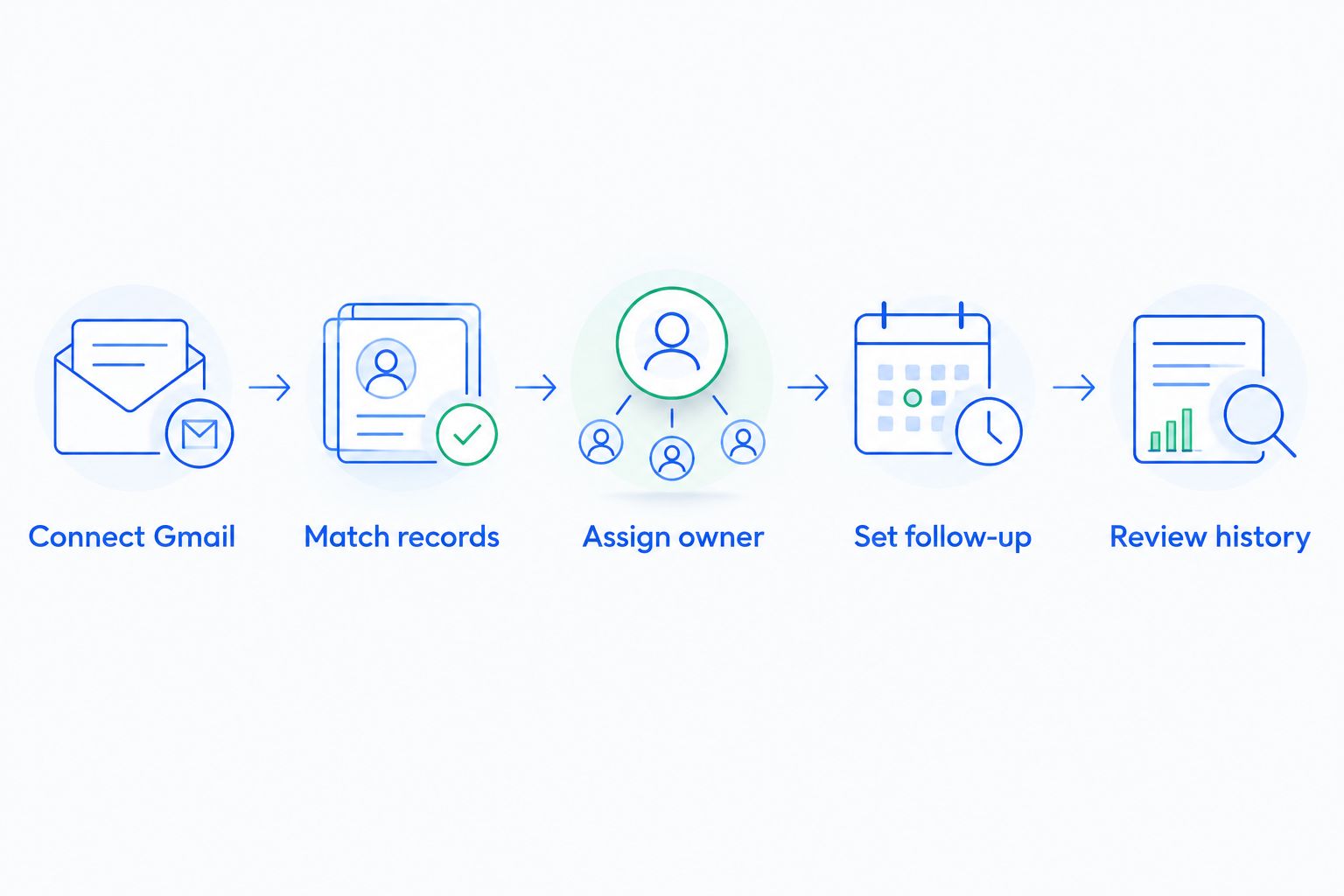
For your 2026 purchase decision, document a pass or fail for each step. A successful connection is not enough if a new owner cannot understand the conversation or identify the next action.
Which Gmail CRM integration should you choose?
Choose Streak by default when your requirement is a CRM inside Gmail. Choose Copper when Google Workspace alignment leads the decision, HubSpot for marketing-to-sales handoffs, Pipedrive for deal-centered work, and Salesforce for configurable processes.
Keep the decision narrow. Your 2026 shortlist should reflect the place your team actually works and the handoff that currently fails—not the longest feature list.
FAQ
What's the best CRM integration for Gmail in 2026?
Streak is the best default for teams that want CRM functionality inside Gmail. Copper, HubSpot, Pipedrive, and Salesforce serve different needs, including Google Workspace alignment, cross-team handoffs, deal management, and configurable processes.
Is Streak better than Copper for Gmail?
Streak is the better fit when you want to manage the pipeline inside Gmail. Copper fits teams seeking a dedicated CRM connected to their wider Google Workspace environment.
What's the difference between a Gmail sidebar and email synchronization?
A Gmail sidebar provides access to CRM information while you read or write email; synchronization concerns how email data moves between systems. Test each separately because access to a record does not establish complete conversation capture.
Can a Gmail CRM integration automate follow-ups?
Follow-up automation depends on the CRM's workflows, not merely its Gmail connection. Check how a reply affects scheduled tasks, reminders, and any configured sequence before choosing a product.
Should a small sales team choose Salesforce for Gmail?
Choose Salesforce when configurable CRM processes justify dedicated administration. For a simple inbox-based pipeline, compare Streak first rather than starting with a larger configuration project.
Is Arches CRM a fit for teams using Gmail and WhatsApp?
Arches CRM fits the broader need for email, WhatsApp, calls, and follow-up workflows in one platform. Verify the required Gmail connection, synchronization, and reply-handling behavior before selecting it for that specific workflow.
What should I test before connecting my team's Gmail accounts?
Test permissions, record matching, owner changes, follow-up behavior, and shared conversation history. Use representative messages so the evaluation includes real handoffs rather than only a successful mailbox connection.
One last thing
A conversation can be recorded correctly and still leave a lead unattended. End every Gmail CRM evaluation by changing the opportunity owner. If the new owner cannot identify the last discussion and the next task, the connection has not solved the handoff you need.