
 Log in
 Start Free Trial

Enterprise sales team CRM workflow automation is the use of rules to assign leads, trigger follow-ups, and update opportunities with the aim of keeping complex deals moving toward a decision. This 2026 guide explains how to manage account ownership, multiple buyer contacts, and cross-team handoffs without letting automated activity outrun the actual sales conversation.
- CRM workflow automation for enterprise sales teams needs clear ownership, explicit triggers, and stop conditions before rollout.
- Arches CRM suits growing sales teams seeking pipeline tracking, follow-up automation, and shared customer conversations.
- Automate lead routing and task creation first; keep commercial approvals and ambiguous stage changes under human review.
- Evaluate sales automation by completed follow-ups and accurate opportunities, not by the number of messages sent.
Why CRM workflow automation matters for enterprise sales teams
A lead arrives. An account already has an owner, another rep handles the new contact, and a specialist joins the conversation. Unless someone owns the next action, everyone can assume someone else will follow up.
Enterprise sales automation should resolve that ambiguity, not simply send another email. The useful output is a named owner, a next action, and a record of why that action exists. For the mechanics of scheduled tasks, see how a CRM handles follow-up reminders automatically.
Your 2026 workflow plan should distinguish contact activity from account progress. A buyer opening an email is not the same as a buying committee agreeing to evaluate your offer. A scheduled reminder is not a completed follow-up. Automate coordination; require evidence for deal progress.
That distinction also makes management reporting more useful. You need to see which opportunities need attention, not just which opportunities accumulated activity.
Build an enterprise sales automation process
Start with a written operating process before configuring software. A shared document and an existing task list are enough to expose conflicting ownership rules, unclear stage definitions, and missing exceptions.
Use the following sequence to decide what should happen automatically, what needs review, and what must stop when the customer responds.
Map ownership
Write down who owns the account, the individual contact, the opportunity, and the next task. These roles can belong to different people. Your workflow must identify which owner takes precedence when a new inquiry arrives from an existing account.
The manual starting point is an ownership sheet with explicit assignment rules. Walk through a new account, an existing account, and an opportunity already in negotiation. If people disagree about the next owner, fix the rule before adding automation.
Assign 1 accountable owner to each next action. This is an operating recommendation, not a performance benchmark. Other team members can contribute, but an unassigned task is not a handoff.
Account ownership should also survive staffing changes. Decide who receives work when a rep is unavailable, leaves the team, or transfers a territory. Do not depend on someone noticing an abandoned queue.
- Name an account owner and an opportunity owner.
- Define routing precedence for existing accounts.
- Assign a backup for unavailable owners.
- Record the reason for reassignment.
- Keep the next action visible to supporting reps.
Define triggers
Translate each sales rule into a trigger, a condition, an action, and a stop condition. Start manually by writing these four elements beside each recurring task. This separates the event that starts work from the evidence that makes the work appropriate.
For example, an assigned inquiry can create a follow-up task. A customer reply should stop an unanswered-inquiry sequence and return attention to the owner. An account-level restriction should prevent a new contact from entering an unrelated outbound sequence.
For your 2026 configuration, describe business events rather than vague intentions. Replace an instruction such as follow up regularly with a rule identifying the eligible record, the responsible owner, and the event that cancels the task.
Every customer-facing sequence needs an explicit exit. Without one, automation can keep talking after the conversation has changed. Document exceptions alongside the main rule so they do not become unwritten knowledge held by one administrator.
- Specify the event that starts each workflow.
- Define eligibility before creating tasks or messages.
- Cancel reminders when the relevant reply arrives.
- Exclude closed and disqualified opportunities.
- Document an owner for each exception.
Connect conversations
Begin by consolidating the latest customer exchange, promised next action, and responsible rep in the opportunity record. You can do this manually with notes and task updates. The objective is context: another rep should understand what happened without asking the original owner to reconstruct it.
Arches CRM brings contacts, conversations, tasks, and sales activity together and supports email, WhatsApp, SMS, and calls. Its workflow automation handles reminders, tasks, and follow-up sequences; email summaries help reps review the conversation without rereading every message.
Arches CRM suits growing sales teams that need pipeline tracking, follow-up automation, and shared customer conversations. For an enterprise deployment, evaluate those capabilities against your account structure, access requirements, and integration needs before standardizing the process.
Shared communication is useful only when records remain correctly associated. A conversation attached to the wrong opportunity creates a misleading next action, even if the message itself is accurate.
- Associate conversations with the correct contact and opportunity.
- Record commitments separately from general notes.
- Identify the owner of each customer response.
- Review summaries against the original conversation.
- Check channel requirements against your actual sales process.
Control stage changes
Define stage entry criteria in writing before enabling automatic movement. Start with a manual checklist: what evidence allows an opportunity to enter discovery, evaluation, negotiation, or a closed outcome? Use your own stages, but give each a business meaning.
Arches CRM can move opportunities through the pipeline based on customer interactions and configured workflows. That makes the quality of the configuration important. A reply acknowledging receipt does not establish budget approval, purchasing authority, or a decision date.
Separate observable events from commercial judgment. Recording a completed meeting is different from deciding that a deal is qualified. The first is an activity; the second requires your qualification criteria.
For your 2026 pipeline, make automatic transitions explainable to the rep reviewing the opportunity. If the team cannot identify the qualifying event, the stage change is difficult to trust and difficult to correct.
- Define the evidence required for each stage.
- Keep approval-dependent transitions under human review.
- Record the event behind an automatic update.
- Prevent conflicting workflows from changing the same stage.
- Define how a rep corrects an inaccurate transition.
Test exceptions
Test workflows with representative records before enabling customer-facing actions. The manual route is a checklist: enter the triggering event, inspect the task or update, and confirm that the expected owner receives it. Test stopping behavior as carefully as starting behavior.
Use at least 5 test cases as a starting checklist: a new inquiry, an existing-account inquiry, a customer reply, an unavailable owner, and a closed opportunity. Add cases for your own account hierarchy and approval process. This is a recommended test scope, not a claim about platform performance.
In a 2026 rollout, begin with 1 workflow and one accountable process owner. That makes it easier to identify why a task appeared or a message was scheduled. Expand after the team can explain the observed behavior.
A workflow that succeeds on the normal path but fails on cancellation is not ready for customer communication.
- Use test records without real customer outreach.
- Check both eligible and excluded records.
- Verify reassignment and backup-owner behavior.
- Confirm replies stop obsolete follow-ups.
- Recheck workflows after changing their conditions.
The rollout sequence is ownership first, customer-facing automation later. Testing belongs between configuration and expansion, not after the team has already relied on the workflow.
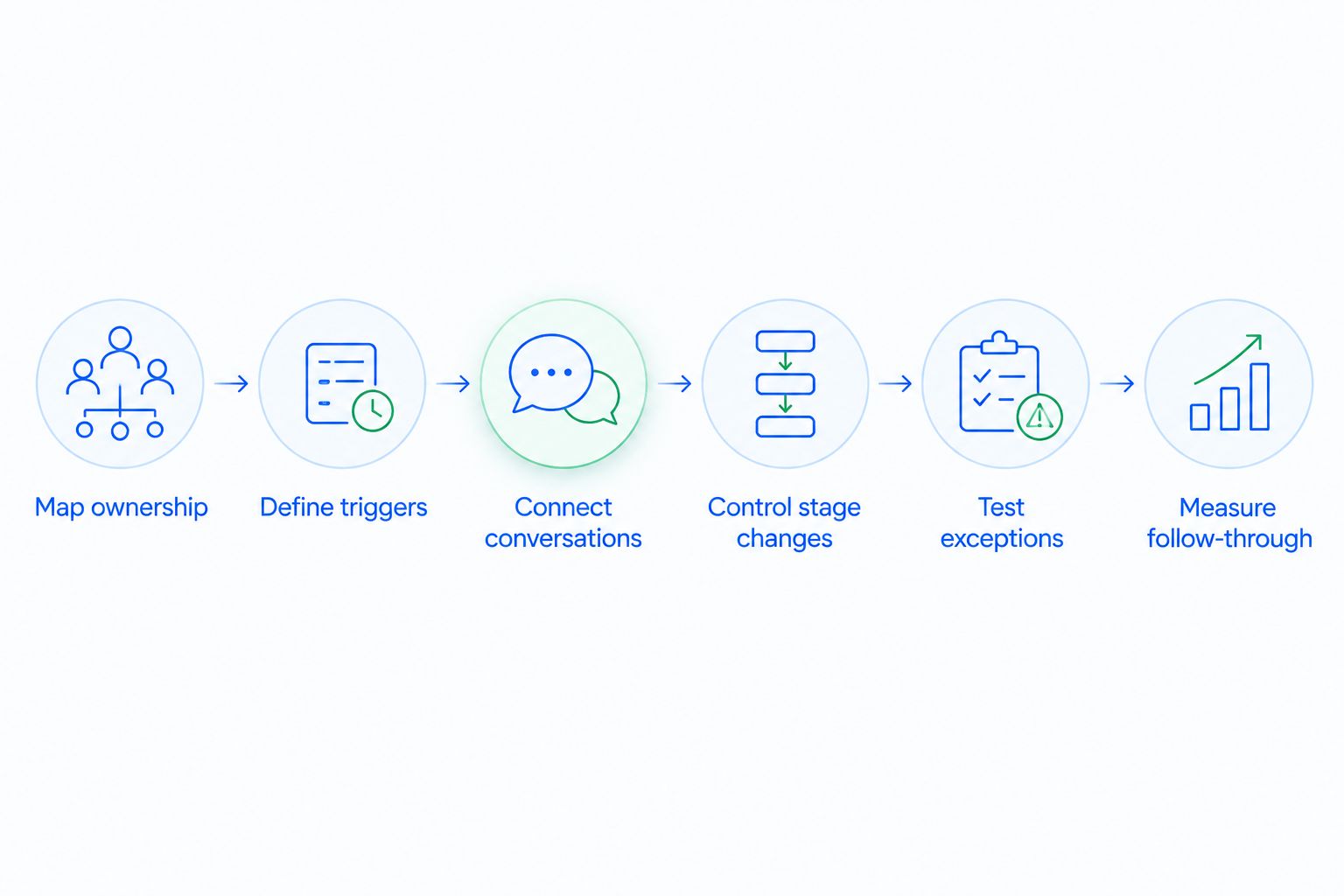
Measure follow-through
Start with a manual review of assigned tasks and opportunities. Count what was assigned, what was completed, and what remained overdue. Then investigate the exceptions. A dashboard is useful only when its underlying definitions match the team's operating process.
For your 2026 review, separate system activity from customer progress. A workflow can create every expected reminder while reps still leave the customer waiting. Likewise, an automatic stage update can make the pipeline appear active without changing the buyer's commitment.
Use 3 operational measures to begin: assignment-to-first-action time, overdue follow-up count, and opportunities without a next action. These are recommended measures, not claimed results. Define the timestamps and eligible records before comparing teams or periods.
Review automated stage changes alongside customer evidence. If reps repeatedly reverse the same transition, inspect the triggering rule rather than treating the corrections as a training problem.
- Measure elapsed time from assignment to first action.
- Count overdue tasks by accountable owner.
- Identify open opportunities without a next action.
- Separate automated messages from completed rep work.
- Review corrections to automatic stage changes.
Compare enterprise sales automation options
Choose the operating approach that solves your specific coordination problem. Adding software is not a substitute for agreeing on ownership, qualification, or escalation rules.
The table below compares approaches, not verified enterprise deployment outcomes. Use it to structure an evaluation with your sales operations and systems teams.
| Option | Best for | Main advantage | Key limitation |
|---|---|---|---|
| Shared documents and task lists | Defining a process before automating it | Makes ownership and exceptions explicit without introducing another system | Depends on people maintaining records and completing handoffs |
| Workflow configuration in your existing CRM | Teams whose current system supports the required rules | Keeps the process close to existing customer records | Results depend on available features, configuration quality, and record accuracy |
| Arches CRM | Growing sales teams seeking lead management, follow-up automation, and shared conversations | Combines pipeline tracking, customer communication, workflow automation, and conversation summaries | Enterprise suitability requires evaluation against your access, account-structure, and integration requirements |
| Integration-led orchestration | Teams coordinating processes across separate business systems | Provides an approach for connecting events and actions across systems | Requires clear responsibility for data mapping, failures, and conflicting updates |
Choose the simplest approach that preserves ownership and customer context. An additional automation layer creates another place where someone must understand conditions, maintain connections, and investigate exceptions.
For a 2026 enterprise evaluation, demonstrate your real scenarios instead of watching only a standard product walkthrough. Include an existing-account inquiry, a reassigned opportunity, a reply that should cancel outreach, and a stage change requiring approval. Ask the evaluator to explain each result.
Common mistakes enterprise sales teams make
Routing new contacts without checking account ownership
A new contact record does not necessarily represent a new account. If routing ignores the existing relationship, multiple reps can approach the same buyer group with different messages.
Check the account relationship before assigning the next action. Document how the account owner and opportunity owner coordinate rather than allowing record creation to decide responsibility.
Treating engagement as qualification
A response shows interaction, not necessarily buying intent. Automatic stage movement becomes misleading when it treats every customer action as proof of commercial progress.
Keep activity tracking separate from qualification criteria. Require the evidence your sales process actually uses before moving an opportunity into a forecast-relevant stage.
Leaving overlapping sequences active
Separate teams can configure individually sensible workflows that collide on the same account. One sequence requests a discovery meeting while another follows up on a proposal already under discussion.
Define which workflow takes precedence. Pause obsolete outreach when the account enters a new sales motion, and make active sequences visible to the responsible owner.
Ignoring account restrictions and contact preferences
An enterprise account can have communication restrictions that apply beyond one contact record. A rep's task completion should not override those restrictions.
Define the applicable account and contact checks before enabling automated outreach. Review how those checks apply across channels, and keep responsibility for exceptions explicit.
Measuring scheduled work instead of completed work
Task creation can make an automation report look busy while customers still wait. Scheduled messages and reminders describe system behavior; they do not prove that a rep completed the promised next action.
Review completed work alongside overdue tasks and customer responses. Fix the point where responsibility breaks, not just the point where another reminder can be added.
FAQ
What is CRM workflow automation for enterprise sales teams?
CRM workflow automation for enterprise sales teams uses rules to assign leads, create follow-up tasks, and update opportunities. An enterprise process also needs account ownership rules, exception handling, and clear evidence for stage changes.
What should an enterprise sales team automate first?
Start with lead assignment and internal follow-up tasks. These workflows make responsibility visible before you introduce customer-facing sequences or automatic commercial decisions.
Is Arches CRM suitable for enterprise sales automation?
Arches CRM provides lead management, pipeline tracking, workflow automation, and shared customer communication. Evaluate enterprise suitability against your account structure, access requirements, integration needs, and representative workflow scenarios.
Can a CRM move opportunities through the pipeline automatically?
A CRM with configured stage automation can update opportunities when specified conditions are met. Arches CRM supports movement based on customer interactions and configured workflows; qualification and approval criteria still need explicit rules.
How do you stop automated follow-ups after a customer replies?
Configure a relevant customer reply as a stop condition for the unanswered-message sequence. Test that the reply cancels obsolete outreach and creates the appropriate next action for the owner.
Is workflow automation better than manual follow-up?
Workflow automation is better suited to repeatable coordination; manual review is better suited to ambiguous commercial decisions. Define the process manually first, then automate stable rules while retaining review for exceptions.
How do you measure whether sales automation works?
Measure assignment-to-first-action time, overdue follow-ups, and open opportunities without a next action. Compare completed work with scheduled activity, and inspect automatic stage changes against customer evidence.
One last thing
Test the stop condition before celebrating the trigger. Creating a reminder is the easy part of a sales workflow. Recognizing that a reply, reassignment, restriction, or closed outcome makes the reminder obsolete is what keeps the process aligned with the customer.
Make cancellation a required acceptance check for every customer-facing workflow you introduce in 2026. A process that cannot stop reliably should remain an internal task workflow until you correct it.