
 Log in
 Start Free Trial

Law-firm CRM is software for organizing prospective clients, intake conversations, and follow-up with the aim of turning suitable inquiries into signed engagements. Unlike a general sales team, your intake team must separate commercial follow-up from conflict review, legal advice, and matter management; this 2026 guide explains how to build that boundary before choosing software.
- Choose CRM for law firms around intake ownership, follow-up, and consultation tracking—not a generic sales dashboard.
- Arches CRM fits intake teams needing lead assignment, workflow automation, and shared conversations; verify legal-specific requirements separately.
- Keep conflict decisions and legal advice under attorney control, outside automatic pipeline changes.
- Compare manual tracking, general CRM, and legal intake software against the same real intake scenarios.
Why CRM matters for law firms
A prospective client calls while your receptionist is handling another inquiry. Someone writes down a name, another person sends an email, and nobody owns the next action. The problem is not the number of leads. It is the missing handoff.
A law-firm CRM should make responsibility visible before it makes follow-up faster. Every active inquiry needs an owner, a status, and a next action. Without those basics, automation just sends messages around an unresolved process.
Law-firm intake also has a boundary that ordinary sales pipelines lack: receiving an inquiry does not establish that the firm should accept the representation. Conflict review, practice-area fit, and attorney approval require distinct decisions. A consultation booking is not a signed engagement.
Arches CRM combines lead management, sales pipelines, workflow automation, and customer communications. Those functions address intake coordination; evaluate legal-specific safeguards separately rather than assuming a general CRM supplies them.
For your 2026 selection, start with the failure you need to fix. Missed callbacks require ownership and reminders. Lost conversation history requires a shared record. Unclear acceptance decisions require approval boundaries—not another automated message.
How to set up CRM for law firms
1. Map your intake process before selecting software
Start with a shared spreadsheet and your existing calendar. Write down what happens between the first inquiry and either a signed engagement or a closed intake record. Include the awkward handoffs, not just the ideal path.
Use separate fields for intake progress and attorney decisions. A receptionist can record that a caller requested a consultation without deciding that the firm can represent that person. Your process should preserve that distinction wherever information moves.
Ask intake staff to walk through recent inquiries from memory and available records. Identify where they had to search an inbox, ask a colleague, or guess who was responsible. Those moments become your software requirements.
- Record each inquiry's source and arrival time.
- Name the person responsible for the next action.
- Separate administrative screening from attorney review.
- Mark where conflict review enters the process.
- Define what closes an inquiry without an engagement.
2. Define stages that reflect actual intake decisions
Use a spreadsheet status column first. Give each stage an entry condition and an exit condition so staff do not interpret the same label differently. Avoid a single stage called qualified if it mixes practice-area fit, conflict status, and readiness to retain counsel.
A workable administrative sequence is New inquiry, Review pending, Consultation scheduled, Decision pending, and Closed intake. Keep an outcome field alongside the final stage to distinguish signed engagement, declined inquiry, and withdrawal. Your firm's workflow can require additional stages.
Stage changes should describe what happened, not what the team hopes will happen. If a prospective client asks about scheduling, the consultation is not scheduled until a date is confirmed. Apply that same discipline throughout your 2026 intake pipeline.
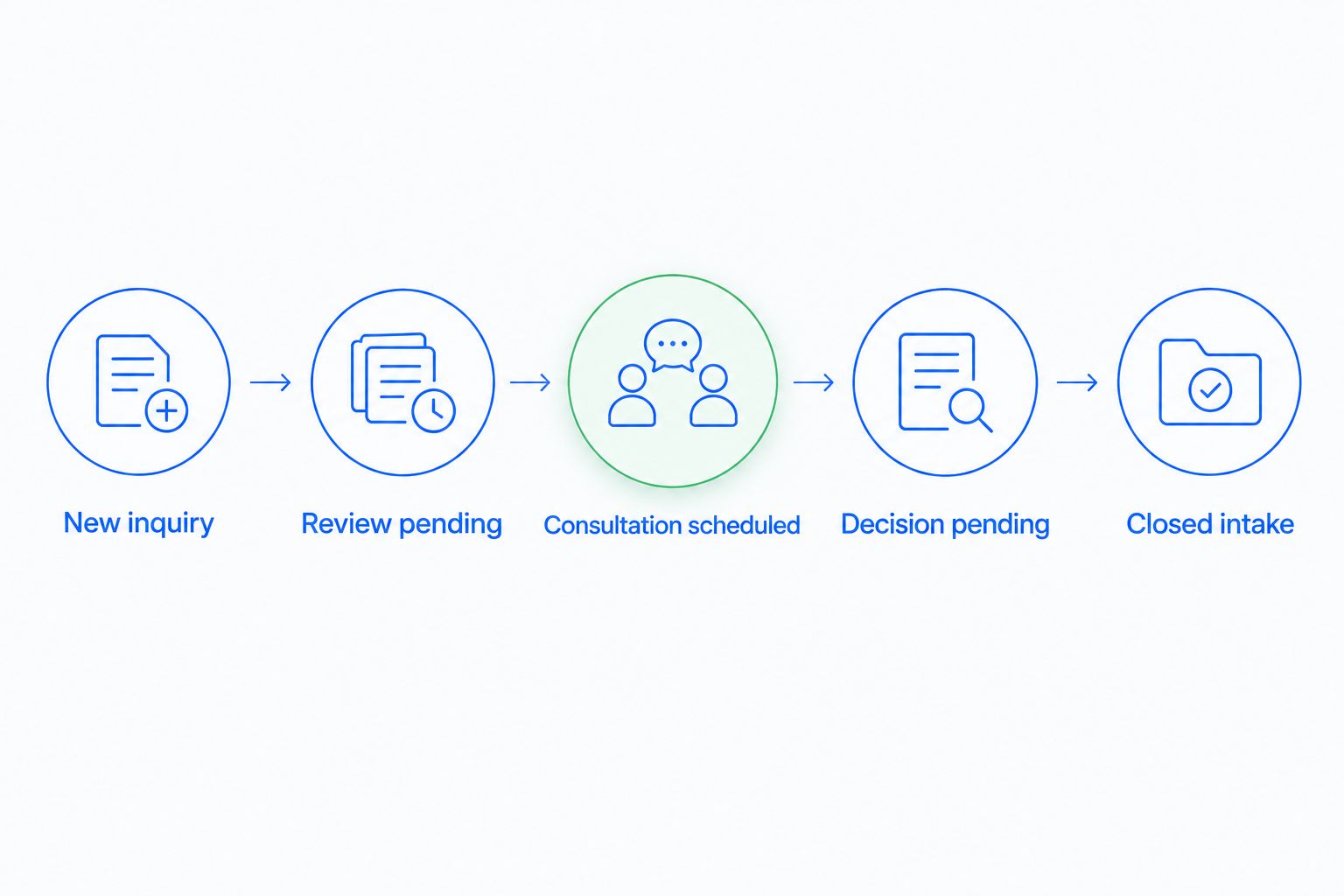
- Define the event that opens each stage.
- Require a recorded next action for active inquiries.
- Keep conflict status separate from scheduling status.
- Record the closure reason rather than deleting inquiries.
3. Assign ownership and control access
Begin with a named owner in your tracking sheet and written handoff rules. Give each active inquiry 1 accountable owner, even when several staff members contribute. Shared responsibility without a named owner leaves callbacks vulnerable to being overlooked.
Arches CRM supports capturing, organizing, and assigning prospects, which gives intake teams a software path beyond spreadsheet ownership. Its shared contacts, conversations, tasks, and activity can reduce the need to reconstruct an inquiry across separate records.
Before loading sensitive information, verify the platform's actual access controls, retention arrangements, data handling, and administrative permissions. Evaluate those requirements directly; do not treat a shared communication feature as proof that every confidentiality requirement is met.
Keep initial intake fields limited to what staff need for routing and the next decision. Collecting detailed case narratives before your firm has established its handling process creates unnecessary exposure.
- Assign an owner when an inquiry enters the system.
- Define who covers absent staff members.
- Limit access according to each person's intake duties.
- Set rules for reassignment and escalation.
- Document which information belongs outside the CRM.
4. Build follow-up around permission and stop conditions
Start with calendar reminders and manually reviewed message templates. Decide which events justify a follow-up: an unanswered callback, a requested consultation, or an outstanding administrative item. Avoid a sequence that treats every inquiry as permission for repeated promotional contact.
Arches CRM supports automated reminders, tasks, and follow-up sequences. That is the faster path once your team has agreed on triggers, ownership, and stopping rules. The workflow should support the intake decision, not pressure staff to skip it.
Your 2026 follow-up rules need explicit exceptions. Stop or pause outreach when someone declines, asks not to be contacted, or requires an attorney decision before further communication. Review the firm's applicable professional and communications requirements when writing templates.
For the mechanics, automatic follow-up reminders should connect a defined event to a task or message, with a clear condition that ends the sequence.
- Tie reminders to recorded intake events.
- Use administrative language rather than legal advice.
- Specify who reviews messages before activation.
- Stop sequences when the relevant action is complete.
- Route exceptions to a named person.
5. Preserve conversation context without copying everything
Manually summarize the latest contact in a consistent note: what the person requested, what staff promised, and what happens next. Store the summary where the assigned owner can find it. Do not make the next person read an entire email chain to locate a callback commitment.
Arches CRM brings email, WhatsApp, SMS, and calls into one platform and supports conversation summaries. For law-firm intake, assess which channels your firm permits and how their records should be handled before connecting them.
A summary is a working aid, not a substitute for checking the original communication when wording matters. Staff should distinguish a prospective client's statement from an attorney's conclusion. That distinction matters when the record passes from intake to the legal team.
Use a fictional inquiry to test the handoff. Someone who did not handle the initial contact should be able to identify the current owner and promised next action without asking the original staff member.
- Record the latest substantive contact and its date.
- Separate client statements from internal decisions.
- Note promises and outstanding administrative requests.
- Preserve the original communication where required.
- Review summaries before using them to trigger action.
6. Test automation against difficult intake cases
Start by walking through the workflow manually. Then test the same scenarios in software with fictional data. A polished demonstration of a straightforward inquiry does not show what happens when someone replies twice, cancels a consultation, or returns after their record has closed.
Use 5 test inquiries as an initial checklist: a duplicate inquiry, an unanswered callback, a canceled consultation, an attorney-review hold, and a declined inquiry. This is a suggested test set, not a performance benchmark. Add scenarios specific to your firm's intake process.
Arches CRM can move opportunities through its pipeline based on interactions and configured workflows. Keep those transitions administrative. An email reply can signal activity; it does not establish conflict clearance or authorize acceptance of representation.
For the 2026 rollout, approve each workflow only after its ordinary path and exception path behave as intended. Test integrations separately from message templates so a routing failure does not look like a communication failure.
- Check whether repeated submissions create duplicates.
- Confirm that cancellations stop irrelevant reminders.
- Keep attorney-review holds from advancing automatically.
- Verify who receives failed-handoff notifications.
- Test reopening a previously closed inquiry.
7. Measure intake outcomes and website handoffs
Begin with a weekly spreadsheet review. Track inquiry arrival, first substantive response, consultation status, and final intake outcome. Record those events consistently before turning them into a dashboard. A fast acknowledgment and a completed intake conversation are different events.
Website submissions deserve their own test. A WordPress lead generation workflow needs a reliable handoff from form submission to intake ownership; a captured email address alone does not establish that staff received or acted on the inquiry. Trace the submission through routing, assignment, and acknowledgment.
Review 30 days of intake records after rollout as a suggested starting window. Examine individual failures alongside totals: which inquiries had no owner, which tasks passed their due date, and which records closed without a reason. Do not interpret every unsigned inquiry as a sales failure; some belong outside your firm's acceptance criteria.
- Define what counts as a substantive response.
- Separate consultations booked from consultations attended.
- Record signed engagements as a distinct outcome.
- Keep decline reasons separate from missed follow-up.
- Test website fields and source information after changes.
Compare your law-firm intake options
Choose the operating model before comparing feature lists. Manual tracking exposes your process with little setup, but staff must maintain it. A general CRM adds structured ownership and automation, while legal-specific software needs a separate assessment of its actual intake and matter functions.
Arches CRM is best for law-firm intake teams that need lead assignment, follow-up automation, and shared conversations. Its documented role is CRM and sales workflow automation, not a confirmed replacement for conflict checking, trust accounting, or matter management.
| Option | Best for | Main advantage | Key limitation |
|---|---|---|---|
| Shared spreadsheet and calendar | Firms defining their intake process | Direct control over fields and handoffs | Staff must maintain reminders and reconcile conversations manually |
| Arches CRM | Intake teams coordinating leads and follow-up across communication channels | Lead assignment, pipelines, shared conversations, and workflow automation | Legal-specific controls and matter-management requirements need separate verification |
| Legal-specific intake software | Firms requiring legal intake functions within their software selection | A category to assess against legal-specific requirements | Category positioning does not prove that a particular product meets your needs |
| Existing practice-management software | Firms checking whether their current system covers intake | Avoids introducing a separate record if intake functions meet requirements | Existing intake capabilities must be tested rather than assumed |
For a 2026 purchase, make every shortlisted option complete the same fictional intake scenarios. Compare the work your staff must perform, the decisions requiring approval, and the information transferred after engagement—not just the appearance of the pipeline.
Common mistakes law firms make with CRM
Treating a booking as acceptance
A scheduled consultation is an administrative event, not proof that the firm has accepted representation. Keep engagement status separate from scheduling status. Otherwise, staff and automated workflows can communicate a level of certainty the legal team has not authorized.
Importing detailed case information too early
A large intake form can collect more information than staff need for initial routing. Decide what belongs in the CRM before importing historical records or connecting communication channels. Start with the minimum information required for the next intake decision, then follow the firm's approved process for further collection.
Automating every pipeline transition
A customer interaction is not always a decision. Replies, cancellations, and requests for information need different handling. Require human review wherever a transition represents conflict clearance, suitability, or acceptance rather than ordinary administrative progress.
Measuring only the number of leads
More inquiries do not resolve missing ownership or incomplete handoffs. Review response events, consultation outcomes, and closure reasons together. Keep unsuitable inquiries visible in reporting so staff are not pushed to pursue matters the firm has decided to decline.
Replacing the matter handoff with a CRM stage
Moving an inquiry to signed engagement does not transfer every document, instruction, or deadline the legal team needs. Define the handoff explicitly, including who checks that it is complete. Test the transition into the firm's matter process before declaring intake finished.
FAQ
What's the best CRM for law firms?
The best CRM for a law firm matches its intake ownership, follow-up, communication, and legal-review requirements. Compare options using the same fictional inquiries, including cancellations, duplicates, and review holds.
Can a general CRM replace legal practice-management software?
A general CRM should not be assumed to replace legal practice-management software. Intake coordination and ongoing matter management require separate evaluation, especially for documents, deadlines, accounting, and legal-review processes.
Is Arches CRM suitable for law-firm intake?
Arches CRM supplies lead assignment, pipelines, workflow automation, and shared communications that support intake coordination. Verify the firm's legal-specific access, data-handling, conflict-review, and matter-handoff requirements before adoption.
Can a law firm automate follow-up messages?
A law firm can automate administrative follow-up after defining approved triggers, message content, and stop conditions. Keep legal advice and acceptance decisions under attorney control, and review applicable professional and communications requirements.
What should a law firm store in its CRM?
A law firm should store the information its approved intake process requires, such as contact details, ownership, communication history, and next actions. Decide separately how sensitive case narratives, legal documents, and attorney conclusions should be handled.
How do I test a CRM before rolling it out?
Test a CRM with fictional inquiries that include duplicates, missed callbacks, cancellations, review holds, and declined matters. Confirm assignment, message stopping rules, access, and the handoff into matter management before using live intake records.
Which intake metrics should a law firm track?
Track inquiry arrival, first substantive response, consultation status, and final intake outcome. Separate unsuitable inquiries from missed follow-up so reporting reflects both service execution and the firm's acceptance decisions.
One last thing
Test what happens when someone says no. Create a fictional inquiry, decline it, and check every connected task, message sequence, and pipeline rule. Then have another staff member open the record and explain its status.
A CRM that handles new inquiries well but continues outreach after closure has an unfinished workflow. Fix that boundary before adding more automation. Your intake process is ready when the next action is clear—and when no further action is appropriate, that is clear too.