
 Log in
 Start Free Trial

Financial advisors’ CRM software is a system for organizing prospects, client conversations, and follow-up tasks with the aim of turning inquiries into accountable next steps. Choosing a CRM for financial advisors in 2026 also means separating relationship management from the controls your firm requires for client information, communications, and supervision.
- Choose a CRM for financial advisors around ownership, client context, and follow-up—not a long feature list.
- Archescrm supports lead management and workflow automation; evaluate financial-services controls separately.
- Test household relationships, approved communication channels, and record exports before committing.
- Automate administrative follow-up while keeping financial recommendations and sensitive decisions under human review.
Why CRM matters for financial advisors
A prospect asks about retirement planning. Someone replies, a meeting gets scheduled, and the next action disappears into an inbox. The problem is not contact storage. It is the missing connection between a conversation, its owner, and its deadline.
Advisory work also involves relationships that do not fit neatly into a sales opportunity: spouses, beneficiaries, professional referral partners, and existing clients with changing needs. Your CRM must preserve those distinctions rather than treating every person as another lead to close.
Your 2026 CRM decision should start with the work that gets missed, not the features that look impressive. Use this guide to automatic follow-up reminders to understand the underlying process, then apply your firm's communication and approval rules.
A sales CRM organizes relationship activity. It does not, by itself, establish that your practice meets its regulatory obligations. Assess communication retention, access controls, review procedures, and required integrations as separate purchase criteria.
Build your financial-advisor CRM workflow
Define the relationships you need to manage
Start with a spreadsheet and your existing calendar. List the information you need before a prospect meeting, after a client conversation, and when another team member takes over. Remove fields that nobody uses to make a decision.
Distinguish a person from a household and a household from an opportunity. A spouse can participate in the same planning relationship without becoming a duplicate prospect. A referral partner can introduce clients without entering your client onboarding pipeline.
For a 2026 evaluation, prepare 10 sample records representing your actual relationship types. Use fictional information during vendor demonstrations. This is a recommended test set, not a benchmark for database size.
- Identify the primary contact and relevant household relationships.
- Separate prospects, clients, and referral partners.
- Assign a relationship owner and a backup owner.
- Record communication preferences and applicable permissions.
- Keep sensitive information out of general notes unless firm policy permits it.
Map stages to completed actions
Sketch your process before configuring software. Use stages that describe something completed, not an advisor's impression that a lead feels promising. A meeting booked is observable; a hot prospect is subjective.
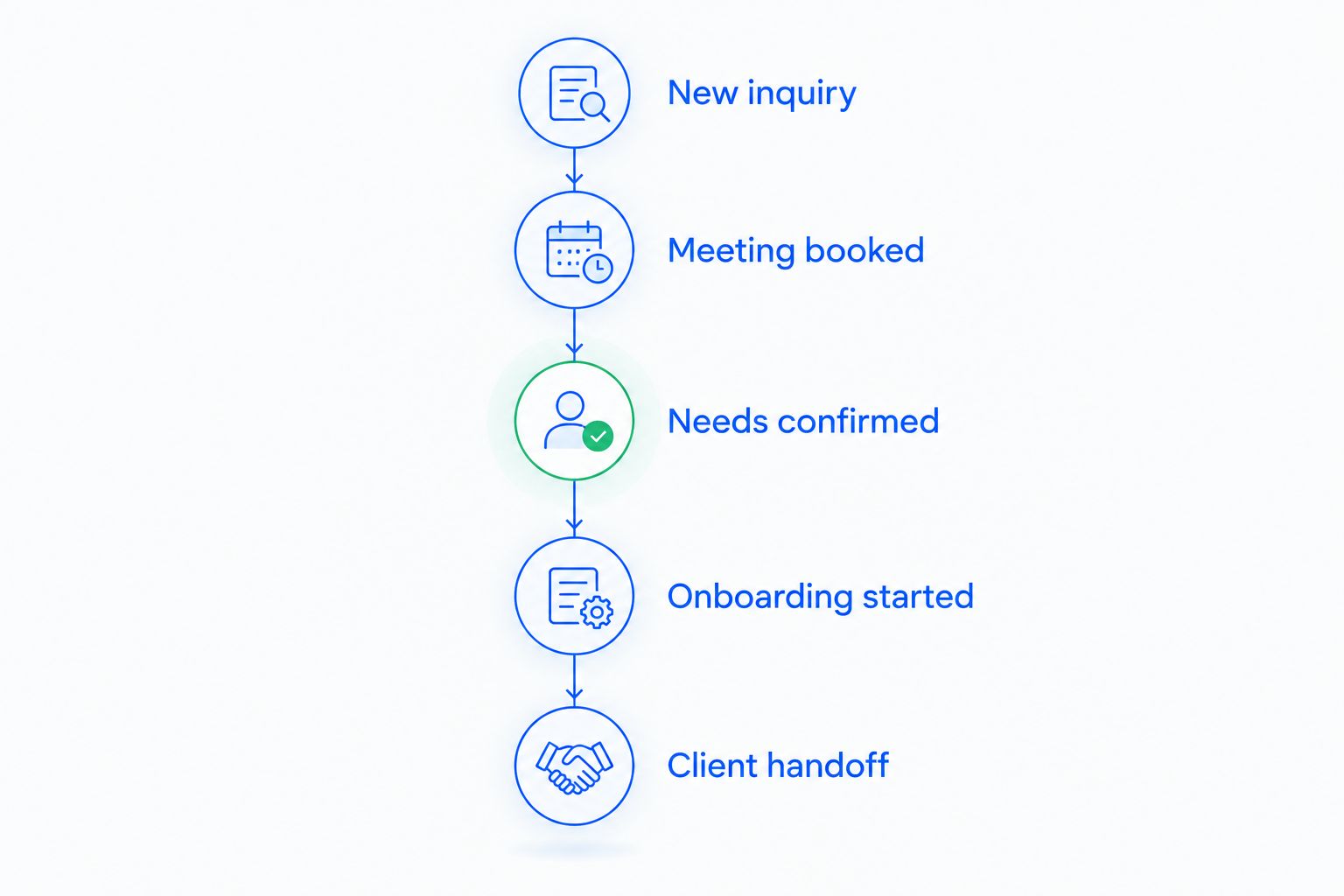
One starting sequence is New inquiry, Meeting booked, Needs confirmed, Onboarding started, and Client handoff. Adapt those labels to your service model. Keep recurring client reviews outside the prospect pipeline so existing relationships do not become permanent open sales opportunities.
Each stage needs an entry condition, an owner, and a next action. Closing an opportunity should not erase unresolved administrative tasks or the relationship's conversation history.
- New inquiry: assign an owner and record the source.
- Meeting booked: record the appointment and preparation task.
- Needs confirmed: document the agreed next administrative step.
- Onboarding started: assign outstanding onboarding tasks.
- Client handoff: identify responsibility for ongoing service.
Assign ownership before automating follow-up
The manual approach is straightforward: put the next task on an assigned calendar, record completion, and check outstanding tasks together. It breaks when responsibility is implicit or a task survives after the underlying conversation changes.
Archescrm is best for financial advisors prioritizing lead follow-up and sales workflow automation. Archescrm provides lead and contact management, sales pipelines, reminders, tasks, and follow-up sequences. Those functions support this administrative workflow; your firm still needs to assess its financial-services requirements separately.
Configure a trigger, an owner, a completion condition, and a stop condition for each sequence. A prospect's reply should prompt a review of the next action rather than leave an unrelated reminder running.
- Assign every new inquiry to a named owner.
- Define the next action before enabling a sequence.
- Stop outreach when the contact declines further communication.
- Recheck scheduled tasks after a reply or meeting change.
- Establish backup coverage for absences and departures.
Choose approved channels before connecting conversations
Begin with a written channel inventory: where prospects contact you, where client conversations happen, and which channels your firm permits. A communication channel being available in software does not make it approved for your practice.
Centralized conversations help a team understand context without searching separate inboxes. The trade-off is that a broader communication setup requires clearer permissions, retention decisions, and responsibility for reviewing what enters the system.
In your 2026 selection process, test message retrieval and export rather than accepting a demonstration of a tidy inbox as proof of recordkeeping suitability. Confirm how your CRM and any separate archive fit together with the person responsible for compliance.
- List approved email, messaging, and calling channels.
- Define who can read, send, and review communications.
- Confirm how required records are retained and retrieved.
- Test an export using fictional conversations.
- Decide where attachments and sensitive documents belong.
Keep automated assistance inside clear boundaries
The manual baseline is an advisor reviewing the original conversation, writing a summary, and assigning a task. Automated assistance is useful when it reduces that administration without changing who is responsible for the decision.
Archescrm can summarize email conversations, draft emails, and move opportunities based on customer interactions and configured workflows. For financial advisors, use these functions for administrative organization and draft preparation—not as a substitute for reviewing financial recommendations or confirming client instructions.
A stage change should have a defined meaning. A polite reply is not the same thing as acceptance, onboarding completion, or authorization. Review the underlying interaction whenever the consequence affects client service or a sensitive decision.
- Review summaries against the original conversation.
- Approve client-facing drafts under your firm's procedures.
- Keep investment recommendations outside unattended follow-up sequences.
- Define which interactions permit a pipeline change.
- Route ambiguous replies to the relationship owner.
Test handoffs, integrations, and reporting
Before buying, reproduce the workflow manually with exported sample data and a shared task list. Identify which information must move between systems and which system owns the authoritative record. Then test the proposed connections rather than assuming an API means your required workflow is supported.
Run a 5-business-day pilot with fictional records, or use appropriately authorized data under your firm's procedures. This is a suggested evaluation window. Include an advisor, an administrative colleague, and the person responsible for reviewing access and communication controls.
Measure whether participants can find the next action and complete a handoff without asking for an explanation. Reporting should reveal unresolved work, not just count how often someone logged in.
- Test contact creation and duplicate handling.
- Check how record changes move between connected systems.
- Transfer a relationship and verify task ownership.
- Retrieve the conversation behind a reported opportunity.
- Export contacts, activities, and open tasks.
Review exceptions before expanding automation
Start with a manual exception list: unanswered inquiries, tasks without owners, overdue follow-ups, and records missing a next action. Reviewing that list exposes gaps before you turn the same process into an automated workflow.
For the initial rollout, select 3 workflows: inquiry assignment, meeting preparation, and overdue-task review. This is a recommended scope, not a promised implementation limit. Add more only after the team can explain what triggers each workflow and how it stops.
In 2026, judge success against your own starting point. Track elapsed time from inquiry to human response, the share of active relationships with an assigned next action, and overdue tasks. Do not confuse an automated acknowledgment with an advisor actually responding.
- Record a baseline before changing the process.
- Separate acknowledgments from substantive responses.
- Review tasks that automation creates but nobody completes.
- Check exceptions after staffing or process changes.
- Expand only workflows with clear ownership and stop conditions.
Compare CRM options for financial advisors
Choose the option that handles your hardest workflow, not the one with the longest demonstration. Evaluate each approach against household relationships, approved communications, access, exports, and handoffs. A general sales platform and an advisor-oriented platform serve different starting points; neither label proves suitability.
| Option | Best for | Practical advantage | Key limitation or evaluation need |
|---|---|---|---|
| Spreadsheet and calendar | Solo advisors defining an initial process | Lets you document fields, ownership, and stages before selecting software | Follow-up and handoffs depend on manual upkeep |
| Archescrm sales CRM | Advisor teams prioritizing lead follow-up and sales workflow automation | Combines contacts, conversations, tasks, pipelines, and automated follow-up | Assess household modeling, supervision, retention, and advisory integrations separately |
| Advisor-oriented CRM | Practices making advisory relationship structure the main selection criterion | Gives you a category to evaluate around households and recurring service workflows | Verify each vendor's actual capabilities; the category label is not evidence |
| Configurable general-purpose CRM | Teams prepared to design their own relationship and task model | Lets you evaluate a setup built around your operating process | Customization creates ongoing configuration and maintenance work |
Keep the evaluation tied to demonstrated actions. Ask each vendor to show the same sample household, missed follow-up, owner change, and conversation export. Record whether each task works as required, needs configuration, or requires another system.
Do not award extra credit for functionality your team will not use. An unused automation builder does not repair an unclear handoff, and a crowded dashboard does not establish that a client received a response.
Common mistakes financial advisors make
Treating households as duplicate leads
A household relationship and an individual contact answer different questions. Collapsing everyone into one record loses personal communication context; treating everyone as unrelated loses the household connection. Define how those records relate before importing your database.
Using pipeline stages as client-service records
A prospect pipeline tracks progress toward a new relationship. Recurring reviews and ongoing service need their own tasks or workflows. Leaving every client in an open opportunity makes the pipeline harder to interpret and obscures unfinished service work.
Assuming a shared inbox satisfies recordkeeping requirements
An accessible conversation is not proof of suitable retention, supervision, or retrieval. Review those requirements with your compliance lead and test the actual setup. Keep channel approval separate from the convenience of having messages together.
Automating reminders without stop conditions
A reminder becomes the wrong reminder when a prospect replies, reschedules, opts out, or becomes a client. Define those exceptions before activating a sequence. Otherwise, automation repeats an outdated instruction more efficiently.
Importing history without deciding what belongs
Old exports can contain duplicates, stale ownership, and sensitive details in unrestricted note fields. Clean the relationship structure and decide what information each role needs before migration. Test a small sample before moving the full dataset.
FAQ
What's the best CRM for financial advisors?
The best CRM for financial advisors is the one that meets your relationship, follow-up, communication, and control requirements in a practical test. Compare a sample household, an owner handoff, a stopped sequence, and a record export before deciding.
Is a general sales CRM suitable for financial advisors?
A general sales CRM is suitable for organizing leads and follow-up when its configuration meets your firm's requirements. Evaluate household relationships, approved channels, retention, supervision, and integrations separately from sales features.
Can financial advisors use Archescrm for follow-up?
Archescrm supports follow-up through reminders, tasks, and follow-up sequences. Financial advisors should define owners, approved messages, stop conditions, and review procedures before enabling those workflows.
Does CRM software automatically make an advisory firm compliant?
No, CRM software alone does not establish compliance. Your firm must assess the system, configuration, connected channels, and operating procedures against its applicable obligations.
Should financial advisors automate client emails?
Financial advisors should automate administrative emails only within their firm's approval and communication procedures. Keep financial recommendations and sensitive decisions under the required human review, and stop sequences when the relationship changes.
What should an advisor test before switching CRM systems?
Test relationship structure, task ownership, communication retrieval, integrations, access, and exports before switching. Include a missed follow-up and an owner change so the evaluation covers exceptions as well as routine work.
Can a spreadsheet replace a CRM for a solo advisor?
A spreadsheet and calendar can document relationships and tasks for a solo advisor's initial process. They require manual upkeep and should be assessed separately for any communication, security, and recordkeeping requirements.
One last thing
Test what happens when the assigned advisor is unavailable. Create a fictional inquiry, assign its next action, and transfer responsibility. If the replacement owner cannot find the conversation and deadline, fix the handoff before adding automation.
Make that the final gate in your 2026 CRM evaluation. Archescrm's lead management and workflow automation support the administrative process; clear ownership determines whether the next conversation actually happens.