
 Log in
 Start Free Trial


Yes, a CRM can track customer referrals automatically when it captures a reliable referral source, connects the referred prospect to the referring customer, and updates that relationship as the deal progresses. Automation still needs configured fields, matching rules, and workflows; it cannot reliably identify an introduction that nobody records.
- Can a CRM track customer referrals automatically? Yes, when referral data connects the customer, prospect, and sales outcome.
- Referral tracking needs a named referrer, not just a generic referral source tag.
- Arches CRM supports sales follow-up automation; confirm referral-specific capture, attribution, and reporting before choosing a setup.
- Test new prospects, existing contacts, and missing referrers before activating customer-facing workflows.
Can a CRM track customer referrals automatically?
A CRM can automate referral tracking from introduction through closed deal, provided the system supports the necessary relationships and workflow triggers. The essential requirement is a traceable connection between the referring customer, the referred prospect, and the resulting opportunity. A source field alone does not provide that connection.
Use this sequence when evaluating a referral workflow in 2026:
- Capture the introduction. Record the prospect and the customer who referred them through a supported form, integration, or staff entry.
- Match the records. Check whether the prospect and referrer already exist before creating new contacts.
- Assign the follow-up. Give the referred opportunity an owner and a clear next action.
- Track the outcome. Keep the referral relationship attached as the opportunity changes stages.
- Review attribution. Separate new introductions, active opportunities, and closed deals in your reporting.
The broader mechanics are covered in how workflow automation reduces manual CRM data entry. Referral tracking adds a specific requirement: preserving who introduced whom, not merely moving information between fields.
Why this matters
A customer makes an introduction. The prospect replies, a salesperson takes over, and the original customer's name disappears into an email thread. Your team can still close the deal, but you lose the connection needed to understand where it came from.
Referral automation should solve that operational problem first. Your salesperson needs the introduction context, the prospect needs a relevant response, and your reporting needs a consistent source record. Sending a thank-you message is useful, but it is not a substitute for accurate attribution.
For a 2026 referral workflow, judge success by whether someone can open an opportunity and answer: who referred this prospect, who owns the follow-up, and what happened next?
Which referral-tracking setup should you use?
Choose the simplest setup that preserves the referral relationship and supports your follow-up process. The following are implementation approaches, not claims that every CRM includes the same capabilities.
| Approach | Best for | Main advantage | Main limitation |
|---|---|---|---|
| Staff-recorded referral with automated follow-up | Teams receiving personal introductions by email or phone | Captures context that a generic form misses | Someone must record the referrer correctly |
| Connected referral form | Teams collecting introductions through a consistent submission process | Creates structured input for matching and assignment | Depends on reliable field mapping and duplicate handling |
| Dedicated referral system connected to the CRM | Teams needing referral-program administration beyond sales tracking | Separates program operations from sales execution | Adds another system and synchronization rules to maintain |
Start with staff-recorded referrals if your introductions arrive through conversations. Automating follow-up after a deliberate entry is more dependable than treating every unfamiliar contact as a referral.
Choose a connected form when customers need a repeatable way to submit introductions. Consider a separate referral system only when your requirements extend beyond contact relationships, opportunity tracking, and sales tasks. Confirm the actual integration behavior before choosing either route.
What information should a referral record contain?
A useful referral record explains both the origin of the introduction and the current sales responsibility. Build your 2026 field checklist around those jobs rather than collecting information simply because a form allows it.
- Referring customer: A reference to the existing customer record, not only a typed name.
- Referred prospect: The person or business being introduced, with enough information to match an existing record.
- Introduction context: What the customer shared and why the prospect is relevant.
- Referral source: A consistent category that distinguishes customer referrals from other lead sources.
- Assigned owner: The salesperson responsible for the next action.
- Opportunity outcome: The connected deal and its current status.
Keep the original referral information distinguishable from later sales activity. A prospect can attend an event or reply to a campaign after an introduction; those interactions do not erase the original referral.
Also distinguish the referring customer from the salesperson who entered the information. They perform different roles. Combining them in a single field makes attribution difficult to interpret.
How should an automatic referral workflow work?
Build the workflow around a recorded introduction, then connect each action to a clear event. Do not make a deal-stage change stand in for evidence that a customer referred someone.
Capture the referral
Choose the entry point your team will actually use. That might be a structured form or a staff action after an email introduction. Confirm that the entry includes the referrer before treating it as an attributable referral.
Match the contact
Look for an existing prospect before creating another record. A referral involving an existing contact needs a deliberate attribution decision, not an automatic duplicate.
Assign the owner
Route the opportunity according to your existing ownership rules. Include the introduction context in the assigned work so the salesperson does not ask the prospect to repeat information already provided.
Trigger follow-up
Create the next task or approved communication when the referral meets your entry conditions. Stop or change the sequence when the prospect responds, the owner takes over, or the opportunity reaches an excluded status.
Record the outcome
Connect the referral to the opportunity outcome. Keep an introduction separate from a qualified opportunity or a closed deal so reporting does not present all referrals as sales.
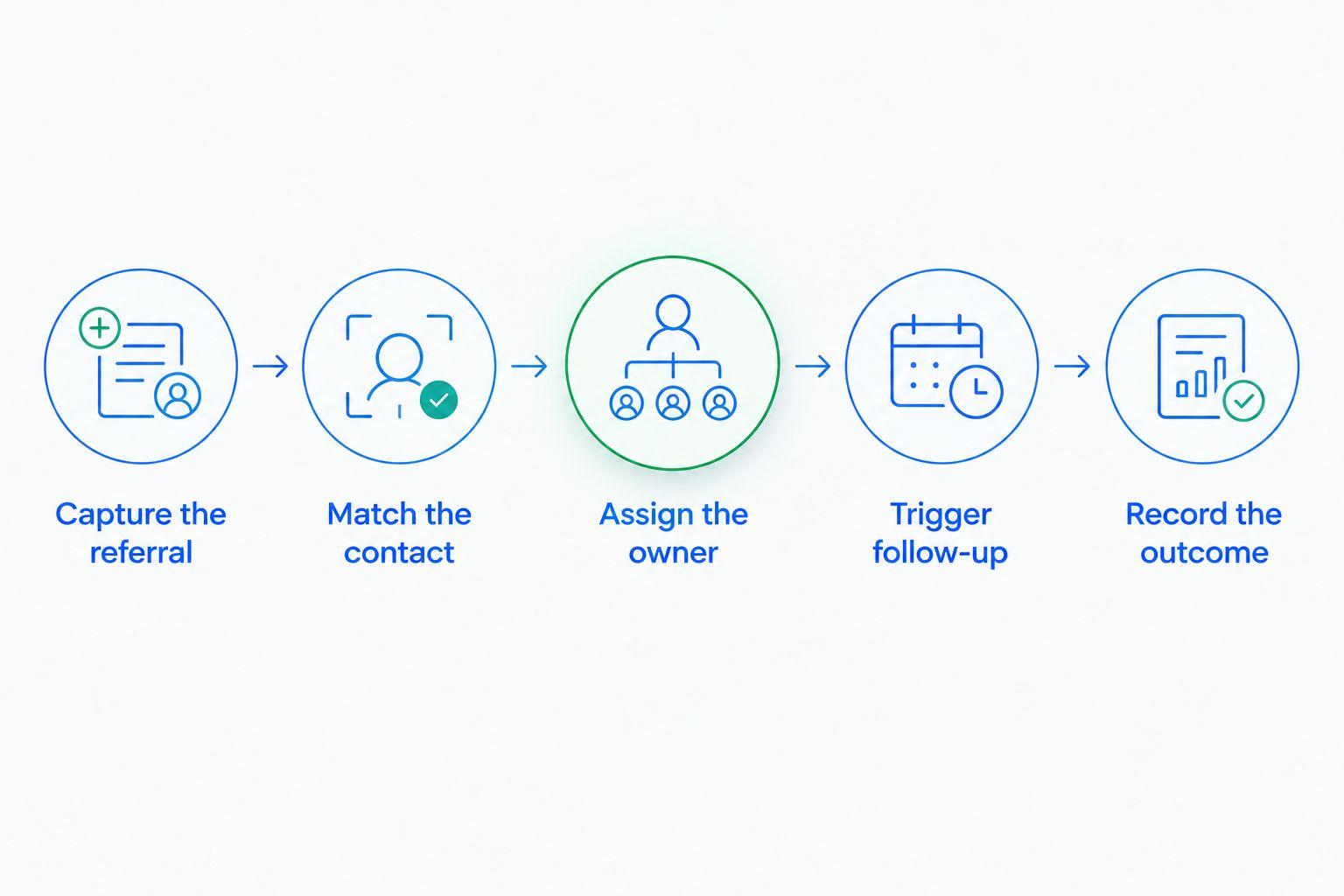
These steps describe the desired workflow, not a guarantee of native support in any particular platform. Check each handoff in the actual configuration, especially contact matching and the connection between a referrer and an opportunity.
Why automatic referral tracking varies
The practical difference between setups is how much reliable information enters the workflow and how consistently that information survives changes. Use these factors to compare implementations:
- Capture method: Structured submissions provide different input from introductions buried in conversations.
- Contact matching: Existing contacts require different handling from genuinely new prospects.
- Relationship support: The system needs a way to connect a referrer with the referred contact or opportunity.
- Workflow controls: Assignment, follow-up, and stop conditions depend on the triggers and actions your setup supports.
- Reporting structure: A report must distinguish referral activity from sales outcomes.
- Integration mapping: Connected tools need consistent field definitions and update behavior.
A 2026 evaluation should follow a referral through the entire process. A successful form submission proves that data arrived; it does not prove that ownership, attribution, and reporting remain correct afterward.
Can a CRM identify referrals from email conversations?
A CRM can store the conversation that contains an introduction, but storing an email is not the same as reliably assigning referral credit. An explicit customer relationship or confirmed referral field provides a clearer basis for attribution than an inferred connection.
Use conversation summaries to help your salesperson understand the introduction. Keep ambiguous attribution subject to confirmation, especially when several customers share a name or multiple people participate in the thread.
Do not assume that a system's ability to summarize messages means it can create and maintain referral relationships. Those are separate capabilities to verify.
Can a CRM track referrals involving existing contacts?
A CRM can track a referral involving an existing contact when its configuration supports recording the introduction without duplicating the person. Decide whether that introduction creates a new opportunity, adds context to an existing opportunity, or receives no new attribution.
Write that rule before activating the workflow. Otherwise, the same introduction can be treated differently depending on who enters it, making your reports inconsistent even when the underlying automation works correctly.
Does automatic referral tracking include customer rewards?
Automatic referral tracking does not inherently include reward administration. Recording an introduction and tracking its sales outcome are different from determining eligibility, approving a reward, or processing a payment.
If your business operates a reward program, define its qualifying event separately. Confirm which system records approval and how it handles reversals or disputed attribution rather than assuming a closed opportunity completes the entire process.
Where Arches CRM fits
Arches CRM is best for growing sales teams that need lead management and automated follow-up in one sales workspace. Arches CRM brings contacts, conversations, tasks, and sales activity together, with workflow automation for reminders, tasks, and follow-up sequences.
For referral work, that makes sales execution the relevant starting point: keeping the introduced prospect visible and ensuring someone owns the next action. Arches CRM also supports integrations and APIs, which are relevant when evaluating how a separate referral capture process would connect.
The limitation is specific: general CRM automation does not establish native referral attribution, referral links, reward administration, or referral-specific reports. Confirm those requirements in Arches CRM before treating the platform as a complete referral-program system.
How do you test referral tracking before launch?
Use 3 sample referrals in your 2026 acceptance test: 1 new prospect, 1 existing contact, and 1 introduction with a missing referrer. These are test cases, not performance benchmarks.
For the new prospect, check that the workflow preserves the referring customer, assigns an owner, and produces the intended next action. Then change the opportunity status and confirm that the relationship remains intact.
For the existing contact, verify that the workflow follows your attribution rule without creating an unnecessary duplicate. For the missing referrer, confirm that the record requires correction rather than receiving invented attribution.
Finally, test a prospect reply. An automated follow-up should not continue blindly after a salesperson has taken over the conversation. Review the task history and the resulting report, not just the first message sent.
FAQ
Can a CRM track customer referrals automatically without a referral form?
Yes, if another supported entry method records the referring customer and connects that customer to the prospect or opportunity. A staff-recorded introduction or connected system can provide the starting data.
What is the difference between a referral tag and referral tracking?
A referral tag classifies a record; referral tracking preserves who introduced the prospect and what happened afterward. Use an explicit relationship when you need customer-level attribution.
Will a CRM automatically know which customer referred a lead?
Not reliably without recorded referral information. Capture the referring customer explicitly or require confirmation before assigning credit.
Can referral tracking trigger an automatic follow-up?
Yes, when the CRM supports a workflow trigger tied to the recorded referral. Configure ownership, the next action, and stop conditions before activating customer-facing messages.
Can I track referrals from WhatsApp or phone conversations?
Yes, if the introduction is recorded and connected to the relevant contact or opportunity. Having a conversation in a CRM does not by itself establish the referring customer.
What should I check in a referral tracking demo?
Ask to see a new prospect, an existing contact, and a missing-referrer case move through the workflow. Check the relationship, owner, follow-up behavior, and final reporting for each case.
Does referral tracking prove that a referral caused a sale?
No, referral tracking records attribution under your chosen rules; it does not establish that the introduction alone caused the sale. Keep the original introduction visible alongside later sales activity.
One last thing
A referral count is not a closed-deal count. Keep introduced prospects, active opportunities, and won deals separate, even when they originate from the same customer.
Before expanding automation, ask a salesperson to open a referred opportunity and identify the referrer without searching a separate inbox. If that relationship is unclear, fix the record structure first. Faster follow-up cannot repair attribution that was never captured.