
 Log in
 Start Free Trial


Yes, a CRM can report on sales performance without manual spreadsheets when it records sales activity and calculates reports from consistent opportunity data. You can replace routine exports and spreadsheet formulas, but your team still needs to maintain accurate deal values, outcomes, and reporting rules.
- Can a CRM report on sales performance without manual spreadsheets? Yes, with consistent records and reporting rules.
- Arches CRM brings sales pipelines, customer conversations, workflow automation, and performance monitoring together for growing sales teams.
- Automate data capture, but keep people responsible for deal accuracy and sales judgment.
- Use CRM reporting for routine sales reviews; keep spreadsheets for analysis your CRM cannot support.
Can a CRM report on sales performance without manual spreadsheets?
A CRM can replace spreadsheet-based sales reporting when the report draws directly from the records your team uses to sell. Instead of copying deal information into a separate workbook, you review metrics calculated from those underlying records.
The distinction is between automatic reporting and automatic accuracy. A report can refresh without anyone touching a spreadsheet and still mislead you if opportunities have missing values or outdated stages.
| Reporting approach | Best for | Main advantage | Main limitation |
|---|---|---|---|
| CRM reporting | Recurring pipeline and sales reviews | Keeps reporting connected to operational records | Depends on supported reports and accurate records |
| Manual spreadsheet reporting | One-off analysis with unusual calculations | Gives you direct control over formulas and structure | Requires reconciliation when source records change |
| CRM plus a separate analysis tool | Reporting that combines several business systems | Separates sales operations from broader analysis | Requires consistent definitions across systems |
Start with the report your manager already uses. Identify which fields come from sales activity and which require outside information. The guide to reducing manual data entry with CRM workflow automation explains the operational side of that change.
Why this matters
A lead arrives, a salesperson replies, and the conversation moves forward. If that progress stays in an inbox while the opportunity record stays unchanged, your report describes an old version of the pipeline.
That disconnect affects decisions. You cannot confidently prioritize follow-up or assess a forecast when every review starts with a debate about which spreadsheet is current.
For your 2026 reporting setup, make the CRM record the shared reference for sales status. The goal is not another dashboard; it is a sales review that does not require rebuilding the facts first.
Which sales metrics should you report without spreadsheets?
Choose metrics that answer management questions, not metrics that simply fill dashboard space. Check that your CRM supports each calculation and the filters your team needs before replacing an existing report.
Pipeline value: what is still open?
Pipeline value adds the recorded value of opportunities included in your chosen view. Filter deliberately: open opportunities, closed deals, and expected close dates describe different things.
Use pipeline value to inspect potential business, not to claim revenue already earned. A large opportunity with no next step deserves scrutiny even when it makes the total look healthy.
Win rate: what share of completed opportunities did you win?
Define win rate as won opportunities divided by won plus lost opportunities, expressed as a percentage. Keep open opportunities outside that denominator when measuring closed-opportunity win rate.
Your reporting period also needs a rule. Counting deals by their closing date answers a different question from following a group of opportunities created during the same period.
Sales cycle: how long does closing take?
Choose the event that starts the clock and the event that stops it. First inquiry, qualification, and opportunity creation are not interchangeable starting points.
Specify whether the report covers won deals only or every closed outcome. Without that definition, a change in the mix of deals can look like a change in selling speed.
Activity and follow-up: what needs action?
Review completed tasks, overdue follow-ups, and customer interactions where your CRM supports those views. Keep activity counts separate from outcomes: sending messages does not establish that an opportunity advanced.
For a practical 2026 review structure, use a 7-day activity view, a 30-day closed-outcome view, and a 90-day pipeline view as starting windows. These are suggested review settings, not performance benchmarks; adjust them to your sales cycle.
How do you set up sales reporting without manual spreadsheets?
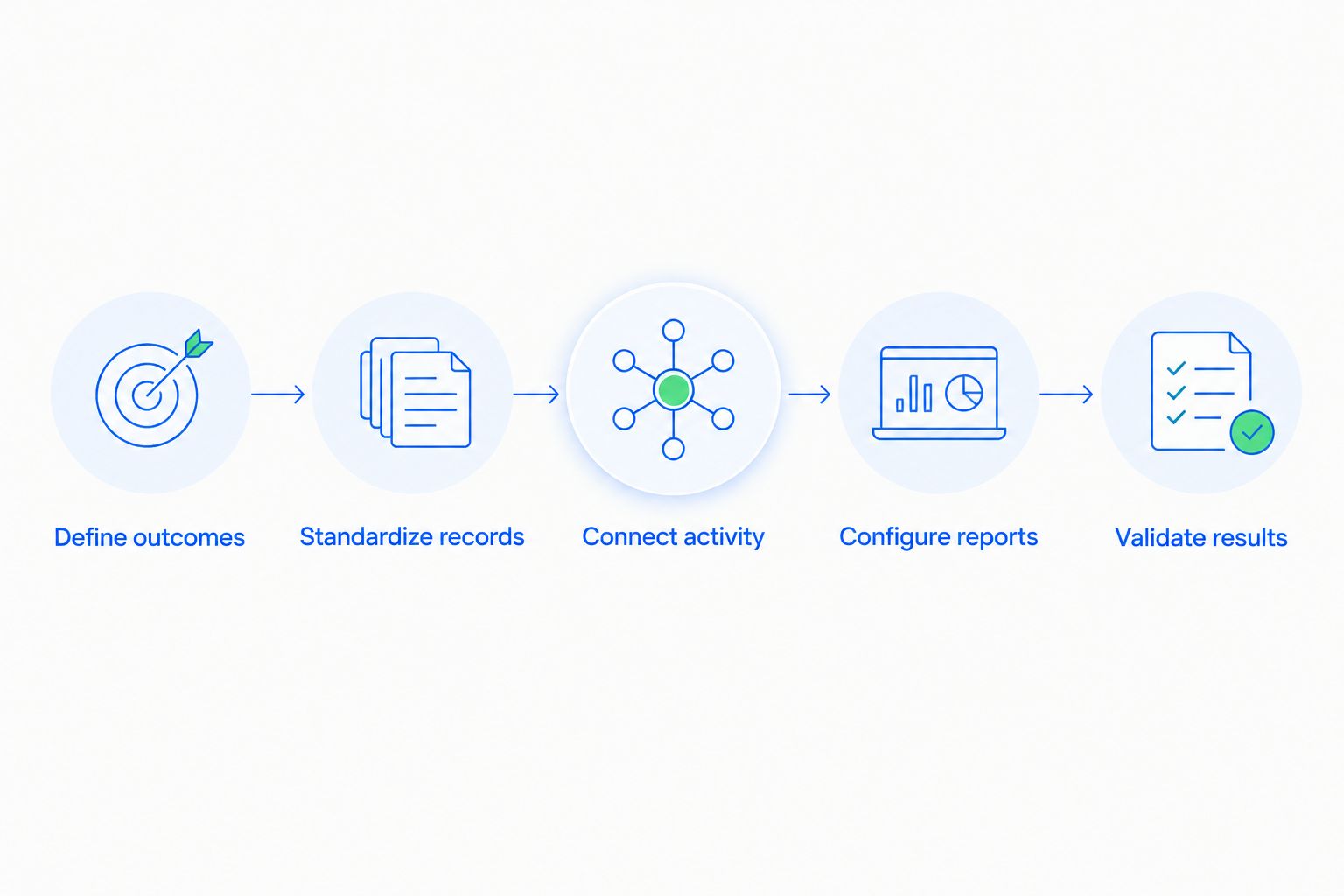
Move the recurring reporting process, not just the spreadsheet file. The following sequence connects the questions you ask with the records and rules needed to answer them.
- Define outcomes. Write down what each report must help you decide. Separate pipeline inspection, salesperson coaching, and closed-sales reporting rather than forcing every question into one total.
- Standardize records. Agree on opportunity stages, owners, amounts, relevant dates, and closed outcomes. Decide which fields must be completed before a record moves forward.
- Connect activity. Identify where customer conversations happen and which supported connections bring that activity into the CRM. Document anything your team must still record manually.
- Configure reports. Set the calculation, reporting period, filters, and grouping for each view. Confirm whether dates refer to creation, expected closing, or actual closing.
- Validate results. Trace report entries back to individual opportunities. Resolve discrepancies before retiring the spreadsheet used for that report.
Give each report an owner who can explain its definition and resolve questions. That owner does not need to update every opportunity, but someone must maintain the rules when your sales process changes.
For a 2026 rollout, write those definitions beside the reports in your internal documentation. A new sales manager should not have to reverse-engineer what your team means by qualified, won, or forecasted.
Why CRM reporting accuracy varies
Automatic calculations remove repetitive assembly work. They do not remove the operational differences that determine whether a report reflects reality.
- Record completeness. Missing owners, amounts, dates, or outcomes restrict what a report can accurately summarize. Make essential fields part of the sales process rather than a cleanup request before meetings.
- Stage discipline. Opportunity stages need shared meanings. If one salesperson uses proposal sent to mean a draft exists and another uses it only after delivery, stage comparisons become inconsistent.
- Communication capture. Conversations outside connected channels leave gaps unless someone records them. Define what enters the CRM automatically and what requires a manual note.
- Workflow configuration. An automated update is only useful when its trigger represents the event you intend to measure. A customer reply is not the same as an agreement to buy.
- Reporting scope. Filters, date fields, owner changes, and duplicate records affect totals. Check scope before interpreting a difference as improved or declining performance.
- System boundaries. Sales records and accounting records serve different purposes. Closed-won opportunity value should not silently become a claim about invoiced or collected revenue.
Fix the source record or reporting definition before fixing the presentation. A cleaner chart cannot resolve an incorrect opportunity status.
What still needs human input?
Your team still needs to record information that customer activity does not establish. A conversation can indicate interest without confirming budget, purchase authority, or an agreed closing date.
Keep judgment-based updates explicit. Require the opportunity owner to confirm the next step and explain material changes in value or timing rather than treating every interaction as proof of progress.
Automation also needs exceptions. A customer can reply to decline, request a delay, or introduce a different buyer; those events should not all produce the same stage change.
For 2026 workflow reviews, inspect the meaning of the trigger before reviewing the action. Automate an observable event, not an assumption about buyer intent.
Where does Arches CRM fit?
Arches CRM is best for growing sales teams that need leads, conversations, follow-up tasks, and sales pipelines in one place. The platform supports lead and contact management, workflow automation, communication across email, WhatsApp, SMS, and calls, and sales performance monitoring.
Arches CRM also summarizes email conversations and moves opportunities based on customer interactions and configured workflows. Those functions address manual record maintenance, which is part of the work behind useful sales reporting.
The reporting boundary still matters. Before choosing Arches CRM for a specific reporting requirement, verify the exact calculations, filters, historical views, and export options you need; general performance monitoring does not establish support for every custom report.
Can a CRM replace every sales spreadsheet?
A CRM can replace routine sales spreadsheets when its reports cover the required calculations and source records. Keep a spreadsheet when you need an unsupported calculation or a temporary analysis that does not belong in the operational system.
The useful dividing line is repeatability. A report used in every sales meeting belongs close to maintained sales records; a one-time scenario model can remain separate without becoming a second pipeline database.
How do you know a CRM report is accurate?
A CRM report is accurate when its calculation, filters, and included records match the question you intend to answer. Trace totals back to opportunities and check missing values, duplicate records, date boundaries, and closed outcomes.
For your 2026 reporting checks, save the report definition alongside the period being reviewed. A total without its scope is difficult to explain later.
Does automated reporting mean salespeople stop updating the CRM?
Automated reporting removes report assembly, not responsibility for sales records. Salespeople still need to confirm information that connected activity and configured workflows cannot establish reliably.
Set clear ownership for exceptions. The person responsible for an opportunity should know which changes happen automatically and which require confirmation.
FAQ
Can a CRM report on sales performance without manual spreadsheets?
Yes, a CRM can report on sales performance without manual spreadsheets when it supports the required calculations and uses maintained sales records. Consistent stages, amounts, dates, and outcomes remain essential.
What's the difference between a pipeline report and a sales report?
A pipeline report describes opportunities still being worked, while a closed-sales report describes completed outcomes. Define the status and date filters before comparing their totals.
Will a CRM update reports when a deal changes?
A CRM can calculate reports from updated opportunity records, but refresh behavior depends on the reporting setup. Confirm how your selected report handles saved changes and connected data.
Can I track salesperson performance without counting every email manually?
Yes, when your CRM captures the relevant activity and supports reporting by owner. Review activity alongside outcomes rather than treating message volume as sales success.
Do I still need a spreadsheet for sales forecasting?
Not when your CRM supports your forecasting method and contains the required inputs. Keep separate analysis for assumptions or calculations the CRM does not support.
Why doesn't my CRM sales total match accounting?
CRM sales totals and accounting totals can measure different events, such as an opportunity being won versus an invoice being paid. Align definitions, dates, and adjustments before expecting the totals to match.
What's the first report I should move out of a spreadsheet?
Start with a recurring report built mainly from opportunity records, such as open pipeline by owner. Validate its filters and individual records before retiring the spreadsheet version.
One last thing
Before replacing a spreadsheet, ask whether it contains a business rule nobody has documented. A formula that excludes particular deals or shifts closing dates might be doing more than arithmetic.
Document that rule before migration. Then decide whether it belongs in your CRM configuration, a separate analysis, or nowhere at all; copying an unexplained formula only preserves an unexplained decision.