
 Log in
 Start Free Trial

Workflow automation reduces manual data entry in a CRM by using customer activity and configured rules to create tasks, update records, and move opportunities without repeated typing. You still need accurate source data, clear field mappings, and human review for ambiguous changes; automation removes repeatable updates, not responsibility for their accuracy.
- How does workflow automation reduce manual data entry in a CRM? Triggers turn customer activity into record updates and tasks.
- Arches CRM connects conversations, follow-up automation, and pipeline updates for growing sales teams.
- Automate repeatable changes; keep judgment-based decisions under human review.
- Measure manual touches and corrections together, not just workflow activity.
How does workflow automation reduce manual data entry in a CRM?
CRM workflow automation replaces a repeated action with an event-driven rule. Instead of asking a salesperson to notice an activity, open a record, change a field, and create a reminder, you configure the system to handle the appropriate updates.
Arches CRM supports automated reminders, tasks, follow-up sequences, and opportunity movement based on customer interactions and configured workflows. The useful distinction is between recording an event and deciding what that event means.
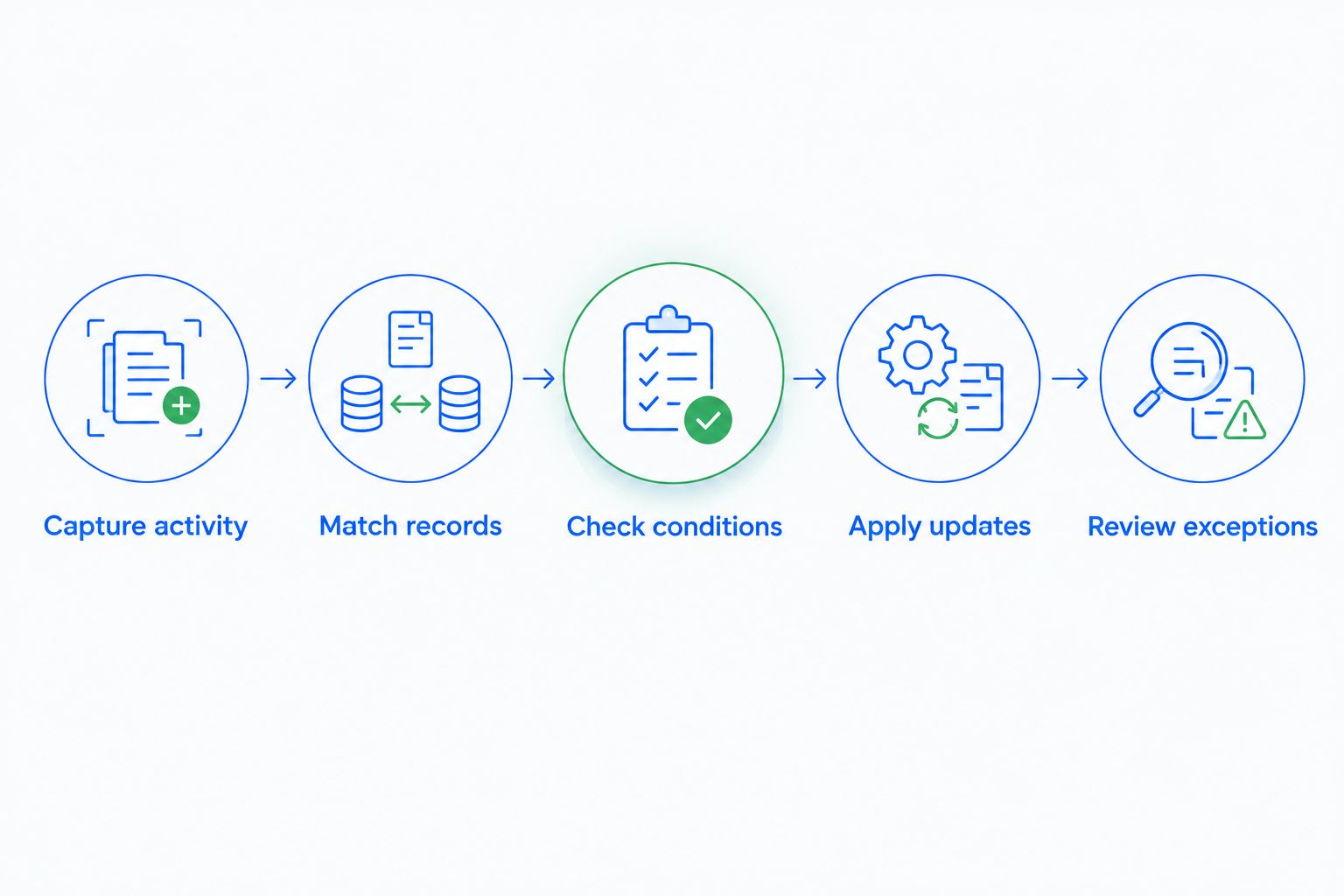
A practical workflow follows 5 steps:
- Capture activity. Receive information from a connected communication channel or business tool.
- Match records. Identify the contact or opportunity that the information belongs to.
- Check conditions. Confirm that the record meets the rule before changing anything.
- Apply updates. Write approved fields, create a task, or change the pipeline stage.
- Review exceptions. Send unclear matches or conflicting information to a person.
These are workflow-design steps, not a promise that every CRM includes every action. In 2026, evaluate each proposed automation against the actual trigger, conditions, and actions your connected systems support.
Why this matters
A lead replies. The salesperson reads the message but leaves the CRM unchanged, so the next person sees an outdated stage and an overdue follow-up task. The problem is not missing customer activity; it is the gap between the conversation and the sales record.
Automate the update where the event happens, rather than asking someone to reconstruct it later. That keeps administrative work attached to the sales process instead of leaving it as a separate cleanup job.
For your 2026 sales process, separate facts from interpretations. A reply is an observable event; purchase intent is a judgment that needs clearer evidence.
Which manual CRM tasks should you automate first?
Start with repetitive actions whose inputs and expected outputs are easy to check. Leave changes that depend on negotiation, context, or uncertain customer intent for review.
The table compares automation candidates, not guaranteed features of every platform. Confirm each action in your CRM and connected tools before building the workflow.
| Task | Best for | What automation replaces | Benefit | Limitation or control |
|---|---|---|---|---|
| Lead capture | Structured inquiries | Retyping submitted contact details | Reuses information already supplied | Field mappings need validation |
| Lead assignment | Defined ownership rules | Choosing an owner repeatedly | Applies the same routing criteria | Exceptions need a fallback owner |
| Follow-up tasks | Repeatable next steps | Creating reminders by hand | Connects tasks to customer activity | Replies must stop inappropriate follow-ups |
| Pipeline updates | Explicit stage criteria | Moving deals after qualifying events | Keeps stages tied to recorded activity | A reply alone does not prove qualification |
| Conversation summaries | Long email exchanges | Rewriting conversation notes | Provides a shorter handoff record | Summaries need checking against the source |
Lead capture: stop copying the same information
When a connected source already contains a prospect's details, map those details to the appropriate CRM fields. Define which fields are required and what should happen when a value is missing.
Do not treat an empty incoming field as permission to erase an existing value. Decide whether the source can create records, update records, or do both, then test those behaviors separately.
Follow-up tasks: remove reminder administration
A workflow can create a task when a defined event occurs or when a record meets specified conditions. Your salesperson should receive the next action, not another instruction to organize their own reminders.
The stop condition matters as much as the trigger. A customer reply, a closed opportunity, or a changed owner should prompt a check of whether the original follow-up still makes sense.
Pipeline updates: move deals only on evidence
Write down the evidence required for each stage before automating movement. For example, an acknowledgment and an agreement to a next step should not automatically mean the same thing.
Arches CRM supports opportunity movement based on customer interactions and configured workflows. That reduces manual stage updates, but your team still defines what each stage represents and which interactions justify a change.
Conversation summaries: shorten notes, retain context
A summary reduces the need to rewrite an email exchange into a separate handoff note. It should preserve the customer's request, any commitment, and the next action without replacing access to the original conversation.
Treat names, dates, responsibilities, and commercial commitments as review points. A short note is useful only when the next salesperson can trust it.
How should you build a workflow that removes typing?
Start with a single repeated task, not the entire sales process. A narrow workflow makes it easier to see whether automation removes work or merely shifts it into corrections.
Define the manual action
Write the current task in plain language: after a qualifying reply, the salesperson updates the opportunity and creates a follow-up task. Identify the fields and actions involved rather than starting with a broad goal such as improving productivity.
Then specify the intended outcome. The workflow should leave the right record updated, the next action assigned, and no unnecessary duplicate task behind.
Set the record-matching rule
Decide how incoming activity connects to an existing contact and opportunity. An email address can help identify a contact, but it does not resolve every situation involving shared inboxes, changed addresses, or multiple open deals.
For ambiguous matches, request review instead of silently choosing. Read the guide to automatically merging duplicate contacts before assuming that record matching and merging are interchangeable.
Set ownership and field authority
Give every actionable lead 1 accountable owner. A workflow can involve several people, but the next task needs a clearly responsible person.
Also decide which source controls each shared field. If a connected tool and a salesperson both update a contact record, define when incoming information should overwrite a value and when it should wait for review.
Define the next action and stopping rules
Give each active opportunity 1 clear next action rather than several overlapping reminders. Specify what creates that action, who receives it, and what completes or cancels it.
For a 2026 workflow review, include customers who reply, opt out, change their request, or already have an open task. Those cases reveal whether the workflow responds to the conversation or keeps running regardless.
Test before expanding
Use test records to check normal and exception paths. Include missing details, an existing contact, an unclear opportunity match, and repeated delivery of the same event.
Record the expected result before running each test. If the system creates an extra task or changes the wrong field, correct the rule before adding more triggers.
Why does the amount of manual work vary?
Workflow automation removes only the actions covered by reliable inputs and explicit rules. The remaining work depends on how your sales process and connected systems are configured.
- Source structure: Consistent form fields are easier to map than information scattered through a conversation.
- Record matching: Clear contact identifiers reduce the need to decide where activity belongs.
- Field ownership: Conflicting sources create review work unless overwrite rules are defined.
- Stage definitions: Observable entry criteria make pipeline updates easier to automate responsibly.
- Integration coverage: An unconnected tool still requires a way to transfer relevant information.
- Exception handling: A named reviewer keeps ambiguous records from becoming an unattended backlog.
Do not use the number of active workflows as a productivity measure. A workflow that creates unnecessary tasks adds administrative work even when every action runs successfully.
Where does Arches CRM fit?
Arches CRM is best for growing sales teams that need CRM workflow automation across conversations, follow-ups, and pipeline activity. It brings contacts, conversations, tasks, and sales activity together, with email, WhatsApp, SMS, and calls included in its communication features.
Arches CRM also supports email summaries, email drafting, integrations, and APIs. These features address different parts of the same problem: information arrives in a conversation, but someone still needs a usable record and a next action.
The limitation is operational: automation does not define your sales stages or establish which source owns a field. Confirm the integration and workflow behavior you need, then assign responsibility for reviewing exceptions.
How do you know whether automation actually saves work?
Compare the same sales task before and after the workflow is enabled. Count the manual touches required to reach a usable outcome, including corrections and exception handling.
For a 2026 evaluation, track these measures separately:
- Manual updates: Field changes and task creation that still require a person.
- Correction work: Incorrect updates, duplicate tasks, and misassigned records that need repair.
- Unresolved exceptions: Records waiting for a matching or ownership decision.
- Record usefulness: Whether the next salesperson can identify the latest conversation and next action.
Use your own observations rather than borrowing a promised time-saving percentage. A successful workflow removes repeated entry without creating an equal burden of cleanup.
Can CRM automation eliminate manual data entry completely?
CRM automation reduces repeatable entry; it does not eliminate the need to supply or verify information. A customer preference that exists only in a salesperson's memory still needs to be recorded, and an unclear commitment still needs confirmation.
Aim to enter a fact at its source and reuse it where appropriate. Do not automate a judgment simply because the underlying field is tedious to update.
Does every customer reply justify a pipeline update?
A customer reply justifies recording activity, not automatically advancing the opportunity. Your stage rule should distinguish a meaningful next step from an acknowledgment, rejection, or unrelated question.
Keep the original conversation accessible when a stage change depends on interpretation. That makes the update explainable during a pipeline review.
Should follow-up automation stop when a customer replies?
A customer reply should trigger a check of the current follow-up plan. Stop or change the sequence when its original assumptions no longer apply, rather than continuing to send reminders for an already completed action.
Specify who handles the reply. Stopping automation without assigning the next action leaves the lead unattended again.
FAQ
How does workflow automation reduce manual data entry in a CRM?
Workflow automation uses customer activity and configured rules to update records, create tasks, and move opportunities without repeated typing. Accurate mappings, record matching, and exception review keep those updates useful.
What's the best CRM task to automate first?
Start with a repetitive task that has structured inputs and a clear expected result, such as creating a follow-up task after a defined event. Test whether it removes manual work without creating duplicate tasks or corrections.
Can CRM workflows update existing contacts instead of creating new ones?
CRM workflows can update existing contacts when the configured integration and matching rules support that action. Define how records are identified and send ambiguous matches for review.
Will workflow automation fix incorrect customer information?
Workflow automation does not automatically establish that customer information is correct. Validation rules and human review are still needed when sources conflict or required details are missing.
Can automated follow-ups keep running after a customer replies?
Automated follow-ups can continue if the workflow lacks an appropriate stopping condition. Include reply handling and assign responsibility for the customer's next action.
Do I need to automate my entire sales pipeline at once?
You do not need to automate the entire sales pipeline at once. Start with a narrow workflow, verify its normal and exception paths, and expand after the results match your rules.
How should I measure CRM automation in 2026?
Measure CRM automation in 2026 by comparing manual updates, correction work, and unresolved exceptions for the same task. Check whether the resulting record gives your team a clear owner and next action.
One last thing
A workflow can run correctly and still do the wrong job. If the rule says every reply advances a deal, the system can follow that instruction exactly while making your pipeline less trustworthy.
Before enabling a workflow, ask: What evidence should prevent this update? That question exposes missing conditions faster than adding another action to the sequence.