
 Log in
 Start Free Trial

Yes, a CRM can handle sales and customer service in one system when it connects customer records, conversations, ownership, and follow-up tasks. The limitation is service depth: a shared customer history does not automatically provide ticket queues, escalation rules, or service-level tracking, so your 2026 selection should test those requirements separately.
- Can a CRM handle sales and customer service in one system? Yes, but shared records alone do not replace service workflows.
- Archescrm fits growing sales teams needing lead management, unified conversations, and automated follow-up.
- Keep opportunities and service requests separate while linking both to the same customer.
- Test ownership, conversation history, escalation, and reporting before moving both teams into one platform.
Can a CRM handle both sales and customer service in one system?
Yes—but one customer record should not mean one process for every customer interaction. Sales needs to track opportunities toward a buying decision. Customer service needs to track requests toward resolution.
The practical test is whether each team can see shared context without losing responsibility for its own work. Your CRM workflow automation should support that distinction rather than simply move information between screens.
| Approach | Best for | Main advantage | Main limitation |
|---|---|---|---|
| CRM with contacts, conversations, and tasks | Teams handling relationship-based customer follow-up | Keeps sales context and next actions together | Tasks alone do not establish a dedicated service operation |
| CRM with dedicated service capabilities | Teams managing sales alongside structured support requests | Connects customer history with separate service workflows | Requires configuration for ownership, permissions, and reporting |
| CRM connected to a help desk | Teams needing specialized support processes | Preserves dedicated service tools while sharing customer context | Requires clear integration rules and data ownership |
These are operating models, not interchangeable feature labels. Choose the model that matches the work your service team actually performs.
Why this matters
A customer does not separate your business into departments. Someone who discussed a purchase yesterday expects the person answering a service question today to understand that conversation.
Disconnected records force employees to reconstruct that history. A poorly configured shared system creates a different problem: everyone can see the customer, but nobody knows who owns the next action.
For a 2026 evaluation, focus on continuity rather than the number of features on a comparison page. The useful outcome is straightforward: your team knows what happened, what remains open, and who responds next.
What sales and customer service should share
Start with 3 linked record types: the customer, the sales opportunity, and the service request. These are requirements for your workflow, not a claim that every CRM supplies all three as dedicated objects.
Customer record
The customer record identifies the person or organization and provides the relationship context. Both teams need a reliable way to find the right contact and understand relevant previous interactions.
Shared visibility still needs boundaries. Decide which employees should view conversations, change contact information, or access sensitive notes before inviting both departments into the system.
Sales opportunity
The opportunity records the commercial decision: what the customer is considering, its current stage, and the next sales action. A salesperson should be able to distinguish an active purchase discussion from a question about an existing purchase.
Do not move an opportunity forward merely because a customer sends a message. The message must provide evidence relevant to that sales stage.
Service request
The service request records a problem or question, its owner, its status, and the next resolution step. It should remain identifiable even when the customer also has an open opportunity.
A support conversation is not automatically a sales opportunity. Treating every interaction as pipeline activity hides unresolved work and makes sales reporting harder to interpret.
When one CRM is enough—and when it is not
A shared CRM fits customer service built around conversations, reminders, and personal follow-through. For example, your team might need to answer a question, assign an employee, record the discussion, and confirm completion.
That approach has a clear advantage: the employee handling the request can work from the same relationship history used by sales. Its limitation is equally clear: a task list is not proof of formal ticket management.
Dedicated service capabilities become a requirement when your process depends on queues, escalation paths, response commitments, or separate resolution reporting. Verify those functions directly rather than assuming that a communications inbox includes them.
A connected help desk is the alternative when your support requirements exceed the CRM's service functions. The benefit is specialized service handling; the trade-off is maintaining the connection between systems and deciding which system owns each field.
For 2026, write those requirements before evaluating vendors. Otherwise, a convincing sales demonstration can leave the service team's actual work untested.
Why the right setup varies
The answer depends on how your teams work, not simply whether a product describes itself as an all-in-one CRM. Use these factors to decide what needs to live together:
- Request complexity: A question answered in a conversation needs a different process from a problem requiring investigation and escalation.
- Ownership: Decide whether the salesperson retains responsibility after purchase or transfers the customer to a service owner.
- Communication channels: Identify where customers contact you and verify that the relevant conversations reach the correct record.
- Automation rules: Separate sales follow-up from service reminders so that one workflow does not interrupt the other.
- Reporting needs: Define sales progress and service resolution independently; closing a deal does not resolve a support request.
- Access requirements: Give each role the information and editing rights needed for its work without making every record unrestricted.
These factors also expose unnecessary complexity. If your service team only needs assigned follow-ups and shared conversation history, do not design a ticket operation it does not use.
How do you set up sales and service in one CRM?
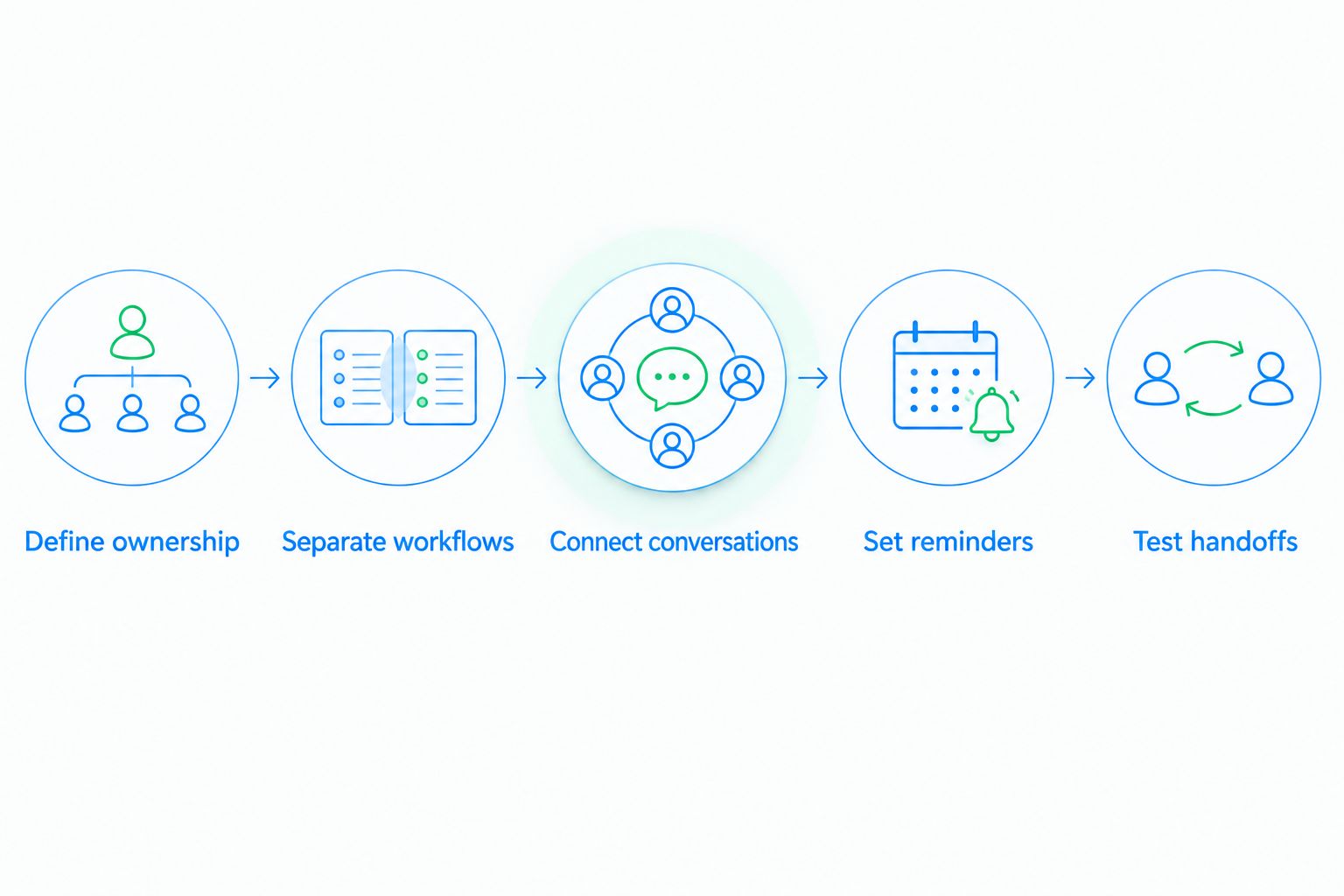
Use 5 setup steps to test the handoff from inquiry to customer care. Run the sequence with a representative customer scenario before moving live work.
1. Define ownership
Name the person responsible for each stage of the relationship. Specify what triggers a handoff and who remains responsible until the receiving employee accepts it.
A changed status is not an accepted handoff. Your workflow should make the next owner and next action visible together.
2. Separate workflows
Keep selling stages distinct from service statuses. A sales opportunity might need a buying decision; a service request needs an answer or resolution.
Link both workflows to the customer, but do not force them through identical stages. This prevents a service update from being mistaken for commercial progress.
3. Connect conversations
Check whether relevant email, messaging, and call activity appears against the right customer. Include a scenario where the customer changes channels during the same discussion.
The receiving employee should be able to find the previous promise without asking the customer to repeat it. Confirm how matching works when contact details differ across channels.
4. Set reminders
Define the event that creates each follow-up and the event that stops it. A customer reply, a resolved request, and a changed owner need distinct handling.
Test for conflicts. An automated sales message should not continue blindly while another employee is addressing an unresolved complaint.
5. Test handoffs
Walk through the complete relationship: inquiry, sales conversation, purchase decision, service question, and completed follow-up. Check ownership and history at every transition.
Then test exceptions, including a reopened request and a customer with an active opportunity. A workflow that handles only the clean demonstration path is not ready for everyday use.
Where Archescrm fits
Archescrm is best for growing sales teams that need lead management and automated follow-up. Its stated capabilities include contact management, sales pipelines, workflow automation, and customer communication across email, WhatsApp, SMS, and calls.
The Archescrm sales CRM also provides email conversation summaries, drafting assistance, and opportunity movement based on customer interactions and configured workflows. Those functions support relationship continuity when employees need to understand previous discussions and the next sales action.
The boundary matters: those capabilities do not establish dedicated ticket management, service-level tracking, or formal escalation queues. Your 2026 evaluation should verify those requirements separately if your service operation depends on them.
Use Archescrm CRM software as a candidate for connected sales conversations and follow-up, not as an assumed replacement for every help-desk function. Demonstrate the actual post-sale workflow before deciding whether your service team can work entirely within it.
Can sales and service use the same pipeline?
Sales and service can share a customer record, but they should use separate workflows when their completion criteria differ. A won opportunity records a commercial outcome; a resolved request records a service outcome.
Keep the distinction visible even if the same employee handles both jobs. Otherwise, closing a sale can hide unfinished customer work, while service activity can make a stalled deal look active.
Does a shared inbox replace customer service software?
A shared inbox centralizes messages; it does not by itself establish request ownership, escalation, or resolution tracking. Evaluate the work around the message, not just whether employees can read and answer it.
If your process requires formal service controls, ask for a demonstration of those controls. Do not accept a conversation timeline as evidence of a ticket queue.
Can automation manage the sales-to-service handoff?
Automation can assign tasks and reminders when the system supports the required triggers and actions. Define the handoff condition, receiving owner, required context, and exception path before enabling the workflow.
Keep human responsibility explicit. An automatically created task still needs an employee who understands what completion means.
What should you test before combining both teams?
Use 4 acceptance checks for your 2026 pilot. Each check should produce an observable result, not a general impression that the software feels connected.
- History: Can the service employee find the relevant sales conversation and customer commitment?
- Responsibility: Can both teams identify the current owner and next action without asking a manager?
- Separation: Can employees distinguish an unresolved request from an open sales opportunity?
- Completion: Can you confirm that finishing the work stops the relevant reminders without closing unrelated work?
Include ordinary employees in the test, not just the person configuring the system. Ask them to complete the scenario without instructions from the administrator.
Record each failure as a specific workflow requirement. A missing conversation, unclear owner, or premature reminder needs a different fix; grouping them under poor adoption conceals the underlying problem.
FAQ
Can a CRM handle sales and customer service in one system?
Yes, a CRM can handle sales and customer service when it supports shared customer context and the separate workflows each team needs. Verify service capabilities rather than assuming contact management includes ticketing and escalation.
Do I need a help desk if I already have a CRM?
You need a help desk when your service requirements exceed the capabilities of your CRM. Compare your needs for queues, escalation, response commitments, and resolution tracking against demonstrated functions.
Can my sales team see customer service conversations?
Your sales team can see service conversations when the system connects those conversations to customer records and permissions allow access. Test visibility across the channels your customers actually use.
Should customer service requests go into the sales pipeline?
Customer service requests should remain separate from sales opportunities when they track different outcomes. Link both to the customer so employees retain context without confusing resolution with revenue progress.
Can the same employee handle sales and customer service?
Yes, the same employee can handle both roles while keeping sales and service work distinct. Separate next actions and completion criteria prevent a closed sale from hiding an unresolved request.
What should I ask a CRM vendor to demonstrate?
Ask the vendor to demonstrate a complete sales-to-service handoff using your customer scenario. Check conversation history, ownership, reminders, permissions, and the handling of a reopened request.
One last thing
Test the second customer message, not just the first. After completing your demonstration sale, have the customer return with a service question while an unrelated sales opportunity remains open.
That scenario tests whether the system preserves context without mixing responsibilities. The right setup lets service resolve the question while sales keeps an accurate view of the separate opportunity.