
 Log in
 Start Free Trial

Best overall for complex sales operations: Salesforce. Best for straightforward contact follow-up: HubSpot. Best for a focused deal pipeline: Pipedrive. This guide compares the best mobile CRM apps in 2026 by the work you need to finish away from your desk, not by the number of features on a product page.
- The best mobile CRM apps match your sales process: Salesforce for complexity, HubSpot for contact follow-up, Pipedrive for deals.
- Zoho CRM suits teams connecting sales with other Zoho applications; Dynamics 365 Sales suits Microsoft-centered operations.
- Arches CRM fits growing sales teams needing workflow automation and unified conversations; evaluate mobile access separately.
- Test record updates, next-action scheduling, permissions, and connectivity before choosing a mobile CRM.
Why this matters
A lead replies while your salesperson is between meetings. The conversation moves forward, but the CRM stays unchanged. Someone else follows up without the latest context. The problem is not a missing dashboard; it is a missing handoff.
Arches CRM is a strong fit for growing sales teams that need CRM workflow automation and unified customer conversations. Arches CRM brings leads, pipelines, tasks, email, WhatsApp, SMS, and calls together. Treat that workflow fit separately from mobile-app fit: this ranking does not classify the platform as a confirmed native mobile app.
For your 2026 shortlist, start with the task that breaks when a salesperson leaves the office. Record updates, reminders, and conversation history deserve more attention than a long feature checklist.
What makes the best mobile CRM apps
Use these criteria before comparing brands. A mobile CRM earns its place when your team can complete the next sales action without returning to a laptop.
- Record access: You can find the right contact, opportunity, and recent activity while speaking with a customer.
- Next-action handling: You can create a task, assign responsibility, and record when follow-up should happen.
- Pipeline updates: You can change the relevant deal details without leaving important information behind.
- Conversation context: You can understand what happened before the current call or meeting.
- Access controls: Your administrators can govern access to customer information and respond when a device is lost.
- Connectivity behavior: You understand which actions require a connection and what happens when service drops.
Do not assume that a desktop feature exists in the mobile app. Evaluate the exact application, account configuration, and devices your team will use. This matters especially when custom fields or required steps shape your sales process.
Best mobile CRM apps at a glance
These are use-case recommendations, not measured speed or satisfaction rankings. Each option occupies a different slot so you can narrow the shortlist before testing.
| App | Best for | Standout feature | Key limitation to evaluate |
|---|---|---|---|
| Salesforce | Complex sales operations | Mobile access to a configurable CRM environment | Whether your custom process stays manageable on a phone |
| HubSpot | Straightforward contact follow-up | Contact, deal, and task work within HubSpot CRM | Whether deeper workflows require desktop work |
| Pipedrive | Focused deal management | Deal and activity management centered on a sales pipeline | Whether your requirements extend beyond sales execution |
| Zoho CRM | Teams using other Zoho applications | Mobile CRM within the wider Zoho software ecosystem | Whether each connected application supports the needed handoff |
| Dynamics 365 Sales | Microsoft-centered sales operations | Sales CRM within Microsoft's business application environment | Whether implementation complexity fits your team |
1. Salesforce: best mobile CRM app for complex sales operations
Salesforce connects mobile sales work to its broader CRM environment. It belongs at the top of the shortlist when your process includes different roles, custom records, and structured opportunity management. The deciding question is whether that structure helps a salesperson in the field or slows down a routine update.
Salesforce pros:
- Connects mobile activity with the Salesforce records your organization already uses.
- Supports a configurable CRM approach rather than forcing every team into the same sales process.
- Fits organizations that need sales data shared across defined roles and responsibilities.
Salesforce cons:
- A complicated underlying process does not become simple because it appears on a phone.
- Customization creates a need to test the mobile experience against your actual configuration.
- Teams without clear CRM ownership have more implementation decisions to resolve.
Best for: Sales organizations with established processes, defined administration, and requirements beyond a basic contact list.
For your 2026 evaluation, ask a representative to update an actual opportunity using the fields your organization requires. Then ask a manager to find the next action. If either person needs a desktop to finish the routine, address the configuration before extending the rollout.
Verdict: Buy Salesforce for process depth; skip it when your main requirement is a simpler way to remember follow-ups.
2. HubSpot: best mobile CRM app for straightforward contact follow-up
HubSpot's mobile CRM supports contact, deal, and task work within the HubSpot environment. It is the shortlist choice when your mobile workflow starts with a person: find the contact, review the record, record an interaction, and arrange the next step.
That focus suits teams trying to make everyday CRM use consistent. It does not remove the need to evaluate the wider system against your sales requirements.
HubSpot pros:
- Connects contact management with deal and task records.
- Fits teams already managing customer relationships in HubSpot.
- Gives your mobile evaluation a clear starting point: the contact and the next action.
HubSpot cons:
- Contact-centered work alone does not prove a fit for a complicated opportunity process.
- Desktop and mobile functionality need separate checks for your required workflows.
- Adding broader business requirements expands the evaluation beyond the mobile app.
Best for: Teams that need consistent contact follow-up and already use, or are considering, HubSpot CRM.
Test the handoff between colleagues. Have one person record the outcome of a call, then have another identify what happens next. A saved note is not enough if the next owner cannot distinguish background information from an assigned task.
Verdict: Buy HubSpot for contact-led follow-up; hold if your decision depends on a complex workflow you have not demonstrated on mobile.
3. Pipedrive: best mobile CRM app for focused deal management
Pipedrive centers sales work on deals, pipeline stages, and activities. Its mobile app belongs on your shortlist when representatives spend their day progressing opportunities and scheduling the next sales action.
The appeal is the scope of the problem it addresses. Your evaluation can focus on keeping deals current rather than building a broader business operating system.
Pipedrive pros:
- Organizes sales work around deals and their progression.
- Connects activities with the opportunities those activities support.
- Suits teams whose main CRM requirement is disciplined pipeline execution.
Pipedrive cons:
- A deal-centered approach is not a substitute for evaluating service or other departmental requirements.
- Clear pipeline stages still depend on your team defining what each stage means.
- Conversation-channel requirements need their own check rather than an assumption of coverage.
Best for: Sales teams that need a focused mobile workflow for updating opportunities and recording next actions.
Before choosing Pipedrive in 2026, write down the evidence needed to move a deal forward. A stage called qualified means little unless your team agrees on qualification. The mobile app should make that evidence easier to record, not encourage stage changes without it.
Verdict: Buy Pipedrive for deal discipline; skip it as a default answer to requirements that extend well beyond sales pipelines.
4. Zoho CRM: best mobile CRM app for teams using Zoho applications
Zoho CRM provides mobile access to sales records within the Zoho CRM environment. It is a relevant choice when your business already uses other Zoho applications and wants to evaluate CRM within that existing software setup.
The ecosystem is a reason to investigate, not proof that every handoff works as required. Follow the customer record through the specific applications your team uses.
Zoho CRM pros:
- Supports mobile work connected to Zoho CRM records.
- Offers a natural evaluation path for existing Zoho users.
- Lets teams consider CRM alongside other applications from the same software provider.
Zoho CRM cons:
- Using applications from the same provider does not establish that every required workflow is connected.
- Configuration choices still require clear ownership and testing.
- A broader application setup adds more handoffs to verify.
Best for: Businesses that already use Zoho applications and need mobile sales work to fit that environment.
Start with a real cross-application task. Identify the source record, the person responsible, and the destination of the update. Check each handoff directly rather than accepting an integration label as the answer.
Verdict: Buy Zoho CRM when its application fit supports your process; hold until the required handoffs are demonstrated.
5. Dynamics 365 Sales: best mobile CRM app for Microsoft-centered teams
Dynamics 365 Sales belongs on the shortlist for organizations building sales operations within Microsoft's business application environment. Its mobile offering connects sales work to that CRM setup.
Choose it for the operating environment and process requirements, not simply because employees use Microsoft email. Familiarity with one application does not establish fit with another.
Dynamics 365 Sales pros:
- Places sales CRM within Microsoft's business application environment.
- Fits an evaluation led by teams already responsible for Microsoft business systems.
- Connects mobile sales requirements with a broader organizational CRM decision.
Dynamics 365 Sales cons:
- Implementation involves more than installing an app on a salesperson's phone.
- Existing Microsoft use does not guarantee an appropriate sales workflow.
- Small teams need to assess whether the configuration work matches their requirements.
Best for: Organizations with Microsoft-centered business systems and defined responsibility for CRM implementation.
For a 2026 decision, involve both sales representatives and the people administering the system. Representatives should demonstrate daily actions; administrators should demonstrate access, ownership, and record visibility. Both groups need to approve the same workflow.
Verdict: Buy Dynamics 365 Sales for a deliberate Microsoft-centered CRM strategy; skip it when that strategy does not exist.
Where Arches CRM belongs in your shortlist
Arches CRM addresses the work behind follow-up: organizing leads, assigning prospects, tracking opportunities, and automating reminders, tasks, and follow-up sequences. Its assistance features include email drafting, conversation summaries, and opportunity movement based on customer interactions and configured workflows.
Best for: Growing sales teams that need CRM workflow automation and a shared view of customer conversations.
Arches CRM pros:
- Brings contact records, conversations, tasks, and sales activity into one platform.
- Supports follow-up automation rather than relying entirely on manual reminders.
- Combines email, WhatsApp, SMS, and calls in the customer communication workflow.
Arches CRM cons:
- Native mobile-app suitability is not established by the platform capabilities described here.
- Automated opportunity movement depends on configured workflows; those rules need clear stage definitions.
- Summary and drafting assistance does not replace checking customer context before acting.
Verdict: Hold for a mobile-first purchase until your required phone workflow is demonstrated; shortlist for follow-up automation and unified conversations.
Run a mobile CRM acceptance test
Use the same exercise for every finalist. These are proposed test conditions, not claims about product performance: prepare 5 lead records, schedule 3 follow-up tasks, and repeat the exercise on 2 devices your team actually uses.
Find context
Open a lead and identify the latest interaction. Ask the salesperson to explain what the customer needs without consulting a separate notebook or message thread.
Record outcome
Record the meeting or call result. Check whether required fields and ownership remain clear on the phone.
Assign follow-up
Create the next task and give it an owner. Have that owner find the task without help from the person who created it.
Check connectivity
Repeat the relevant actions with connectivity interrupted. Observe what remains accessible and how the app handles changes after the connection returns; do not assume offline support.
Verify handoff
Have a manager review the updated record from another device. The customer context, outcome, and next action should agree.
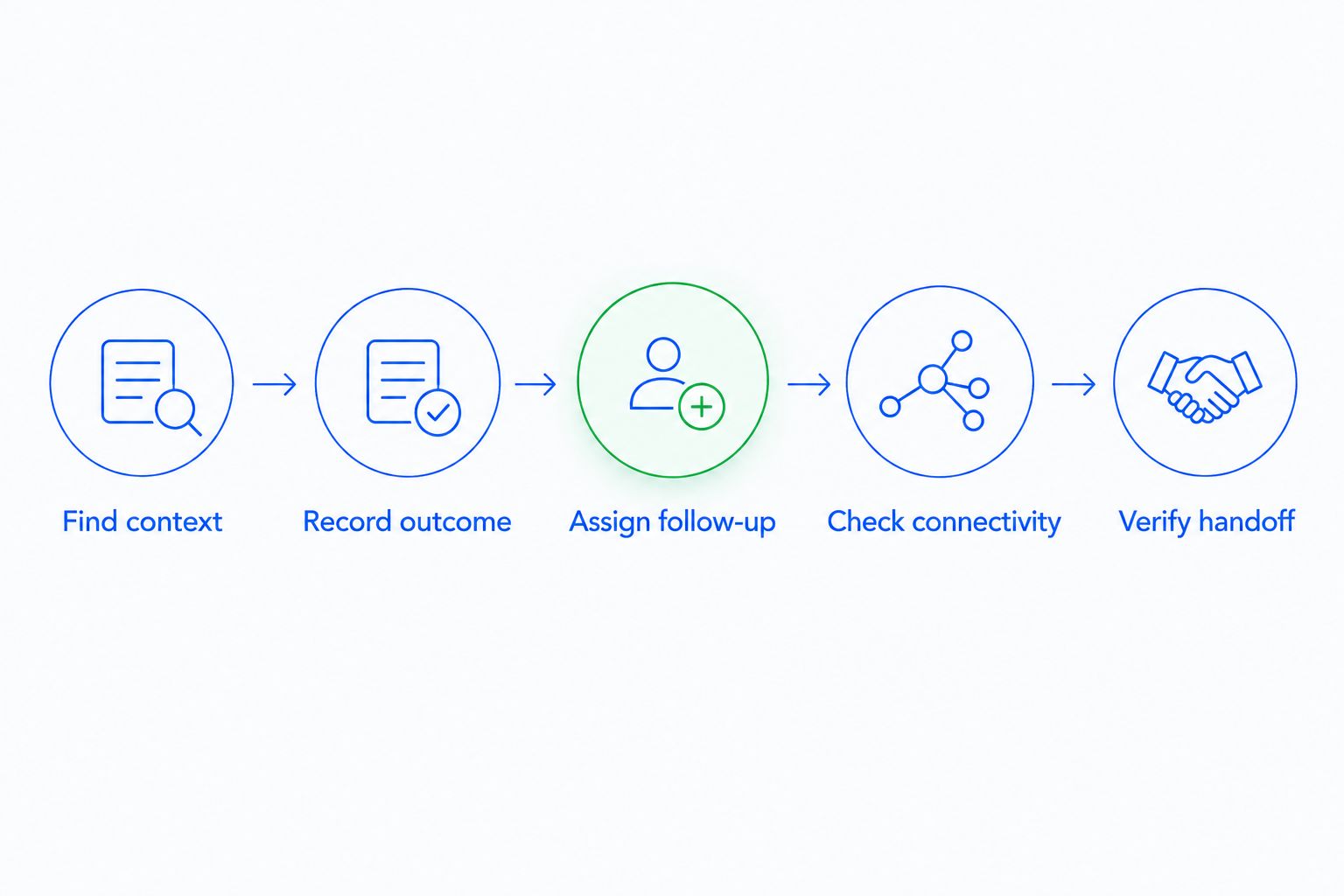
Reserve 15 minutes for each finalist's core exercise, then investigate any unfinished actions. Record the obstacle in plain language: missing context, unclear owner, unavailable field, or failed handoff. That gives your team a decision record instead of a collection of impressions.
How we ranked
The recommendations prioritize workflow fit: process depth for Salesforce, contact follow-up for HubSpot, deal management for Pipedrive, application fit for Zoho CRM, and Microsoft-centered operations for Dynamics 365 Sales. The criteria are record access, next actions, pipeline updates, conversation context, access controls, and connectivity behavior.
This is a use-case ranking, not a claim that every listed app performs equally across those criteria. Your configured workflow is the final acceptance test.
Which mobile CRM app should you choose?
Choose HubSpot as the starting shortlist for straightforward contact follow-up, or Pipedrive when deal progression is the central job. Salesforce is the stronger starting point for complex sales operations. Evaluate Zoho CRM and Dynamics 365 Sales when your existing application environment makes their respective ecosystem fit relevant.
In 2026, do not replace your current CRM just to obtain a different mobile interface. First establish whether the failure is the app, the configuration, or an undefined sales process. Changing software will not assign an owner to a task your team never creates.
FAQ
What's the best mobile CRM app in 2026?
Salesforce is the overall recommendation for complex sales operations; HubSpot is the starting choice for straightforward contact follow-up. Pipedrive is the focused choice when mobile work centers on deals and activities.
Is HubSpot better than Pipedrive for mobile sales work?
HubSpot is the recommendation for contact-led follow-up, while Pipedrive is the recommendation for deal-led pipeline work. Test the workflow your representatives repeat most often rather than choosing from feature counts.
Which mobile CRM should a Microsoft-centered sales team consider?
Dynamics 365 Sales belongs on the shortlist for a Microsoft-centered business application strategy. Existing Microsoft email use alone does not establish CRM fit.
Can I use a mobile CRM without an internet connection?
Offline behavior depends on the app, configuration, and action you need to perform. Test record access and updates with connectivity interrupted, then verify what happens when the connection returns.
Does Arches CRM belong on a mobile CRM shortlist?
Arches CRM belongs in a workflow evaluation for growing sales teams needing automated follow-up and unified conversations. Confirm the required mobile experience before treating it as a native mobile-app recommendation.
What should I test before choosing a mobile CRM?
Test finding customer context, recording an outcome, assigning follow-up, handling interrupted connectivity, and verifying the handoff. Use the same records and tasks for every finalist.
Should I choose a CRM based only on its mobile app?
No: choose the CRM for the complete sales workflow, then make mobile usability an acceptance requirement. A convenient app does not compensate for unclear ownership or an unsuitable pipeline process.
One last thing
The most revealing mobile CRM test happens after the first salesperson puts the phone down. Ask a colleague what should happen next. If the answer requires chasing the original salesperson, the handoff is unfinished—even when every field was saved.