
 Log in
 Start Free Trial

Best overall for follow-up-led consulting: Arches CRM. Best for visual deal tracking: Pipedrive. Best for connecting marketing and sales: HubSpot CRM. This 2026 guide compares the best CRM for consultants by the work each platform helps you organize—not by the length of its feature list.
- Arches CRM is the best CRM for consultants who need automated follow-ups and customer conversations together.
- Pipedrive fits consultants who organize business development around visible deal stages and sales activities.
- HubSpot CRM fits consulting firms connecting marketing activity with contact and deal management.
- Zoho CRM suits configurable sales processes; Salesforce suits consulting firms with dedicated CRM administration.
Why this matters
A prospect asks for a proposal. You send it, return to client delivery, and lose track of the next conversation. The problem is not a missing contact record. It is a missing next action.
For consultants choosing a CRM in 2026, the useful distinction is between storing relationships and managing commercial work. You need to know who owns the opportunity, what the prospect last said, and what happens next.
Choose the system that makes your next action clear. A detailed dashboard does not replace a follow-up task, and an automated reminder does not replace a relevant conversation.
What makes the best CRM for consultants?
Use these criteria to evaluate your 2026 shortlist before comparing individual products:
- Contact context: Keep prospect details, conversation history, and relationship notes accessible when you prepare a response.
- Pipeline clarity: Separate inquiries, qualified opportunities, proposals, decisions, and closed outcomes.
- Follow-up control: Assign responsibility and schedule the next action without relying on memory.
- Communication fit: Match the CRM to the channels your prospects actually use, rather than changing your process to suit a feature list.
- Setup burden: Choose a configuration you can maintain while delivering client work.
- Reporting usefulness: Track the opportunities that need attention, not just the volume of records stored.
For your evaluation, use a proposed pipeline with 5 stages: Inquiry, Qualified, Proposal, Decision, and Closed. These are starting labels, not a required consulting sales process. Adapt them to your actual buying journey.
The best consultant CRMs at a glance
This 2026 comparison assigns each CRM a distinct use case. The limitation column identifies the trade-off to examine before committing.
| CRM | Best for | Standout feature | Key limitation to evaluate |
|---|---|---|---|
| Arches CRM | Follow-up-led consulting teams | Customer conversations, follow-up workflows, and sales activity together | Automated pipeline movement depends on configured workflows |
| Pipedrive | Consultants focused on active deal progression | Visual sales pipelines and activity management | A sales pipeline does not replace client-delivery planning |
| HubSpot CRM | Firms connecting marketing and sales | Contact and deal records connected with a broader marketing platform | Broader platform scope increases the number of decisions during setup |
| Zoho CRM | Firms with configurable sales processes | Sales automation, customization, and reporting | Customization requires clear process definitions |
| Salesforce | Firms with dedicated CRM administration | Extensive sales-process customization and reporting | Administrative complexity is a trade-off for that flexibility |
1. Arches CRM: best CRM for automated consultant follow-ups
Arches CRM brings leads, contacts, conversations, tasks, and sales activity into one platform. It supports email, WhatsApp, SMS, and calls, with workflow automation for reminders, tasks, and follow-up sequences.
Its assistance features include drafting emails, summarizing conversations, and moving opportunities through the pipeline based on customer interactions and configured workflows. That combination fits consulting teams whose prospect conversations continue across channels while delivery work competes for attention.
Pros:
- Connects contact management, conversations, and sales activity instead of treating them as separate records.
- Supports reminders and follow-up sequences for repeatable sales tasks.
- Provides conversation summaries to help you recover context before responding.
- Supports integrations and APIs for connecting existing business tools.
Cons:
- Automated stage movement requires configured workflows; you still need to define what each stage means.
- Conversation summaries do not replace reading the original exchange before making a sensitive commitment.
- A sales CRM is not a substitute for defining project scope, delivery responsibilities, or client acceptance criteria.
Best for: Consultants and growing consulting sales teams that need consistent follow-up across customer conversations.
Before adopting it, map an inquiry, a proposal follow-up, and a paused opportunity. Specify which interaction should create a task and which should change a stage. Buy if organized conversations and repeatable follow-up are your main requirements.
2. Pipedrive: best CRM for visual consulting deal management
Pipedrive organizes sales work around deals, pipeline stages, and activities. Its visual pipeline gives consultants a direct way to review opportunities and identify the work associated with each deal.
Choose this approach when your main question is where a proposal stands and what action should happen next. The pipeline remains useful only when your stage definitions describe buyer progress rather than your internal workload.
Pipedrive pros:
- Makes deal stages central to the sales workflow.
- Connects activities with active sales opportunities.
- Supports a focused review of proposals, decisions, and follow-up work.
Pipedrive cons:
- A deal board loses meaning when consultants use inconsistent stage definitions.
- Sales activities do not replace a project plan after an engagement closes.
- A pipeline-focused evaluation still needs a separate check of your communication and marketing requirements.
Best for: Consultants who want a visible deal pipeline as their primary business-development workspace.
During evaluation, move a sample proposal through the pipeline and assign its next activity. Then ask whether another consultant could understand the status without an explanation. If the answer requires a separate spreadsheet, simplify the stages before adding more fields.
Buy if visual opportunity management is the center of your sales process.
3. HubSpot CRM: best CRM for marketing-led consulting firms
HubSpot CRM manages contacts and deals within a broader platform that includes marketing and customer-service tools. That structure fits consulting firms that want business-development records connected with their marketing activity.
The relevant question is not whether you need every part of the platform. It is whether connecting prospect acquisition with sales follow-up solves a real handoff problem in your firm.
HubSpot CRM pros:
- Provides contact and deal management within a connected business platform.
- Supports a shared view of relationships across marketing and sales work.
- Gives firms a path to organize additional customer-facing processes within the same ecosystem.
HubSpot CRM cons:
- A broader platform introduces more setup decisions than a narrowly defined sales workflow.
- Multiple teams need consistent rules for record ownership and data entry.
- Adding tools does not resolve unclear responsibility for responding to an inquiry.
Best for: Consulting firms whose marketing and sales teams need connected prospect records.
Evaluate a prospect's journey from initial inquiry to a qualified opportunity. Check whether the consultant handling the conversation can find the relevant context without asking marketing to reconstruct it. Keep the evaluation focused on that handoff, not on features your firm has no plan to use.
Buy if connecting marketing context with sales follow-up is your main requirement.
4. Zoho CRM: best CRM for configurable consulting sales processes
Zoho CRM provides lead and contact management, sales automation, customization, and reporting. It suits consulting firms that need to adapt their CRM around different services, qualification requirements, or sales responsibilities.
Configuration is useful when it reflects a real operating difference. A strategy engagement and a recurring advisory relationship can require different qualification details without requiring unrelated systems.
Zoho CRM pros:
- Supports configurable records and sales processes.
- Provides automation for repeatable sales work.
- Offers reporting for reviewing pipeline activity and outcomes.
Zoho CRM cons:
- Custom fields require maintenance and clear definitions.
- Automation becomes difficult to inspect when rules accumulate without an owner.
- A heavily customized process asks more of consultants entering information.
Best for: Consulting firms with defined sales processes that need meaningful configuration.
Start with the decisions each field supports. If nobody uses a field to qualify a prospect, prepare a proposal, or report on the pipeline, question why it is required. Fewer useful fields beat a detailed form that your consultants avoid completing.
Assign 1 owner to approve changes to fields and workflows. This is a proposed operating rule, not a product requirement.
Buy if your firm needs customization and has someone responsible for keeping it understandable.
5. Salesforce: best CRM for consulting firms with CRM administrators
Salesforce supports configurable sales records, workflows, and reporting. Its flexibility fits consulting firms that need a formal CRM operating model with dedicated responsibility for administration.
The decision is organizational as much as technical. Before selecting it, identify who will maintain the sales process, manage changes, and help consultants use the system correctly.
Salesforce pros:
- Supports extensive customization of sales processes and records.
- Provides reporting for structured pipeline management.
- Offers a broad ecosystem of integrations and connected applications.
Salesforce cons:
- Configuration and administration add work beyond daily selling.
- Complex processes require training and change management.
- Flexibility encourages unnecessary complexity when requirements are not controlled.
Best for: Consulting firms with dedicated CRM administration and clearly documented sales requirements.
Write down the workflows that require this level of configuration. Then separate essential requirements from preferences. A system chosen for possible future complexity still needs to serve the consultants using it now.
Hold unless your firm has an accountable administrator and a clear reason to choose a highly configurable platform.
How to evaluate a consultant CRM before committing
Use the same 3 sample opportunities in every 2026 evaluation: a new inquiry, a proposal awaiting a decision, and a former client discussing another engagement. These are test scenarios, not performance benchmarks.
Walk each opportunity through the same sequence:
- Capture: Record the contact, service interest, and source of the conversation.
- Assign: Identify the consultant responsible for the opportunity.
- Follow up: Create the next action and check what triggers a reminder.
- Review: Find the latest conversation and confirm the current deal stage.
- Close: Record the outcome and the reason behind it.
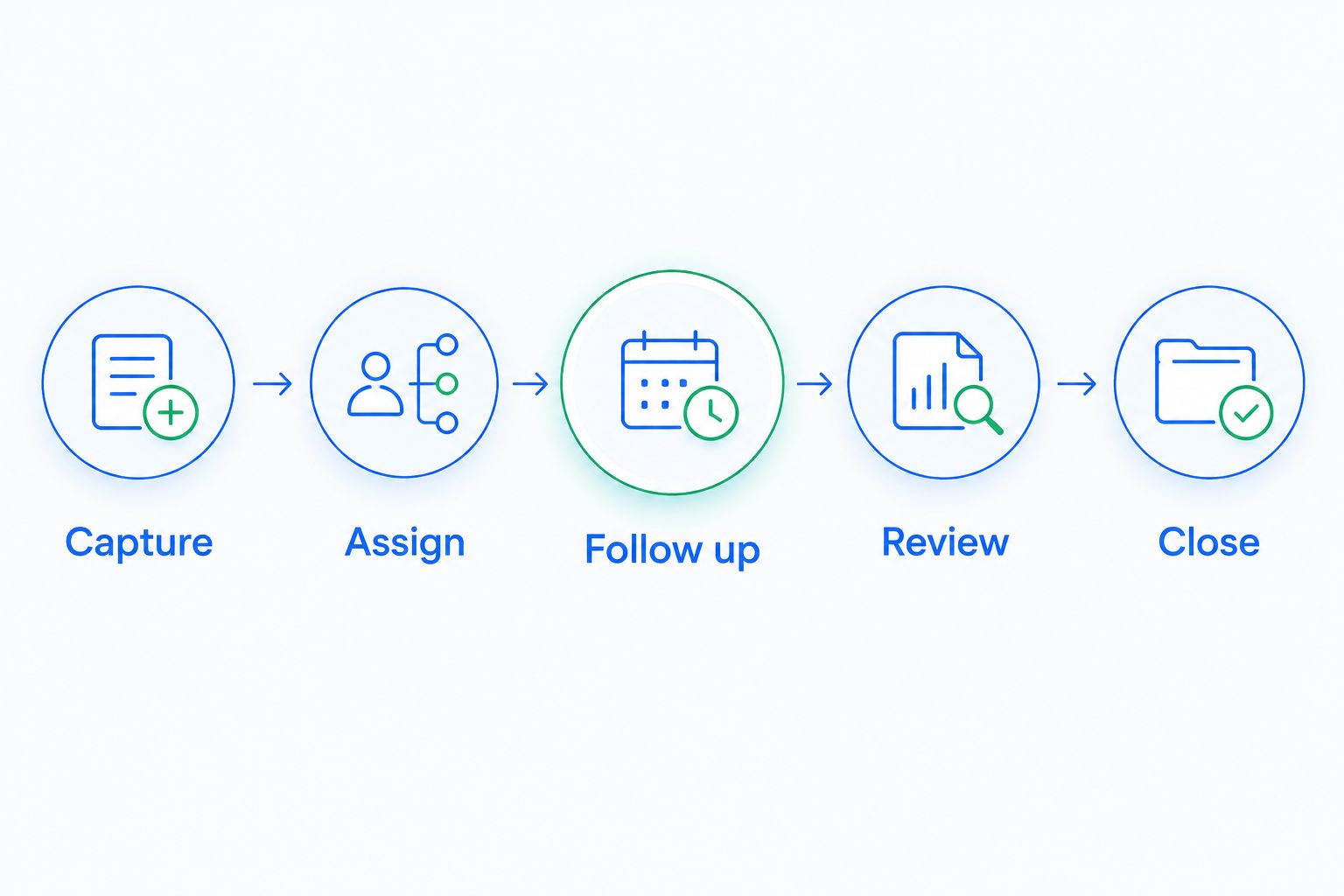
Have the person who will use the CRM complete the walkthrough. A demonstration led by someone else does not show whether your consultant can find the conversation, update the opportunity, and identify the next action.
Reject workflows that leave the next action unclear. If setup is the problem, simplify the configuration and repeat the evaluation before changing products.
How these CRMs were ranked
The ranking prioritizes contact context, pipeline clarity, follow-up control, communication fit, setup burden, and reporting usefulness. Each recommendation maps to a distinct consulting workflow rather than claiming that one platform wins every comparison.
This is a feature-and-workflow comparison, not a measured speed or conversion test. The order favors practical sales follow-up first, then more specialized needs: visual deal management, marketing alignment, process customization, and dedicated administration.
Which CRM should consultants choose?
Arches CRM is the best CRM for consultants who need automated follow-ups and customer conversations together. Choose it when your central problem is keeping leads, messages, tasks, and pipeline activity connected.
Choose Pipedrive when a visual deal board is your main working view. Choose HubSpot CRM when marketing and sales need connected context. Choose Zoho CRM when your process needs deliberate customization. Choose Salesforce when dedicated administration supports a more complex operating model.
For your 2026 decision, name the sales task that currently gets missed. Make that task the deciding criterion—not the longest feature list.
Organize your next follow-up
Explore contact management, customer conversations, pipelines, and follow-up automation in one platform.
FAQ
What's the best CRM for consultants in 2026?
Arches CRM is the best fit for consultants who need automated follow-ups and customer conversations together. Pipedrive fits visual deal management, while HubSpot CRM fits connected marketing and sales work.
Does a solo consultant need a CRM?
A solo consultant needs a CRM when contact notes alone no longer keep opportunities and next actions organized. Evaluate whether you can reliably find the latest conversation, proposal status, and follow-up task.
Is Pipedrive better than HubSpot CRM for consultants?
Pipedrive fits consultants focused on visual deal progression; HubSpot CRM fits firms connecting marketing and sales. Choose according to the workflow you need to organize rather than treating either platform as universally better.
Can a CRM automate consulting proposal follow-ups?
A CRM with workflow automation can create reminders, tasks, or follow-up sequences around proposals. Define the trigger and stop condition so the process responds correctly when a prospect replies or declines.
Should consultants use a CRM for project management?
Consultants should use a CRM to manage relationships and sales opportunities, not assume it replaces project management. Evaluate delivery planning separately if you need dependencies, resource scheduling, or detailed project milestones.
What should I check during a consultant CRM demonstration?
Check a new inquiry, a proposal awaiting a decision, and a returning-client opportunity. For each scenario, find the conversation, identify the owner, create the next action, and record the outcome.
One last thing
An automated follow-up needs a stop condition as much as a trigger. A prospect who has replied should not receive a message that treats the conversation as unanswered.
Before enabling a sequence, write down what ends it: a reply, a booked conversation, a declined proposal, or a closed opportunity. Clear exit rules make automation part of the conversation instead of a distraction from it.