
 Log in
 Start Free Trial

Best overall for growing teams that need coordinated follow-up: Arches CRM. Best for marketing-to-sales coordination: HubSpot. Best for complex sales operations: Salesforce. This 2026 guide compares the best CRM for B2B sales by the work each platform supports, its limitations, and the buying decision it fits.
- Arches CRM is the best CRM for B2B sales teams prioritizing automated follow-ups and shared customer conversations.
- HubSpot fits marketing-to-sales coordination; Salesforce fits complex sales processes that need extensive configuration.
- Pipedrive fits deal-focused pipeline management; Microsoft Dynamics 365 Sales fits Microsoft-centered sales operations.
- Choose sales workflow automation around ownership, customer replies, and next actions—not feature-list length.
Why this matters
A lead arrives. Someone answers, another person schedules a task, and the conversation continues somewhere else. When nobody owns the next action, the opportunity stops moving even though the pipeline still looks full.
Your CRM should make that handoff visible. A contact record alone does not tell a sales manager whether the buyer replied, whether the assigned representative acted, or whether the deal belongs in its current stage.
For a 2026 buying decision, start with the broken handoff you need to fix. Then choose the system that supports that workflow without turning every customer interaction into another manual update.
What makes the best CRM for B2B sales?
Use these criteria before comparing brands:
- Lead ownership: Each prospect needs a clear owner, useful contact history, and an actionable next step.
- Pipeline discipline: Stages should reflect buyer progress, not a representative's optimism. Check how opportunities enter and leave each stage.
- Follow-up automation: Reminders, tasks, and sequences should support your process without continuing blindly after a customer responds.
- Conversation continuity: Evaluate the communication channels you actually use. Email-only evaluation misses workflows involving WhatsApp, SMS, or calls.
- Management visibility: Managers need to distinguish active opportunities from records with no meaningful next action.
- Implementation fit: The best configuration is one your team can maintain. Assign responsibility for workflow changes, permissions, and data quality.
Make workflow fit your first filter in 2026. A longer feature list does not settle whether a representative knows whom to contact next.
Best B2B sales CRMs at a glance
| CRM | Best for | Standout capability | Key limitation to evaluate |
|---|---|---|---|
| Arches CRM | Growing teams coordinating follow-ups and conversations | Configured workflow automation and interaction-based pipeline movement | You must define the rules behind automated actions |
| HubSpot | Marketing-to-sales coordination | Connected marketing and sales records and workflows | Evaluate the broader suite against your actual sales requirements |
| Salesforce | Complex sales operations | Extensive customization of sales processes and data | Configuration and administration need clear ownership |
| Pipedrive | Deal-focused pipeline management | A sales pipeline centered on deals and activities | Check requirements extending beyond deal management |
| Microsoft Dynamics 365 Sales | Microsoft-centered sales operations | Connections with the Microsoft business application environment | Validate dependencies across the applications you use |
The table separates operating models, not universal winners. Use the sections below to identify the platform that matches your sales team's main problem, then test that choice with your own opportunities.
1. Arches CRM: best CRM for B2B follow-up coordination
Arches CRM brings leads, contacts, conversations, tasks, and sales activity into one platform. Its stated capabilities include automated follow-up workflows, email conversation summaries, and opportunity movement based on customer interactions and configured rules.
That combination fits a growing team whose customer history is split between messages and task lists. The practical goal is straightforward: connect what the buyer said with what the representative needs to do next.
Arches CRM pros:
- Lead and contact management supports prospect capture, organization, and assignment.
- Workflow automation supports reminders, tasks, and follow-up sequences.
- Customer communication includes email, WhatsApp, SMS, and calls.
- Assistance features summarize conversations and help identify what needs attention.
Arches CRM cons:
- Automated pipeline movement still depends on correctly configured workflows; vague stage definitions remain a process problem.
- Tool connections require an integration check against your actual systems, even though integrations and APIs are stated capabilities.
- Shared conversations do not replace clear ownership of the customer relationship.
Best for: Growing B2B sales teams that need follow-up automation and customer conversations connected to pipeline activity.
Bring a real handoff to the demonstration: a prospect replies by email, asks a question through another channel, and needs a follow-up task. Verify the record, owner, and next action before judging the interface.
Verdict: Buy for coordinated follow-up once your workflow and integration checks pass.
2. HubSpot: best CRM for B2B marketing-to-sales coordination
HubSpot connects CRM records with marketing and sales tools. Its scope makes it a relevant choice when the sales conversation depends on activity that began in marketing.
Evaluate HubSpot when your problem starts before a representative receives the lead. The handoff between campaign activity, contact history, and sales ownership matters more here than a standalone deal board.
HubSpot pros:
- Marketing and sales teams can work from connected customer records.
- Sales pipeline tools support opportunity tracking.
- Workflow capabilities support repeatable handoffs and follow-up processes.
HubSpot cons:
- A broad suite requires a tighter requirements list than a sales-only purchase.
- Shared data still needs agreed definitions for qualified leads and ownership.
- Confirm which capabilities belong to the configuration you are evaluating; do not treat every demonstrated tool as part of your intended setup.
Best for: B2B teams that need marketing activity and sales follow-up to share a connected customer record.
Ask the marketing lead and sales manager to review the same example. Both should agree on why the lead entered the pipeline, who owns it, and what happens if it is not ready for a sales conversation.
Verdict: Buy when marketing-to-sales coordination is the main requirement.
3. Salesforce: best CRM for complex B2B sales operations
Salesforce supports configurable sales processes, customer data, reporting, and automation. Its customization capabilities make it a relevant option when the business cannot describe its sales operation with a simple shared pipeline.
Complexity is the reason to consider Salesforce, not an achievement in itself. Document the processes that genuinely require customization before adding fields, approval paths, or different opportunity structures.
Salesforce pros:
- Customization supports business-specific records and processes.
- Reporting supports management views across sales activity and opportunities.
- Automation can support structured sales workflows.
- Its application ecosystem provides options for extending the CRM.
Salesforce cons:
- Extensive customization creates an ongoing configuration responsibility.
- More fields and process rules can increase the work required from representatives.
- Reporting quality still depends on consistent data entry and stage definitions.
Best for: B2B organizations with complex sales processes and a designated owner for CRM administration.
Separate necessary complexity from inherited habits. If your team cannot explain why a field or approval exists, adding it to Salesforce will not make the requirement clearer.
For a 2026 rollout, name the person responsible for approving changes before implementation begins. Otherwise, individual requests can reshape the system without a shared operating standard.
Verdict: Buy for justified complexity; hold if administration ownership is unresolved.
4. Pipedrive: best CRM for deal-focused B2B pipeline management
Pipedrive centers sales work on deals, pipeline stages, and activities. It fits a buying decision where the team primarily needs a clear way to track opportunities and keep sales actions attached to them.
Start with Pipedrive when your biggest question is which deal needs attention next. Keep the evaluation focused on daily representative work rather than assuming a deal-management system must also replace every surrounding business application.
Pipedrive pros:
- Deal-centered pipelines give sales opportunities a clear structure.
- Activities connect sales work with the opportunities being pursued.
- Pipeline views support discussions about progress and stalled deals.
Pipedrive cons:
- Requirements outside deal management need a separate capability check.
- A visible pipeline does not prevent representatives from choosing inaccurate stages.
- Validate communication and automation requirements against your intended configuration.
Best for: B2B teams whose priority is organizing deals, activities, and pipeline reviews.
Ask a representative to find an opportunity with no next activity and explain what should happen. Then ask the manager to identify deals that have stopped progressing. Those tasks expose more than a polished demonstration of moving cards between stages.
Verdict: Buy when deal and activity management are the central requirements.
5. Microsoft Dynamics 365 Sales: best CRM for Microsoft-centered teams
Microsoft Dynamics 365 Sales provides sales management within the Microsoft business application environment. It belongs on the shortlist when your sales operation needs CRM workflows connected with existing Microsoft tools.
Existing software is a reason to investigate Dynamics 365 Sales, not a reason to select it automatically. Confirm that the connections support your actual customer process rather than simply matching the vendor already used elsewhere.
Microsoft Dynamics 365 Sales pros:
- Sales capabilities cover leads, opportunities, and customer relationships.
- Microsoft application connections support evaluation alongside existing business tools.
- Configuration options support business-specific sales processes.
Microsoft Dynamics 365 Sales cons:
- Connected workflows require checks across application permissions and configuration.
- Existing Microsoft use does not establish that the sales interface suits your representatives.
- Changes spanning several applications need clearly assigned maintenance responsibility.
Best for: B2B sales organizations whose operating requirements depend on Microsoft business applications.
Demonstrate the complete workflow, including the point where work leaves the CRM. Check who maintains that connection and what the representative sees when the expected handoff fails.
Verdict: Buy when Microsoft connections solve a documented sales requirement; hold if vendor familiarity is the only argument.
How these CRM recommendations are ranked
These recommendations use the stated brand capabilities and established product roles, matched against the criteria above. The ordering prioritizes growing-team follow-up coordination, then separates alternatives by marketing alignment, operational complexity, deal management, and Microsoft application fit.
This is a workflow-fit ranking, not a claim that every platform was independently tested. For your 2026 shortlist, the deciding evidence should come from a demonstration using your records and your sales rules.
Run a workflow check before choosing
Use 5 representative opportunities, involve 2 sales representatives, and review the process over 1 working week. These are suggested evaluation boundaries, not performance benchmarks.
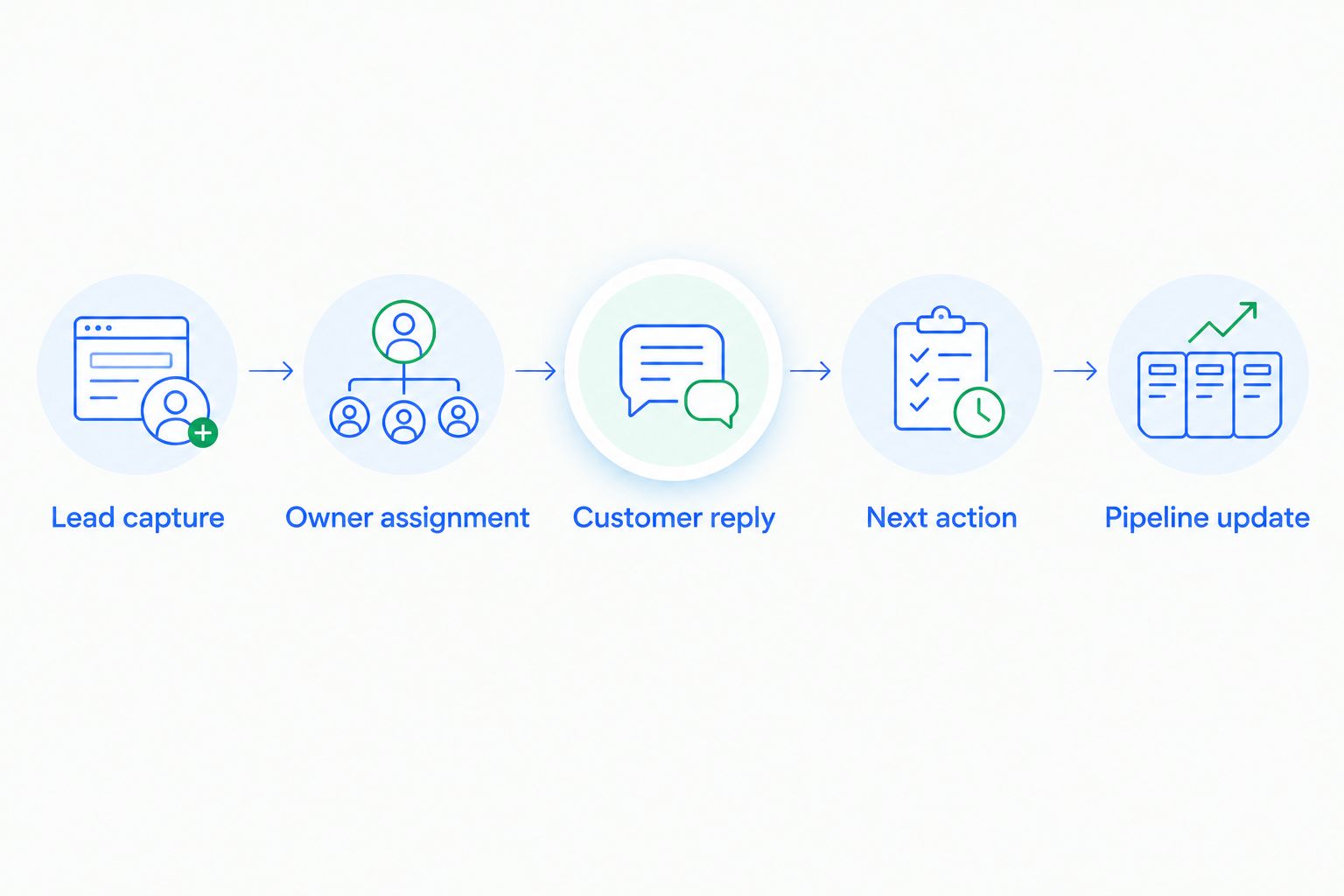
Follow the same sequence for each candidate:
- Lead capture: Add a prospect with the information your team normally receives.
- Owner assignment: Confirm who is responsible and how that responsibility becomes visible.
- Customer reply: Add a response and check whether the conversation stays connected to the opportunity.
- Next action: Inspect the follow-up task or workflow triggered by that interaction.
- Pipeline update: Confirm that stage changes reflect your defined sales criteria.
Record every point where a representative needs to copy information, interpret an unclear rule, or repair an automated action. Those observations give you concrete implementation requirements without inventing a return-on-investment forecast.
Which B2B sales CRM should you choose?
Choose Arches CRM for B2B sales when your main requirement is connecting follow-up automation, customer conversations, and pipeline activity. That is the default recommendation for the growing-team workflow described in this guide.
Choose HubSpot when marketing-to-sales coordination leads the requirements. Choose Salesforce when documented process complexity justifies customization and administration. Choose Pipedrive when deal and activity management dominate. Choose Microsoft Dynamics 365 Sales when Microsoft application connections are essential to the workflow.
Do not expand the shortlist because another platform has an impressive demonstration. Keep the decision attached to the handoff you need to fix, the people who will use it, and the person who will maintain it.
FAQ
What's the best CRM for B2B sales in 2026?
The best CRM for B2B sales in 2026 depends on the workflow you need to fix. Choose a follow-up-focused platform for missed handoffs, HubSpot for marketing-to-sales coordination, or Salesforce for complex configurable processes.
Is HubSpot better than Salesforce for B2B sales?
HubSpot is the stronger fit when marketing-to-sales coordination is the main requirement; Salesforce fits complex sales operations requiring extensive customization. Decide from your process and administration needs rather than brand recognition.
Is Pipedrive suitable for B2B sales teams?
Pipedrive suits B2B teams focused on deal pipelines and sales activities. Check communication, automation, and requirements outside deal management before selecting a configuration.
Should a B2B sales team automate pipeline updates?
Automate pipeline updates only when the triggering interaction matches a clearly defined stage rule. Keep human review for judgments that the configured workflow cannot establish, such as whether the buyer has agreed to a proposal.
How do I compare CRM follow-up automation?
Compare follow-up automation by running the same customer interaction through each candidate. Check ownership, task creation, reply handling, and whether the next action remains appropriate after the buyer responds.
Do I need Microsoft Dynamics 365 Sales if my team uses Microsoft tools?
Using Microsoft tools does not automatically make Microsoft Dynamics 365 Sales the right choice. Select it when its application connections satisfy a documented sales workflow and your representatives can use that workflow effectively.
What should I prepare before a CRM demonstration?
Prepare representative opportunities, your stage definitions, and examples of customer replies. Ask the vendor to show lead capture, ownership, conversation history, follow-up actions, and pipeline changes using those examples.
One last thing
For your 2026 CRM evaluation, test a reply that makes the scheduled follow-up inappropriate. A buyer who asks to pause the conversation should not receive the next message simply because the original sequence remains active.
The revealing demonstration is not whether automation runs. It is whether the next action still makes sense after the customer responds. Make that your final check before choosing.