
 Log in
 Start Free Trial

Best overall for follow-up-led agencies: Arches CRM. Best for inbound marketing and sales: HubSpot. Best for straightforward pipeline management: Pipedrive. This 2026 guide compares five CRM options by the agency sales problem each one fits—not by the length of its feature list.
- The best CRM for agencies connects lead ownership, client conversations, and the next follow-up task.
- HubSpot is the best fit here for agencies connecting inbound marketing with sales.
- Pipedrive suits agencies that want a clear, activity-led sales pipeline.
- Choose Zoho CRM for configurable sales processes; choose Salesforce for complex account management.
- Test your actual inquiry-to-proposal workflow before choosing agency CRM software.
Why this matters
A lead arrives while your team is delivering client work. Someone replies, a proposal follows, and then ownership becomes unclear. A CRM should make the next action visible instead of leaving it buried in an inbox.
For an agency, winning the sale is only part of the workflow. You also need to preserve the promised scope, key contacts, and conversation history when delivery takes over. Your 2026 shortlist should reflect that handoff, even when project delivery lives in a separate system.
Choose around the work your team repeatedly misses. More features do not fix an undefined sales process.
What makes the best CRM for agencies
Use these criteria before comparing vendors:
- Lead ownership: Every inquiry needs an assigned person and a clear next action.
- Follow-up control: Reminders, tasks, and sequences should match how you sell—not keep messaging prospects who already replied.
- Conversation continuity: Your team needs enough context to continue a discussion without asking the prospect to repeat it.
- Pipeline clarity: Stages should represent buyer progress, with explicit conditions for moving an opportunity.
- Sales-to-delivery handoff: A won deal should leave an accessible record of scope, stakeholders, and commitments.
- Administrative fit: Configuration and maintenance must fit the people responsible for running the CRM.
Separate requirements from preferences. If WhatsApp conversations drive your sales, channel handling belongs near the top. If account reporting drives your decisions, reporting structure deserves more attention than email drafting.
Agency CRM options at a glance
These 2026 recommendations give each platform a distinct use case. The limitation column identifies the buying trade-off, not a claim that the platform cannot support other workflows.
| CRM | Best for | Standout capability | Key limitation or buying trade-off |
|---|---|---|---|
| Arches CRM | Follow-up-led agency sales | Connected conversations, workflow automation, and interaction-based pipeline updates | Automated stage movement needs clear rules and exception handling |
| HubSpot | Inbound marketing connected to sales | Marketing and sales tools within a shared CRM ecosystem | You need to define which tools and workflows your team actually requires |
| Pipedrive | Straightforward sales pipeline management | Deal stages and activity-focused sales organization | Pipeline visibility alone does not define your delivery handoff |
| Zoho CRM | Configurable agency sales processes | Custom fields, workflow rules, and sales process configuration | More configuration creates more decisions to maintain |
| Salesforce | Complex accounts and sales governance | Configurable account, opportunity, and reporting structures | Requires clear ownership of configuration and ongoing administration |
1. Arches CRM: best CRM for agency follow-up automation
This platform brings contacts, conversations, tasks, and sales activity together. Its stated capabilities include email, WhatsApp, SMS, and calls, alongside automated reminders and follow-up sequences. It also summarizes email conversations and moves opportunities based on customer interactions and configured workflows.
That combination fits an agency whose problem is inconsistent follow-through. Your buying test should follow an inquiry from assignment through conversation, proposal, and the next scheduled action—not stop at a contact record.
Arches CRM pros:
- Lead capture, organization, and assignment support a defined owner for each inquiry.
- Shared communication context helps your team understand what was discussed.
- Automated reminders, tasks, and follow-up sequences support repeatable sales work.
- Conversation summaries and configured pipeline updates reduce the need to reconstruct activity manually.
Arches CRM cons:
- Interaction-based stage changes require explicit rules; a reply is not automatically a qualified opportunity.
- Follow-up automation still needs exceptions for paused discussions, changed contacts, and prospects who decline.
- Agency delivery requirements need a separate evaluation from the stated sales CRM capabilities.
Best for: Growing agency sales teams that need connected conversations and a clearer next action.
Verdict: Buy when follow-up ownership and conversation continuity are your main requirements, and the workflow demonstration matches your sales process.
2. HubSpot: best agency CRM for inbound marketing and sales
HubSpot combines CRM tools with marketing, sales, and customer service products. Its contact and deal records support a shared view of prospects as marketing activity turns into sales conversations.
Choose this slot when your agency needs to connect inbound inquiries with a managed sales process. The evaluation should include how a new contact becomes an owned opportunity, not just how a form submission enters the database.
HubSpot pros:
- Marketing and sales tools sit within the same product ecosystem.
- Contact and company records give relationship context alongside deal activity.
- Deal pipelines support a structured progression from inquiry to decision.
- Reporting tools support reviewing marketing and sales activity together.
HubSpot cons:
- A broad product ecosystem requires a deliberate scope; distinguish needed workflows from optional tools.
- Shared contact data needs agreed definitions so marketing and sales do not interpret lifecycle stages differently.
- Your agency still needs to specify where sales records end and delivery work begins.
Best for: Agencies that want their own inbound marketing activity connected to sales management.
Do not confuse your agency's CRM with the systems you manage for clients. Decide which relationships belong in your own database before designing fields, access, or automation.
Verdict: Buy when connecting inbound marketing to agency sales is the central requirement. Skip this use-case recommendation when you only need a simple deal board.
3. Pipedrive: best agency CRM for pipeline visibility
Pipedrive organizes sales around deals, pipeline stages, and activities. It fits a buying process centered on knowing which opportunities are active and what your sales team should do next.
For an agency founder managing new business alongside delivery, that is a useful decision lens. Evaluate whether you can review stalled proposals and missing next actions without rebuilding the picture in a spreadsheet.
Pipedrive pros:
- Deal pipelines provide a direct view of sales progression.
- Activities connect opportunities with planned sales actions.
- Contact and organization records keep relationship details attached to sales work.
- Configurable stages let you reflect your agency's qualification and proposal process.
Pipedrive cons:
- A visible pipeline still depends on accurate stages and recorded next actions.
- Delivery handoffs need an agreed process rather than a closed-won label alone.
- Client retention workflows deserve their own evaluation; acquisition stages should not stand in for account management.
Best for: Agencies that want a focused, activity-led way to manage new-business opportunities.
Use buyer milestones for stage names. Proposal sent and proposal accepted are different states; putting them together hides the work still required to win the account.
Verdict: Buy when your main requirement is clearer deal ownership and pipeline activity. Hold if your requirements center on complex account structures rather than new-business tracking.
4. Zoho CRM: best agency CRM for configurable sales processes
Zoho CRM supports leads, contacts, accounts, deals, custom fields, and workflow rules. Its configuration options suit agencies that need their CRM to reflect different service lines or qualification requirements.
Customization earns its place when it changes a decision or triggers useful work. A field that nobody uses is another item your team must maintain.
Zoho CRM pros:
- Custom fields support agency-specific qualification details.
- Workflow rules support repeatable actions around sales records.
- Lead, account, and deal structures distinguish people from business relationships and opportunities.
- Reporting can reflect the fields and sales process your agency defines.
Zoho CRM cons:
- More configuration requires a clear owner for fields, rules, and process changes.
- Separate service-line workflows need consistent definitions if you want comparable reporting.
- Detailed forms create unnecessary work when the information does not affect qualification or follow-up.
Best for: Agencies with distinct sales processes and someone responsible for maintaining CRM configuration.
Start with the minimum information needed to assign, qualify, and advance a lead. Add detail when your team can explain the action it supports.
Verdict: Buy when process configuration is a real requirement. Hold when your team has not yet agreed on its basic sales stages.
5. Salesforce: best agency CRM for complex account management
Salesforce provides account, contact, opportunity, automation, and reporting capabilities within a configurable CRM platform. It fits the evaluation list when an agency must manage more involved relationship structures and sales governance.
This is a requirements-led choice. Multiple stakeholders, differentiated access, and detailed reporting need a defined operating model before configuration begins.
Salesforce pros:
- Accounts, contacts, and opportunities support structured relationship management.
- Configurable fields and processes reflect detailed sales requirements.
- Automation supports repeatable record-based workflows.
- Reporting supports reviewing opportunities across defined teams and account structures.
Salesforce cons:
- Someone must own configuration, data quality, and subsequent changes.
- Detailed permissions and reporting requirements need to be specified before implementation.
- Complexity is unnecessary when your agency only needs contact ownership and a straightforward pipeline.
Best for: Agencies with complex account relationships and an established CRM administration function.
Document the reporting questions first. If your requirements only say that you need better visibility, turn that into specific questions before choosing this route.
Verdict: Buy when account complexity and governance justify the administrative work. Skip for a simple agency sales process without a configuration owner.
How we ranked these agency CRM options
The ranking prioritizes lead ownership, follow-up control, conversation continuity, pipeline clarity, handoff requirements, and administrative fit. It is a use-case ranking, not a measured comparison of conversion results.
The first recommendation matches the stated need for connected communications and automated follow-up. The remaining slots distinguish inbound marketing, pipeline management, customization, and account complexity. For your 2026 decision, move the platform matching your primary problem to the top of your own shortlist.
Run a workflow test before you commit
Use 10 sample leads over 5 working days as a practical evaluation exercise, not a performance benchmark. Include 3 scenarios: a new inquiry, a proposal awaiting a reply, and a won deal ready for delivery.
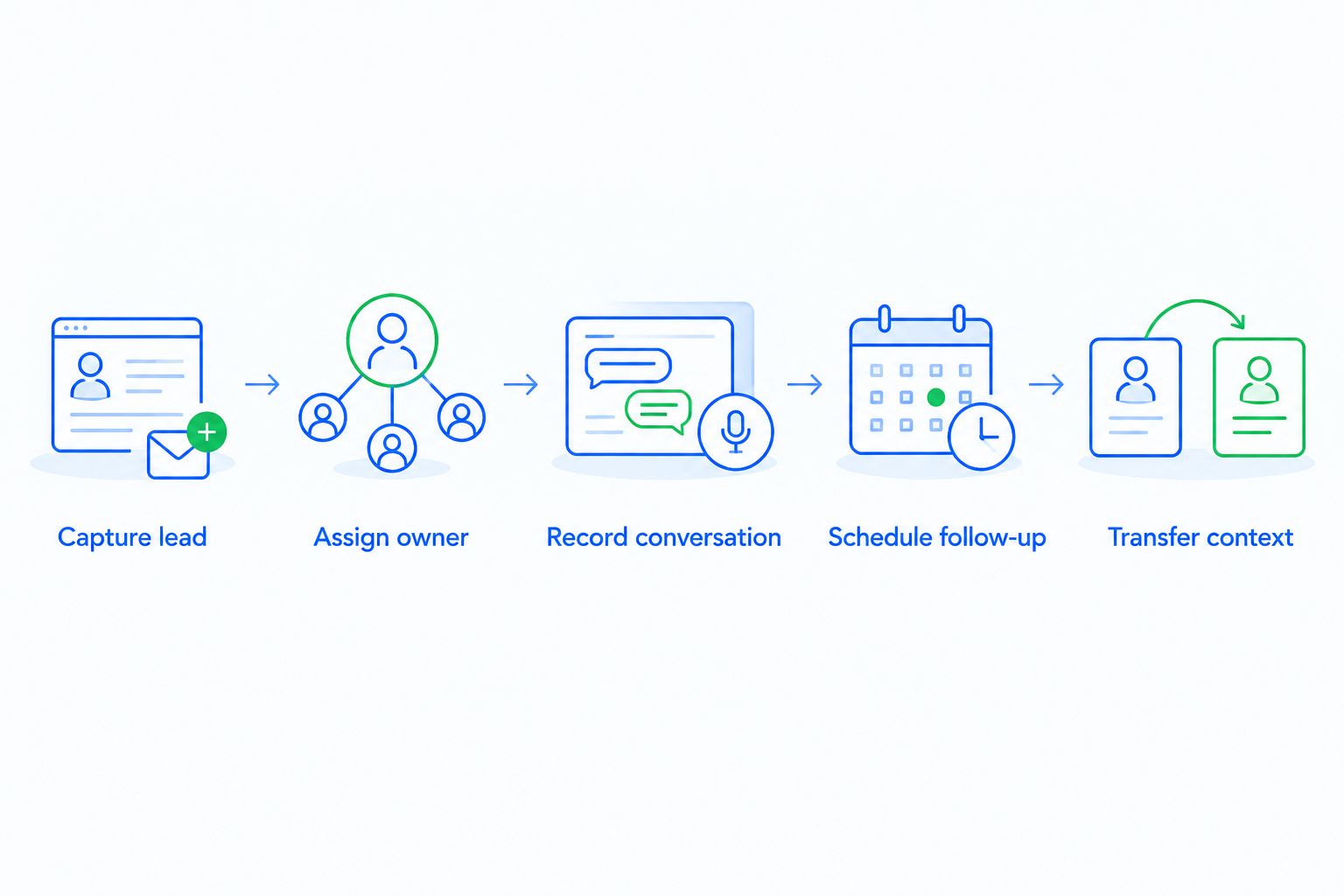
Follow the same sequence in every shortlisted CRM:
- Capture lead: Add the inquiry and preserve its source and context.
- Assign owner: Identify who is responsible for the next action.
- Record conversation: Check whether another teammate can understand the discussion.
- Schedule follow-up: Create the next task and test what happens after a reply.
- Transfer context: Give delivery the scope, stakeholders, and outstanding commitments.
Record what each scenario requires your team to do manually. Also check whether a reply stops the intended sequence, a reassignment changes task ownership correctly, and a stage change leaves a clear record. These checks make your 2026 shortlist more useful than a demonstration built around perfect data.
Which agency CRM should you choose?
Arches CRM is the best fit here for agencies that prioritize connected conversations and automated follow-up. Choose HubSpot for inbound marketing connected to sales, Pipedrive for pipeline-focused selling, Zoho CRM for configurable processes, or Salesforce for complex account management.
For an undecided agency, start with the missed action rather than the platform. Identify whether your recurring problem is an unassigned inquiry, an unanswered proposal, fragmented conversation history, or an incomplete handoff. Then test the corresponding recommendation against that exact workflow.
FAQ
What's the best CRM for agencies in 2026?
The best CRM for agencies depends on the sales problem you need to fix. Prioritize connected conversations and automated follow-up for missed actions, pipeline management for deal visibility, or configurable account structures for complex relationships.
Is HubSpot or Pipedrive better for an agency?
HubSpot is the stronger fit in this comparison for connecting inbound marketing with sales; Pipedrive fits pipeline-focused sales management. Choose based on the workflow your agency needs, then test both with the same sample opportunities.
Does an agency need CRM software or project management software?
An agency needs CRM software to manage prospects and sales relationships, and project management software to organize delivery work. Evaluate the handoff between them rather than assuming a won deal contains everything delivery needs.
Can a CRM automate agency follow-up?
A CRM with workflow automation can create reminders, tasks, and follow-up sequences. Define ownership, timing, stop conditions, and exceptions before activating a sequence.
What should an agency track in its sales pipeline?
Track the opportunity owner, buyer milestone, last meaningful conversation, next action, and expected scope. Use stage definitions that distinguish an inquiry, a qualified opportunity, an outstanding proposal, and an accepted deal.
Should an agency use the same CRM database for its prospects and client campaigns?
Your agency should separate its own sales relationships from client campaign data unless a defined operating model requires them together. Decide access, record ownership, and reporting boundaries before importing contacts.
How should a small agency evaluate a CRM?
A small agency should test its actual inquiry-to-proposal workflow before committing. Use the same sample leads across shortlisted platforms and compare ownership, conversation context, follow-up behavior, and delivery handoffs.
One last thing
A positive reply is not the same as an accepted proposal. Before you automate pipeline movement in 2026, write the evidence required for each stage change. That small operating decision keeps your sales view tied to buyer progress rather than message activity.