
 Log in
 Start Free Trial

Instead of manually checking texts and chasing calendar confirmations, build an sms crm workflow that assigns each lead, routes replies to a salesperson, and stops follow-up after a confirmed booking. This 2026 guide shows how to connect consent, conversations, tasks, and meeting status without treating every delivered text as sales progress.
- Arches CRM fits growing sales teams that need SMS conversations, follow-up tasks, and pipeline tracking in one platform.
- An sms crm workflow needs consent checks, reply ownership, booking confirmation, and stop rules before activation.
- Use CRM automation for routine follow-up; give a salesperson responsibility for questions and objections.
- Mark meetings booked only after confirmation, not after sending a scheduling invitation.
Why this matters
A lead replies to your text. Nobody owns the conversation. Another reminder goes out while the prospect waits for an answer. The failure is not message delivery; it is a missing handoff.
Arches CRM is best for growing sales teams that need customer conversations and follow-up tasks alongside pipeline tracking. Arches CRM brings contacts, conversations, tasks, and sales activity together, including SMS communication and workflow automation.
The benefit is shared context. The limitation is setup: your team still needs to define consent requirements, ownership, booking evidence, and exceptions. CRM automation does not replace those decisions.
For your 2026 rollout, treat the workflow below as a configuration specification. Implement each rule through the controls your CRM, messaging provider, and booking system support; use a reviewed manual task where an automatic action is unavailable.
Before you start
- Prepare access and ownership. Have permission to configure CRM workflows, access to your SMS sending service, and access to the calendar or booking system. Name the salesperson responsible for replies and the person responsible for integration failures.
- Prepare consent and message content. Record the phone number, the source and scope of permission, any withdrawal of consent, and the contact's time zone. Review applicable messaging rules with qualified counsel. Write an introduction, a follow-up, and a booking confirmation before activation.
- Resolve the hidden booking dependency. Sending a scheduling invitation is not proof of a booking. Confirm how an actual calendar event reaches the CRM, how it matches the correct contact, and how cancellations update that record. If there is no connection, require owner verification.
Use field names below as suggested worksheet labels, not as claimed interface labels. Keep the underlying meaning consistent even when your systems use different terminology. Never activate sending until consent and suppression checks work across every connected service.
Lead entry and eligibility
Your first configuration unit decides who enters the workflow. Start with one clearly defined lead source, such as prospects who explicitly request contact by text, rather than enrolling every phone number in your database.
- Define the entry event. Choose a new lead, an explicit request for follow-up, or a salesperson-approved enrollment. Document exactly what qualifies and what does not.
- Match the contact before creating another record. Normalize phone numbers with country codes and check the CRM for an existing contact. Resolve ambiguous matches before sending anything.
- Create or map your eligibility fields. Suggested labels are SMS permission, Permission source, Permission date, Time zone, Assigned owner, and Workflow status. Store the evidence behind the permission, not just a checkbox.
- Exclude contacts with withdrawn permission, an active suppression status, or a confirmed meeting. Also exclude records whose consent does not cover the planned message.
- Assign an owner before enrollment. If assignment fails, create an internal task for review instead of sending a message that invites an unowned reply.
- Set Workflow status to an enrollment state only after the eligibility checks pass. Preserve the entry event so you can trace why the contact received a message.
Expected result: an eligible contact has one record, documented permission, an assigned owner, and a traceable reason for entering. An ineligible contact receives no workflow message.
For an initial acceptance test, use 3 test contacts: one eligible, one without permission, and one suppressed. Use internal test numbers or records; do not test consent logic on unsuspecting prospects.
Message sequence and reply routing
The second configuration unit turns an eligible contact into a conversation. Keep the opening message connected to the prospect's actual request. Identify your business and make the next action clear.
- Write the initial message. A draft structure is: identify the business, refer to the request, and ask whether the contact wants to arrange a conversation. Add the identification and opt-out wording required for your use case and sending setup.
- Limit enrollment to 1 opening SMS per contact per workflow entry. Treat this as a recommended duplicate-control rule, not a performance benchmark. Define what happens if the same source event arrives again.
- Schedule sending against the contact's local time and your approved messaging window. Hold records with an unknown time zone for review rather than assuming your team's location.
- Add an unanswered-message review after 1 business day as a starting configuration. The review checks delivery, consent, replies, and booking status before approving another message. Adjust the timing to your sales process and applicable requirements.
- Route replies to the assigned owner. Pause the unanswered-message sequence whenever a reply requires attention. A pricing question, objection, or request for a call belongs with a person, not another generic reminder.
- Separate opt-outs from ordinary replies. Apply suppression and stop pending messages when permission is withdrawn. Do not make suppression depend on a salesperson noticing the conversation.
Expected result: the contact receives a relevant opening message, the owner receives actionable replies, and exceptions stop routine follow-up.
In your 2026 message review, check context as carefully as grammar. A text that references an inquiry the contact never made is wrong even if it passes a delivery test. Keep the first message focused on the requested next step.
Choose the follow-up method
Both methods below use the same eligibility and stop rules. The difference is who approves the next outbound message.
| Method | Best for | Benefit | Limitation |
|---|---|---|---|
| Automated follow-up | Repeated, clearly defined requests with validated consent | Removes routine scheduling and task repetition | Requires reliable reply, suppression, and booking signals |
| Owner-approved follow-up | Nuanced questions and conversations needing judgment | Lets a salesperson respond to the actual context | Depends on task ownership and timely action |
Use owner-approved follow-up when the next message depends on what the prospect means. Use automated follow-up only when the conditions are explicit and tested. A prospect asking about suitability needs an answer before a booking invitation.
Booking confirmation and pipeline updates
The third configuration unit distinguishes interest from a scheduled meeting. A delivered message proves delivery. A positive reply proves interest. Neither proves that a calendar appointment exists.
- Define booking evidence. Accept a confirmed booking event from the scheduling system or an owner-verified appointment with a contact, start time, and time zone.
- Match the event to the correct contact and opportunity. If the booking contains only an email address, define how that address maps to the SMS contact. Send unresolved matches to review.
- Record Meeting status, Meeting start, Meeting time zone, and Booking reference using your chosen schema. Keep the reference so an update or cancellation can be matched to the original appointment.
- Move the opportunity to your booked-meeting stage only after the evidence passes validation. Do not move it because a booking invitation was sent or a prospect said they were interested.
- Stop the prospecting sequence. Remove or invalidate pending follow-up messages and resolve related prospecting tasks so the owner does not chase a contact who has already booked.
- Send a confirmation through your approved communication process. State the agreed meeting details and the rescheduling method your team actually supports. Keep confirmation separate from promotional follow-up.
Expected result: the calendar and CRM refer to the same appointment, the opportunity reflects a confirmed booking, and prospecting messages stop.
Use these five checkpoint labels in your workflow specification: Eligibility, Opening message, Reply routing, Booking confirmation, and Sequence stop. Each checkpoint needs a defined pass condition and an exception owner.
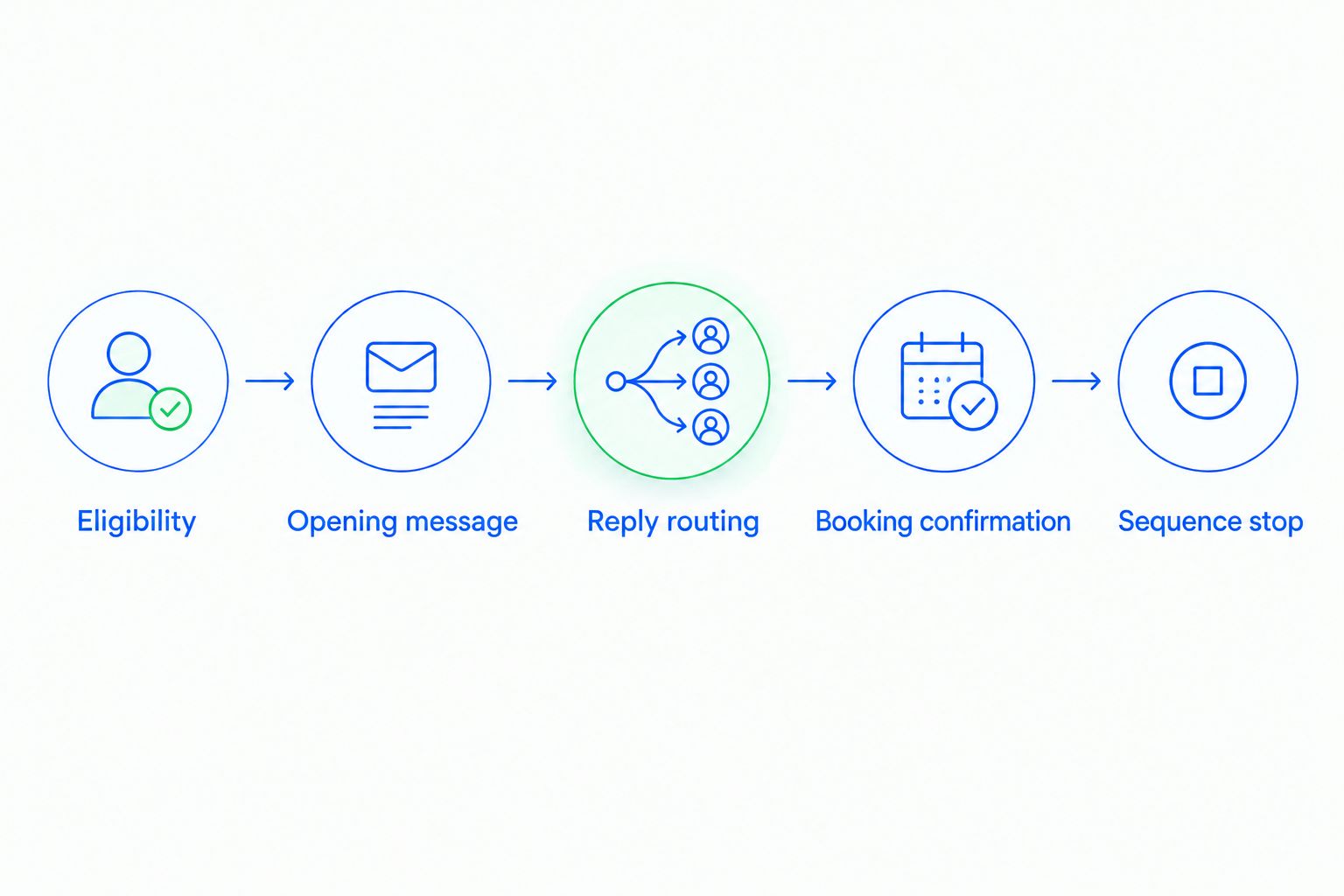
The important connection is the return signal from the calendar to the CRM. If you cannot automate that connection, make booking verification an assigned task. An explicit manual handoff is better than a pipeline stage that claims an unconfirmed meeting.
Stop rules and launch checks
The final configuration unit protects contacts from stale messages. Check stop conditions immediately before each send, not only when the contact first enters the sequence.
- Define terminal conditions. Withdrawn permission and a confirmed booking end prospecting. Invalid contact details prevent sending. A reply requiring judgment pauses the sequence until the owner reviews it.
- Decide how paused contacts resume. Require an explicit owner action or a clearly defined event. Do not restart unanswered-message reminders just because a conversation has been quiet.
- Check queued messages. Confirm whether your sending service cancels them, removes them, or evaluates eligibility again at send time. Verify the actual behavior through testing.
- Run end-to-end scenarios. Test an eligible lead, an opt-out, an ordinary reply, a booking, a cancellation, and a duplicate source event. Check the contact record, owner task, calendar, and message queue in each case.
- Assign failure handling. Route unmatched bookings, failed messages, and integration errors to a named owner with a clear next action.
Expected result: every tested exception produces a visible task or a safe stop, rather than an unexplained message.
Before your 2026 launch, rehearse the shortest failure path: a lead enters, replies, and books before the next scheduled message. If another prospecting text still sends, fix the stop logic before expanding enrollment.
When a meeting is rescheduled or canceled
A booking update is an adjacent workflow, not a fresh lead. Reuse the contact match and booking reference from the original appointment.
For a reschedule, update the existing meeting details and cancel reminders tied to the old time. Verify the new time zone before sending an updated confirmation. The opportunity remains booked unless your sales process defines a different state.
For a cancellation, record the canceled appointment and create an owner task to decide the next action. Do not automatically restart the original prospecting sequence. Cancellation does not establish renewed permission or explain why the prospect canceled.
This variant prevents contradictory communication: an old reminder after a reschedule, a confirmation after a cancellation, or a generic introduction to someone already speaking with your team.
Troubleshooting
Duplicate opening messages
Check repeated entry events, duplicate contact records, and overlapping workflows. Use an enrollment marker and source-event reference to block repeat processing. Review queued messages before removing a duplicate record.
A reply arrives but nobody responds
Check contact matching and owner assignment first. Then inspect whether the reply created a task or reached the responsible conversation view. Assign a backup reviewer for replies whose owner is absent or missing.
A booked contact receives another prospecting text
Check whether the booking reached the CRM and matched the correct contact. Inspect the pending queue and the send-time eligibility check. Updating the pipeline alone is insufficient if a separate service still holds the message.
An opted-out contact receives a message
Stop the affected sending path immediately. Check suppression synchronization, pending queues, and the condition evaluated before sending. Resume only after the failure is corrected and the consent rules have been reviewed.
A reschedule leaves reminders at the old time
Check whether the update references the original appointment or creates an unrelated event. Cancel old reminder jobs before creating replacements. Keep both the booking reference and time zone in the update process.
Customize your workflow
Start with one lead source and one owner-routing rule. Expand only after your entry, reply, booking, and suppression scenarios pass.
Arches CRM supports lead management, customer communication, workflow automation, and pipeline tracking. Use those capabilities to keep the next task visible, while validating the specific messaging and calendar connections in your setup. The platform's shared sales context is useful; unreliable external event matching remains a dependency you must resolve.
Track workflow outcomes without inventing a target: eligible enrollments, delivered messages, replies requiring action, confirmed bookings, and suppressed sends. Define each measure before comparing results. A scheduled invitation must not count as a confirmed meeting.
For your next configuration step, use the guide to automatic follow-up reminders to connect task timing with responsibility. Review your 2026 workflow whenever consent requirements, lead sources, or booking tools change.
FAQ
What is an sms crm workflow?
An sms crm workflow connects text communication with contact records, owner tasks, and sales status. A booking-focused workflow checks permission, routes replies, confirms appointments, and stops prospecting after a verified booking.
Can Arches CRM support SMS follow-up?
Arches CRM includes SMS communication and workflow automation alongside contact and pipeline management. Verify the sending, reply-routing, and calendar-event controls in your setup before activating the workflow.
Should I automate every follow-up text?
No; automate only messages whose eligibility and next action are clearly defined. Route questions, objections, and ambiguous replies to the assigned salesperson, with routine reminders paused.
How do I know a meeting is actually booked?
Use a confirmed scheduling event or an owner-verified appointment matched to the contact. An invitation, delivered text, or positive reply is not booking confirmation.
How many texts should I send before a meeting?
Use the smallest sequence that supports the agreed next step, rather than a universal message count. Start with one opening message and a reviewed follow-up decision, then stop for replies, bookings, or withdrawn permission.
What happens when a prospect cancels a meeting?
Record the cancellation and assign the owner a next-action task. Do not automatically restart prospecting; review the conversation and applicable permission first.
What should I test before launching in 2026?
Test eligibility, opt-outs, reply ownership, booking matches, cancellations, duplicate events, and queued-message cancellation. Confirm that each exception creates a visible task or prevents an inappropriate send.
One last thing
The most important automation is often the message you prevent. Test a booking that arrives just before a scheduled follow-up and confirm that the follow-up never sends. That single scenario checks whether your calendar, CRM, and messaging service behave as one workflow rather than separate systems.