
 Log in
 Start Free Trial


Instead of manually copying Shopify orders into your sales pipeline, build a Shopify CRM integration that matches each buyer to a contact, records the order, and assigns the next follow-up. Use paid orders as the starting event when your workflow should begin only after payment, then test duplicate delivery and refunds before enabling live updates.
- Build your Shopify CRM integration around paid orders when follow-up depends on confirmed payment.
- Arches CRM suits growing sales teams that need contacts, pipeline tracking, and follow-up automation together.
- Match buyers by a stable customer identifier; match order records by the Shopify order identifier.
- Confirm connector actions and destination fields before configuring order-to-pipeline automation.
Why this matters
An order record tells you what someone bought. A sales workflow tells your team who owns the relationship and what happens next. Copying every order into an open sales opportunity confuses those two jobs.
Arches CRM is best for growing sales teams that need contact management, pipeline tracking, and follow-up automation together. Its CRM and workflow automation features cover leads, opportunities, tasks, and customer conversations; the Shopify connection still needs a confirmed integration route and explicit mapping rules.
For a 2026 implementation, separate transaction history from future selling activity. Start with the contact and pipeline capabilities described by Arches CRM, then define exactly which order events deserve a task, a completed-sale record, or a new opportunity.
Before you start
- Access: Have authorized Shopify store access, CRM configuration access, and permission to configure the chosen integration route. Confirm that the route can read the required order data and search, create, or update the necessary CRM records.
- Materials: Prepare sample orders, a contact-matching rule, a field map, pipeline stages, an owner assignment rule, and an exception destination. Confirm the actual connector actions or API operations before building; this guide is a configuration specification, not a claim of a native Shopify connector or specific interface labels.
- The gotcha: Order creation and payment are different events. Choose the event that matches your business rule, and preserve the Shopify order identifier so processing the same order again does not create another deal.
Order event configuration
Choose the event that earns a pipeline update
- Write down the business outcome: completed purchase tracking, post-purchase follow-up, or an unpaid-order sales task.
- Select the Shopify event exposed by your integration route that matches that outcome. For payment-dependent follow-up, require a confirmed paid state rather than treating order creation as payment confirmation.
- Add eligibility conditions before any CRM write. Exclude test records from live reporting and route canceled orders away from new-sales actions.
- Capture the store identifier, order identifier, customer identifier when present, contact details, payment state, currency, and event timestamp.
Expected result: A sample event contains enough information to identify the source order and explain why it qualifies. No CRM record has changed yet.
The following comparison covers workflow choices, not named connector buttons. Apply the rules through the fields and actions documented for your selected connection.
| Starting event | Best for | Benefit | Limitation |
|---|---|---|---|
| Order creation | Teams that need visibility before payment | Starts internal review earlier | Does not establish that payment is complete |
| Confirmed payment | Teams whose follow-up begins after purchase | Aligns the task with the purchase milestone | Excludes unpaid-order outreach unless handled separately |
| Order status change | Teams maintaining existing purchase records | Keeps later changes attached to the original order | Requires checks against duplicate or older events |
Use confirmed payment for the main purchase-to-follow-up workflow. Keep unpaid-order activity separate so a reminder about an incomplete transaction does not appear beside a completed purchase without context.
For your 2026 workflow specification, record the exact source event and its eligibility conditions together. An event name without a business rule is not enough for someone else to maintain the automation.
Establish record ownership
Designate Shopify as the authority for order identity and transaction status. Designate the CRM as the authority for relationship ownership, sales tasks, and opportunity stage decisions.
Do not let an order update overwrite a rep's notes or reassign an established account without an explicit rule. Record ownership prevents the integration from treating every incoming field as permission to replace existing information.
Contact matching and field mapping
Match the customer before creating a record
- Search the CRM for the stored Shopify customer identifier, scoped to the source store. Use this identifier only when the destination has somewhere appropriate to retain it.
- If no identifier match exists, search by normalized email under your agreed matching policy. Treat shared addresses as exceptions rather than proof that two buyers are the same person.
- Update the matched contact or create a new contact only after the search returns no valid match. Preserve a rep's existing ownership unless reassignment is intentional.
- Route ambiguous matches and orders without usable contact details to review. Keep the source order identifier with the exception so someone can resolve it.
Expected result: Reprocessing the same customer updates the same contact. Your design targets 1 contact record per identified buyer, not a new contact for every purchase.
A guest order still needs an identity decision. An email address can support matching, but it is not a substitute for a written policy covering shared inboxes, changed addresses, and existing duplicate records.
Map only information the next action needs
Use this table as a destination design. The destination descriptions are not claims about built-in CRM field names; create or select appropriate fields only after confirming what your setup supports.
| Shopify source information | Intended destination | Mapping rule |
|---|---|---|
| Store and customer identifiers | Contact reference fields | Preserve source identity without replacing CRM record identifiers |
| Buyer name and contact details | Contact details | Avoid overwriting useful values with blanks |
| Order identifier | Order reference on the associated record | Use for lookup before every create action |
| Order timestamp and payment state | Purchase context | Keep transaction timing separate from task timing |
| Order currency | Transaction context | Retain the currency alongside monetary fields |
| Marketing consent information | Corresponding permission fields, where supported | Preserve its meaning; never infer consent from purchase alone |
Expected result: A rep can identify the buyer, locate the original order, and understand the next task without reading an unstructured order dump.
For a 2026 field map, document the source, destination, overwrite policy, and owner for each field. Remove fields that serve no defined sales or service action; unnecessary copies create more information to maintain.
Pipeline and follow-up configuration
Separate completed revenue from future opportunity
- Look up the Shopify order identifier before creating any order-linked record. If it already exists, update the existing record rather than creating another.
- Decide whether the completed purchase belongs in a completed-sale record, purchase history, or another supported structure. Do not place a paid purchase into an open stage merely to make it visible.
- Create an open opportunity only when there is a distinct future sales action, such as an account expansion conversation. Link that opportunity to the contact and retain the purchase context.
- Assign an owner using your documented account or routing policy. Send unmatched assignments to a monitored exception destination rather than leaving them unowned.
- Create a follow-up task with a purpose, owner, and due-date rule. Start with an internal task before enabling customer-facing messages.
Expected result: The purchase is represented once, the contact has an accountable owner, and any open opportunity represents work that can still be won.
Keep completed purchases out of open-pipeline totals. If you choose one order-linked record per purchase, enforce 1 order-linked record per source order. Repeat purchases from the same customer should retain their separate order identities.
Use the following sequence as your implementation map: Payment confirmed, Contact matched, Order recorded, Owner assigned, Follow-up queued. Stop processing at an unresolved identity or write error instead of continuing with partial context.
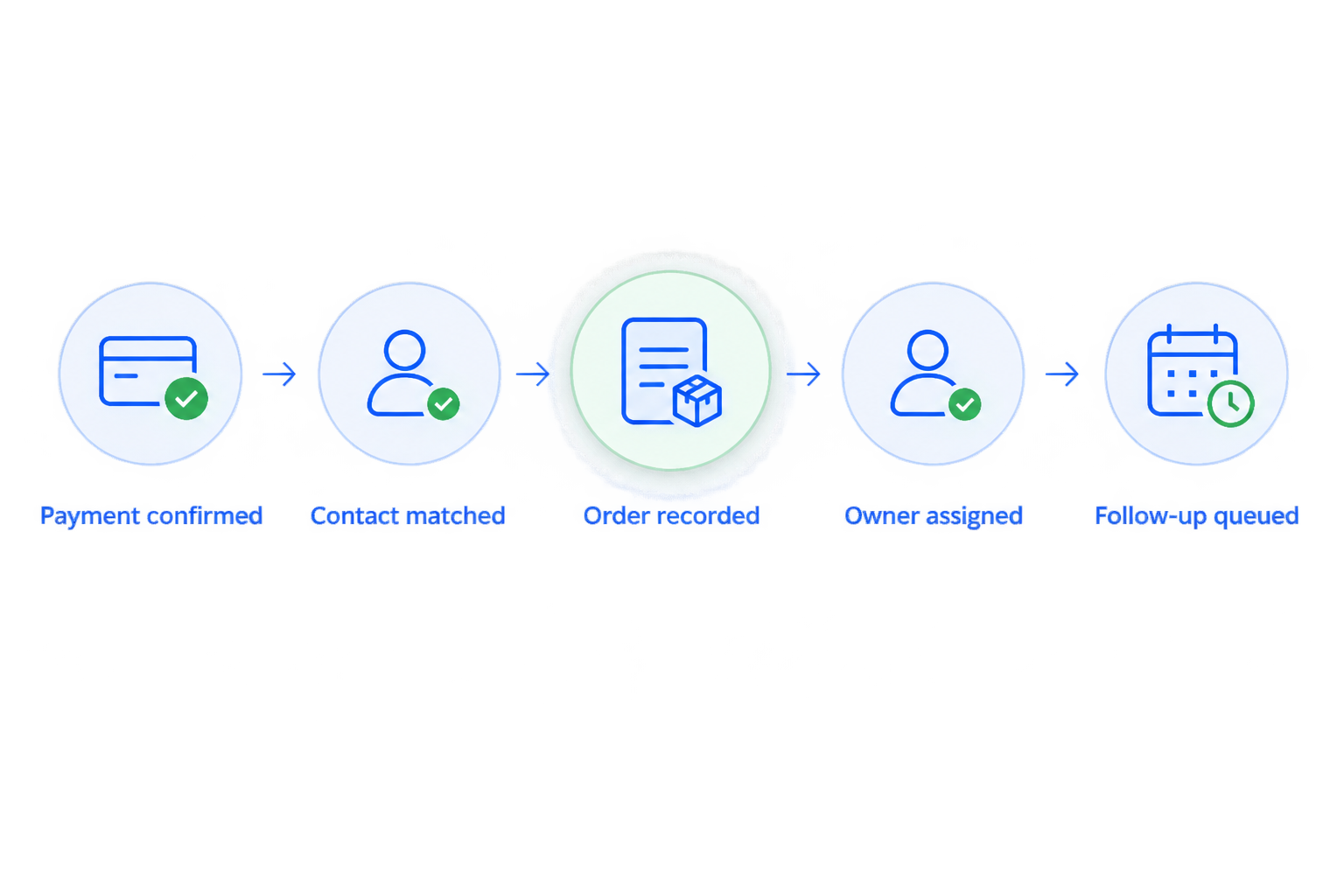
The sequence keeps the task attached to a known customer and purchase. For the broader design principles, read how workflow automation reduces manual CRM data entry.
Verify the workflow before enabling messages
- Run a qualifying paid-order example through the complete workflow. Inspect the contact, order reference, owner, stage, and task.
- Replay the same event. Confirm that neither the contact nor the order-linked record duplicates, and that replaying does not create repeated tasks.
- Run a repeat-buyer example with a different order identifier. Confirm that the contact stays the same while the new purchase remains distinct.
- Run a canceled or refunded-order example through the relevant status-change path. Confirm that the existing purchase record changes without creating fresh sales work unintentionally.
- Inspect failure handling. Confirm that a rejected CRM write produces a visible exception and that retrying preserves the original identifiers.
Expected result: Your minimum test set covers 4 scenarios: qualifying purchase, repeated event, repeat buyer, and cancellation or refund. These are acceptance tests, not a promised setup duration.
Arches CRM provides follow-up automation and unified customer communication. Those features still need clear enrollment and stop rules: define when a task is complete and which customer interactions should stop further outreach.
Update the pipeline whenever an order changes
The adjacent workflow maintains existing records after the initial purchase. Use an order-change event supported by your integration route, then look up the existing CRM record using the store and order identifiers.
For a 2026 rollout, specify how each meaningful change affects work already assigned:
- Cancellation: Update the recorded status and review purchase-dependent tasks before they run.
- Refund: Record the refund context without automatically deleting the relationship history or creating a replacement opportunity.
- Partial refund: Preserve the distinction between a partial adjustment and a fully reversed transaction.
- Older event: Compare source timestamps or documented ordering information before replacing a newer state. If order cannot be established, retrieve current source state before writing.
Expected result: Changes remain attached to the original purchase. A refund does not silently turn into a new lead or leave inappropriate follow-up running.
Keep this workflow separate from the initial create path. Both paths should share identity rules, but status maintenance should not repeat the actions reserved for a new qualifying purchase.
Troubleshooting
The same order creates multiple deals
The create action is running without a reliable lookup. Match on the source store and order identifier before writing, and make retries update the matched record. If events can run simultaneously, use a supported uniqueness control or serialize processing for the same order.
A returning customer receives another contact record
The workflow is matching only on the incoming email or skipping the existing identifier lookup. Check whether the Shopify customer identifier was retained on the original record. Route conflicting matches to review rather than merging contacts automatically.
A paid purchase appears as an open sales opportunity
The destination stage is using a default instead of your purchase rule. Correct the mapping and review affected records. Keep a completed purchase separate from a genuinely new expansion opportunity.
The workflow stops at the CRM write
Inspect the failed operation for missing required fields, invalid destination values, or authorization errors. Correct the specific failure before retrying. Preserve the source identifiers so a partially completed attempt does not become a duplicate on replay.
A canceled buyer still has a sales follow-up task
The status-update workflow is changing the purchase record but not reviewing dependent tasks. Add an explicit cancellation or suppression rule, then test it with a pending task. A status change alone is not a task-management policy.
Customize your workflow
Once purchase recording passes the acceptance tests, expand the workflow around relationship needs. Add separate handling for first-time buyers, returning accounts, or purchases that require a rep's attention; define the routing condition before adding another branch.
Arches CRM combines contacts, conversations, tasks, and sales activity. The benefit is shared relationship context; the implementation limitation is that Shopify events still need verified connection capabilities, matching rules, and error handling.
For your 2026 expansion, add one workflow branch at a time and rerun the replay test after each change. Do not automate a customer message until you can explain why that customer qualifies and what stops the sequence.
FAQ
What is the best starting event for a Shopify CRM integration?
Confirmed payment is the best starting event when your follow-up should begin only after purchase. Use order creation separately when your team needs to act before payment, and label that workflow accordingly.
Does this guide require a native Shopify connector?
No. The workflow requires an authorized integration route that supports the necessary Shopify events and CRM operations. Confirm the connector actions or API operations before configuring the workflow.
Should every Shopify order become a new CRM deal?
No. Record completed purchases without inflating open pipeline, and create an open opportunity only for a distinct future sales action. Keep the source order identifier attached to purchase-related records.
How do I prevent duplicate contacts and orders?
Match contacts using a stored customer identifier where possible, and match purchases using the store and order identifiers. Search before creating records and verify that replaying an event does not repeat tasks.
Can I send follow-up messages automatically after an order?
Enable automatic messages only after confirming the sending capability, applicable permissions, enrollment conditions, and stop rules. Begin with internal tasks so you can inspect the workflow before customers receive anything.
What should happen in the CRM after a Shopify refund?
Update the existing purchase record and review its dependent follow-up tasks. Preserve the distinction between partial and full refunds instead of creating another sales opportunity.
How do I know the integration is ready for live orders?
The integration is ready when qualifying purchases, repeated events, repeat buyers, and cancellations or refunds produce the intended records and tasks. Also confirm that failed writes are visible and can be retried without duplicates.
One last thing
The most revealing test is not a new order. It is the same order arriving again.
Replay a successful event before enabling live processing. If the replay creates another contact, deal, or task, fix the matching and retry rules first. A workflow that handles repetition correctly is easier to trust when an order changes later.