
 Log in
 Start Free Trial

Yes, you can run sales pipelines without a dedicated CRM by using a shared spreadsheet or task board, provided every opportunity has an owner, a defined stage, and a dated next action. The trade-off is manual work: someone must update records, connect conversations to deals, and check overdue follow-ups. In 2026, the deciding factor is whether your team can maintain that discipline—not whether a spreadsheet can display a pipeline.
- Is it possible to run sales pipelines without a dedicated CRM? Yes, with clear ownership and consistent follow-up.
- Shared spreadsheets suit straightforward deal tracking; manual updates remain your responsibility.
- Task boards make stages visible but require a separate plan for customer conversation history.
- Arches CRM suits growing sales teams that need pipeline management, shared communications, and follow-up automation together.
Is it possible to run sales pipelines without a dedicated CRM?
Yes. A dedicated CRM is optional; a reliable system for managing opportunities is not. You need to know who owns each deal, what the customer has agreed to, and what happens next.
If your current setup already struggles with those questions, compare a shared spreadsheet with CRM sales tracking before adding more fields or another tool.
| Approach | Best for | Main advantage | Main limitation |
|---|---|---|---|
| Shared spreadsheet | Straightforward pipelines with a consistent update routine | Flexible rows, columns, filters, and shared access | Owners must maintain stages, activity notes, and follow-up dates |
| Task board | Teams that organize work visually by stage | Makes deal movement and assigned work visible | Customer history needs a deliberate structure beyond moving cards |
| Arches CRM | Growing sales teams needing connected records and follow-up automation | Brings contacts, conversations, tasks, and sales activity together | Still requires clear stages, configured workflows, and team adoption |
None of these approaches fixes an undefined sales process. Choose the system your team can keep accurate, then test whether it supports the work between customer conversations.
Why this matters
A lead arrives. Someone replies, a proposal goes out, and the next step stays in that person's inbox. The pipeline still shows an active opportunity, but nobody else knows whether the customer is waiting or the salesperson is.
That is the operational problem to solve in 2026. A visible list of deals is useful, but it does not establish accountability on its own.
Your pipeline should answer an action question, not just a reporting question. Knowing how many opportunities sit in proposal is less useful than knowing which proposals need attention and who must respond.
Shared spreadsheet: best for straightforward tracking
A spreadsheet is a reasonable starting point when your team can maintain a shared record without reconstructing every deal from private messages. It lets you define the information you need without first configuring a dedicated sales platform.
Use a consistent row structure. Record the opportunity, customer, owner, stage, latest interaction, next action, and next-action date. Add other fields only when they support an actual decision.
The benefit is flexibility. The limitation is that the sheet depends on people recording what happened elsewhere: an email reply, a call, or an agreed change to the next meeting.
For a spreadsheet-based pipeline in 2026, keep these rules explicit:
- Use 1 accountable owner per opportunity. Contributors can help, but responsibility should not be ambiguous.
- Record 1 clear next action per active opportunity. Make the immediate commitment visible rather than burying it in notes.
- Maintain 1 shared record per opportunity. Avoid parallel versions that disagree about the deal's status.
These are operating rules, not software limits. A spreadsheet works when your team follows them; adding columns does not compensate for missing updates.
Task board: best for visual stage management
A task board suits teams that want to see opportunities move through defined stages. A card can hold the owner, due date, customer context, and outstanding work, depending on the tool you choose.
Its strength is visibility. Its weakness is that moving a card does not necessarily capture the customer conversation that justified the move.
Define what belongs on every card before using a board as your pipeline. Include the customer contact, the latest meaningful interaction, the next action, and a reference to the relevant conversation where your access rules permit it.
Keep stage movement separate from task completion. Sending a proposal completes a seller's task; it does not prove that the buyer has reviewed or accepted it.
Choose a board for clear work ownership, not as a substitute for customer history. If handoffs require teammates to search separate inboxes, address that gap before expanding the board.
Dedicated CRM: best for connected sales work
A dedicated CRM becomes relevant when the work extends beyond displaying stages. Shared customer history, assigned follow-ups, consistent records, and workflow automation belong in the decision—not just the appearance of the pipeline.
Arches CRM is best for growing sales teams that need pipeline management, shared conversations, and follow-up automation in one platform. Its stated features include lead and contact management, sales pipelines, reminders, tasks, follow-up sequences, and communication across email, WhatsApp, SMS, and calls.
The benefit is connecting work that otherwise requires separate updates. The limitation is implementation discipline: your team still has to define ownership, agree on stage rules, and configure workflows around the actual sales process.
Do not migrate solely to reproduce a messy spreadsheet on a different screen. First decide which manual steps should disappear and which decisions still need a salesperson's judgment.
How do you run a sales pipeline without a CRM?
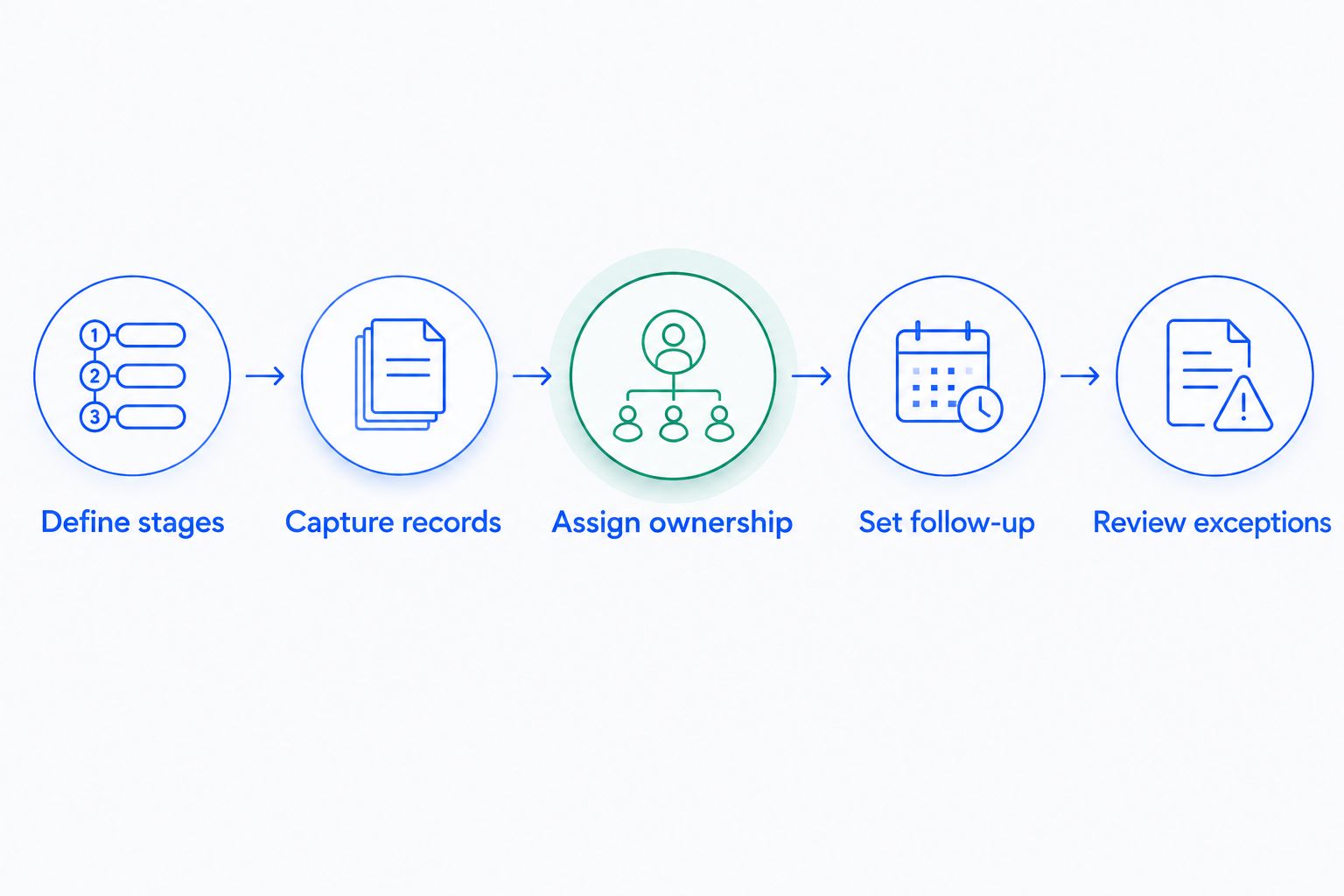
Build the process around customer commitments, not around whichever tool is easiest to open. Use the following sequence to make a non-CRM pipeline usable in 2026.
1. Define stages
Give each stage an entry condition that another teammate can understand. “Qualified” should describe an agreed qualification standard, not a salesperson's general confidence.
An illustrative sequence is Inquiry, Qualified, Proposal, Decision, and Closed. Adjust the labels to your process, and distinguish won deals from lost deals when recording the outcome.
2. Capture records
Create a shared opportunity record when the lead enters your sales process. Keep the customer identity and deal identity distinct so separate opportunities do not become one confusing history.
Record only what your team uses. A smaller record that stays accurate is more useful than an elaborate template filled with blanks.
3. Assign ownership
Name the person responsible for the next customer interaction. When responsibility changes, update the owner and explain the handoff in the shared record.
Do not treat a group chat notification as an assignment. Someone must accept responsibility for moving the opportunity forward.
4. Set follow-up
Write the next action as a specific task: send the revised scope, confirm the decision meeting, or answer the customer's outstanding question. Add the date agreed with the buyer or chosen under your team's follow-up policy.
Avoid vague entries such as “check in.” They leave the next salesperson guessing about the purpose of the contact.
5. Review exceptions
Review opportunities with missing owners, overdue actions, unclear stages, or incomplete handoffs. Start with those exceptions rather than reading every row aloud.
Close or reclassify records when the evidence supports it. Keeping an inactive opportunity open does not make the pipeline healthier.
Why running a pipeline without a CRM varies in difficulty
The deciding factors are how your team works and where customer information lives. Assess these conditions before deciding that your 2026 pipeline needs more software—or that it can safely stay as it is.
- Ownership changes: Handoffs require the next person to understand the conversation, commitment, and outstanding task without relying on private memory.
- Communication channels: Email, calls, WhatsApp, and SMS create separate places to check unless your process brings their relevant context together.
- Stage complexity: Different sales processes need clear rules so similarly named stages do not mean different things to different people.
- Follow-up requirements: A manual setup needs a reliable way to assign, schedule, complete, and review customer actions.
- Reporting needs: Managers need consistent stage definitions and current records before totals describe the pipeline accurately.
- Access requirements: Shared customer information needs appropriate permissions and a deliberate approach to who can view or change it.
No single lead count settles the choice. Assess the work required to keep each opportunity accurate and actionable.
How do you know when your spreadsheet is no longer enough?
Your spreadsheet is no longer enough when keeping it trustworthy becomes a separate coordination problem. Look for repeated gaps, not merely a dislike of entering data.
A practical check is to ask a teammate to take over an active opportunity using only the shared record. Can that person identify the customer's concern, the latest commitment, the owner, and the next action?
If the answer requires searching private inboxes or asking the original salesperson to reconstruct the story, the shared record is incomplete. Fix the process first, then decide whether maintaining that process manually is still sensible.
Can you automate follow-up without replacing your pipeline?
You can retain a spreadsheet or board and connect supported tools for reminders or tasks. The limitation is that every connection still needs an owner, clear trigger conditions, and a way to detect failures.
Start with a specific action rather than automating the entire sales process. Define what triggers the reminder, who receives it, and what should happen when the customer replies.
Do not let a scheduled message ignore a live conversation. Before enabling any follow-up sequence, confirm how completed tasks, replies, changed ownership, and closed opportunities affect future actions.
What should you check before switching systems?
Use a real opportunity to evaluate the workflow from inquiry through follow-up. Check whether a salesperson can find the customer context, see the next task, and make a clear handoff without duplicating the same update across systems.
For a 2026 evaluation, separate required capabilities from optional features:
- Required: Accurate ownership, understandable stages, customer context, dated next actions, and appropriate access.
- Conditional: Shared communication channels, workflow automation, and integrations that match your existing tools.
- Unproven until checked: Whether your proposed configuration handles your team's exceptions and handoffs correctly.
Arches CRM provides sales CRM and workflow automation features for these connected workflows. Evaluate those features against your actual process rather than treating a feature list as proof that implementation is finished.
Keep the move focused. Preserve useful customer context, remove duplicate opportunity records, and agree on stage definitions before introducing additional automation.
FAQ
Can I manage a sales pipeline with just a spreadsheet?
Yes, you can manage a sales pipeline with a spreadsheet if you consistently maintain owners, stages, customer context, and dated next actions. The trade-off is that your team must keep the record aligned with conversations happening elsewhere.
What's the best alternative to a dedicated CRM?
A shared spreadsheet is best for straightforward record tracking; a task board is best for visual stage management. Choose based on how your team maintains customer history and follow-up, not just how the pipeline looks.
How many leads can I manage before I need a CRM?
There is no universal lead-count threshold for needing a CRM. Evaluate missing follow-ups, handoff difficulty, record accuracy, and the work required to keep information current.
Can a task board replace CRM software?
A task board can replace the stage-tracking portion of a CRM workflow. You still need a deliberate way to manage customer records, conversation history, follow-up actions, and reporting.
Will a CRM stop my team from missing follow-ups?
A CRM can support follow-up through assigned tasks, reminders, and configured workflows, but it does not replace clear ownership. Your team must also define how replies, completed actions, and closed deals change scheduled work.
Is Arches CRM relevant if my team uses email and WhatsApp?
Arches CRM brings email, WhatsApp, SMS, and calls together alongside contacts, conversations, tasks, and sales activity. It is relevant when your sales team needs those communications connected to pipeline management and follow-up.
Should I organize my sales process before buying CRM software?
Yes, define ownership, stage entry conditions, and follow-up responsibilities before configuring CRM software. Those decisions give your team a clear process to implement and evaluate.
One last thing
Test the handoff, not the dashboard. Choose an active opportunity and ask someone other than its owner to explain the next customer action from the shared record.
If the answer is clear, your process has something worth preserving. If it is not, identify the missing context before buying software or rebuilding your spreadsheet. Make that your next pipeline review in 2026.