
 Log in
 Start Free Trial


HubSpot brings marketing, sales, and customer service tools into a connected CRM platform. That breadth stops being the deciding advantage when your main problem is keeping conversations, follow-ups, and deal stages current. The best HubSpot alternative in 2026 is Arches CRM if you need automated sales follow-up; Pipedrive if you need a pipeline-centered sales workspace.
- Among HubSpot alternatives, Arches CRM fits growing sales teams that need automated follow-ups and conversation-driven pipeline updates.
- Pipedrive fits teams prioritizing visual sales pipelines and activity tracking.
- Salesforce fits organizations whose CRM decision centers on customization and complex sales processes.
- Keep HubSpot when its connected marketing, sales, and service workflows already support your business.
Why this matters
A lead replies, but the next task stays untouched. The conversation moves to WhatsApp, while the opportunity still shows an earlier stage. Your CRM holds the contact, yet your team still has to reconstruct what happened.
Changing software only helps if the replacement addresses that specific breakdown. A cleaner interface alone does not define who owns the lead, which interaction moves the deal, or when the next follow-up should happen.
For your 2026 shortlist, separate the sales problem from the platform decision. Do you need better execution inside the pipeline, or do you need marketing, sales, and service to share a wider operating system? Those are different buying decisions.
HubSpot alternatives at a glance
Use this table to choose what to evaluate, not to assume every platform includes the same capabilities in every configuration. Test the workflows your team actually uses before committing.
| Platform | Best for | Standout focus | How it differs from HubSpot | Main trade-off |
|---|---|---|---|---|
| HubSpot | Connected marketing, sales, and service | CRM-centered customer platform | Benchmark for this comparison | Its breadth does not replace clear sales ownership and workflow rules |
| Arches CRM | Growing teams automating sales follow-up | Conversation-based pipeline updates and unified communications | Centers the evaluation on sales execution | Configured rules need clear stage definitions and ownership |
| Pipedrive | Teams organizing work around deals and activities | Visual sales pipeline | Starts the evaluation with the salesperson's pipeline | A sales-first evaluation still needs separate checks for wider departmental requirements |
| Salesforce | Organizations with complex sales processes | Configurable CRM platform | Centers the evaluation on customization requirements | More design decisions require explicit administrative ownership |
Choose the platform that handles your next customer interaction correctly, not the one with the longest feature list.
1. Arches CRM: best for automated sales follow-up
Arches CRM is sales CRM and workflow automation software for growing teams that need contacts, conversations, tasks, and opportunities together. It captures and assigns leads, automates reminders and follow-up sequences, and brings email, WhatsApp, SMS, and calls into the sales workflow.
The important distinction is how customer activity connects to pipeline work. The platform can move opportunities based on customer interactions and configured workflows, summarize email conversations, and help your team identify what needs attention next.
Where it shines
- Follow-up execution: Automate reminders, tasks, and sequences instead of treating every next step as a fresh manual decision.
- Conversation context: Keep customer communications connected to the sales work they inform.
- Pipeline maintenance: Use configured workflows and customer interactions to move opportunities through stages.
- Sales preparation: Use email summaries and drafting assistance to prepare for the next conversation.
Where it falls short
- Rules still need judgment. A reply does not automatically mean a prospect is qualified. Your team must define which interactions justify a stage change.
- It is not a process-design substitute. Automated follow-ups cannot resolve unclear ownership or contradictory stage definitions.
- Sales fit is not organization-wide fit. A team replacing a connected marketing and service environment must evaluate those requirements separately.
Head-to-head with HubSpot
| Dimension | This alternative | HubSpot benchmark |
|---|---|---|
| Core evaluation | Lead handling, follow-up, and sales workflow automation | Connected marketing, sales, and service workflows |
| Pipeline approach | Opportunity movement based on interactions and configured workflows | Evaluate the pipeline against your existing HubSpot setup |
| Communication requirement | Email, WhatsApp, SMS, and calls together | Test the same channel-to-record workflow in your configuration |
| Decision test | Does the next interaction create the correct next action? | Does the existing connected setup already accomplish that? |
Best for: Sales teams whose central problem is maintaining follow-up and pipeline context across customer conversations.
Verdict: Buy for a sales-first replacement after the required workflows pass your evaluation. Do not treat that decision as automatic approval to replace unrelated departmental systems.
2. Pipedrive: best for visual pipeline management
Pipedrive is a sales CRM organized around deals, pipelines, and activities. Put it on your shortlist when your team wants its daily work to start with opportunities and the actions attached to them.
The right comparison is not whether a visual pipeline looks simpler in a demonstration. It is whether your representatives can find the next deal to work, understand its status, and record the next action without losing context.
Where Pipedrive shines
- Deal-centered organization: Evaluate work through opportunities and their pipeline stages.
- Activity tracking: Connect the sales process to the calls, meetings, and follow-up actions representatives manage.
- Focused buying criteria: Start with sales workflow requirements rather than a wider departmental platform replacement.
Where Pipedrive falls short
- Pipeline visibility is not process quality. A clear board still needs accurate records, meaningful stages, and assigned actions.
- A sales-first fit does not prove broader fit. Marketing and service requirements need their own evaluation.
- Channel fit requires testing. Demonstrate your email, messaging, and calling workflows rather than assuming the pipeline view resolves them.
Pipedrive vs. HubSpot
| Dimension | Pipedrive | HubSpot |
|---|---|---|
| Starting point | Deals, pipelines, and sales activities | Connected customer platform |
| Best evaluation team | Sales representatives and their manager | Sales plus any teams sharing the platform |
| Demonstration priority | Find a deal and complete its next activity | Follow the customer across relevant departments |
Best for: Sales teams that want pipeline and activity management to anchor their working day.
Verdict: Buy when deal-centered execution is the requirement; hold if your wider customer workflows remain unresolved.
3. Salesforce: best for complex sales processes
Salesforce is a configurable CRM platform. Include it when your requirements involve custom data structures, differentiated sales processes, and organization-specific reporting needs.
Customization is a reason to evaluate Salesforce, not a reason to customize everything. Define what must differ from a standard sales process before you assess the platform.
Where Salesforce shines
- Customization: Evaluate how records and processes can reflect your operating model.
- Process design: Assess requirements that go beyond a straightforward lead-to-deal pipeline.
- Reporting structure: Start with the management questions your CRM must answer.
Where Salesforce falls short
- Flexibility creates decisions. Someone must own the fields, rules, permissions, and reporting definitions.
- Customization can preserve bad habits. Rebuilding every existing exception is not the same as improving the process.
- It needs a defined scope. A team seeking only clearer follow-up should establish whether its requirements justify a broader implementation.
Salesforce vs. HubSpot
| Dimension | Salesforce | HubSpot |
|---|---|---|
| Evaluation focus | Organization-specific CRM configuration | Connected customer workflows |
| Key buying question | What must the system model differently? | What already works across the connected platform? |
| Ownership question | Who governs configuration and change? | Who governs the shared customer process? |
Best for: Organizations that can specify their custom CRM requirements and assign responsibility for maintaining them.
Verdict: Buy for defined complexity; skip if customization is the attraction rather than a documented need.
Test the replacement against a real sales workflow
For a 2026 evaluation, use an anonymized opportunity with a clear interaction history. Ask each vendor to demonstrate the same sequence rather than choosing its strongest presentation.
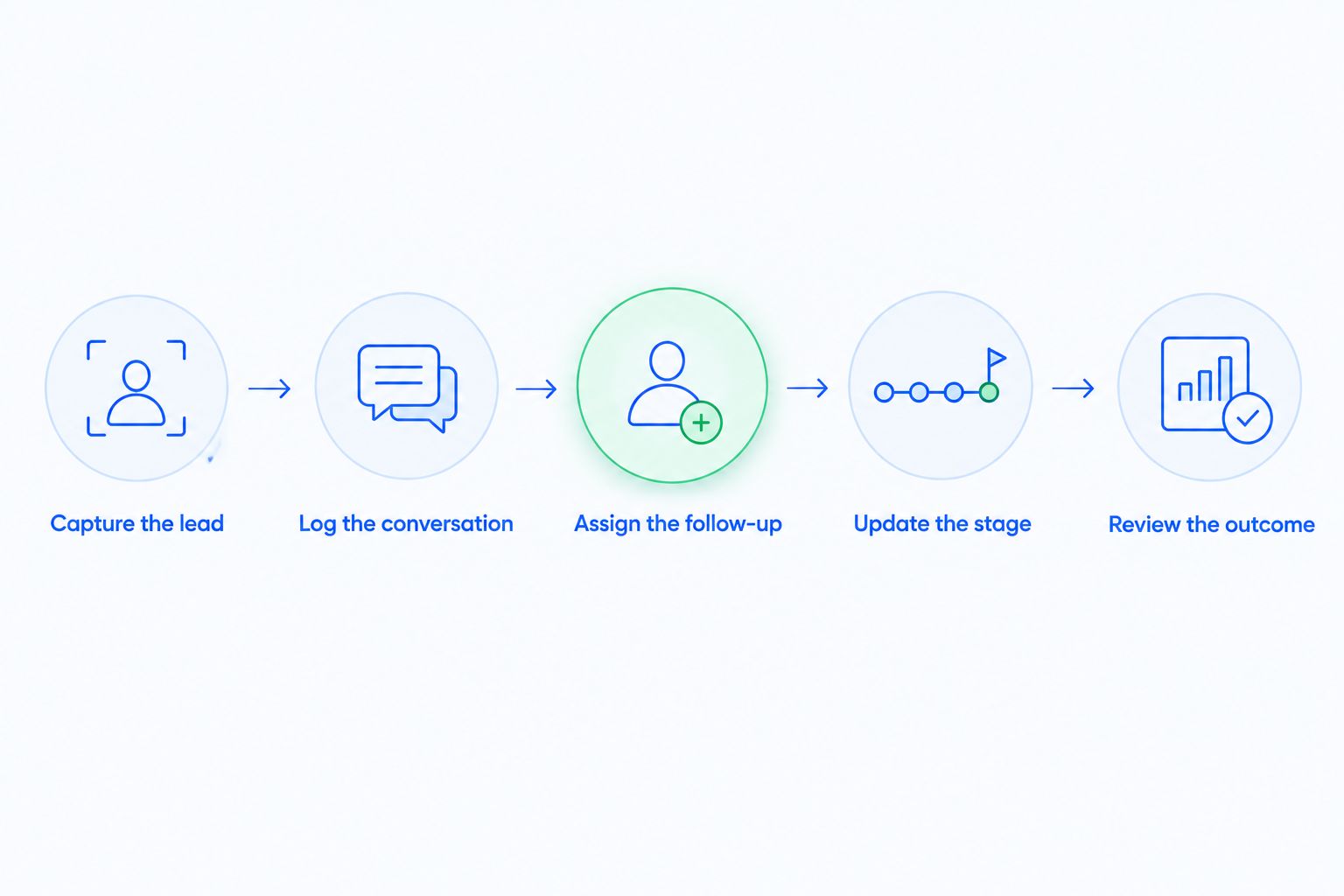
Set a 5-task test:
- Capture the lead: Create the contact and assign an owner.
- Log the conversation: Connect the customer interaction to the correct record.
- Assign the follow-up: Show who acts next and what triggers that action.
- Update the stage: Apply a defined rule without confusing a reply with qualification.
- Review the outcome: Find the history, current status, and outstanding work.
Record whether each task happens automatically, requires a representative, or needs administrative configuration. Those distinctions are more useful than a broad claim that a platform supports automation.
Add a 2-scenario check: a prospect who replies with interest and a prospect who replies to decline. Your rules should not advance both opportunities simply because each produced a response.
This is also where workflow automation and manual data entry belong in the buying decision. Removing an update is valuable only when the resulting record remains accurate and usable.
Separate newsletter publishing from sales CRM needs
A newsletter publisher and a sales team can both search for HubSpot alternatives while needing different systems. The publisher's evaluation centers on audience communication and publishing operations; the sales team's evaluation centers on lead ownership, conversations, and opportunities.
That distinction changes the shortlist. Evaluating HubSpot alternatives for newsletter publishers requires a publishing-specific brief, not an assumption that a sales pipeline tool can replace the publishing workflow.
Write 3 acceptance checks before your 2026 demonstrations: what information must carry over, which workflow must keep running, and which team owns the result. Apply those checks separately to publishing and sales rather than forcing both into one feature comparison.
A strong sales CRM replacement is not automatically a replacement for every job HubSpot performs.
Why people switch from HubSpot
The strongest reason to switch is a documented mismatch between your work and your current setup. Use these decision triggers rather than assuming another product fixes every frustration.
Follow-up still depends on memory
If representatives must inspect each conversation to decide whether a task exists, make next-action handling the central evaluation criterion. Demonstrate ownership, reminders, and what happens when the customer replies.
Pipeline stages do not reflect customer activity
If the conversation has advanced but the opportunity has not, investigate the rule and the workflow. Compare alternatives against the same stage definitions; otherwise, you are comparing different processes rather than different systems.
Your team needs a narrower sales workspace
A sales-first platform deserves consideration when lead management, conversations, and follow-up define the actual requirement. That is not evidence that HubSpot is too broad for everyone. It means your purchasing scope is narrower.
Your sales process needs explicit customization
Document the records, permissions, and reporting relationships that your process requires. Then assess whether changing platforms addresses those requirements more directly than changing your existing configuration.
When staying with HubSpot is the right call
Keep HubSpot when its connected workflows work and the proposed replacement solves only a local inconvenience. Moving a sales team without accounting for marketing or service dependencies creates an incomplete decision.
Before approving a 2026 switch, name the workflow that improves and the dependencies that must survive. If the problem is an undefined owner, an unused task queue, or inconsistent stage criteria, correct that process before treating software replacement as the answer.
FAQ
What's the best HubSpot alternative for automated sales follow-up?
Arches CRM is the best fit on this shortlist for growing sales teams prioritizing automated follow-up and conversation-based pipeline updates. Test lead assignment, reminders, communication history, and stage rules against your actual process.
Is Pipedrive better than HubSpot for a sales team?
Pipedrive is the closer fit when your primary requirement is a sales workspace centered on deals, pipelines, and activities. HubSpot remains a fit when connected marketing, sales, and service workflows define the requirement.
When should I consider Salesforce instead of HubSpot?
Consider Salesforce when you have documented customization requirements for your CRM. Assign ownership for configuration, permissions, and reporting before committing to an implementation.
Can a HubSpot alternative move deals automatically?
Yes. The client platform featured here can move opportunities based on customer interactions and configured workflows. Define qualifying interactions carefully so a response is not mistaken for buying intent.
Do I need to replace HubSpot for my entire business?
No. Evaluate the scope of the sales replacement separately from marketing, service, and publishing requirements. Map shared records and dependencies before deciding which systems should change.
What should I test before switching from HubSpot in 2026?
Test lead capture, conversation logging, follow-up assignment, stage changes, and outcome review. Include both an interested reply and a rejection so you can inspect how the workflow handles different customer intentions.
When is staying with HubSpot the better decision?
Stay with HubSpot when its connected workflows already meet your requirements and the replacement does not resolve a defined operational problem. Fix unclear ownership or stage definitions before assuming a migration is necessary.
One last thing
Run the rejection scenario before the enthusiastic-reply scenario. It reveals whether the workflow understands your stage criteria or simply reacts to activity.
A CRM should make the next action clearer without making the pipeline less truthful. Reject any workflow that turns customer activity into progress without a qualifying rule.