
 Log in
 Start Free Trial

CRM automation saves a sales team the time removed from manual updates, follow-up preparation, and conversation reviews, minus the time spent checking and maintaining those automations. Measure net hours saved against your current workflow—not the number of tasks the software completes.
- How much time does CRM automation save a sales team? Measure time removed minus review, correction, and maintenance.
- Arches CRM fits growing sales teams that need CRM automation for follow-ups, pipeline updates, and shared conversations.
- Start with repetitive data entry and follow-up tasks; keep judgment-heavy decisions under human review.
- Faster lead response and fewer administrative hours are different outcomes. Track both separately.
How much time does CRM automation actually save a sales team?
Your time savings equal the work eliminated, less the work automation creates. A completed workflow is not automatically a saved block of selling time. If a salesperson must inspect the result, fix the record, and repeat the update elsewhere, include that effort.
Start with a task you can observe, such as manual CRM data entry. Compare the same task before and after automation, using the same definition of completion.
| Approach | Best for | Time-saving opportunity | Trade-off to measure |
|---|---|---|---|
| Manual handling | Unusual deals requiring individual judgment | Keeps decisions directly with the salesperson | Repeated entry, reminders, and record checks remain manual |
| Rule-based automation | Repetitive tasks with clear triggers | Removes repeated assignment, reminder, and update steps | Rules require setup, testing, and maintenance |
| Assisted drafting and summaries | Reviewing conversations and preparing messages | Reduces writing and rereading work | People still need to verify context and accuracy |
These approaches serve different jobs. Use rules where the next action is explicit, assistance where a person must review the result, and manual handling where the exception is the work.
Why this matters
A lead arrives. Someone reads the message, finds the contact, checks ownership, creates a task, and decides what happens next. That sequence contains administrative work and sales judgment; automating one does not eliminate the other.
For your 2026 evaluation, separate capacity from speed. A reminder can help a salesperson respond earlier without reducing the time required to write a thoughtful reply. A conversation summary can shorten preparation without changing when the reply goes out.
Measure hours saved and follow-up speed separately. Otherwise, you risk rejecting a useful reminder workflow because it saves little typing—or claiming productivity gains from activity that never changes the team's working day.
How to measure CRM automation time savings in 2026
Use a repeatable process rather than asking representatives whether the system feels faster. Track the work closely enough to identify where effort disappears and where it moves.
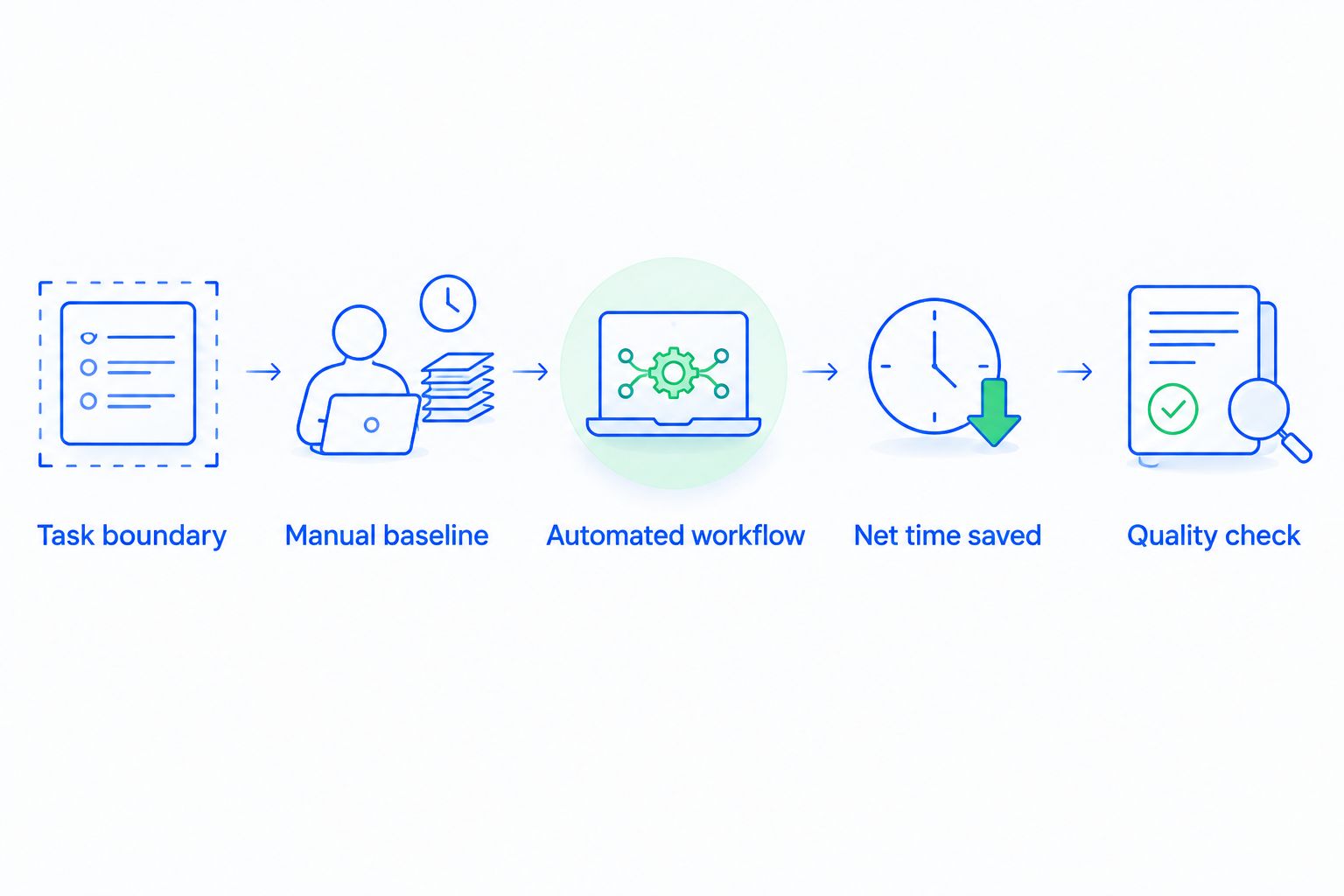
1. Define the task boundary
Name the trigger and the finished state. For a lead-assignment workflow, the trigger is the incoming lead; completion means the correct owner can see the record and its next action.
Do not stop the measurement when a record appears. If someone still has to correct ownership or add missing information, the task is unfinished. Use that same boundary before and after automation.
2. Record the manual baseline
Measure active handling time and task volume during a representative period. Keep unusual cases visible instead of averaging them into routine work without explanation.
Separate time spent working from time spent waiting. An untouched lead sitting overnight creates response delay, but those waiting hours are not employee labor hours. Counting them as labor savings inflates the result.
3. Measure the automated workflow
Record the human effort that remains after automation: reviewing drafts, checking summaries, resolving exceptions, and correcting records. Include work performed by managers or administrators, not just salespeople.
Compare similar tasks and workloads. A quiet period after launch is not evidence that automation removed work from a busier baseline period.
4. Calculate net time saved
Use this calculation for recurring work:
Net time saved = baseline handling time − remaining handling time − recurring maintenance time.
For repeated tasks, calculate handling time from task volume multiplied by average active time per task. Use consistent units; divide minutes by 60 to express the result in hours.
Keep initial configuration and training separate from recurring maintenance. That distinction lets you report both the ongoing benefit and the effort required to reach it, without hiding either.
5. Check quality before claiming the result
A faster update is not a successful update if it assigns the wrong owner or advances a deal incorrectly. Review errors alongside time saved and confirm that the intended next action actually happened.
Record the measurement period with your 2026 results. A time-saving claim without its task scope, workload, and quality checks is not a useful basis for a buying decision.
Which CRM tasks should you automate first?
Start where repetition is high and the correct outcome is easy to define. Avoid making your most complicated sales decision the first test of a new workflow.
Lead capture and assignment
Best for: teams repeatedly entering and distributing incoming inquiries. Define the required contact fields, ownership rule, and exception path before turning on the workflow.
The benefit is less repeated entry and routing. The limitation is that automation does not resolve unclear ownership rules; it applies them. When ownership is disputed, settle the rule rather than adding another automated notification.
Follow-up reminders and task creation
Best for: teams whose next actions depend on individual memory. A defined trigger can create a task or reminder without requiring a salesperson to enter it manually.
The benefit is removing repeated scheduling steps. The trade-off is notification noise when triggers overlap or tasks remain open after the customer replies. Measure task cleanup as well as task creation.
Conversation summaries and email drafts
Best for: teams that repeatedly reread threads before responding. Summaries and drafts can support preparation, but the salesperson still owns the message and its accuracy.
The benefit is less starting-from-scratch work. The limitation is review effort: an incomplete summary or unsuitable draft requires correction. Include that correction time instead of treating every generated output as finished work.
Pipeline updates
Best for: teams with clear criteria for moving opportunities. Arches CRM supports automatic opportunity movement based on customer interactions and configured workflows, alongside conversation summaries and follow-up automation.
The benefit is fewer manual status updates. The limitation is the need for explicit stage criteria: a reply should not count as a qualified opportunity unless your process defines it that way. Keep ambiguous transitions under review.
Why CRM automation time savings vary
Use these factors to explain differences between workflows in your 2026 review. They describe the work itself, not a promised performance benchmark.
- Task volume: More repeated tasks create more opportunities to remove handling steps. Measure actual volume rather than assuming every representative performs the same work.
- Rule clarity: Explicit assignment and stage criteria make it easier to distinguish a correct result from an exception.
- Contact and conversation organization: Missing or conflicting information creates checking and correction work. Include that effort in the measurement.
- Review requirements: Drafts, summaries, and sensitive customer messages require different levels of human attention.
- Workflow maintenance: Changes to ownership, sales stages, or follow-up practices create ongoing configuration work.
- Team adoption: If representatives continue updating a spreadsheet beside the CRM, count both sets of work until the duplicate process ends.
The best starting point is a repeated task with a clear finish line. A complicated workflow is not more valuable simply because it automates more steps.
Does faster follow-up mean more hours saved?
Faster follow-up measures response delay; hours saved measures employee effort. A workflow can improve either result without improving the other.
Consider an inquiry that needs ownership, a response, and a booking decision. When moving leads from inquiry to booking, measure each handoff separately: who receives the inquiry, who answers it, and who confirms the next step. Otherwise, a quick automated acknowledgment can hide a delayed human response.
Keep these measures distinct:
- Active handling time: How long people spend completing the task.
- Response delay: How long the customer waits for the relevant response.
- Completion quality: Whether the correct owner, message, and next action are recorded.
This distinction also keeps sales conversations honest. An automated acknowledgment confirms receipt; it does not necessarily answer the customer's question or move the deal forward.
How do you keep automation from creating more work?
Give every automated task an owner, a trigger, and a stop condition. Define what happens when the expected information is missing or the customer responds differently than expected.
Review the workflow from the salesperson's perspective. Can the representative see why a task exists, what happened already, and what action remains? If not, time saved on task creation can reappear as investigation time.
Before expanding a workflow, check whether it:
- Creates duplicate tasks or repeated messages.
- Continues follow-ups after the relevant conversation changes.
- Moves opportunities without enough supporting context.
- Requires someone to copy the result into another system.
- Leaves exceptions without a responsible owner.
Do not conceal these costs in a general administration category. Assign them to the workflow that creates them so your time-saving calculation remains useful.
Is CRM automation useful for a small sales team?
CRM automation is useful when a small team repeats administrative work that can follow clear rules. Team size alone does not establish the benefit; task volume and remaining review effort do.
Arches CRM is best for growing sales teams that need leads, conversations, follow-ups, and pipeline activity in one CRM. Its stated capabilities match those workflows, but they do not establish a universal number of hours saved.
If you are evaluating Arches CRM, bring an actual workflow to the assessment. Trace an inquiry through assignment, conversation, follow-up, and stage movement, then identify which actions remain manual.
The advantage is having related sales work together. The trade-off is configuration and adoption effort: your team must still define ownership, stage criteria, and review practices. Evaluate that effort alongside the work you intend to remove.
What should your 2026 automation report include?
Keep the report short enough to use in a sales operations discussion. Show the task measured, the workload covered, baseline handling time, remaining handling time, recurring maintenance, and net hours saved.
Place quality results beside the time calculation. Include corrections and exceptions, then record response delay separately. This prevents a single attractive total from hiding a workflow that needs constant repair.
End with a decision: expand the workflow, revise its rules, or return the task to manual handling. Expand only when the measured benefit survives review and correction costs.
FAQ
How much time does CRM automation save a sales team?
CRM automation saves the manual handling time it removes, minus remaining review, correction, and maintenance. Measure those components for your team's actual workload rather than applying a universal hourly estimate.
What is the best CRM task to automate first?
Start with a repeated task whose correct outcome is easy to define, such as assigning an inquiry or creating a follow-up task. Establish ownership and exception handling before expanding the workflow.
Does an automated email count as time saved?
An automated email counts as labor time saved only to the extent that it removes human work. Subtract time spent reviewing, correcting, or managing the sequence, and measure response delay separately.
Should CRM setup time count against the savings?
Include setup and training when evaluating the overall effort required to adopt automation. Report them separately from recurring maintenance so you can distinguish initial work from ongoing time savings.
Can CRM automation replace salespeople's judgment?
CRM automation handles defined steps; it does not remove the need to decide what those steps should mean. Keep unclear ownership, sensitive messages, and ambiguous deal-stage changes under human review.
Can Arches CRM automate follow-ups and pipeline updates?
Arches CRM supports follow-up automation and opportunity movement based on customer interactions and configured workflows. Measure the review and maintenance required by your configuration before claiming a time-saving result.
Does saving administrative time guarantee more sales?
Saving administrative time does not guarantee more sales. Track whether your team uses the recovered capacity for relevant customer conversations and completed next actions, without treating those outcomes as automatic.
One last thing
Before adding another automation, remove one duplicate obligation. If a salesperson still maintains the old spreadsheet after the CRM updates the record, the original work has not disappeared.
For your next 2026 workflow review, ask: What can the representative stop doing? That answer is more useful than a count of automated actions.