
 Log in
 Start Free Trial


A sales rep’s weekly CRM data-entry time depends on the work required to log conversations, update contacts, move deals, and create follow-up tasks—not a universal hours-per-week figure. Measure those activities separately from selling, then include correction and review time so your total captures the work that automation does not remove.
- How long does a sales rep spend on CRM data entry each week? Measure logging, updates, tasks, and corrections.
- Count manual entry separately from customer conversations, sales planning, and proposal preparation.
- Arches CRM suits growing sales teams that need CRM workflow automation and shared customer conversations.
- Judge automation by net time saved after review and corrections, not by the number of workflows enabled.
Why this matters
A lead replies. Your rep reads the message, updates the opportunity, records the next step, and sets a reminder. Only part of that work requires sales judgment; copying information between records does not.
For your 2026 workflow review, separate the decision from the recordkeeping. Otherwise, you risk removing useful notes while leaving repetitive updates untouched. Start with how workflow automation reduces manual CRM data entry, then measure the activities your team actually performs.
The goal is less repeated entry without losing the information needed for the next conversation. A fast update that leaves the wrong owner or next step is not an improvement.
How long does a sales rep spend on CRM data entry each week?
Your answer is the rep’s total weekly time spent entering, correcting, and checking CRM records. Keep this separate from all time spent inside the CRM: reading a customer’s history before a call is preparation, not data entry.
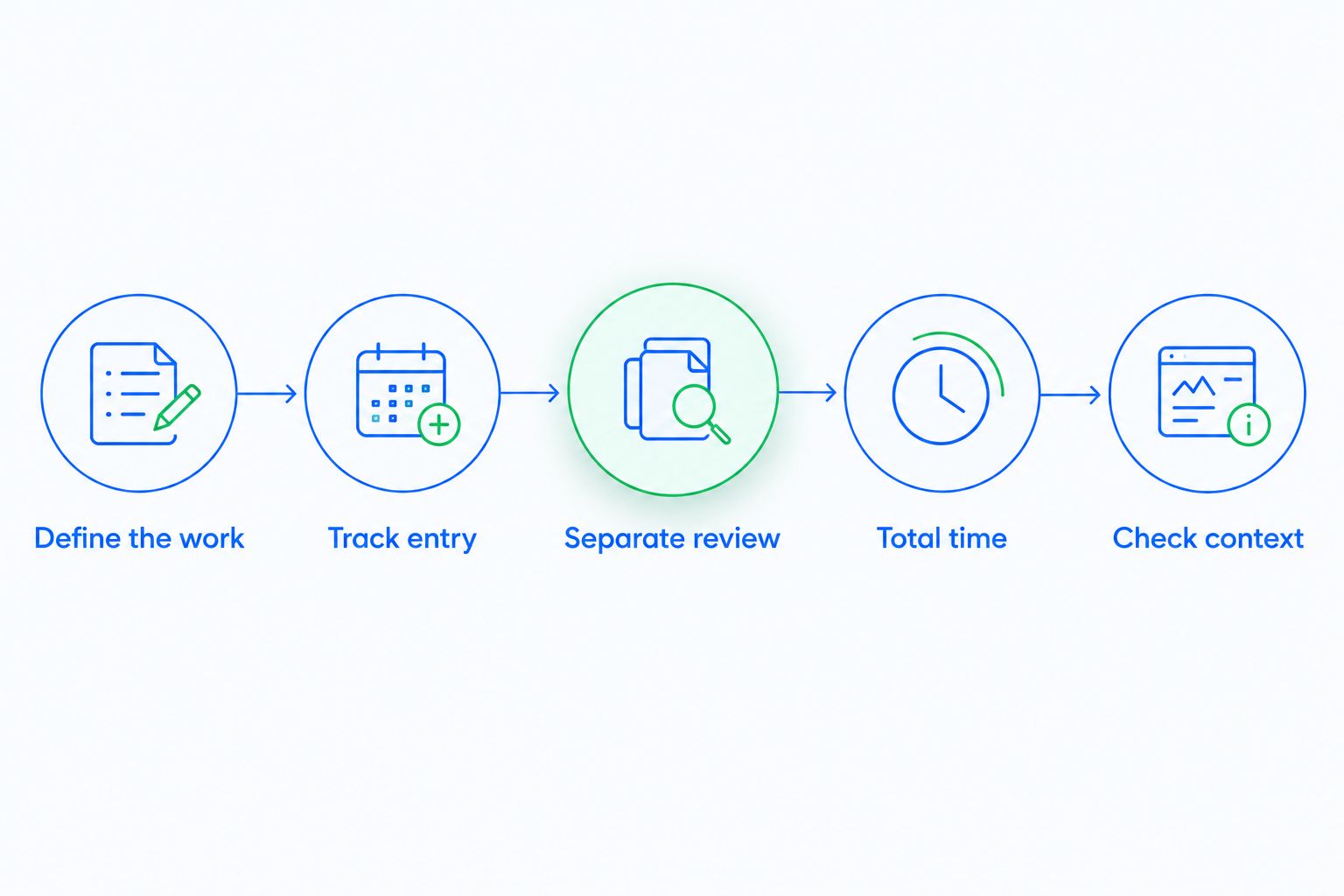
Use this measurement process to establish your 2026 baseline:
- Define the work. Include contact updates, activity logging, deal changes, task creation, and record corrections. Exclude customer conversations and proposal writing.
- Track entry. Record the time spent completing those activities across 5 working days. Include small updates between calls, not just the end-of-day cleanup.
- Separate review. Record time spent checking summaries, correcting automated updates, and resolving duplicate or misplaced information.
- Total time. Add entry and review minutes for each rep. Divide by 60 minutes per hour to express the weekly result in hours.
- Check context. Note unusual imports, training, absences, or pipeline cleanup so those events do not become your definition of a normal week.
These are measurement instructions, not an industry benchmark. If work varies substantially between weeks, extend the observation to 2 weeks and report each week separately before calculating an average.
Keep the method consistent across reps. Comparing one person’s timed activity with another person’s end-of-week estimate produces a weak baseline, even when both totals look precise.
What belongs in the weekly total?
Use the same categories throughout the measurement period. The distinction is whether the rep is recording information or doing the sales work that produces it.
| Activity | Count as data entry? | What to record |
|---|---|---|
| Updating contact details | Yes | Time spent adding or correcting fields |
| Logging an email or call | Yes | Manual logging time, not conversation length |
| Changing a deal stage | Yes | Time spent updating the opportunity |
| Creating a follow-up task | Yes | Time spent entering the task and due date |
| Correcting an automated summary | Yes | Review and correction time |
| Talking with a prospect | No | Track separately as customer-facing work |
| Preparing a proposal | No | Track separately as sales preparation |
When an activity mixes both kinds of work, split it at the point where recordkeeping begins. Deciding what to offer belongs to selling; typing the agreed next step into a task belongs to administration.
Why CRM data-entry time varies
Compare workflows before comparing reps. These factors determine what your measurement needs to capture:
- Required fields. Each mandatory field adds an update requirement. Ask what decision the field supports and who uses it.
- Communication channels. Email, WhatsApp, SMS, and calls create different logging steps when conversations sit outside the customer record.
- Pipeline rules. A stage change can require an update, a task, or both. Document the evidence required for each transition.
- Workflow automation. Assignment rules and follow-up sequences replace specific manual actions only when their triggers match the work.
- Record quality. Duplicate contacts, missing ownership, and incorrect details create correction work beyond the original entry.
- Review requirements. Generated summaries and automatic stage changes still need a defined process for handling exceptions.
Use these factors to explain differences in your 2026 baseline, not to label a rep inefficient. A rep handling more complex handoffs has a different administrative workload from a rep managing straightforward inquiries.
Which CRM updates should you automate first?
Automate repeated, rule-based updates before automating decisions that require interpretation. Start where you can describe the trigger, expected action, and exception without ambiguity.
Compare the work itself rather than assuming every automated action removes useful minutes. The approaches below serve different needs.
| Approach | Best for | Benefit | Limitation |
|---|---|---|---|
| Manual updates | Exceptions and nuanced deal notes | Gives the rep direct control over the record | Requires repeated entry and consistent habits |
| Rule-based workflows | Predictable assignments, reminders, and tasks | Applies a defined action when conditions are met | Incorrect conditions produce incorrect actions |
| Generated summaries | Reviewing long customer conversations | Provides a shorter account to review | Requires checking commitments and important details |
Start with predictable follow-up tasks
Choose a repeated task with a clear owner and completion condition. A reminder should tell the rep what needs attention, not merely add another notification.
Before enabling the workflow, decide what happens when the customer replies, the deal closes, or ownership changes. A task that remains active after its purpose disappears creates cleanup instead of saving work.
Keep judgment in the sales process
A reply confirms that a conversation happened; it does not automatically confirm qualification, budget, or buying intent. Write stage definitions that distinguish customer activity from evidence of progress.
For your 2026 automation review, ask whether each transition reflects a meaningful sales event. Keep ambiguous cases visible for a rep to review rather than forcing every interaction into a stage change.
Remove repeat entry at handoffs
Look at what happens when a lead changes owners or moves from an inbox into an active opportunity. Identify which details are entered again and which details genuinely need updating.
Agree on where the authoritative record lives. If a rep must maintain the same status in a personal spreadsheet and the CRM, removing one update location is a process decision—not just a software setting.
Where Arches CRM fits
Arches CRM is best for growing sales teams that need shared customer conversations and automated follow-up. The sales CRM brings contacts, conversations, tasks, and pipeline activity into one place, with email, WhatsApp, SMS, and calls among its stated communication capabilities.
Arches CRM supports lead assignment, workflow automation, email summaries, and automatic opportunity movement based on customer interactions and configured workflows. Those capabilities address specific entry tasks; they do not establish how many hours your team will recover.
The trade-off is configuration and review. Your team still needs clear ownership rules, stage definitions, and a way to correct updates that do not reflect the conversation. Evaluate the platform against a repeated workflow you have measured, rather than treating every feature as a time-saving result.
How do you know whether CRM automation saves time?
Compare the same activities before and after the change. Use your 2026 baseline categories again so that a reduction in manual entry does not hide an increase in checking and corrections.
Calculate net time saved as baseline administration time minus post-change administration time. Include ongoing exception handling in the post-change total, and report initial setup work separately so readers can distinguish implementation effort from recurring work.
Check these outcomes alongside the time result:
- Are contacts assigned to the correct owner?
- Do records show the next action and who owns it?
- Do follow-up tasks stop or change when circumstances change?
- Do pipeline stages reflect the agreed definitions?
- Can reps find the relevant customer conversation without reconstructing it?
A lower time total is useful only when the records remain usable. If reps save entry time but managers must repair the pipeline before every review, the work has moved rather than disappeared.
Should you measure each rep separately?
Measure each rep separately, then compare people doing similar work. Team totals conceal whether administration is concentrated in a particular role or handoff.
Report workload context with the result. Include the activity types handled and any unusual cleanup, without turning the measurement into a ranking based on speed alone.
Does time spent reading CRM records count as data entry?
Time spent reading CRM records is not data entry unless the rep is checking or correcting recorded information. Reviewing account history before a call belongs in sales preparation.
Keep that boundary stable. Otherwise, better use of customer history can appear to increase administrative time even though the rep is preparing for a more informed conversation.
Should you aim to eliminate CRM data entry entirely?
Eliminating CRM data entry entirely is the wrong target when some information requires human judgment. Negotiation context, stakeholder concerns, and agreed next steps still need accurate records.
Aim to remove duplicate typing and predictable updates. Preserve the notes that another person needs to understand the opportunity without asking the rep to reconstruct it.
FAQ
How many hours a week should a sales rep spend entering CRM data?
Set the target from your measured workflow rather than a universal hours-per-week allowance. Count entry, checking, and corrections, then identify which repeated tasks can be removed without weakening the record.
How can I measure CRM data-entry time without monitoring every click?
Use a consistent activity log covering contact updates, conversation logging, deal changes, tasks, and corrections. Record time near the activity rather than asking reps to reconstruct the week from memory.
Does automatic email logging eliminate CRM administration?
Automatic email logging addresses the logging step, not every CRM task. Reps still need a process for reviewing important details, handling exceptions, and keeping ownership and next actions accurate.
Can Arches CRM reduce manual pipeline updates?
Arches CRM supports automatic opportunity movement based on customer interactions and configured workflows. Define stage criteria and review exceptions before relying on automatic changes.
What is the difference between CRM data entry and sales administration?
CRM data entry is the work of adding, updating, and correcting records. Sales administration is broader and can include internal coordination, reporting, and other tasks outside recordkeeping.
Should I count time spent correcting automated CRM updates?
Count correction and review time when measuring the administrative workload after automation. Excluding it overstates the reduction in work.
What should I do if CRM entry takes less time but follow-up gets worse?
Check ownership, task triggers, and the information available to the rep before expanding automation. Less entry time is not a successful outcome if the next action becomes unclear.
One last thing
Before adding another automation in 2026, inspect a required field that nobody uses. Ask who reads it, what decision it changes, and whether the same information already exists elsewhere.
Deleting an unnecessary update removes the task; automating it only changes who performs it. Keep required fields tied to an identifiable sales, reporting, or operational need, and protect the information your team actually uses.