
 Log in
 Start Free Trial

A CRM decides which tasks need attention first by applying configured rules to customer activity, sales stages, ownership, and task deadlines. The resulting order depends on the system and your setup; a task list sorted by due date is different from a queue that responds to customer replies. Start with customer commitments and active conversations, then handle routine follow-up.
- How does a CRM decide which tasks need attention first? Configured rules connect customer activity to next actions.
- Prioritize customer commitments and active replies before routine follow-up; keep an owner and deadline on each task.
- Archescrm suits growing sales teams that need CRM workflow automation and customer conversations together.
- Check the latest conversation before acting; an old reminder does not prove the task still matters.
How does a CRM decide which tasks need attention first?
A CRM task queue follows the information and instructions available to it. A deadline-based view puts overdue or upcoming work first; a workflow-driven queue creates or changes work when a defined event occurs. Neither approach removes the need to decide what your team considers urgent.
For your 2026 setup, separate when a task is due from why it deserves attention. A routine reminder can be overdue while a new customer reply requires action now.
| Approach | Best for | What it uses | Advantage | Limitation |
|---|---|---|---|---|
| Due-date ordering | Scheduled commitments | Task deadlines | Makes promised actions visible | An old deadline can outlive the need for the task |
| Rule-based workflows | Repeatable follow-up | Configured triggers and conditions | Connects defined events to actions | Incorrect conditions create incorrect work |
| Rep-reviewed priorities | Exceptions and sensitive conversations | Conversation context and judgment | Accounts for circumstances outside a rule | Requires consistent review |
These are approaches to organizing work, not a feature checklist shared by every CRM. Before choosing a setup, identify which decisions belong in a rule and which require a person. The guide to how CRM follow-up reminders work explains the reminder side of that process.
Why this matters
A lead arrives. Someone owns it, but nobody has a clear next action. A reminder appears later, after the conversation has already changed. The problem is not a shortage of tasks; it is a mismatch between the task and the customer's current situation.
Adding more reminders does not fix that mismatch. Your queue needs to distinguish a customer waiting for an answer from a prospect scheduled for routine outreach. Otherwise, reps spend their attention clearing notifications instead of moving conversations forward.
For your 2026 sales process, define urgency before automating it. A useful task explains what happened, who should act, and what outcome the action should produce. That gives the rep a decision, not just another item to dismiss.
Build the decision process around customer activity
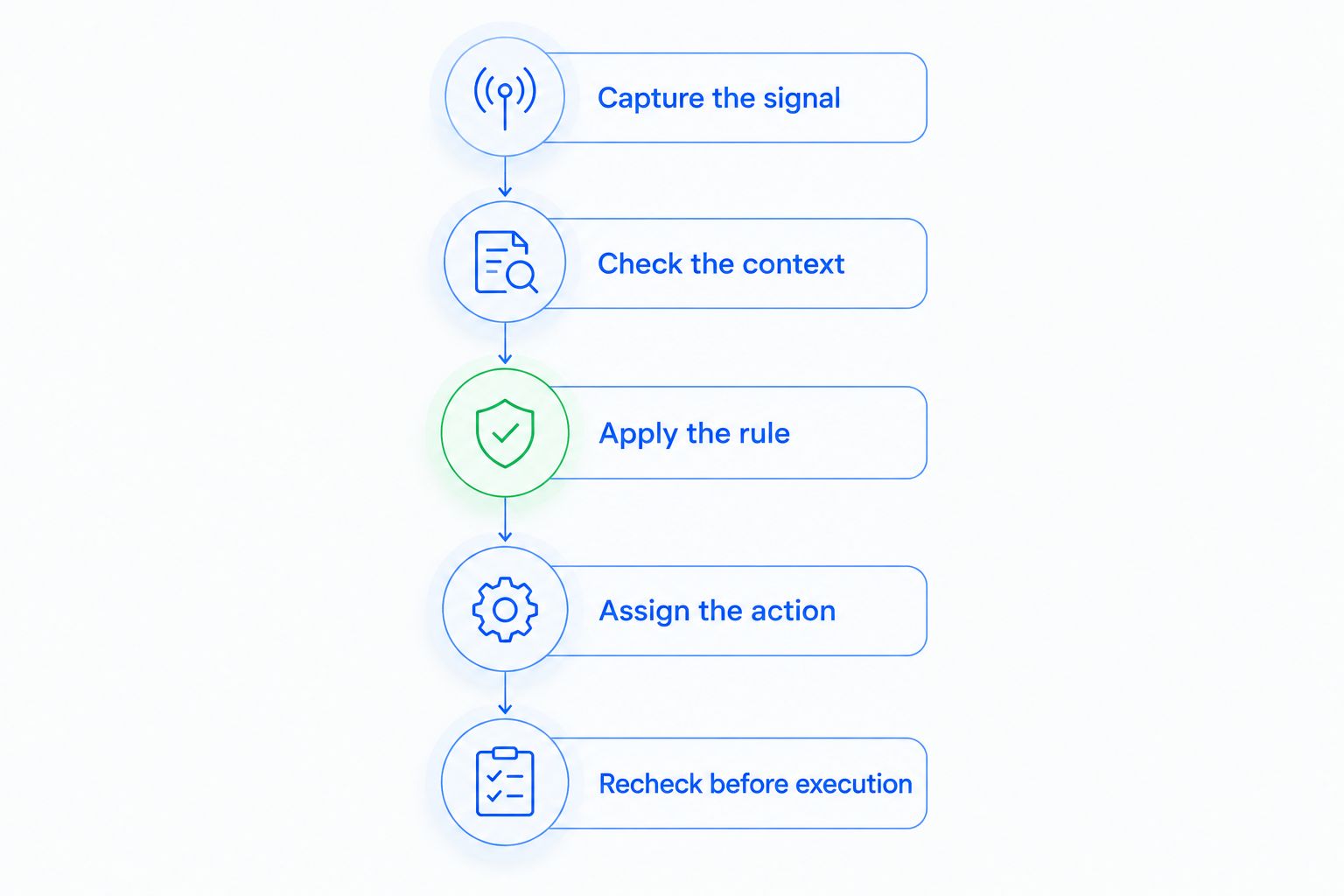
Use the following sequence as a setup framework, not as a claim that every CRM performs these steps automatically. Each step gives your team a clear requirement to check when configuring workflows.
1. Capture the signal
Start with an observable event: a customer reply, a completed call, a newly assigned lead, or a change in the opportunity's stage. Record the event against the relevant contact or deal so the next person does not have to reconstruct the conversation.
Distinguish customer activity from internal activity. A rep editing a record is not the same as a buyer asking for the next step. Your workflow should reflect that difference rather than treating every update as evidence of progress.
2. Check the context
Read the event alongside the existing conversation and sales stage. A reply asking to continue deserves a different action from a reply asking to stop. The presence of a message alone does not tell you which response is appropriate.
Also check whether the work is already complete. An unanswered reminder should not send a rep back to a customer who has already received the requested information. Make this review part of your workflow design, even when the final check is manual.
3. Apply the rule
Write the condition in plain language before configuring it. For example: when a customer requests a next step, route the conversation to the responsible rep for review. Avoid conditions so broad that unrelated activity produces the same urgent task.
Separate task creation from priority assignment. Creating a follow-up tells someone that work exists; marking it urgent says that it should displace other work. Require a clear reason for both decisions.
4. Assign the action
Give each task 1 owner, 1 next action, and 1 due date as a starting operating standard. These are setup recommendations, not performance benchmarks. Shared responsibility without a named owner leaves the actual decision unresolved.
Use a concrete task description such as reviewing a customer's requested next step. A vague instruction to follow up leaves the rep to discover the purpose after opening the record. The task should point to the relevant conversation rather than replace it.
5. Recheck before execution
Review the latest activity before completing the task or sending the next message. Customer conversations change, and a previously sensible action can become unnecessary. Treat a new reply as a reason to reassess the pending work.
For your 2026 workflow review, test what happens after a reply, reassignment, or stage change. Confirm that the person working the queue can identify outdated tasks and resolve them without losing the underlying conversation.
Why CRM task priority varies
Different queues produce different orders because they use different inputs and operating rules. Check these factors before blaming the software for a confusing list:
- Customer interactions: A conversation changes what the customer needs next. Review the content, not just the existence of activity.
- Sales stage: The next action should match the opportunity's current position, rather than repeat work from an earlier stage.
- Configured workflows: Conditions determine which events create work. Broad triggers produce broad task lists.
- Task ownership: Assignment determines who receives the work and who is responsible for resolving it.
- Follow-up commitments: A promised action needs a deadline that reflects the commitment, not an arbitrary reminder.
- Conversation visibility: A rep needs the relevant history to distinguish an unanswered request from a completed exchange.
Keep the reason for priority visible wherever your setup permits it. If that reason cannot appear in the queue itself, put it in the task description. A rep should not have to guess why a task moved ahead of everything else.
What should come first: a new reply or an overdue follow-up?
Put a customer waiting for an answer ahead of routine outreach, unless another task has a more urgent explicit commitment. This is a recommended operating rule, not a universal CRM default. The message content and the promise made to the customer determine the action.
An overdue task deserves review, not automatic escalation forever. Check whether the customer replied elsewhere, whether another rep completed the work, or whether the opportunity's next step changed. Then complete, revise, or reschedule the task deliberately.
Do not make the newest activity the winner in every situation. A recent internal update does not automatically outrank a customer commitment. Your priority policy should explain the difference between fresh information and urgent work.
Is lead scoring the same as task prioritization?
Lead scoring evaluates a prospect; task prioritization orders actions. A prospect's potential does not, by itself, tell a rep whether to respond, prepare information, make a call, or wait for an agreed date.
Keep those decisions separate in your 2026 process. A valuable opportunity still needs an appropriate next step, while a routine contact can have a time-sensitive request. Use the conversation to determine the action rather than treating a lead label as an instruction.
If your team uses scoring, ask what happens after a score changes. The operational question is who should do what next, and why. Without that connection, a score is another field to inspect rather than a usable work instruction.
Can a CRM move a deal without deciding every task for you?
Moving an opportunity and prioritizing a rep's work are separate decisions. A stage change records progress in the sales process. A task specifies an action that someone still needs to complete.
Do not assume that automatic pipeline movement proves automatic task ranking. Check which customer interactions trigger changes, which workflows govern them, and where a person reviews exceptions. A stage label alone does not establish urgency.
Your workflow should make the next required action clear after a deal moves. Sometimes that means creating work; sometimes it means closing obsolete work. Review both directions so progress does not leave old reminders behind.
Where Archescrm fits
Archescrm is best for growing sales teams that need CRM workflow automation and customer conversations in one place. Its stated capabilities include lead assignment, sales pipelines, automated reminders and follow-up sequences, conversation summaries, and automatic opportunity movement based on interactions and configured workflows.
The practical benefit is access to the contact, conversation, task, and sales context needed to decide what happens next. The boundary is equally important: those capabilities do not establish a particular task-ranking formula. Evaluate the workflow against your priority policy rather than assuming that automation supplies the policy.
Use Archescrm to assess that fit around your actual sales process. Bring examples of a customer reply, a missed follow-up, and a reassigned opportunity. Ask how the intended owner identifies the next action in each case.
Test the queue before adding more automation
Use a small set of deliberately different situations to review the design. These are test scenarios, not claims about measured results:
- Active reply: A customer asks a question while a routine follow-up remains pending. Check that the rep sees the question before repeating the outreach.
- Completed action: Another team member has already answered. Check that the remaining task does not prompt duplicate contact.
- Changed owner: A lead moves to a different rep. Check that responsibility is clear rather than split across old and new assignments.
- Changed stage: An opportunity progresses. Check that the remaining work matches the new stage.
- Stale reminder: A deadline passes without a useful next action. Check that someone reviews the reason instead of repeatedly postponing it.
For your 2026 review, judge the queue by whether a rep can explain the next action from the record. Do not judge it by the number of notifications created. More visible work is not necessarily better-directed work.
FAQ
How does a CRM decide which tasks need attention first?
A CRM orders tasks using the rules, activity, and task information available in its configuration. Due-date sorting and event-triggered workflows serve different purposes, so check how your particular queue is built.
Should overdue CRM tasks always come first?
Overdue CRM tasks should receive review, not unconditional priority. Check whether the action is still needed and compare it with current customer requests and explicit commitments.
What's the best starting rule for prioritizing sales tasks?
Start with customer commitments and active conversations before routine follow-up. Give each task an owner, a clear next action, and a deadline tied to the work.
Can a CRM understand why a customer replied?
A reply needs interpretation before it becomes an appropriate next action. Review the message and conversation context rather than treating every reply as a signal to advance the deal.
Does Archescrm support automated sales follow-up?
Archescrm supports CRM workflow automation for reminders, tasks, and follow-up sequences. Its stated capabilities also include conversation summaries and opportunity movement based on customer interactions and configured workflows.
Is automatic deal movement the same as automatic task ranking?
Automatic deal movement is not the same as automatic task ranking. Moving an opportunity changes its pipeline stage; prioritizing a task determines which action should receive attention first.
How do I stop CRM reminders from becoming noise?
Connect each reminder to a specific action and review it when the conversation changes. Resolve completed or outdated work instead of leaving every reminder open or repeatedly postponing it.
One last thing
A completed task can still represent unfinished sales work. Checking off a call does not tell the next rep what the customer agreed to, whether anything remains unanswered, or who owns the next step.
Before closing work, record the outcome and the next commitment. If there is no next action, make that clear too. The useful queue is the one that reflects what remains to be done, not the one that preserves every reminder ever created.