
 Log in
 Start Free Trial


Veterinary clinic CRM software is a system for managing pet-owner inquiries, conversations, and follow-ups with the aim of turning unanswered requests into booked visits. This 2026 guide explains how to organize that work without confusing owner communication with patient records, clinical decisions, or your appointment calendar.
- CRM software for veterinary clinics should organize owner follow-up, not replace veterinary practice management software.
- Arches CRM fits clinics seeking shared conversations, assigned follow-ups, and configurable pipelines; verify veterinary system connections before choosing.
- Keep pet identity, owner identity, booking confirmation, and communication preferences distinct.
- Start with a manual inquiry queue, then automate only the workflow your team can explain.
Why CRM software matters for veterinary clinics
A veterinary inquiry involves more than a prospective customer. Your team needs to know which owner contacted you, which animal the request concerns, whether the request needs clinical attention, and who owns the next administrative action.
The CRM's job is to prevent an inquiry from losing its next action—not to decide what care an animal needs. A message acknowledgment is not clinical triage, and a pipeline update is not a confirmed appointment.
For your 2026 setup, prioritize a clear handoff over a long feature list. The practical test for reducing manual CRM data entry is whether staff can record a conversation once and leave the next person enough context to act.
Keep clinical records and appointment availability in their designated systems. Add a CRM only where inquiry ownership, conversation history, or follow-up needs a clearer process.
How to build a veterinary clinic CRM workflow
1. Map the inquiry before choosing software
Start manually. Use your existing approved tools to list incoming requests, the assigned staff member, the last contact, and the next action. Avoid putting clinical detail into an improvised tracking sheet.
Separate administrative requests from messages that require your clinic's clinical escalation procedure. A question about becoming a client belongs in a different queue from a report of symptoms. Front-desk staff need a documented handoff, not an automated guess about urgency.
Choose one starting workflow, such as new-client inquiries. Adding every reminder and service request at once makes it harder to identify where the process breaks.
- Record the inquiry source and arrival time.
- Assign a named owner for the next action.
- Identify the pet without treating the owner as the patient.
- Record the next action and its due time.
- Route clinical concerns through your clinic's approved process.
2. Define stages around observable events
Write your stages on paper before configuring a pipeline. A stage should describe something that happened, not how optimistic a staff member feels about the inquiry.
For example, an owner replying to an email proves contact occurred. It does not prove that your clinic accepted the patient or reserved an appointment. Keep those events separate so automated updates do not overstate progress.
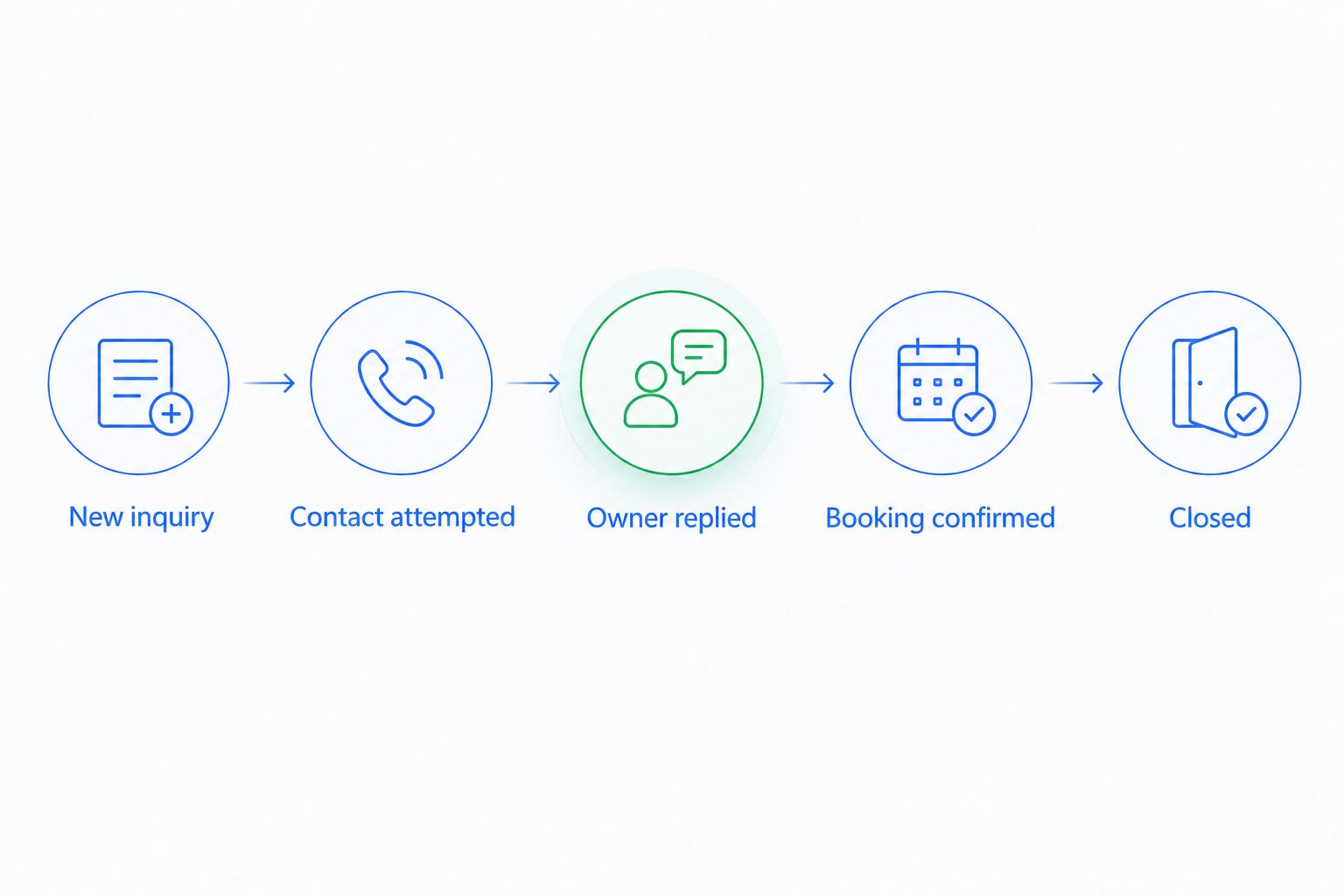
Use this starter sequence only for administrative new-client inquiries. Give each stage a written entry rule, then test whether two staff members would classify the same conversation consistently.
- New inquiry: an administrative request has arrived.
- Contact attempted: staff have tried to reach the owner.
- Owner replied: the owner has responded.
- Booking confirmed: staff have verified the appointment in the scheduling system.
- Closed: the inquiry has a recorded final outcome.
The sequence separates conversation progress from booking confirmation. That distinction matters whenever a reply triggers another task or stage change.
3. Centralize conversations without duplicating clinical records
First, establish a manual handoff standard: every open inquiry needs a conversation summary, an assigned person, and a next action. Use approved communication channels, and make the handoff understandable without requiring someone to search a colleague's inbox.
Arches CRM brings contacts, conversations, tasks, and sales activity together. Its supported communication capabilities include email, WhatsApp, SMS, and calls; confirm the setup required for each channel before moving clinic communication into it.
Arches CRM is best for veterinary clinics seeking general-purpose inquiry management and follow-up automation, rather than a replacement for clinical software. Its configurable workflows and conversation summaries support administrative coordination. A veterinary practice management connection still requires verification.
For your 2026 evaluation, ask the vendor to demonstrate a real administrative handoff using fictional records. Check what staff can see, what they must enter, and what remains in the veterinary system.
- Define which owner contact details belong in the CRM.
- Keep clinical notes in the designated patient record.
- Specify how staff distinguish pets within one household.
- Test email, messaging, and call workflows separately.
- Verify permissions and record-access controls before importing data.
4. Automate the next action, not the medical decision
Begin with a manual checklist for each inquiry type. Write down the trigger, the assigned action, the stopping condition, and the escalation route before enabling automation.
Arches CRM supports automated reminders, tasks, and follow-up sequences. It also moves opportunities through pipelines based on customer interactions and configured workflows. Those capabilities need explicit boundaries in a veterinary setting: a message about symptoms must not be treated as routine sales progress.
Keep message content administrative unless a clinician has approved the relevant process. A booking acknowledgment should not promise treatment, imply acceptance, or confirm a slot that the scheduling system has not reserved.
- Trigger an administrative follow-up task after an unanswered inquiry.
- Define how replies stop or redirect an existing sequence.
- Send clinical questions to the designated staff queue.
- Require verified booking before marking an inquiry booked.
- Specify how staff pause outreach for sensitive situations.
5. Test identity, scheduling, and failure handling
Before connecting systems, manually trace a fictional inquiry from arrival to closure. Identify which system holds the authoritative owner record, patient record, appointment, and communication preference.
Arches CRM supports integrations and APIs, but that does not establish compatibility with your veterinary practice management software. Ask for a demonstration of the specific connection you need. An API's existence alone does not establish which records transfer or how conflicts are resolved.
Use 20 fictional records as a manageable test set, not as a technical capacity claim. Include a household with multiple pets, duplicate owner details, a changed appointment, an unanswered inquiry, and a withdrawn communication permission.
- Check which fields transfer and in which direction.
- Confirm how duplicate owner records are handled.
- Test appointment changes and cancellations.
- Identify who sees a failed transfer or missing update.
- Reconcile CRM outcomes against the appointment system.
6. Pilot one workflow and review the exceptions
Run a 7-day pilot with one administrative inquiry type before expanding the setup. This is a proposed testing window, not a promised implementation timeline. Keep the scope small enough that staff can inspect each outcome.
Hold a 15-minute review at the end of each working day during the pilot. Examine unanswered inquiries, incorrect assignments, duplicate messages, and bookings that appear in one system but not the other. Fix the rule behind each repeated exception instead of asking staff to remember another workaround.
For appointment communication, appointment reminder chatbots belong within the same ownership rules as staff messages: distinguish a reminder, an owner response, and a verified schedule change. A request to reschedule still needs a clear destination and confirmation.
Measure the administrative process separately from care decisions. Count only verified appointments as bookings, and record unresolved inquiries rather than quietly removing them from the queue.
- Track elapsed time from inquiry arrival to first staff response.
- Count open inquiries without an assigned next action.
- Separate owner replies from verified bookings.
- Record duplicate outreach and failed handoffs.
- Expand only after staff can explain the exceptions.
Compare your veterinary clinic CRM options
For a 2026 decision, choose the smallest setup that resolves your actual handoff problem. Evaluate existing capabilities before adding another system, and require a demonstration wherever the workflow depends on a connection between products.
| Option | Best for | Main advantage | Key limitation |
|---|---|---|---|
| Manual inquiry queue using existing approved tools | Clinics defining an initial process | Lets staff test stages and responsibilities before configuring software | Staff must maintain assignments, updates, and handoffs manually |
| Existing veterinary system's communication features, where supported | Clinics whose current system already meets their inquiry needs | Keeps work within the established operating environment | Available channels, task handling, and automation depend on the specific system |
| Arches CRM alongside veterinary software | Clinics needing shared conversations, follow-up tasks, and configurable pipelines | Combines general-purpose contact management, communication, and workflow automation | Veterinary scheduling and patient-record compatibility must be verified |
Choose by workflow evidence, not by the longest feature list. Ask staff to complete the same fictional inquiry in each option. Watch for repeated entry, unclear responsibility, and any point where the system displays a booking without scheduling confirmation.
The manual option gives you control but requires ongoing discipline. Existing software avoids another handoff only if its actual capabilities meet your needs. A separate CRM adds workflow tools while also creating a connection and governance responsibility.
Common mistakes veterinary clinics make
Treating the owner and patient as one record
A household contact and an animal patient serve different purposes. If staff cannot tell which pet a message concerns, a tidy conversation history still leaves an unsafe ambiguity.
Define how each inquiry identifies the relevant pet. Keep the clinical record in its designated system, and test households with multiple animals before importing live contacts.
Treating an acknowledgment as a completed response
An automated receipt confirms that a message arrived. It does not establish that a person reviewed the request, answered the question, or escalated a clinical concern.
For your 2026 reporting, separate automated acknowledgments from staff responses. Otherwise, a fast automated message can hide an administrative queue that nobody owns.
Confirming appointments from conversation activity
An owner saying a proposed time works does not prove the appointment exists in the calendar. A pipeline rule based only on a reply risks marking unfinished work as complete.
Require a scheduling check before recording a confirmed booking. Test this rule with changed times, cancellations, and conversations containing several proposed appointments.
Continuing outreach after the context changes
A generic follow-up sequence is inappropriate when an owner has withdrawn permission, reported a pet's death, or raised a complaint needing personal attention. Staff need a clear way to interrupt routine outreach.
Document sensitive-message handling and test the actual stopping process. Do not assume that reading a reply automatically changes every active sequence.
Moving the entire contact list before testing
Importing everything first spreads unresolved field mappings and duplicate records across more work. A successful contact import also says nothing about whether appointment changes or communication preferences transfer correctly.
Start with fictional records, then a controlled live pilot. Keep a reconciliation process and a documented recovery plan before expanding the migration.
FAQ
What's the best CRM software for veterinary clinics?
The best fit depends on the administrative gap: inquiry ownership, shared conversations, or follow-up automation. Arches CRM fits general-purpose inquiry and follow-up workflows, but clinics must verify veterinary software compatibility before choosing it.
Can a CRM replace veterinary practice management software?
Do not treat a general-purpose CRM as a replacement for veterinary practice management software. Use the CRM for administrative relationships and follow-up, while keeping clinical records and appointment management in systems verified for those jobs.
Do we need a CRM if our veterinary software already sends reminders?
You need an additional CRM only if your existing setup leaves a defined workflow problem unresolved. Test inquiry assignment, shared conversation history, and next-action tracking before adding another system.
Can veterinary clinics automate appointment reminders?
Veterinary clinics can use reminder automation when their selected software supports the required scheduling and communication workflow. Verify appointment changes, permissions, and response handling before enabling messages for clients.
How should a veterinary CRM handle owners with several pets?
A veterinary CRM workflow should distinguish the owner contact from the animal involved in each inquiry. Test multi-pet households and keep clinical details in the designated patient record.
What should we measure during a veterinary CRM pilot?
Measure staff response time, unassigned inquiries, verified bookings, and failed handoffs. Separate automated acknowledgments from human responses and owner replies from confirmed appointments.
Can CRM automation decide whether a pet needs urgent care?
Do not use a general-purpose CRM workflow to decide clinical urgency. Route symptom reports and urgent concerns through your clinic's clinician-approved escalation process.
One last thing
Test the interruption, not just the happy path. Before expanding your 2026 workflow, send a fictional reply withdrawing communication permission while an inquiry remains open. Check who sees it, who stops outreach, and what happens to the pending task.
A workflow is not finished when it sends the right message. It also needs to stop, redirect, and hand control back to a person when the situation changes.