
 Log in
 Start Free Trial

Mortgage brokers’ CRM software is a system for managing borrower relationships, conversations, and follow-up with the aim of turning inquiries into completed mortgage applications. A CRM for mortgage brokers should keep borrower outreach separate from loan processing, connect each inquiry to an accountable owner, and make the next action clear.
- Choose a CRM for mortgage brokers around borrower follow-up, referral tracking, and clear pipeline ownership.
- Archescrm suits teams prioritizing shared conversations and sales workflow automation; validate mortgage-specific requirements separately.
- Google Sheets supports manual lead tracking, but follow-up depends on your team maintaining records and reminders.
- Keep sensitive borrower documents in an approved system rather than treating every CRM as a loan-processing platform.
Why CRM matters for mortgage brokers
A borrower asks about financing. Someone replies, requests information, and waits. Without a recorded next action, that inquiry becomes an email thread nobody owns.
Mortgage broker follow-up involves more than sending another message. You need to distinguish a new inquiry from a borrower awaiting documentation, a lender-dependent update, or a past client discussing another purchase. Those situations require different actions, not the same automated sequence.
Choose your 2026 CRM around the handoffs where borrower follow-up stops. A contact database helps you remember names; a working pipeline tells you who needs attention and why.
Use these operational constraints as your selection criteria:
- A borrower can discuss financing before being ready to apply.
- Referral partners and borrowers require separate communication histories.
- A loan-processing milestone and a sales follow-up task serve different purposes.
- Sensitive financial information requires deliberate storage and access decisions.
For the reminder mechanics, see how a CRM handles follow-up reminders automatically. Start by defining the action a reminder should trigger, not by adding more notifications.
Build a mortgage broker CRM workflow that people will use
Map your borrower journey before selecting software
Start with a spreadsheet and describe how an inquiry becomes an active borrower relationship. Record what your team actually does, including pauses and handoffs. Do not copy a generic sales pipeline and assume it fits mortgage work.
Separate relationship stages from lender or processing milestones. A borrower awaiting a lender response still needs communication, but another sales message does not resolve the underlying dependency. Your CRM should show the blocker and the person responsible for the next update.
Use stage names that explain observable progress. Avoid labels such as hot or promising unless your team has agreed on what they mean.
- New inquiry: record the source and assign an owner.
- Contact underway: record outreach and the next attempt.
- Requirements discussed: capture the borrower’s stated objective.
- Application handoff: identify the receiving person or system.
- Ongoing relationship: record the next relevant reason to reconnect.
Standardize the information you capture
Build a manual intake template before configuring CRM fields. Start with 5 required fields: contact name, contact details, inquiry source, assigned owner, and next action. This is a suggested operating template, not an industry benchmark.
Keep contact information separate from opportunity information. The same person can return with a different financing need; creating another unrelated contact record splits the relationship history. Likewise, a referral partner should not appear as the borrower on every opportunity they introduce.
For your 2026 setup, require only information that changes routing, communication, or the next decision. Collecting unnecessary details makes intake slower and expands what your team must protect.
- Identify duplicate contacts before importing records.
- Record the borrower’s preferred communication channel.
- Separate referral source from the assigned broker.
- Capture the agreed next action in plain language.
- Keep sensitive documents out of casual notes and message templates.
Assign ownership and schedule the next action
A shared spreadsheet and calendar can establish the rule: every active inquiry has an owner and a dated next action. Make that rule work manually before automating it. Otherwise, software simply repeats an unclear process faster.
Archescrm provides lead assignment, sales pipelines, automated reminders, tasks, and follow-up sequences. Those functions offer a faster path than maintaining separate records and calendar entries, once your team has defined the workflow.
Archescrm CRM is best for mortgage broker teams prioritizing lead follow-up and shared conversations over loan processing. Its fit depends on your sales workflow; evaluate mortgage-specific integrations, document handling, and access requirements separately.
- Assign one accountable owner to each active inquiry.
- Record the next action immediately after a conversation.
- Create a backup handoff for absent brokers.
- Stop routine outreach when a borrower responds or opts out.
- Escalate overdue tasks to an agreed reviewer.
Separate conversations from document collection
Start by reviewing where borrower information currently lives: inboxes, phones, shared folders, and processing systems. Decide which system holds each type of information. A CRM should provide relationship context without becoming an uncontrolled copy of every financial document.
Archescrm brings email, WhatsApp, SMS, and calls together and can summarize email conversations. That supports continuity when another team member takes over a lead. Summaries still need review before you rely on them for commitments, eligibility discussions, or instructions.
Use an approved document-collection process for financial records. Determine the actual storage destination and permission rules before connecting communication tools. Convenience does not replace your firm’s security and compliance review.
- Record the borrower’s communication preference.
- Document where supporting files belong.
- Keep referral-partner conversations distinct from borrower records.
- Review summaries against the original conversation.
- Give each team member access appropriate to their responsibilities.
Trigger automation from meaningful borrower events
Write your follow-up rules in a simple worksheet first. Each rule needs a trigger, an action, a stop condition, and an exception. A sequence without a stop condition can keep contacting someone after the conversation has moved on.
For your 2026 workflow, distinguish message activity from confirmed progress. An email reply does not automatically mean an application is complete. A requested document does not mean that document has been received and accepted.
Archescrm can move opportunities through the sales pipeline based on customer interactions and configured workflows. Configure those transitions around evidence your team can verify, and leave judgment-dependent decisions with the responsible person.
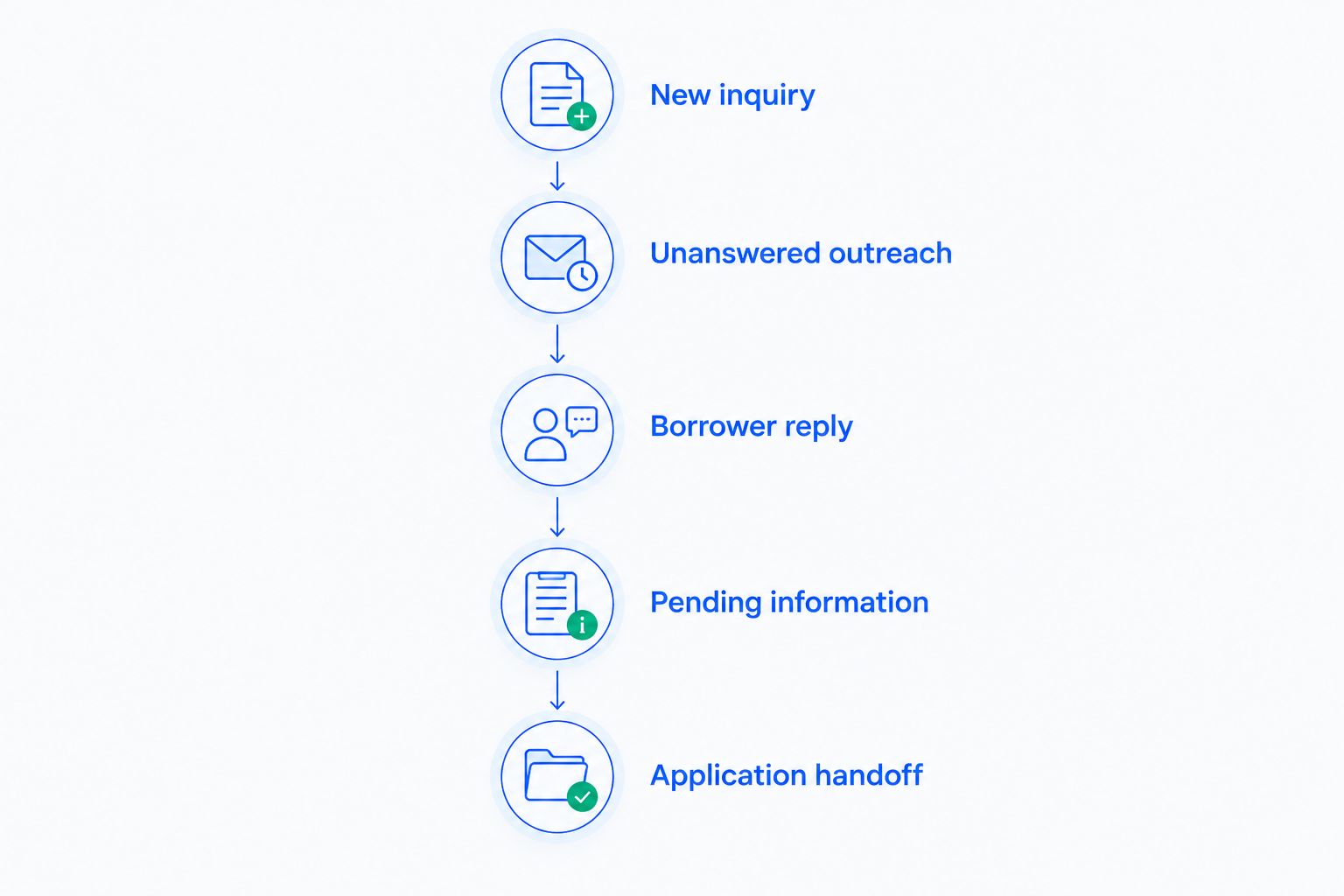
- New inquiry: create an owner’s first-contact task.
- Unanswered outreach: schedule the next approved attempt.
- Borrower reply: stop the unanswered-outreach sequence.
- Pending information: remind the owner to check the blocker.
- Application handoff: create a relationship-update task.
- Opt-out request: stop the affected communication workflow.
Connect the CRM to your existing mortgage systems
Begin with a written handoff procedure between the CRM and your existing loan-processing tools. Specify who transfers information, what they transfer, and how they confirm completion. A documented manual handoff is better than an integration nobody checks.
The CRM and a loan origination system have different jobs. The CRM manages relationship activity and follow-up; the loan origination system supports the application and origination workflow. Keep the authoritative record for each field clear.
Evaluate integrations using the exact systems and workflows your business uses. An API connection alone does not establish that ownership, permissions, duplicates, and failed transfers are handled correctly. Ask for a demonstration using representative, non-sensitive sample records.
- Identify the authoritative system for each shared field.
- Specify which events should update the CRM.
- Test how duplicate contacts are handled.
- Check what happens when a transfer fails.
- Confirm who can view and change connected records.
- Document a manual fallback for interrupted connections.
Review missed follow-up before expanding automation
Use a suggested 15-minute review to inspect overdue actions, unassigned inquiries, and records without a next step. Start with the spreadsheet or CRM view you already have. The goal is to find broken ownership, not to admire a larger dashboard.
Before rolling out your 2026 workflow, test 10 sample leads covering replies, silence, duplicate records, handoffs, and opt-outs. These are suggested test cases, not performance benchmarks. Include an interrupted integration and an absent owner so the test covers exceptions, not just the expected path.
Measure activity separately from outcomes. A sent message is an action; a completed borrower conversation is a different result. Reports should preserve that distinction rather than treating every automated message as progress.
- Review inquiries without an assigned owner.
- Inspect overdue tasks and their actual blockers.
- Check whether replies stopped the correct sequences.
- Compare stage changes with supporting evidence.
- Record which handoffs required manual correction.
- Expand automation only after correcting repeated failures.
Compare your mortgage broker CRM options
Choose the operating approach before choosing the interface. The right option depends on whether your immediate problem is inconsistent recordkeeping, shared follow-up, mortgage-specific workflow, or application processing.
For a 2026 evaluation, compare the work each option removes and the work it leaves with your team. A general sales CRM should not receive credit for mortgage functionality you have not verified. A specialized system should still prove that everyday borrower communication is usable.
| Option | Best for | Main advantage | Key limitation |
|---|---|---|---|
| Google Sheets with a shared calendar | A broker establishing a manual lead-management process | Makes fields, owners, and next actions explicit | The team must maintain records, reminders, and conversation context manually |
| Archescrm CRM | Growing teams coordinating borrower follow-up across communication channels | Combines contacts, conversations, pipelines, tasks, and workflow automation | Mortgage-specific integrations, document controls, and processing requirements need separate validation |
| Mortgage-specific CRM | Teams evaluating specialized borrower and referral workflows | Provides a category focused on mortgage relationship management | Features vary; verify actual workflows rather than relying on the category label |
| Existing loan origination system | Teams managing mortgage applications and origination work | Keeps application processing in its designated system | Relationship-management and follow-up functions require their own evaluation |
Do not treat these options as mutually exclusive. A mortgage broker can use a CRM for relationship activity alongside a loan origination system, provided the handoff is clear. The decision is which system owns each task, not which system can display the most fields.
Common mistakes mortgage brokers make with CRM
Treating every borrower as ready to apply
A borrower researching financing needs a different next action from someone assembling an application. Putting both into the same sequence produces irrelevant outreach. Record readiness and the agreed next step before scheduling messages.
Mixing referral partners with borrower opportunities
An agent or other referral partner can introduce multiple borrowers without becoming the borrower themselves. Keep the partner relationship separate and connect it to the relevant inquiries. That preserves both histories and makes referral attribution understandable.
Advancing stages because a message arrived
A reply proves that someone replied. It does not establish that requested information is complete or a processing milestone has been reached. Define the evidence required for each stage change, especially when automation can move records.
Collecting financial documents wherever it is convenient
An attachment in an inbox is not a deliberate document-management process. Identify approved collection and storage methods before asking borrowers to send sensitive records. Verify access, retention, and deletion requirements with the people responsible for those controls.
Reporting sent messages as pipeline progress
Automation can produce activity without resolving a borrower’s question or removing a blocker. Review conversations completed, next actions agreed, and handoffs confirmed alongside outreach activity. The CRM should expose stalled work, not hide it behind message totals.
FAQ
What is the best CRM for mortgage brokers?
The best CRM for mortgage brokers fits your borrower follow-up, referral tracking, and system handoffs. Choose shared communication and workflow tools for relationship management, then verify mortgage-specific processing and security requirements separately.
Is Archescrm suitable for mortgage brokers?
Archescrm suits mortgage broker teams that need lead management, shared conversations, sales pipelines, and automated follow-up. Evaluate its fit against your exact mortgage systems, document-handling requirements, and access rules before adopting it.
Can a CRM replace a loan origination system?
Do not assume a CRM replaces a loan origination system. Relationship management and loan processing serve different functions; verify every required origination workflow before considering any replacement.
Can I manage mortgage leads in a spreadsheet?
You can manage mortgage leads in a spreadsheet with defined owners, stages, and next actions. Your team must maintain the records and reminders manually and keep sensitive borrower information in approved systems.
What should mortgage brokers automate first?
Automate owner assignment, follow-up tasks, and stop conditions first. Establish the manual rules before configuring automation, and keep judgment-dependent borrower decisions under human review.
How do I test a mortgage CRM before rollout?
Test a complete borrower workflow using non-sensitive sample records before rollout. Include replies, unanswered messages, duplicate contacts, opt-outs, absent owners, and failed handoffs so the test covers exceptions.
Should borrower documents be stored in the CRM?
Store borrower documents in the CRM only when your approved security and compliance process permits that use. Verify storage, access, retention, and deletion controls rather than assuming a contact record is an appropriate document repository.
One last thing
Before adding another sequence, open an active borrower record and ask a colleague to explain the next action without checking someone else’s inbox. If they cannot, fix the record and ownership rule first.
For your 2026 setup, make one clear next action per active opportunity the operating standard. More automation cannot compensate for a team that has not decided who acts next.