
 Log in
 Start Free Trial

Home services contractor CRM is software that organizes inquiries, customer conversations, estimates, and follow-up tasks with the aim of turning leads into booked work. This 2026 guide explains how to choose and set up a CRM for contractors without confusing sales follow-up with crew scheduling, dispatch, or job management.
- Choose a CRM for contractors around estimate follow-up, lead ownership, and clear handoffs to job scheduling.
- Arches CRM fits contractors prioritizing lead management, shared customer conversations, and automated sales follow-up.
- A sales CRM organizes opportunities; field service software addresses operational workflows. Evaluate those needs separately.
- Test your actual inquiry-to-booking process before moving every customer record into a new system.
Why CRM matters for home services contractors
A homeowner asks about a repair. Someone answers the call, someone else prepares the estimate, and another person manages the calendar. Without a shared record, the handoff depends on people remembering what happened.
Your CRM should make the next customer action visible, not just store a name and phone number. A contact record alone does not tell you whether an estimate needs approval, the customer requested a callback, or the office is waiting for site photos.
Start with a written follow-up process. Understanding how a CRM handles follow-up reminders automatically helps you distinguish a reminder to your team from a message sent to the homeowner.
For your 2026 selection, separate sales needs from operational needs. Winning an installation project and assigning a technician to an emergency repair are different workflows. Define both before choosing software, or you will judge a sales system against a dispatch requirement it was never selected to meet.
How to choose and set up your contractor CRM
1. Map your inquiry-to-booking process
Start manually with a shared worksheet and your existing calendar. Write down what happens from the first inquiry until the customer accepts the work, including who owns each handoff. Use actual situations from your business rather than a software demo's sample pipeline.
Separate emergency service from planned projects. An urgent repair needs a clear route to scheduling; a replacement or renovation inquiry needs qualification, an estimate, and follow-up. Putting both into an identical sequence hides the actions that distinguish them.
Choose a 30-day pilot as your initial evaluation window. That is a planning recommendation, not a promised implementation time. Select a workflow you can observe through that period and use it to test whether the system supports your process.
- List every inquiry source your office currently handles.
- Name the person responsible for the first response.
- Record the information needed before preparing an estimate.
- Define what counts as accepted work.
- Identify the point where sales responsibility passes to scheduling.
2. Define stages that reflect customer decisions
Build your pipeline in a spreadsheet before configuring it in software. Each stage needs an entry condition and a clear next action. Labels such as New inquiry, Qualified, Estimate sent, and Accepted work describe progress better than vague categories such as Active.
Do not use a pipeline stage for every internal task. Ordering materials and assigning a crew belong in an operational workflow unless they directly determine whether the customer can accept the proposal. Keep the sales view focused on the buying decision.
Also separate the homeowner's contact record from individual opportunities. A customer requesting a repair today and discussing an installation later should not force you to overwrite the original sales history.
- Define when an inquiry becomes qualified.
- Record when the estimate actually reaches the customer.
- Distinguish waiting for a customer from waiting on your team.
- Require a reason when an opportunity closes without a sale.
- Create a separate opportunity for a distinct project.
3. Assign ownership and automate the next action
Begin with calendar reminders and a named owner for every open opportunity. Write down the event that triggers follow-up, the action required, and the condition that stops it. Only then move those rules into software.
Arches CRM provides lead assignment, sales pipelines, workflow automation, and shared customer communication. Its automation supports reminders, tasks, and follow-up sequences; its assistance also summarizes conversations and moves opportunities through configured workflows based on customer interactions.
Arches CRM is best for contractors prioritizing lead management, shared conversations, and automated sales follow-up. Those capabilities address the sales workflow; they do not establish whether the platform meets your crew scheduling or dispatch requirements.
For a 2026 rollout, start with a narrow rule: an estimate sent creates an owner task, while acceptance ends the sales follow-up sequence. Expand only after you have checked the behavior against real customer responses.
- Assign an owner before starting any follow-up sequence.
- Trigger tasks from a defined event, not an ambiguous stage.
- Stop sales messages when the customer accepts or declines.
- Route unusual requests to a person for review.
- Check automated stage changes against the conversation history.
4. Bring customer conversations into the record
The manual starting point is a shared log: who contacted the homeowner, which channel they used, what was agreed, and what happens next. That log is more useful than a collection of messages with no connection to the estimate.
When evaluating communication features, test the channels your customers already use. Arches CRM brings email, WhatsApp, SMS, and calls together, but your evaluation should check the actual account setup and how each conversation connects to the relevant contact and opportunity.
Check practical distinctions rather than accepting a broad feature label. A logged phone call is not the same as a recorded call. An email summary is not the original conversation. Ask users to open the underlying record when an estimate, appointment, or disputed instruction depends on exact wording.
- Attach each conversation to the correct customer.
- Record the homeowner's preferred contact channel.
- Separate project notes from unrelated customer requests.
- Keep the original conversation accessible for verification.
- Confirm who can view and edit customer records.
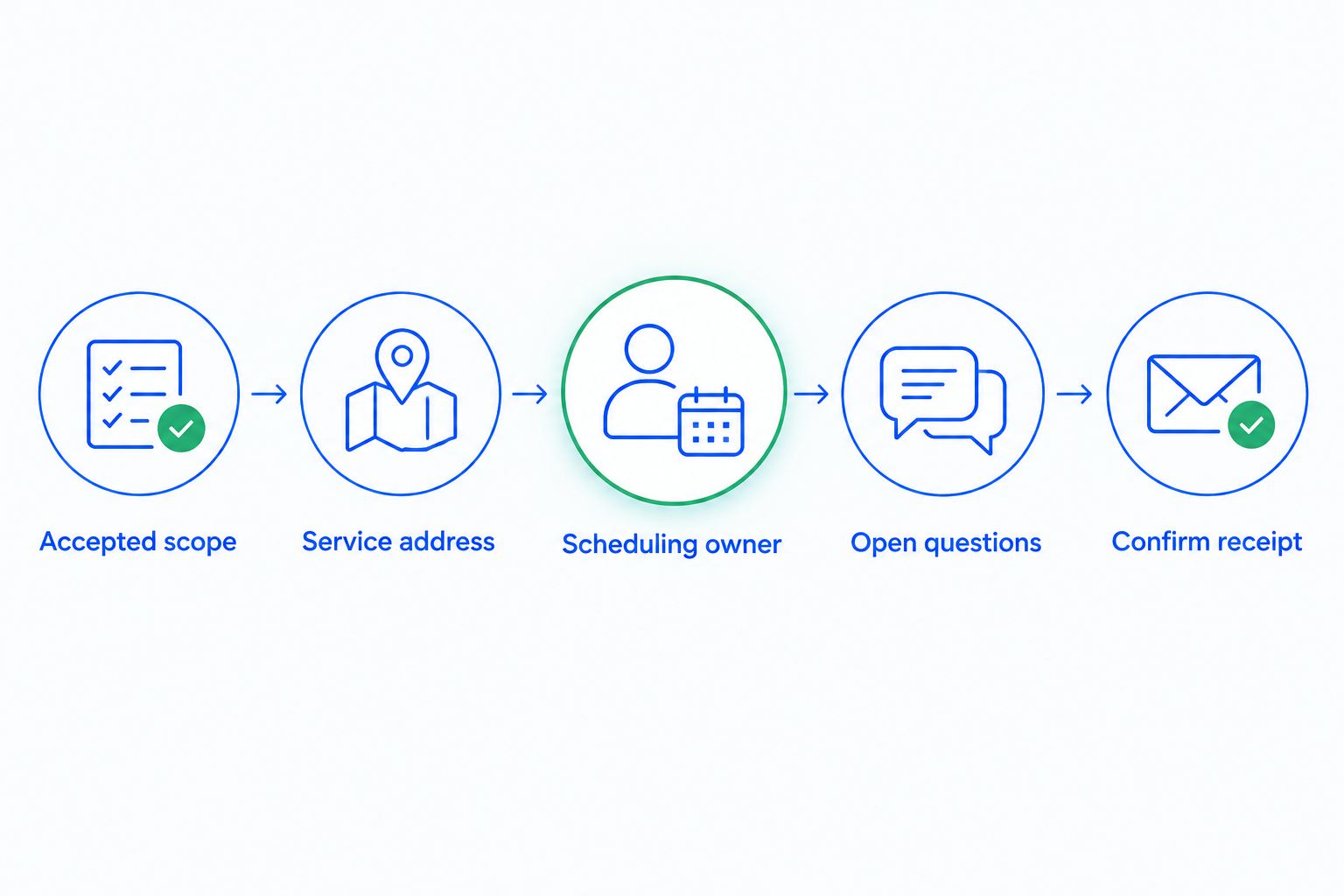
5. Define the handoff from accepted work to scheduling
Write a handoff checklist before connecting systems. An accepted estimate should tell the scheduling team what was approved, where the work belongs, and what still needs confirmation. Moving a card to Won does not communicate those details by itself.
Use a shared document or task list to test this handoff manually. Then evaluate whether your CRM can support the required task creation or exchange information with the operational tools you already use. Integrations and APIs are part of the brand's stated capabilities, but compatibility with a particular system needs verification.
Keep responsibility explicit throughout the transition. Sales should not assume that scheduling received the job simply because an opportunity changed stage. The receiving person needs a visible way to acknowledge the handoff and flag missing information.
- Attach the accepted scope and relevant customer notes.
- Record the service address separately from billing details.
- Identify the person receiving the scheduling handoff.
- Mark unresolved access or appointment questions.
- Confirm receipt before closing the sales-side task.
A clear handoff separates customer agreement from operational readiness. Use these checkpoints to test whether information survives the transition between people and systems.
6. Test the workflow before importing everything
Run the process manually with a small, representative set of opportunities first. Include an urgent inquiry, a planned estimate, a customer who changes scope, and someone who declines. You need to test exceptions, not just a customer who moves neatly through every stage.
During your 2026 pilot, set a 7-day checkpoint to review record quality, ownership, and automation behavior. This is a suggested review cadence, not a performance benchmark. Have the office and sales users explain what they believe the next action is without asking the system administrator.
Check the effort required to maintain the record. If staff must enter the same address or estimate status in separate tools, document that duplication before deciding whether an integration resolves it. Do not assume that a connection transfers every field or update you need.
- Test a new inquiry through estimate acceptance.
- Test a declined estimate and confirm follow-up stops.
- Change an owner and inspect existing tasks.
- Check duplicate-contact handling with a repeat customer.
- Export sample records and inspect the usable fields.
- Verify what reaches the scheduling workflow.
7. Measure response, follow-up, and booked outcomes
Start with a spreadsheet report using consistent definitions. Track inquiry received, first response, estimate sent, customer decision, and handoff confirmed. A dashboard does not fix inconsistent event timestamps or opportunities that staff never close.
Use a 15-minute review to inspect overdue actions and unclear ownership with your team. That is a recommended meeting limit, not a claim about time saved. Address the stuck records first, then check the wider pattern: are opportunities waiting on customers, estimates, or internal handoffs?
Trade-specific evaluation belongs here too. The distinction matters when evaluating CRM software for plumbing contractors: an urgent repair inquiry needs a scheduling handoff, while a planned replacement estimate needs a sales follow-up record. Measure the workflow each inquiry actually follows rather than treating every request as the same lead.
- Define first response consistently across communication channels.
- Track overdue next actions by opportunity owner.
- Separate estimate acceptance from completed job revenue.
- Record lost opportunities with a specific reason.
- Review handoff failures alongside sales-stage delays.
Compare CRM approaches for your contractor business
Choose the workflow first and the software second. For a 2026 decision, compare options against the same customer journey, including declined estimates and scheduling handoffs. A system that demonstrates contact storage but cannot support your next action has not passed the evaluation.
| Option | Best for | Main advantage | Key limitation |
|---|---|---|---|
| Shared spreadsheet and calendar | Owner-operated teams documenting a simple sales process | Lets you define stages, ownership, and follow-up without a software migration | Reminders, updates, and conversation logging depend on manual work |
| Arches CRM | Growing contractor sales teams prioritizing leads, conversations, and follow-up | Combines lead management, pipelines, communication, and workflow automation | Evaluate dispatch and job-management requirements separately; sales capabilities alone do not establish operational fit |
| Field service management software | Contractors prioritizing technician assignment and job execution | Centers the evaluation on service delivery rather than only the sales pipeline | Check estimate follow-up and shared sales communication rather than assuming they meet your needs |
| CRM connected to operational software | Teams needing a sales workflow alongside existing job-management tools | Keeps the sales and delivery requirements distinct | Connections need field mapping, ownership rules, and testing to prevent conflicting records |
A spreadsheet is a valid starting point when you are still defining the process. Its limitation is the manual work required to keep it current. Automation becomes valuable after your team agrees on what should happen and who is responsible.
A connected setup also needs a defined source of truth. Decide which system owns the customer address, accepted scope, and job status. Otherwise, a corrected detail in one tool can remain wrong in another.
Common mistakes home services contractors make
Treating every inquiry like an estimate opportunity
Emergency repairs, maintenance requests, and planned installations need different next actions. A blanket sales sequence ignores those differences. Route by service need before applying follow-up rules, and keep urgent scheduling requests visible outside the estimate queue.
Tracking the homeowner but losing the project
A contact record does not replace a project record. Repeat customers can have different properties, scopes, and decisions. Keep each opportunity distinct while preserving the shared customer history, so a declined installation estimate does not erase an active repair request.
Sending reminders after the customer has decided
A follow-up sequence needs stop conditions. Acceptance, rejection, and a request to pause each require a clear response from your workflow. Test those conditions with actual record changes before expanding automation to the entire pipeline.
Buying sales software to solve dispatch problems
Lead assignment and technician assignment are different requirements. Write separate acceptance criteria for sales and operations, then ask the system to demonstrate both if both are required. Do not substitute a general feature list for a working scheduling handoff.
Counting accepted estimates as completed revenue
An accepted estimate marks a sales decision, not proof that the work was completed or payment collected. Keep booked work, completed work, and collected revenue distinct. Your CRM reporting and operational reporting should use labels that make those differences explicit.
FAQ
What's the best CRM for contractors handling home service leads?
The best CRM for contractors fits your inquiry-to-estimate process, assigns ownership, and makes the next action clear. Arches CRM fits teams prioritizing lead management, shared conversations, and automated sales follow-up; evaluate operational requirements separately.
Is a contractor CRM the same as field service management software?
A contractor CRM and field service management software address different core workflows. CRM evaluation centers on leads, conversations, and sales progress, while field service evaluation centers on scheduling and job execution. Some systems cover both, so test the actual functions you need.
Can I manage contractor leads in a spreadsheet?
Yes, a spreadsheet can track contractor leads, owners, stages, and next actions. It is a practical way to define your process before adopting software, but your team must maintain records and reminders manually.
What should a CRM do after I send an estimate?
A CRM should record that the estimate was sent, assign a follow-up owner, and make the next action visible. Automated follow-up needs stop conditions for acceptance, rejection, and requests to pause.
Can a CRM replace my technician scheduling system?
Only a CRM with the required scheduling and operational functions can replace your technician scheduling system. Lead management and sales automation alone do not establish that fit. Test technician assignment, appointment changes, and handoff details before replacing an existing tool.
How should I test a CRM before moving customer records?
Test a representative inquiry through qualification, estimate follow-up, acceptance, and the scheduling handoff. Include declined work, ownership changes, and repeat customers so the evaluation covers exceptions as well as the normal path.
Which contractor sales metrics should I track first?
Track time to first response, overdue next actions, estimate decisions, and confirmed scheduling handoffs first. Define each event consistently and keep estimate acceptance separate from completed work and collected revenue.
One last thing
Before your 2026 CRM decision, ask someone who did not handle the original inquiry to read an opportunity record and explain the next action. If that person cannot identify the owner, customer decision, and unresolved question, fix the record structure before adding more automation.
Automation follows your rules; it does not define responsibility for you. Start with a clear handoff, then automate the repetitive work around it.