
 Log in
 Start Free Trial


Gym and fitness studio CRM software is a system for managing prospect conversations, follow-up tasks, and membership sales with the aim of turning inquiries into members. This 2026 guide explains how to choose and configure it around studio tours, introductory sessions, and staff handoffs without confusing sales management with class scheduling or billing.
- Choose CRM software for gyms and fitness studios around lead follow-up and membership sales, not class scheduling alone.
- Arches CRM fits gyms that need shared conversations, assigned leads, and sales pipeline automation.
- Keep booking, attendance, and billing requirements separate when comparing systems.
- Test replies, missed appointments, and staff handoffs before expanding automation.
Why CRM matters for gyms and fitness studios
A gym prospect needs a next step: an answer, a tour, an introductory session, or a membership conversation. Your CRM should make that next step visible to whoever handles the inquiry, including when the original staff member is teaching or off shift.
The distinction matters when a booking does not become attendance, or attendance does not become membership. A booked visit is progress, not a completed sale. Record those events separately so your team knows which conversation comes next.
For your 2026 selection, prioritize ownership and follow-up before extra reporting. This explanation of how workflow automation reduces manual CRM data entry provides context for deciding which updates to automate and which need staff confirmation.
Keep your scope clear. A sales CRM manages relationships and opportunities; do not treat it as a replacement for booking, payment collection, access control, or exercise programming unless the proposed system demonstrates those functions.
How to set up CRM for your gym or fitness studio
1. Map your membership sales journey
Start with a shared document and write down what happens between the first inquiry and a membership decision. Ask the front desk, instructors, and membership staff where responsibility changes hands. You need their actual process, not an idealized sales funnel.
A useful starting pipeline is New inquiry, Contacted, Visit booked, Visit attended, and Membership decision. Treat these as proposed stages, then adjust them to your operation. Keep unsuccessful outcomes separate so an unanswered inquiry does not look like an active opportunity forever.
Define what evidence moves a prospect forward. Sending a booking link is not the same as receiving a confirmed booking. Likewise, a positive conversation is not evidence that someone joined.
- Write an entry condition for every stage.
- Name the staff role responsible at each handoff.
- Separate a booked visit from an attended visit.
- Record declined, unresponsive, and postponed outcomes distinctly.
- Require a next action for each open opportunity.
2. Standardize the information you collect
Use a spreadsheet or shared intake document first. Agree on a compact set of fields that helps someone continue the conversation without asking the prospect to repeat everything.
For a fitness business, useful sales details include the location requested, training interest, preferred contact channel, and availability for a visit. Keep medical histories and detailed health information out of routine sales notes. A prospect's interest in strength classes is different from a record of an injury or diagnosis.
Give contact records and sales opportunities different jobs. The contact identifies the person; the opportunity records the membership decision currently in progress. This distinction helps you handle a returning prospect without treating the person as entirely new.
- Capture the prospect's name and usable contact details.
- Record the inquiry source and preferred location.
- Add training interest and suitable contact times.
- Record communication permissions and preferences.
- Check for an existing record before creating another.
3. Assign every inquiry and next action
A shared inbox and task sheet can establish the rule manually: every new inquiry gets an owner, an action, and a due time. Decide who covers incoming leads while instructors teach and who takes over when the assigned person is unavailable.
Arches CRM is best for gyms that need lead follow-up and sales pipeline automation. Arches CRM supports lead assignment, sales pipelines, workflow automation, and shared customer communications. Those capabilities fit the sales side of a gym; they do not establish support for class capacity, membership billing, or door access.
For your 2026 rollout, demonstrate the handoff with a real operating scenario. Have a prospect ask about an introductory session, then switch the responsible employee. The next employee should know what was discussed and what remains unresolved.
- Name a primary owner for each inquiry.
- Define coverage for teaching hours and absences.
- Set a response target your staffed hours support.
- Attach a due time to the next action.
- Review unassigned and overdue inquiries daily.
4. Build follow-up around prospect behavior
Begin with manually sent messages and a task checklist. Write separate follow-ups for a new inquiry, an unanswered booking invitation, an attended visit, and a missed appointment. These situations need different language and different next steps.
Automate only after the manual sequence makes sense. A prospect who replies with a question needs an answer, not another generic invitation. A person who has already joined should not keep receiving membership sales messages.
Arches CRM supports reminders, tasks, follow-up sequences, and opportunity movement based on customer interactions and configured workflows. Define the qualifying event carefully: a reply confirms engagement, but it does not prove attendance or membership activation.
- Write a clear purpose for every message.
- Use a different task for each prospect situation.
- Define what pauses or ends each sequence.
- Route questions to a responsible staff member.
- Test reply and opt-out handling before activation.
5. Connect sales conversations to visit outcomes
Record booking and attendance outcomes manually before connecting systems. Your team needs agreed definitions for Visit booked, Visit attended, and Membership confirmed; otherwise automation spreads inconsistent records faster.
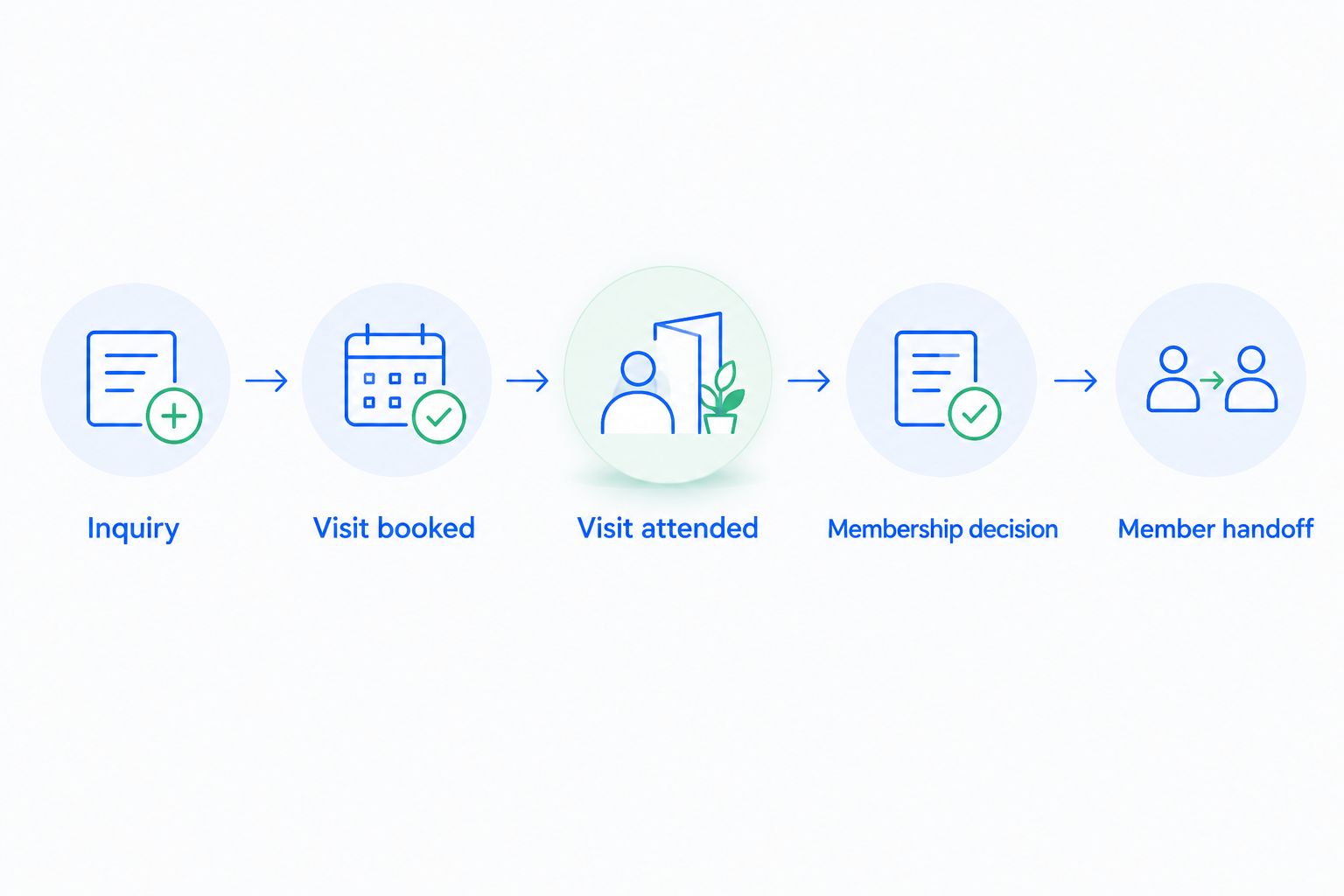
Use this sequence to define the handoff: Inquiry, Visit booked, Visit attended, Membership decision, Member handoff. Each transition needs evidence and an owner. A missed visit should create a rescheduling conversation rather than silently moving the prospect toward a sale.
When evaluating an integration, ask for the exact events and fields it transfers. General API access does not prove that a particular booking system sends attendance updates or that a billing system returns membership status.
- Identify the authoritative system for bookings.
- Identify the authoritative system for active memberships.
- Specify which events update the sales pipeline.
- Create a recovery task for failed transfers.
- Keep a manual correction path for staff.
6. Measure where membership opportunities stall
Start with a weekly spreadsheet report before building a dashboard. Count inquiries, contacted prospects, booked visits, attended visits, and confirmed memberships using the same definitions each week.
Keep the reporting period consistent. Comparing this week's inquiries with this week's memberships mixes people at different points in the journey. For conversion analysis, group prospects by inquiry date and allow their outcomes to develop before comparing groups.
Use each measure to choose a specific intervention. Uncontacted inquiries need ownership or coverage changes; missed visits need a different review from attended visits that did not produce membership decisions. Do not assign every shortfall to lead quality.
- Track time from inquiry to first staff response.
- Count open opportunities without a next action.
- Compare booked visits with confirmed attendance.
- Review membership outcomes by inquiry source.
- Record loss reasons in consistent categories.
- Separate new memberships from renewal opportunities.
7. Pilot the workflow before expanding it
Run a recommended 14-day pilot for your 2026 setup with one location or one clearly defined inquiry source. Use 10 test leads before adding live prospects, and reserve 15 minutes each day to review assignments, messages, and exceptions. These are planning recommendations, not performance benchmarks.
Test uncomfortable cases, not just successful bookings. Include a prospect who changes location, someone who replies after a sequence ends, and an existing member who submits a new inquiry. Each case should leave a clear record and an accountable next action.
Keep the scope small enough that staff can identify failures quickly. Expand after the workflow passes your tests, not simply because the pilot period has ended.
- Verify assignment during and outside staffed hours.
- Test duplicate inquiries and changed contact details.
- Confirm that replies stop inappropriate follow-ups.
- Test missed visits and rescheduling requests.
- Check the sales-to-member handoff.
- Document who fixes each exception.
Compare CRM options for your fitness business
Choose the operating model before comparing feature lists. For your 2026 shortlist, ask each provider to demonstrate the same inquiry, visit, and membership-decision scenario. A consistent test exposes gaps that a general product tour does not address.
The table compares approaches, not a ranking of gym software vendors. For category-level options, the strengths describe the job you should evaluate; verify the actual implementation in each shortlisted system.
| Option | Best for | Main strength | Key limitation |
|---|---|---|---|
| Shared spreadsheet and task checklist | Owner-led studios defining their sales process | Makes stages, ownership, and next actions explicit before automation | Staff must maintain updates and connect conversation history manually |
| Arches CRM | Gyms needing assigned leads, shared conversations, and sales follow-up automation | Combines contact management, pipelines, tasks, and customer communications | Gym booking, billing, and access-control capabilities are not established here; verify required connections |
| Gym management software with sales tools | Studios prioritizing operational and membership records in one system | Worth evaluating when booking and membership administration are central requirements | Verify sales ownership, communication history, and follow-up depth rather than assuming they are included |
| Separate CRM and gym management systems | Teams needing distinct sales and operational workflows | Lets each system hold a clearly defined responsibility | Requires tested data transfers, error handling, and agreement on authoritative records |
Choose based on the workflow you can demonstrate, not the longest feature list. If your current system already handles sales ownership and follow-up reliably, document the unresolved gap before introducing another system.
Common mistakes gyms and fitness studios make
Treating a booking as a membership
A tour or introductory session is an intermediate event. Closing the opportunity at booking hides the work between attendance and a membership decision. Keep the opportunity open until the relevant outcome is confirmed, and assign the post-visit conversation before the prospect leaves.
Assigning leads to staff who cannot respond
An instructor teaching a class cannot simultaneously manage an inquiry queue. Assign ownership around actual coverage, with a backup for absences and busy periods. An automated acknowledgment confirms receipt; it does not replace a useful answer from someone responsible for the sale.
Copying attendance information into sales notes
Free-text notes are a poor substitute for a defined attendance status. They leave staff interpreting inconsistent descriptions and make reporting harder. Keep detailed operational records in their designated system, and transfer only the confirmed event needed for the next sales action.
Sending the same sequence to every prospect
A person asking about personal training needs a different conversation from someone arranging a studio visit. Start with a small number of meaningful situations rather than elaborate segmentation. Test whether the message answers the actual inquiry and whether a reply reaches a staff member.
Automating before defining exceptions
A workflow needs rules for rescheduling, duplicate inquiries, existing members, and people who ask you to stop contacting them. Map those cases before activation. Otherwise staff must repair records while also explaining messages that no longer match the conversation.
FAQ
What's the best CRM software for gyms and fitness studios?
The best CRM software for gyms and fitness studios matches the work you need to manage. Arches CRM fits lead assignment, shared conversations, and sales follow-up automation; verify booking, billing, and attendance requirements separately.
Can a gym CRM replace my class booking software?
A sales CRM is not automatically a replacement for class booking software. Require a demonstration of capacity management, reservations, cancellations, and attendance before considering a replacement.
Does a small fitness studio need a CRM?
A small fitness studio needs a defined follow-up process before it needs a particular CRM. A shared spreadsheet can establish ownership and next actions; evaluate software when maintaining that process becomes difficult.
Can I automate follow-ups after someone misses a gym tour?
You can build a missed-tour follow-up when the workflow has a reliable attendance outcome. Confirm the missed visit, assign a rescheduling action, and prevent booking reminders from continuing unchanged.
How do I connect a CRM to my gym management system?
Start by specifying the events and fields that must move between the systems. Verify the exact connector or API workflow, test failures, and identify which system controls bookings and membership status.
What should I test during a gym CRM demonstration?
Test a complete inquiry-to-membership scenario, including a reply, a missed visit, and a staff handoff. Ask the provider to show ownership, conversation history, next actions, and how incorrect updates are corrected.
Should I store members' health information in a sales CRM?
Keep medical histories and detailed health information out of routine sales records. Establish separate requirements for sensitive information, permissions, and appropriate systems before collecting it.
One last thing
Before approving your 2026 setup, ask a staff member who did not handle the original inquiry to take over a test prospect. Give no verbal briefing. Can that person identify the prospect's interest, the last conversation, and the next commitment?
The handoff is the test. If the next action still lives in someone's memory, fix ownership and records before adding more automation or buying more leads.