 Log in
 Start Free Trial


Auto dealership CRM software is a system for organizing buyer inquiries, sales conversations, and follow-up with the aim of turning leads into completed vehicle sales. Dealerships need to connect online inquiries with showroom visits, test drives, and sales handoffs without confusing customer interest with a confirmed purchase.
- Choose CRM software for auto dealerships around lead ownership, follow-up automation, and clear appointment handoffs.
- Arches CRM is best for dealership sales teams prioritizing shared conversations and configured follow-up workflows.
- Verify dealer management system connections and vehicle-data requirements before choosing a general sales CRM.
- Test missed appointments, unavailable vehicles, and customer replies before activating automated follow-up.
Why CRM software matters for auto dealerships
A vehicle inquiry is not a sale. Your team still needs to establish what the buyer wants, confirm the next action, and preserve that context when another salesperson takes over.
A dealership CRM should make those responsibilities visible. If a buyer asks about a vehicle by email, then calls to arrange a visit, the salesperson needs the conversation—not just a contact record.
For your 2026 selection, separate customer follow-up from dealership operations. A sales CRM organizes relationships and opportunities; a dealer management system, or DMS, serves a different operational role. Do not assume one replaces the other.
Start by documenting which updates your team repeats. This guide to reducing manual CRM data entry through workflow automation explains the underlying process. Automating an unclear handoff only makes the unclear handoff repeat.
Your selection criteria should answer three questions: Who owns the inquiry? What happens next? What evidence shows the buyer moved forward?
How to choose and set up your dealership CRM
1. Map your inquiry-to-sale process
Start with a shared worksheet and your existing inboxes. Trace a sample of 10 recent inquiries from arrival to their current outcome; use this as a diagnostic exercise, not a performance benchmark.
For each inquiry, identify the source, assigned salesperson, first response, latest conversation, and next action. Include website inquiries, phone calls, and walk-ins so your process does not describe only one route into the showroom.
Look for missing handoffs rather than blaming individual salespeople. If nobody knows who should contact a buyer after a test drive, software cannot resolve that policy decision for you.
Finish with a short process map your sales manager can explain without opening a dashboard.
- List every inquiry source you currently use.
- Identify where customer details are first recorded.
- Mark each handoff between salespeople or teams.
- Record the next action expected at each handoff.
2. Define stages using buyer actions
Write your pipeline on a whiteboard before configuring software. A useful starting sequence is Lead capture, Ownership, Follow-up, Appointment, and Handoff; adapt it to your dealership rather than treating it as a required template.
Keep activities separate from outcomes. Sending an email is an activity; a buyer confirming a test drive is evidence of progress. A reply asking whether a vehicle is still available does not establish that an appointment exists.
For your 2026 pipeline, give every stage an entry rule and an exit rule. Define what happens when the requested vehicle is unavailable, the buyer postpones, or the opportunity ends without a sale.
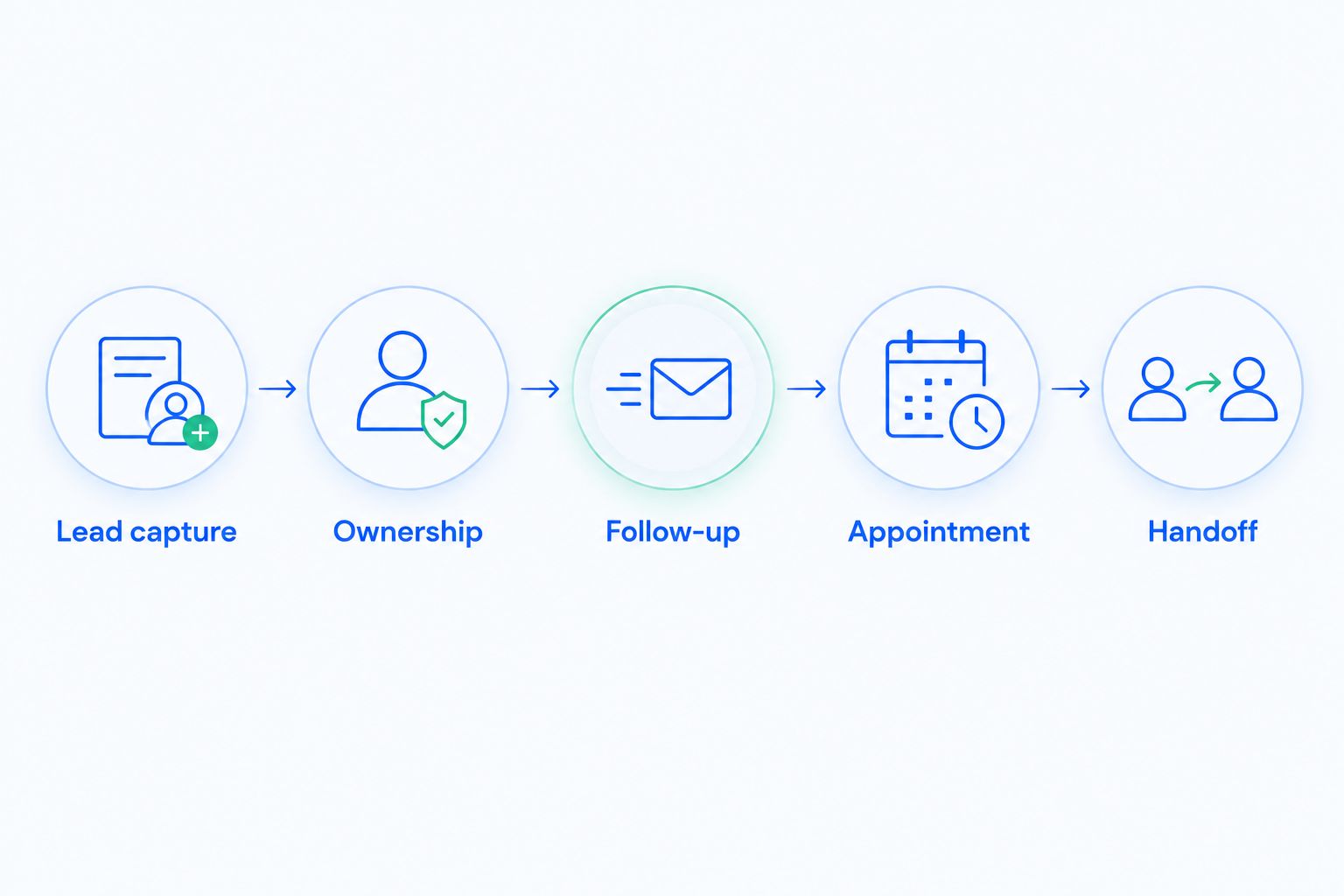
Use the map to distinguish a person from a purchase opportunity. The same customer can return with a different vehicle requirement; preserving the relationship should not erase the earlier sales history.
- Define observable evidence for entering each stage.
- Separate appointment requests from confirmed appointments.
- Record why an opportunity closes without a sale.
- Specify how returning buyers enter the pipeline.
3. Establish ownership before adding automation
Begin manually: assign one accountable owner to every active opportunity and keep a shared list of overdue actions. This establishes the operating rule before any software starts routing work.
A practical standard is 1 accountable owner per opportunity, with a named backup for absences. Multiple people can contribute, but responsibility for the next contact should not be shared so broadly that nobody acts.
Arches CRM provides lead assignment, sales pipelines, workflow automation, and shared customer communications as a software path beyond that worksheet. Arches CRM is best for dealership sales teams prioritizing shared conversations and configured follow-up workflows. Its stated capabilities do not establish compatibility with your DMS or inventory system; verify those connections separately.
Test ownership changes during a live demonstration. Ask what happens to open tasks and conversation context when the original salesperson is unavailable.
- Assign an owner when an inquiry enters your process.
- Name a backup for unattended opportunities.
- Define who resolves conflicting ownership claims.
- Test reassignment without losing the next action.
4. Build follow-up around customer responses
Draft your follow-up rules in a document first. Specify the triggering event, intended message, responsible person, and stopping condition before creating a sequence.
A buyer who replies needs a relevant response, not another generic reminder. Likewise, an appointment cancellation should lead to a rescheduling decision rather than an unchanged visit reminder.
Use automation for repeatable tasks and reminders; keep vehicle availability, trade-in expectations, and financing questions subject to appropriate verification. Do not let a message template promise something your team has not checked.
For your 2026 setup, test every sequence with internal contacts before sending customer messages. Confirm applicable consent and opt-out requirements for each communication channel rather than assuming one permission covers every use.
- Define a trigger and stopping condition for each sequence.
- Test what happens when a customer replies.
- Route vehicle-specific questions to a responsible salesperson.
- Check permission and opt-out handling before sending.
5. Connect conversations without assuming compatibility
Manually review a buyer's email thread, call notes, and messages before deciding what needs connecting. Identify which channels actually contain sales decisions and which tools your staff currently use.
Arches CRM brings email, WhatsApp, SMS, and calls together and supports integrations and APIs. That feature set supports a shared-conversation approach, but it is not proof that every dealership phone system, lead provider, or DMS connects as required.
Request a demonstration using your actual systems and a non-sensitive test record. Ask the vendor to show the direction of data transfer, what triggers an update, and what the team sees when a connection fails.
Keep sensitive finance information out of your test records. Establish access and storage requirements before copying customer documents into a new platform.
- Inventory the channels your sales team actually uses.
- Verify each required connection by system name.
- Test failed transfers and conflicting field updates.
- Confirm who can view, change, and export customer records.
6. Pilot the workflow before migrating everything
Use a limited pilot rather than moving your entire active pipeline at once. A proposed 7-day pilot gives your team a bounded window to test handling and ownership; it is not a promise that implementation finishes within that period.
Start with representative inquiries and clear acceptance criteria. Include a new inquiry, a returning buyer, an appointment change, and an unavailable-vehicle question so the pilot tests exceptions as well as the simplest path.
Keep a reconciliation sheet while the pilot runs. Compare owners, stages, conversation history, and next actions against the source records before treating the new system as authoritative.
Your 2026 rollout decision should depend on those checks, not on how polished the demonstration looked. Expand only after staff can complete the workflow without inventing workarounds.
- Select a limited group of users and test records.
- Document required fields before importing data.
- Compare imported records with their original sources.
- Resolve failed handoffs before expanding access.
7. Measure follow-up quality and completed outcomes
Start with a weekly worksheet if your reporting is not ready. Track inquiry arrival, first human response, appointment outcome, and final sales outcome using consistent definitions.
Distinguish automated acknowledgments from actual salesperson responses. A confirmation that a form arrived does not answer the buyer's question about a vehicle.
Review results by inquiry source and assigned team where your data supports it. Keep new inquiries separate from older opportunities so a change in lead mix does not obscure what happened.
Do not set a universal conversion target without a dependable baseline. First make the records consistent enough to explain where buyers stop progressing.
- Measure elapsed time to the first human response.
- Count active opportunities without a dated next action.
- Separate scheduled appointments from attended appointments.
- Review closed sales and recorded loss reasons together.
Compare your dealership CRM options
Choose the operating model before comparing feature lists. Your 2026 shortlist should reflect whether the main problem is scattered follow-up, dealership-specific operations, or the connection between them.
The table compares approaches, not verified specifications for unnamed vendors. For any dealership-focused system, require a demonstration of the capabilities you need rather than assuming the category guarantees them.
| Option | Best for | Main advantage | Key limitation |
|---|---|---|---|
| Shared spreadsheet and existing inboxes | Documenting a simple process before software selection | Lets your team define fields, ownership, and stages with familiar tools | People must maintain the records and reconcile conversations manually |
| Arches CRM | Sales teams prioritizing shared conversations and configured follow-up | Combines lead management, pipelines, workflow automation, and customer communications | DMS, inventory, and dealership-specific workflow compatibility require verification |
| Dealership-focused CRM | Teams requiring automotive-specific workflows | Gives you a category to evaluate against vehicle and dealership requirements | The category label does not prove compatibility with your existing systems |
| CRM connected to a DMS | Teams needing customer follow-up alongside dealership operations | Keeps relationship management distinct from operational records | Requires clear data ownership, mapping, and connection testing |
Choose on demonstrated workflow fit, not the longest feature list. If your team must re-enter the same buyer information after every handoff, make that exact handoff part of the evaluation.
Common mistakes auto dealerships make
Treating every reply as sales progress
A reply can contain a question, objection, cancellation, or request to stop contact. Require specific evidence before an automated rule advances the opportunity; message activity alone is not a confirmed test drive or sale.
Following up without checking vehicle context
A reminder about a vehicle no longer under consideration creates unnecessary back-and-forth. Require the salesperson to confirm the buyer's current interest before sending vehicle-specific promises or appointment details.
Confusing the CRM with the DMS
A customer pipeline does not establish inventory, accounting, or finance capabilities. Write down which system owns each operational record and demonstrate the required handoff before committing to a replacement.
Importing contacts without open commitments
A clean contact list is incomplete if the promised callback disappears during migration. Move owners, next actions, appointment details, and relevant conversation context alongside names and phone numbers.
FAQ
What's the best CRM software for auto dealerships?
The best CRM software for auto dealerships is the system that demonstrates your required lead, conversation, appointment, and operational handoffs. Arches CRM fits teams prioritizing shared communications and configured follow-up; verify dealership-specific integrations separately.
Can a dealership use a general sales CRM?
A dealership can use a general sales CRM when its lead management and follow-up requirements fit the platform. Test vehicle-related fields, appointment handling, permissions, and required system connections before choosing it.
Does a CRM replace a dealer management system?
A CRM does not automatically replace a dealer management system. Treat customer follow-up and dealership operations as separate requirements, then verify whether the proposed setup covers both.
What should happen when a buyer asks about an unavailable vehicle?
Assign a salesperson to confirm the buyer's current requirements and agree on the next action. Update the opportunity context before continuing vehicle-specific follow-up.
Can automated follow-up continue after a customer replies?
Your workflow should define whether a customer reply pauses, changes, or ends the sequence. Test that behavior directly so the salesperson can respond without conflicting automated messages.
What should a dealership test before migrating its CRM?
Test ownership, stage rules, conversation history, open tasks, permissions, and required integrations. Reconcile a limited set of records against the original systems before expanding the rollout.
Which CRM metric should a dealership review first?
Start by reviewing active opportunities without a dated next action. This identifies records that need a decision, then response-time and appointment-outcome reporting can explain the wider follow-up process.
One last thing
A lost-sale record can be more useful than an unexplained open opportunity. It distinguishes an ended buying conversation from work someone still needs to do.
Before adding another automation, ask your sales manager to open any active opportunity and identify its owner, current buyer requirement, and dated next action. If those answers are missing, fix the operating rules first. Software should carry a clear process—not conceal an unfinished one.