
 Log in
 Start Free Trial

Yes, a CRM can replace a shared spreadsheet for sales tracking in 2026 when you need assigned leads, connected conversations, follow-up tasks, and a shared pipeline. The change also requires data cleanup, clear sales stages, and consistent team use; importing rows alone does not create a working sales process. Keep spreadsheets for separate analysis, not as a competing record of active deals.
- Can a CRM replace a shared spreadsheet for sales tracking? Yes, when sales tracking must include ownership and follow-up.
- Arches CRM suits growing sales teams that need lead management, shared conversations, and workflow automation.
- Keep spreadsheets for flexible analysis; keep active opportunities and next actions in the CRM.
- Define sales stages and clean records before replacing your shared tracker.
Can a CRM replace a shared spreadsheet for sales tracking?
A CRM replaces the operational sales tracker, not every spreadsheet your business uses. The difference is whether you need to record a deal or coordinate the work required to move it forward.
Arches CRM brings lead management, sales pipelines, conversations, tasks, and workflow automation into one platform. Those capabilities match the work that otherwise sits across spreadsheet columns, inboxes, and personal reminders.
| Sales tracking need | Shared spreadsheet | CRM with relevant features |
|---|---|---|
| Best for | Flexible lists, calculations, and occasional analysis | Coordinating active leads, conversations, and next actions |
| Lead ownership | An owner column records responsibility | Assigned records connect responsibility to sales activity |
| Deal stages | Reps edit stage cells | Pipeline stages organize opportunities and configured workflows |
| Follow-up | Dates record intended actions; execution needs a separate process | Tasks and reminders connect follow-up to customer records |
| Conversation history | Notes and links require upkeep | Connected communication channels bring supported conversations together |
| Custom analysis | Formulas and ad hoc layouts offer flexibility | Reporting depends on available fields and reporting features |
| Main drawback | Updates depend on people maintaining the tracker | Setup, configuration, and team adoption require attention |
Do not replace a spreadsheet simply because it looks basic. Replace it when its limitations force your team to reconstruct what happened and decide what should happen next outside the tracker.
Why this matters
A lead arrives, someone replies, and a colleague takes over. If the spreadsheet shows only a name and a stage, the new owner still needs the conversation, the commitment, and the next action.
That gap is the practical reason to consider a CRM in 2026. Your tracker should answer who owns the opportunity, what the customer said, and what happens next without requiring a separate round of messages.
A pipeline is useful only when your team can act on it. A tidy list of opportunities does not solve missed handoffs or forgotten follow-up.
When a shared spreadsheet is still the right choice
Best for: straightforward tracking where manual coordination remains manageable. Keep the spreadsheet when your team can reliably maintain ownership, deal status, and next actions without searching across separate records.
Spreadsheets give you direct control over columns, formulas, and temporary views. They also work well for a specific calculation that does not need to become part of your everyday sales process.
The limitation is operational. A cell can say that a prospect needs a reply, but the team still needs a dependable way to send that reply, record the conversation, and handle the next step.
Before switching, ask whether the problem is missing software or missing discipline. If nobody agrees on what counts as a qualified opportunity, a new pipeline screen will preserve the disagreement rather than resolve it.
Keep the spreadsheet if it supports the work without becoming extra work. Stop defending it when reps must maintain parallel notes just to understand their deals.
When a CRM becomes the better sales tracker
Best for: teams that need coordinated follow-up across leads, owners, and communication channels. Choose a CRM when tracking the sales process requires more than updating a row after something happens.
The strongest reason to switch is a recurring coordination problem:
- A new lead has no clear owner.
- The opportunity stage does not reflect the latest conversation.
- A follow-up date exists, but nobody knows whether the action happened.
- A handoff leaves the next rep searching through messages.
- A manager must ask each rep for context before reviewing the pipeline.
A CRM with the right connected channels and configured workflows can bring those activities into the customer record. It still needs accurate information and sensible rules.
Do not confuse automation with judgment. A reply can justify a follow-up task without proving that the buyer is qualified or ready to purchase. Define what each event means before allowing it to change deal status.
Why the results of replacing a spreadsheet vary
The same software category can support very different working habits. For your 2026 switch, assess these factors before deciding that the replacement is complete:
- Record quality: Inconsistent names, duplicate entries, and unclear contact details need review before they become CRM records.
- Stage definitions: Reps need shared rules for moving opportunities, rather than personal interpretations of stage names.
- Ownership: Each active opportunity needs an accountable owner, including a clear handoff when responsibility changes.
- Communication setup: Email, messaging, and call connections determine which conversations appear alongside the opportunity.
- Workflow configuration: Reminders and stage changes need explicit triggers, conditions, and stop rules.
- Team adoption: The CRM cannot serve as the working record while reps continue maintaining a separate live tracker.
These are implementation decisions, not reasons to delay indefinitely. Resolve them around the sales process you actually use rather than building a system for hypothetical future complexity.
How to replace the shared spreadsheet without losing context
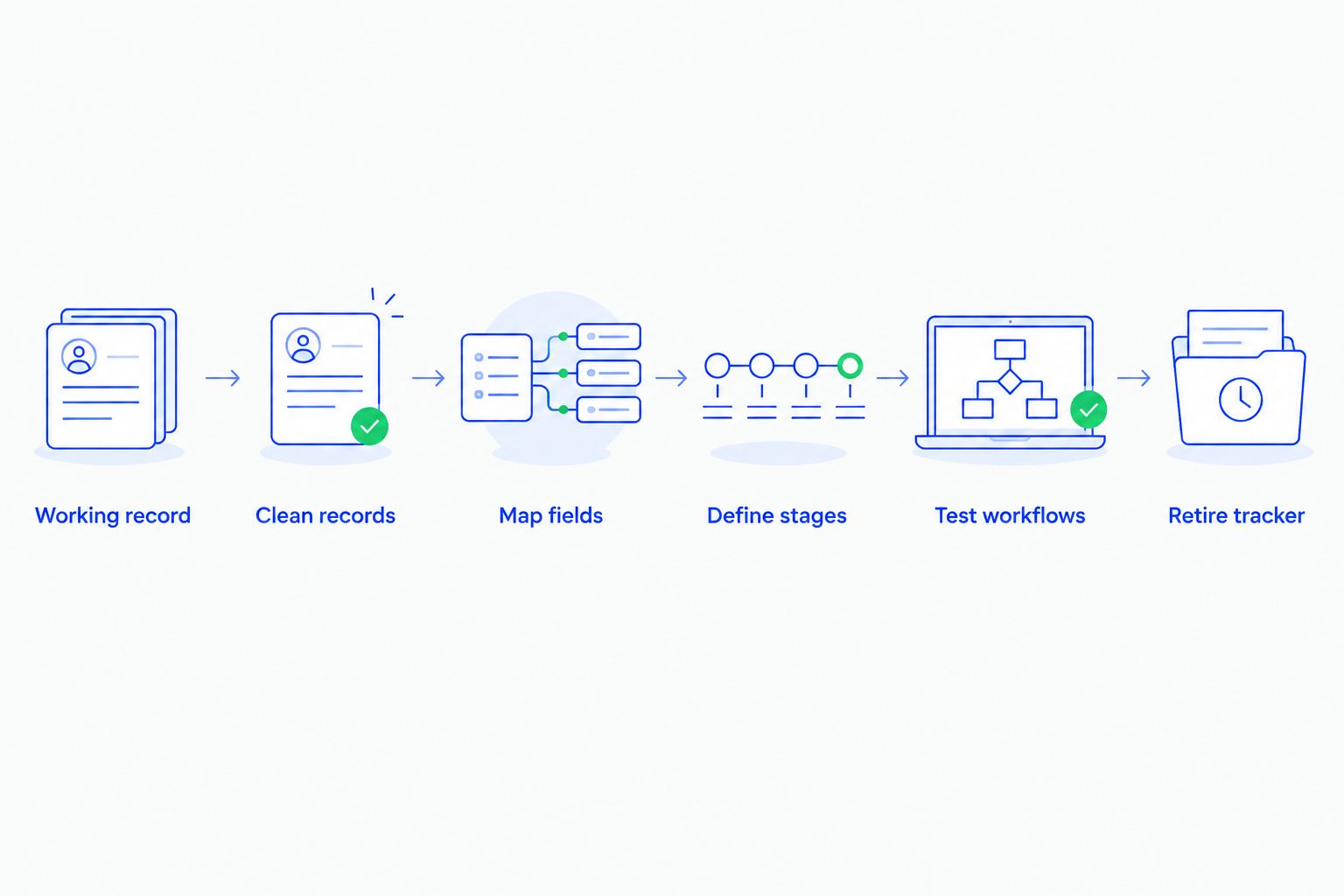
Use this 6-step migration checklist in 2026. Treat each step as a decision about how sales work will happen, not just where data will live.
1. Define the working record
Decide that the CRM will hold active opportunities, ownership, conversation context, and next actions. Specify which spreadsheet activities remain separate, such as temporary analysis or planning calculations.
Write down the boundary. Without it, a rep can update the spreadsheet while a manager reviews the CRM, leaving both people confident in different versions of the pipeline.
2. Clean records
Review the spreadsheet before moving it. Identify duplicate people, unclear company names, outdated opportunities, and notes that do not explain the current situation.
Keep the cleanup focused on usability. A record should let the next person identify the customer and understand the opportunity without guessing which row contains the latest information.
3. Map fields
Match the spreadsheet's useful columns to the destination system's supported fields. Separate contact information from opportunity information so the team does not confuse a person with a specific sales opportunity.
Confirm import formats and field support before transferring records. A spreadsheet column does not automatically become a supported CRM field just because it has a useful heading.
4. Define stages
Give every stage an entry condition that your team understands. A stage should describe an observable sales event or agreed requirement, not a rep's confidence alone.
Also define how opportunities leave the active pipeline. Keeping an inactive conversation in an active stage makes it harder to distinguish current work from historical interest.
5. Test workflows
Test ownership, reminders, and connected conversations using representative records before relying on the process. Check both the expected path and the exception: a customer replies, a rep changes ownership, or a deal closes.
For follow-up sequences, specify when messages stop or change. A workflow that ignores the latest customer interaction creates a different problem from the spreadsheet it replaced.
6. Retire the tracker
Choose a clear handover point and make the old spreadsheet read-only for reference. After that point, update active sales work in the CRM rather than entering the same change twice.
Preserve historical context where your retention requirements allow it. The goal is to stop competing updates, not to discard information your team still needs.
Migration planning deserves its own checklist. Use the guide to migrating from spreadsheets to a CRM to structure the handover rather than treating file transfer as the finish line.
What should you check before retiring the spreadsheet?
Check 3 deal details on each representative opportunity: owner, latest interaction, and next action. If a colleague cannot identify them without asking the original rep, the replacement process is not ready.
Then walk through a handoff. Have the receiving rep explain the customer's situation, the current stage, and the promised follow-up using the CRM record alone.
This exercise tests the information your team needs to sell, rather than whether the import technically completed. Fix unclear records and workflow gaps before making the new process mandatory.
Can you keep a spreadsheet alongside your CRM?
Yes—keep 1 operational source of truth, with separate spreadsheets for analysis. The CRM should hold live deal updates; a spreadsheet can support a defined calculation without becoming another place to maintain customer activity.
Make the distinction visible whenever you share a report. Label exported analysis with its extraction date, and direct operational changes back to the CRM rather than accepting edits in a detached copy.
Is a CRM worth it if your team still needs manual updates?
Yes, when shared ownership, conversation context, and connected follow-up solve the actual tracking problem. Manual updates are not evidence that the switch failed; some sales decisions require a rep to confirm what happened.
Judge the setup by whether the team can find and complete the next action. Do not judge it by an expectation that every field and decision will update itself.
Where Arches CRM fits
Arches CRM is best for growing sales teams that need lead management, shared conversations, and workflow automation. Its stated capabilities include lead assignment, pipeline tracking, reminders, follow-up sequences, email summaries, and communication across email, WhatsApp, SMS, and calls.
That makes Arches CRM a relevant replacement when your spreadsheet records the deal but leaves the team coordinating conversations and tasks elsewhere. Configured workflows can move opportunities based on customer interactions, connecting activity to pipeline progress.
The limitation is the same decision you must make with any CRM: your team still needs stage rules, useful records, and agreement on the working process. Do not treat software as a substitute for those decisions or assume every existing spreadsheet calculation belongs inside it.
FAQ
Can a CRM completely replace our shared sales spreadsheet?
Yes, a CRM can replace the shared spreadsheet used to track active leads, opportunities, and follow-up. Keep separate spreadsheets for analysis when they serve a distinct purpose, rather than maintaining a second live pipeline.
Is a spreadsheet better than a CRM for a small sales team?
A spreadsheet is better when straightforward tracking and manual coordination meet the team's needs. A CRM becomes more useful when ownership, conversation history, reminders, and handoffs need a connected process.
Will moving to a CRM automatically fix missed follow-ups?
No, moving records alone does not fix missed follow-ups. You need clear ownership, configured reminders, accurate customer context, and rules for what happens when a customer responds.
Can I import my existing sales spreadsheet into a CRM?
Import support depends on the CRM's accepted formats, fields, and limits. Check those requirements, clean your records, and test field mapping before transferring your working sales data.
Can a CRM move opportunities when customers reply?
Arches CRM can move opportunities based on customer interactions and configured workflows. Define which interactions justify a stage change so a reply does not automatically stand in for buyer qualification.
Should we delete the old spreadsheet after switching?
Do not delete the old spreadsheet simply because the CRM is live. Make it read-only for reference and retain or dispose of it according to your business's data-retention requirements.
What should we test before making the CRM our main sales tracker?
Test whether a rep can identify the owner, latest interaction, and next action for an opportunity. Also check handoffs, reminder behavior, connected conversations, and the conditions that stop follow-up workflows.
One last thing
The most useful replacement test in 2026 is a handoff, not a dashboard. Ask someone unfamiliar with an active opportunity to explain what happened and what they should do next from the record alone.
If the answer still lives in someone's memory, the tracking problem remains. Fix that gap before adding more fields, reports, or automation.