
 Log in
 Start Free Trial


Yes, a CRM can manage separate pipelines for multiple agency clients when it supports the pipeline structure, permissions, and reporting your agency needs. Give each client's opportunities a clear home, then scope follow-ups and reports to that client. Separate pipelines organize deals; they do not, by themselves, prevent clients from seeing each other's data.
- Can a CRM manage separate pipelines for multiple agency clients? Yes, but pipeline separation does not guarantee data isolation.
- Use client-specific pipelines for different sales processes; require tested permissions before giving clients access.
- Arches CRM suits growing sales teams that need lead management and automated follow-ups.
- Test routing, conversation visibility, automation, and reporting before importing live client records.
Can a CRM manage separate pipelines for multiple agency clients?
Yes. Your agency can organize client opportunities in separate pipelines, provided the CRM supports multiple pipelines. The important decision is whether you need different sales stages, restricted access, or independently administered client environments.
Start with how CRM software tracks deals across multiple pipelines, then evaluate the access controls separately. A filtered board is not proof that the underlying contacts, conversations, and exports are restricted.
| Structure | Best for | Main advantage | Main limitation |
|---|---|---|---|
| Shared pipeline with client fields | Internal teams using the same sales stages | Keeps a common process together | Client fields alone do not enforce access restrictions |
| Separate client pipelines | Agencies managing different client sales processes | Gives each process its own stages and deal view | Permissions still need separate verification |
| Separate client environments | Agencies requiring independently administered client records | Establishes a clearer administrative boundary when supported | Adds configuration and cross-client reporting work |
Choose the structure around access requirements first, then sales stages. A convenient board layout is not a sufficient reason to combine confidential client records.
Why this matters
A lead arrives for a client. Your team assigns the opportunity, sends a follow-up, and schedules the next conversation. If the record lacks clear client ownership, the mistake can spread into tasks, messages, and reports.
Your 2026 CRM selection checklist should therefore cover more than pipeline count. It should show how a lead enters the right process, how the right person receives the task, and how unrelated users are kept out.
Keep your agency's own business development separate from the sales work you perform for clients. Winning a new agency retainer and qualifying a prospect on a client's behalf are different processes with different reporting needs.
Shared pipeline: best for a common internal process
A shared pipeline is a reasonable starting point when your internal team follows the same stages for every client. Require a client field on every opportunity and use that field consistently in views, assignments, and reports.
The advantage is consistency. You maintain a common set of stage definitions rather than recreating the same process under different client names.
The drawback is dependence on correct classification. A missing client field or incorrectly scoped report undermines that separation, and a saved filter does not establish a security boundary.
Use a shared pipeline for operational grouping, not as evidence of confidentiality. If clients need access, test the actual permissions instead of relying on what the agency administrator sees.
Separate pipelines: best for different sales processes
Separate pipelines make sense when clients sell differently. For example, a proposal-led process and an appointment-led process need different definitions of progress; forcing both into identical stages makes the board harder to interpret.
Give each pipeline documented entry and exit conditions. A stage should describe something that happened, such as an appointment being booked, rather than a salesperson's impression that a deal looks promising.
The advantage is process clarity. The drawback is maintenance: stage definitions, automation rules, and reporting mappings need attention as client requirements change.
Your 2026 operating standard should distinguish a pipeline's name from its purpose. Client-specific names help people find records, but stage rules explain how those records should move.
Use separate pipelines when the sales process differs, not simply because another client signed.
Separate environments: best for independent client administration
Evaluate separate environments when clients need their own administrators, independently managed users, or a distinct handover at the end of your engagement. Confirm what the vendor means by an account, workspace, or environment; those terms do not establish the same boundary in every system.
The benefit is a clearer place to manage client-specific configuration when the product supports it. The trade-off is additional administration, especially when your agency needs visibility across all client accounts.
Do not assume separate environments eliminate every access risk. Agency administrators, connected applications, exports, and shared reporting processes still need defined access rules.
Choose independently administered environments when client control is a requirement, then verify the boundary in practice.
Why the right pipeline setup varies
The right structure depends on how your agency works, not just how many clients it serves. Evaluate these factors before you copy a pipeline template across accounts:
- Sales process: Different qualification requirements and stage definitions support separate pipelines.
- Client access: Internal-only operation and direct client login require different permission checks.
- Communication ownership: Shared agency inboxes and client-owned channels need explicit conversation-routing rules.
- Reporting scope: Client reports need accurate boundaries, while agency management needs a consistent roll-up.
- Handover requirements: Decide which records, conversations, and workflow documentation the client needs when the engagement ends.
Write down the required outcome for each factor. This turns a vague request for a multi-client CRM into a practical demonstration brief.
How do you set up client pipelines without mixing records?
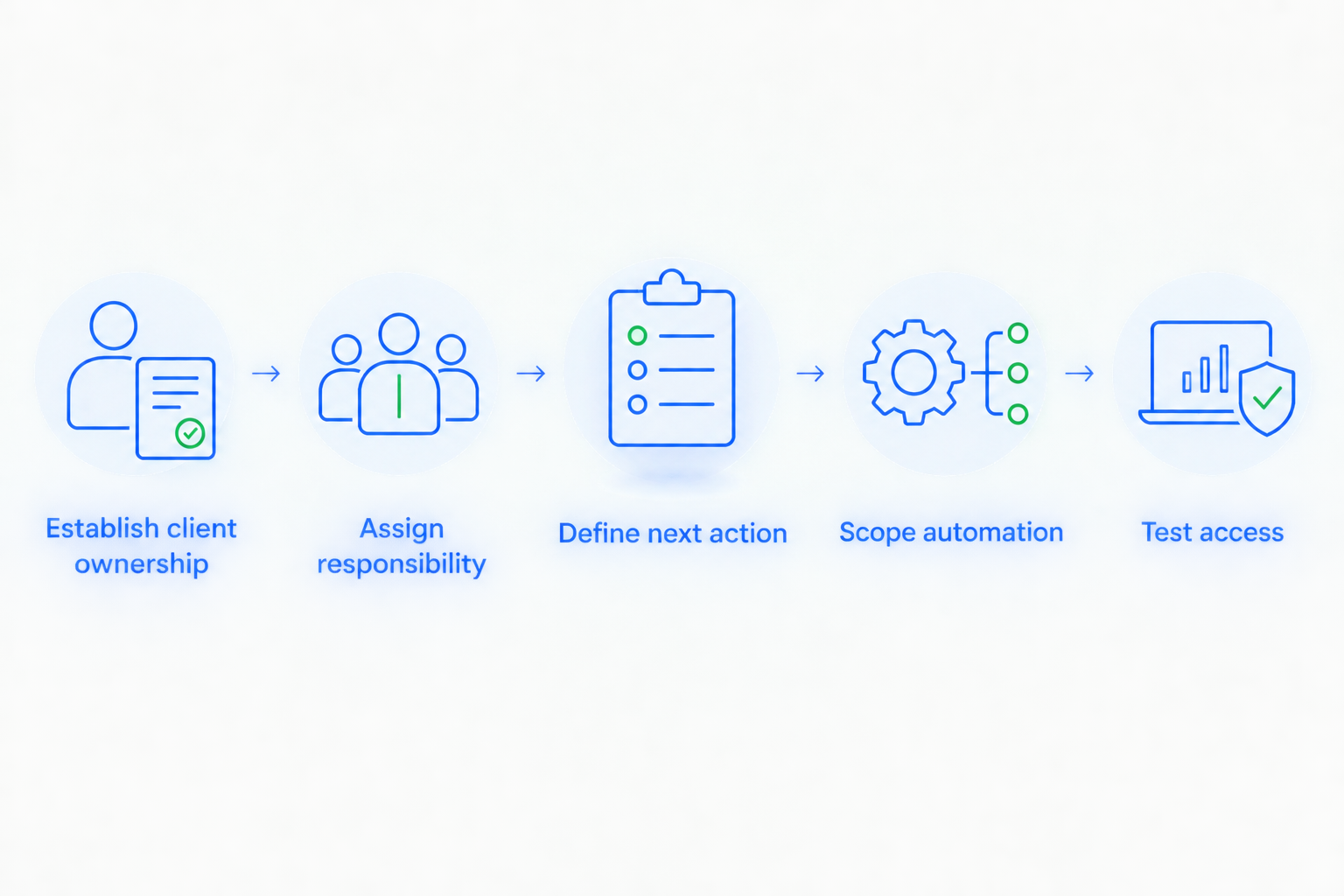
Use the following sequence as your 2026 implementation checklist. Prove the complete path with test records before importing active opportunities or enabling outbound messages.
Establish client ownership
Require 1 client identifier per opportunity as an operating rule. Use a consistent client value rather than free-text variations that split reports or break routing conditions.
Decide how to handle a person who appears in more than one client's sales activity. The same email address does not automatically mean those conversations should be combined or exposed to the same users.
Assign responsibility
Require 1 accountable owner per active opportunity, even when several people contribute. The owner is responsible for the next action; supporting team members can still participate.
Document reassignment rules for absences and client transitions. Otherwise, moving a deal to another pipeline risks leaving responsibility unclear.
Define the next action
Require 1 next-action date per active opportunity unless the deal is deliberately paused under a documented rule. A pipeline stage tells your team where a deal stands; a next action tells your team what to do.
Agree on what should happen after a reply, a missed appointment, or a request to stop contact. Do not treat every customer interaction as permission to send another follow-up.
Scope automation
Include the client and relevant pipeline in each automation's conditions. Review the intended recipient, message context, assigned owner, and stop conditions before enabling the rule.
A customer reply should not trigger unrelated workflows merely because the contact exists elsewhere in the CRM. Test that scenario explicitly when records are shared.
Test access
Sign in as an ordinary agency user and, where supported, as a client user. Test search, contact records, conversation history, reports, exports, and connected applications—not just the pipeline board.
Approve the setup only when records route correctly and unrelated records remain inaccessible to restricted users. A clean administrator dashboard does not prove either outcome.
What should an agency test in a CRM demonstration?
Ask the vendor to demonstrate your actual workflow rather than a prepared board. Use fictional clients and contacts so the test does not expose real customer information.
Have a lead enter through a client-specific source. Confirm where the opportunity lands, who receives the task, which conversation record it uses, and which report includes it.
Then test an exception. Change the assigned owner, submit a matching email address for another client, or reply after a follow-up sequence starts. These checks reveal whether the configuration handles ordinary complications, not just the happy path.
Record the result as pass, fail, or requiring configuration. A feature name on a presentation is not the same as a demonstrated workflow your team can operate.
For your 2026 evaluation, make the decision depend on observable behavior: correct routing, appropriate visibility, accurate reporting, and controlled messages.
How should integrations and automated decisions stay client-specific?
Every connected form, inbox, phone system, or external application needs a defined client destination. Passing a lead's name and email is not enough; the integration also needs the context required to assign the correct process and owner.
Treat connecting AI to your CRM as a workflow-control decision: define which client records the connection can read, what actions it can initiate, and where a person must review the result.
The same principle applies to automated stage changes. A reply confirms that a conversation occurred; it does not necessarily confirm qualification, approval, or a buying decision. Define the evidence required for each transition before automating it.
Keep a documented way to pause outbound activity for a client. During a routing error or account transition, your team needs to stop the affected workflow without guessing which rules are involved.
An integration is ready when the destination, permissions, and resulting action are correct—not merely when the connection succeeds.
Where does Arches CRM fit?
Arches CRM is best for growing sales teams that need lead management and automated follow-ups. Its stated capabilities include contact management, sales pipelines, workflow automation, conversation summaries, and communications across email, WhatsApp, SMS, and calls.
Those capabilities address the daily work an agency needs to coordinate: who owns a lead, what was discussed, and what happens next. Arches CRM also supports automated opportunity movement based on customer interactions and configured workflows.
For agency use, evaluate Arches CRM against your client-access requirements before committing. Demonstrate pipeline configuration, restricted-user visibility, report scope, and client handover rather than assuming general sales features establish client isolation.
The fit is operational sales coordination. The decision boundary is whether the demonstrated configuration satisfies your agency's separation and administration requirements.
How do you report across clients without mixing results?
Keep client reporting and agency oversight distinct. A client report should contain the agreed client scope; an agency management report should explain workload and pipeline health across the accounts your team manages.
Standardize definitions before combining results. If clients define qualified opportunities differently, a single qualification total hides a process mismatch rather than resolving it.
For your 2026 reporting template, document the client filter, date basis, stage definitions, and treatment of closed or reopened deals. Check a sample of underlying records against the report before sharing it externally.
Report access deserves its own test. Restricting a pipeline view is not enough if an exported report or shared dashboard exposes unrelated client details.
Can clients see only their own pipeline?
Yes, when the CRM's permissions support that restriction and the configuration passes access testing. A client-specific board or saved filter alone does not establish restricted access.
Test the contact record and conversation history as well as the opportunity. Information outside the board can still belong to another client.
Should every agency client have a separate pipeline?
No. Use separate pipelines when sales stages or operating rules differ; use a shared process only when its classification and access controls meet your requirements.
Do not duplicate pipelines to solve a permissions problem. Change the access design instead.
Can an agency automate follow-ups separately for each client?
Yes, when the CRM's automation rules can target the relevant client records and communication context. Confirm client conditions, sender identity, message content, and stop rules before enabling outbound activity.
A correct recipient with the wrong client's message is still an incorrect follow-up.
FAQ
Can a CRM manage separate pipelines for multiple agency clients?
Yes, a CRM with multiple-pipeline support can organize opportunities into separate client processes. Verify permissions separately because different boards do not automatically establish client data isolation.
What's the best CRM structure for an agency managing client sales?
The best structure matches your access requirements and sales processes. Use shared stages for genuinely common processes, separate pipelines for different processes, and independently administered environments when client control requires them.
Is a separate pipeline the same as a separate client account?
No, a pipeline organizes opportunities, while a client account or environment can represent a broader administrative boundary. Confirm the vendor's definitions and test the actual access restrictions.
Can my agency team see every client while clients see only themselves?
Yes, if the CRM supports the required administrator and restricted-user permissions. Verify search, conversations, reports, exports, and connected applications under each role.
Can I use the same contact in different client pipelines?
That depends on the CRM's contact model and permissions. Test whether shared contacts also share conversation history before using the same person across client processes.
Does Arches CRM automate sales follow-ups?
Arches CRM supports workflow automation for reminders, tasks, and follow-up sequences. Evaluate the client-specific conditions and access requirements needed for your agency's setup.
What should I test before importing agency client leads?
Test lead routing, ownership, next actions, automation conditions, conversation visibility, and report scope. Use fictional records and restricted-user accounts before moving live client data.
One last thing
Start the acceptance test with a search, not a pipeline board. Ask a restricted user to search for a fictional contact belonging to another client, then try to reach that contact through reports and conversation history.
That test checks the boundary your clients actually care about. Separate boards are useful; correctly restricted records are the requirement.