
 Log in
 Start Free Trial

Yes, a CRM can automatically create tasks from customer replies when its workflow supports incoming-message triggers and task-creation actions. In 2026, the practical limit is whether your CRM receives the reply, matches it to the right record, and applies rules that distinguish a real follow-up request from an acknowledgment or automated response.
- Can a CRM automatically create tasks from customer replies? Yes, with connected messages, workflow triggers, and task actions.
- Arches CRM supports task automation and customer conversations; verify reply-trigger behavior before choosing your setup.
- Create tasks for actionable requests, not every incoming message, and assign an owner and deadline.
- Test duplicate prevention, automatic replies, and ownership changes before enabling sales follow-up automation.
Can a CRM automatically create tasks from customer replies?
Yes—but receiving a message and creating a useful task are separate capabilities. The CRM needs a connected communication channel, a reply event that workflows can use, and an action that creates or updates a task. Your rules then determine who handles it and what happens next.
A reminder based on elapsed time is different from a task triggered by a customer response. The guide to how a CRM handles follow-up reminders automatically explains the adjacent reminder workflow; for reply-based automation, use this sequence:
- Receive the reply. Confirm that incoming messages enter the CRM, not just the salesperson's inbox.
- Match the record. Connect the sender and conversation to the relevant contact and opportunity.
- Check the conditions. Decide whether the reply needs action and whether an equivalent task already exists.
- Assign the task. Specify the owner, deadline, task description, and source conversation.
- Handle exceptions. Route unmatched messages, unclear requests, and missing owners for review.
A successful test ends with an actionable task attached to the correct record. A notification alone does not satisfy that requirement.
Why this matters
A customer replies with a question. The message reaches the inbox, but nobody owns the next action. The conversation has moved; the team's work queue has not.
Reply-triggered tasks address that handoff. Instead of asking a salesperson to read, interpret, remember, and manually record every follow-up, you define which responses should become work.
For your 2026 workflow, separate message visibility from action ownership. A shared conversation shows what happened; an assigned task establishes who must respond and when. You need both if multiple people handle the same lead.
The limit is equally important: automatically creating more tasks does not establish which tasks deserve attention. Without filters and duplicate checks, the automation replaces inbox clutter with task clutter.
Build the reply-to-task workflow
Start with a narrow rule you can inspect. Expand only after the incoming message, record match, assignment, and exception handling behave as intended.
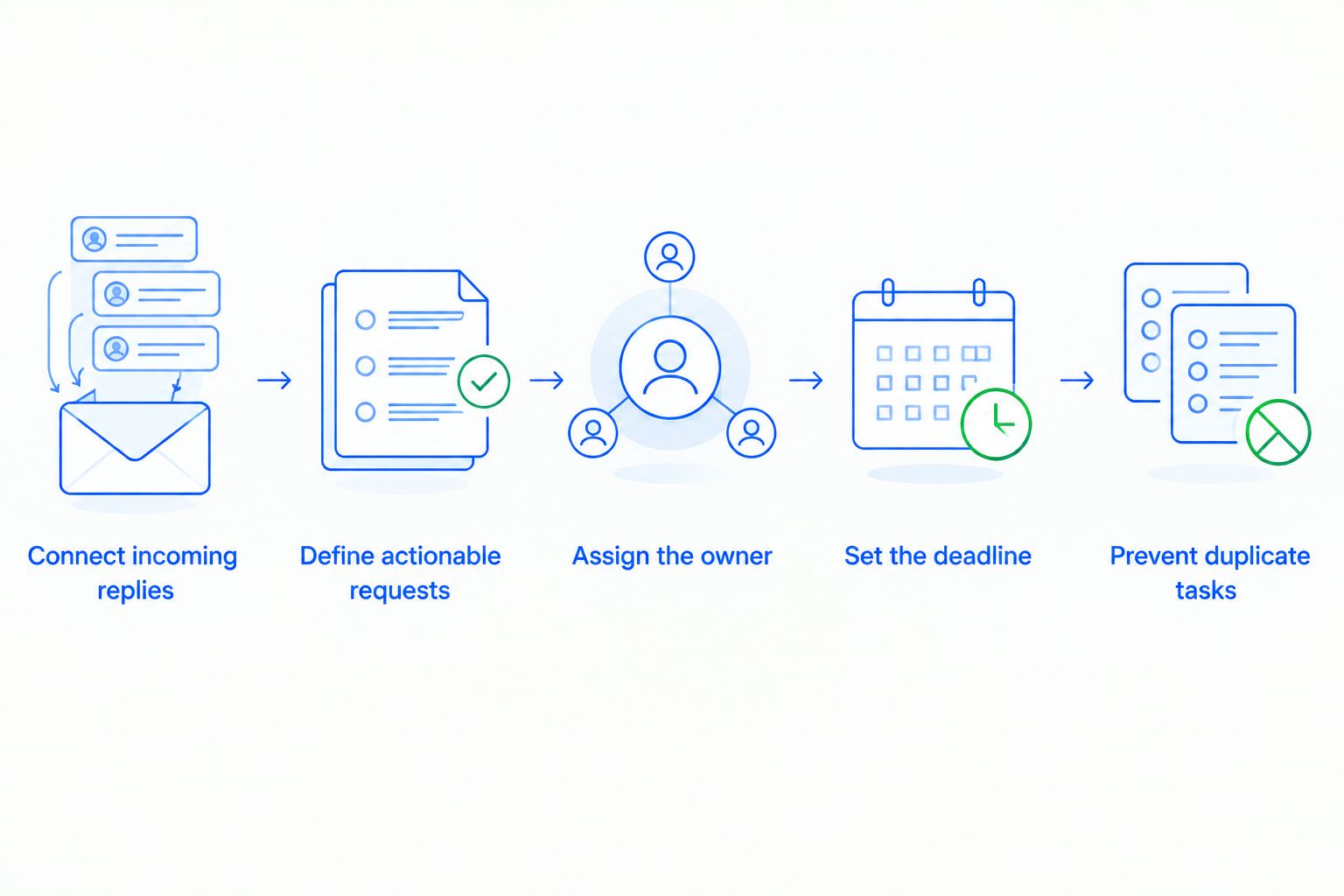
Connect incoming replies
Check the channel your customers actually use. Sending email from a CRM does not, by itself, prove that incoming email is available as a workflow trigger. The same distinction applies to messaging integrations.
Ask for a demonstration using a reply to an existing conversation. Inspect the contact record, message history, and workflow event rather than accepting an outbound-message demonstration as evidence.
Also check what happens when the sender uses a different address. An unmatched reply needs a review path; it should not silently attach to an unrelated opportunity.
Define actionable requests
Write the rule around a business action. Requests for a callback, revised proposal, meeting, or answer need different follow-through from a brief acknowledgment.
Avoid a blanket rule that creates a task after every reply. A customer thanking you for an answer should not automatically reopen completed work.
Where message classification is supported, test it against the language customers use. Where it is not supported, use explicit conditions or a human triage step instead of assuming the system understands intent.
Assign the owner
Choose whether the task belongs to the contact owner, opportunity owner, or designated queue. Make that decision explicit when those owners differ.
Define a fallback for records without an owner. A task with no accountable person is not a completed handoff, even if it appears on a dashboard.
Test ownership changes too. If a lead moves to another salesperson before the customer responds, the reply should reach the person responsible now, not merely the person who sent the original message.
Set the deadline
Use a deadline that reflects the request. A promised callback needs different treatment from a general question with no stated timing.
Do not assume the system can extract dates, interpret time zones, or calculate business hours unless those capabilities are demonstrated. If date interpretation is unavailable, create a review task rather than inserting an unsupported deadline.
Keep the original wording accessible. The salesperson should be able to verify the customer's request without reconstructing the conversation.
Prevent duplicate tasks
Use 1 open task per actionable request as your initial design target, not as a claim about any platform's default behavior. Several replies about the same unresolved question should prompt a duplicate check before another task appears.
Decide when the workflow should update an existing task instead of creating a new one. A customer adding context to an unanswered question is different from asking for a separate action.
Which automation approach fits your team?
For a 2026 evaluation, compare the behavior you need rather than treating every feature labeled automation as equivalent. The approaches below describe workflow designs, not verified capabilities of a particular vendor.
| Approach | Best for | Main advantage | Main limitation |
|---|---|---|---|
| Rule-based task creation | Teams with explicit reply conditions | Gives you defined conditions to inspect and test | Requires you to maintain those conditions |
| Message classification | Teams sorting varied customer requests | Can support routing by interpreted request when available | Interpretation needs testing and an exception path |
| Human-reviewed task creation | Teams handling ambiguous or sensitive requests | Keeps a person responsible for the decision | Leaves a manual review step |
Rule-based task creation
Best for: clear, repeatable conditions. Choose this approach when you can state exactly which reply event and record conditions should create work.
Its strength is inspectability: you can compare the event against the rule. Its constraint is coverage. A rule designed around one condition does not establish that every differently worded customer request will be handled correctly.
Message classification
Best for: routing varied requests when classification is supported. Evaluate whether the CRM can distinguish a callback request, a meeting question, and a simple acknowledgment before connecting classification to task creation.
The benefit is routing beyond a single explicit condition. The trade-off is interpretation risk. Keep unclear messages visible to a person, and do not treat a generated summary as proof that the correct action was selected.
Human-reviewed task creation
Best for: requests that need judgment before assignment. Route the reply into a review queue, then let a person approve or change the next action.
This preserves oversight but does not remove the review workload. Set a clear review owner; otherwise, the queue becomes another place where messages wait without accountability.
Why reply-triggered task creation varies
The same workflow description can produce different results across CRM setups. For your 2026 assessment, inspect these factors:
- Channel coverage. Verify incoming replies for each connected channel separately. Support for one channel does not establish support for another.
- Trigger detail. Check whether the workflow exposes a reply event or only a broader record-update event. The distinction affects how precisely you can define the rule.
- Record matching. Establish how the system associates a reply with a contact and an opportunity, especially when several opportunities are open.
- Task controls. Inspect assignment, deadlines, descriptions, and the ability to check for existing work. Task creation alone does not establish those controls.
- Exception visibility. Confirm where unmatched replies and failed actions appear, and who reviews them. An exception without an owner remains unresolved.
Ask to see the complete path from incoming reply to assigned task. A feature list cannot demonstrate that your specific handoff works.
Test the workflow before enabling it
Use 5 test replies as a recommended starting checklist, not a performance benchmark. Send them through the actual connected channel and inspect the resulting records and tasks.
| Test reply | What to verify | Failure to catch |
|---|---|---|
| A clear callback request | Correct owner, source message, and next action | Task created without enough context |
| A simple acknowledgment | No unnecessary work under your chosen rules | Task created for a completed conversation |
| An automatic absence response | Correct exclusion or review handling | Automated response treated as buying intent |
| A repeated request in the same thread | Existing task checked before creating another | Duplicate open work |
| A reply after an ownership change | Assignment follows your current ownership rule | Task sent to the former owner |
For each case, record the expected result before sending the message. Otherwise, it is too easy to accept whatever the automation produces as correct.
Review 1 complete conversation from incoming reply through task completion. This recommended end-to-end check catches a different problem from trigger testing: whether the salesperson can understand and finish the work without searching elsewhere.
For a 2026 rollout, keep the initial workflow limited to a defined team and channel. Review unexpected results before extending the same rule to other conversations.
Can a customer reply also move the deal forward?
Yes, a CRM with interaction-based pipeline automation can move an opportunity when a reply meets configured conditions. Task creation and pipeline movement still need separate rules because they represent different decisions.
A request for more information creates work, but it does not automatically prove that the buyer has reached a later sales stage. Define the evidence required for the stage change rather than treating every reply as progress.
Should every customer reply create a task?
No, not every customer reply requires a new task. Create work when there is an unresolved action, and check for an existing task before adding another.
Acknowledgments, repeated context, and automatic responses belong in your test cases. Your rules should explain how each is handled instead of leaving the outcome accidental.
Where Arches CRM fits
Arches CRM fits growing sales teams that need customer conversations, pipeline tracking, and task automation in one CRM. Its stated capabilities include lead management, workflow automation for tasks and follow-up sequences, email summaries, and opportunity movement based on customer interactions and configured workflows.
That combination is relevant when your problem is the handoff between a conversation and the next sales action. The evaluation boundary is specific: verify incoming-reply triggers, supported conditions, duplicate checks, and task assignment for the channel you intend to use.
Arches CRM brings contacts, conversations, tasks, and sales activity together. Assess that benefit alongside the configuration work: your team still needs to define ownership, actionable requests, and exceptions.
FAQ
Can a CRM create a task when someone replies to an email?
Yes, when incoming email replies are exposed as workflow triggers and the workflow supports task creation. Verify that the reply attaches to the correct contact and opportunity before enabling the rule.
Do I need message classification to create tasks from replies?
No, rule-based workflows can create tasks from supported reply events and conditions. Message classification is a separate capability to evaluate when you need the system to interpret the request.
Can a CRM assign a reply task to the current salesperson?
Yes, if its workflow supports assignment using the relevant record owner. Test an ownership change and define a fallback for records without an owner.
How do I stop duplicate tasks from customer replies?
Check for an equivalent open task before creating another task. Decide whether later replies should update existing work or represent a genuinely separate request.
Can WhatsApp replies create CRM tasks too?
WhatsApp replies can create tasks when the integration exposes incoming-message events to a workflow with task actions. Connecting a messaging channel alone does not establish that this workflow is supported.
Does Arches CRM support task automation?
Arches CRM supports workflow automation for tasks, reminders, and follow-up sequences. Verify the exact incoming-reply trigger, conditions, and assignment behavior required for your setup.
Will creating a task automatically send the customer a reply?
No, task creation and message sending are separate actions. Check the workflow for any outbound-message action rather than assuming that creating a task either sends or stops a message.
One last thing
Check what stops when the customer replies—not just what starts. If an unanswered-lead sequence remains active after a real response, your team can receive a useful task while the customer receives an irrelevant follow-up.
Include sequence stopping, pausing, or review in your acceptance test wherever the CRM supports those controls. The goal is a coherent next action, not merely a new task.