 Log in
 Start Free Trial


Yes, a CRM can automate onboarding after a deal closes by using a closed-won event to start configured tasks, reminders, customer messages, and handoff workflows. The limit is the setup: your CRM needs reliable deal data, clear ownership, and supported connections for any work that happens outside the platform.
- Can a CRM automate onboarding after a deal closes? Yes—configured workflow automation can start the handoff.
- Arches CRM suits growing sales teams that need contacts, conversations, tasks, and follow-up together.
- Automate repeatable onboarding tasks; keep scope decisions and customer commitments under human review.
- Separate closed-won status from onboarding completion so a sales update never becomes false delivery progress.
Can a CRM automate onboarding after a deal closes?
Yes. The practical approach is to connect a verified sales milestone to a defined onboarding workflow, rather than asking someone to remember the handoff. Start with the same principles used to reduce manual data entry with CRM workflow automation: reuse existing records, define the trigger, and specify the action.
Build the workflow in this order:
- Confirm the trigger. Decide what closed-won means and whether another approval must happen before onboarding starts.
- Check the record. Require the customer contact, agreed scope, responsible owner, and next action before proceeding.
- Assign the handoff. Give an accountable person responsibility for the customer's next step.
- Start the work. Configure supported tasks, reminders, messages, or connected-system actions.
- Handle exceptions. Route missing information, failed actions, and unusual requests to someone who can resolve them.
- Confirm completion. Record evidence that onboarding is finished instead of treating a sent email as success.
Automate the handoff, not the assumption that the customer is ready. A deal can be commercially complete while the delivery team still needs information.
Why this matters
A closed deal is not a completed customer handoff. Sales knows what was promised; the person delivering the work needs that context without searching through separate conversations.
For your 2026 onboarding process, treat the sale and the handoff as connected but distinct events. Automation should carry the relevant information forward and make the next responsibility visible. Otherwise, it simply creates tasks around an incomplete record.
What should the onboarding workflow contain?
A useful onboarding workflow answers a short set of operational questions: who owns the customer, what happens next, what information is missing, and what proves completion? Write those answers before configuring software.
Use the following structure as a design checklist. These are workflow requirements to verify in your chosen CRM, not a claim that every platform includes every action.
| Workflow element | What to define | What to prevent |
|---|---|---|
| Entry condition | The event that makes the customer ready | Starting onboarding before approval |
| Customer context | Contact, scope, commitments, relevant conversations | Asking the customer to repeat agreed details |
| Ownership | The person responsible for the next action | An unassigned handoff |
| Task sequence | Required actions and their dependencies | Work starting in the wrong order |
| Communication | Approved message, recipient, and sending condition | Conflicting or premature instructions |
| Completion condition | Evidence that the handoff is finished | Marking onboarding complete after an email sends |
Keep the first version narrow. Automating an unclear process makes the unclear parts repeat automatically; it does not resolve them.
Which onboarding approach should you use?
Choose the approach that matches where your team actually performs the work. A straightforward handoff and a delivery process involving separate systems need different designs.
| Approach | Best for | Main advantage | Main limitation |
|---|---|---|---|
| CRM task workflow | Teams that can manage onboarding through contacts, tasks, and conversations | Keeps the handoff close to the sales record | Does not replace specialist delivery work |
| CRM plus connected tools | Teams that perform onboarding in another business system | Can transfer context without repeated entry when the connection supports it | Requires field mapping, permissions, and failure handling |
| Approval-led workflow | Teams with custom scope or sensitive customer commitments | Keeps judgment with a responsible person | Progress depends on someone completing the review |
Choose the simplest approach that preserves accountability. Adding another system is justified when the work requires it, not merely because a connection exists.
For a 2026 rollout, separate essential actions from optional additions. Establish the handoff first; add more automation only after the team can explain how the existing process behaves when something goes wrong.
How do you build the closed-won handoff?
Use a short sequence with explicit checks between sales completion and onboarding completion. Each stage should have an observable result, not just an activity someone hopes happened.
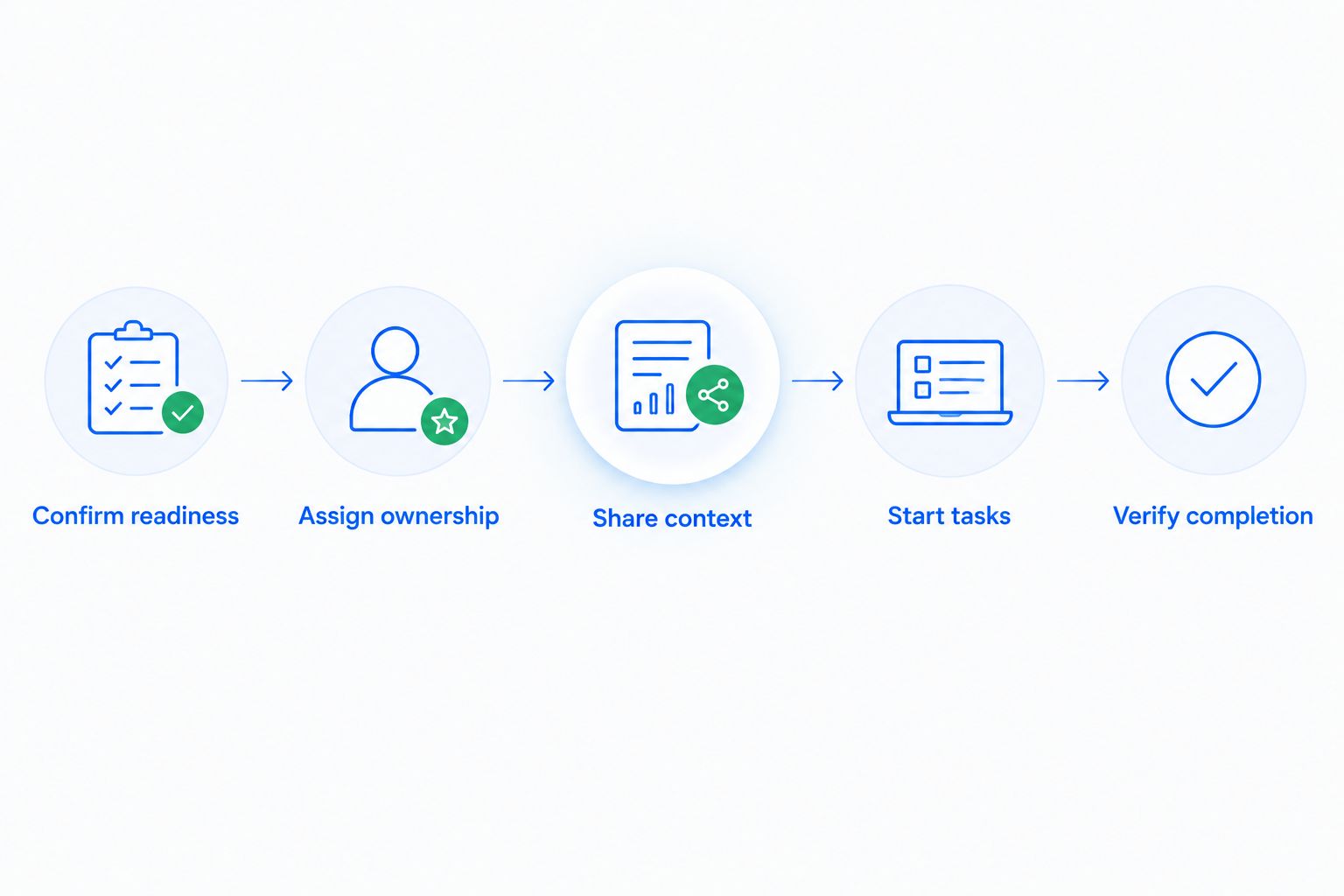
Confirm readiness
Define the evidence required to begin. Depending on your process, that means an approved scope, a confirmed customer contact, or another business requirement you choose.
Do not make a salesperson's stage change stand in for every prerequisite. If readiness is incomplete, create a review task rather than sending customer instructions prematurely.
Assign ownership
Set 1 accountable owner per onboarding record as an operating rule. Other people can contribute, but someone must be responsible for noticing that the handoff has stalled.
Define a fallback for records that cannot be assigned. An empty owner field should create an exception to resolve, not an invisible waiting period.
Share context
Pass along the agreed outcome, open questions, relevant conversations, and the next promised action. Keep the summary focused on what the receiving team needs to act.
A summary is a starting point, not a replacement for the underlying agreement. The owner should verify commitments that affect scope, delivery, or customer expectations.
Start tasks
Configure the repeatable actions your platform supports. These can include task creation, internal reminders, and follow-up sequences, with external actions handled through a supported connection where necessary.
Give each task a completion condition. A task named “onboarding” is less useful than an action that tells the owner exactly what must be confirmed.
Verify completion
Define the evidence that allows onboarding to finish. That evidence should reflect the customer's actual progress, not merely the fact that your team sent a message.
Keep 2 separate milestones: closed-won and onboarding complete. This recommended distinction protects your sales reporting from becoming a misleading picture of delivery progress.
Why onboarding automation varies between teams
The right workflow depends on your operating rules and the capabilities you have confirmed. These factors determine how much can happen automatically:
- Trigger quality. A closed-won label only works as a trigger when the team uses it consistently and the required conditions are satisfied.
- Record completeness. Missing contacts, unclear scope, and absent ownership prevent a reliable handoff, regardless of the automation design.
- Work location. Actions performed outside the CRM need a supported connection or an explicit manual handoff.
- Decision complexity. Repeatable instructions suit automation; exceptions involving customer commitments need a responsible reviewer.
- Communication rules. Customer-facing messages need an approved recipient, accurate context, and conditions that prevent inappropriate sending.
- Failure handling. Someone needs to know when an action fails and what must happen before it is retried.
Before expanding your 2026 workflow, resolve these dependencies in plain language. “Send the welcome message after readiness is confirmed” is an actionable rule; “automate the customer journey” is not.
Where does Arches CRM fit?
Arches CRM is best for growing sales teams that need CRM contacts, conversations, tasks, and follow-up in one place. Its stated capabilities include lead and contact management, sales pipelines, automated reminders and tasks, follow-up sequences, and connections through integrations and APIs.
Those functions are relevant to organizing a post-sale handoff. Arches CRM also summarizes email conversations and moves opportunities through the pipeline based on customer interactions and configured workflows, helping teams maintain context around the sale.
The boundary matters. Those capabilities do not establish that every onboarding action in an external system is supported. Verify the exact trigger, required fields, assignment behavior, and destination-system action before relying on them.
Evaluate Arches CRM against a written handoff scenario. The benefit is shared sales context and workflow automation; the limitation is that your specific onboarding process still needs configuration and capability checks.
How should you test onboarding automation before launch?
Test the intended path and the failure paths before enabling customer-facing actions. Use internal test records and approved test recipients so a configuration check does not become an unexpected customer message.
Apply 3 acceptance checks per test: correct entry, correct action, and visible outcome. This is a recommended testing structure, not a performance benchmark.
| Test scenario | What to inspect | Required outcome |
|---|---|---|
| Ready deal closes | Entry conditions and assigned work | The intended handoff starts |
| Required information is missing | Validation and exception handling | The record receives a visible review path |
| The deal changes stage again | Repeat-entry behavior | No unintended duplicate work |
| The assigned owner is unavailable | Fallback responsibility | Someone remains accountable |
| An external action fails | Failure visibility and recovery | The failure does not disappear silently |
| The customer replies | Active messages and open tasks | Follow-up remains consistent with the conversation |
For your 2026 launch, write down the expected result before running each test. If the observed result differs, fix the rule rather than teaching the team to work around it.
Also test the customer experience. Read the messages in order and check whether they explain who owns the next step, what the customer needs to do, and where unresolved questions belong.
Can onboarding start without sending a customer email?
Yes. Onboarding can begin with internal tasks and readiness checks before any customer-facing message is sent, provided your configured workflow supports those actions.
This is useful when the team must confirm scope or ownership first. A workflow starting and a customer receiving instructions are different events. Keep them separate when review is necessary.
What happens if a closed deal is reopened?
Reopening a deal needs an explicit workflow rule. Decide whether onboarding pauses, continues, or returns to review, then verify that your system supports the intended behavior.
Do not assume that moving a sales stage reverses tasks or messages already created. Record what has happened and make the owner responsible for resolving any conflicting instructions.
Does automation replace the onboarding owner?
No. Automation executes configured actions; an owner remains responsible for exceptions, customer questions, and commitments that require judgment.
The practical division is straightforward: let the workflow handle repeatable coordination, and let the accountable person handle uncertainty. Removing manual reminders does not remove responsibility.
FAQ
Can a CRM automatically start onboarding when a deal closes?
Yes, a CRM can start onboarding from a closed-won event when its workflow capabilities support the required trigger and actions. Check readiness conditions before enabling customer-facing steps.
What should I automate first after closing a deal?
Automate the repeatable handoff first: assign responsibility, preserve customer context, and create the next required task. Add customer messages after you have verified the entry conditions.
Can Arches CRM help with post-sale onboarding?
Arches CRM provides contacts, pipelines, automated tasks, reminders, follow-up sequences, and integrations that are relevant to post-sale coordination. Verify the specific closed-won trigger and onboarding actions your process requires.
Can onboarding automation create work in another tool?
A CRM can create work in another tool when a supported integration or API connection permits the required action. Confirm field mapping, access permissions, and failure handling before launch.
How do I stop onboarding from starting twice?
Define repeat-entry rules and test what happens when a deal changes stage more than once. Verify the platform's controls rather than assuming the trigger runs only once.
Should a welcome email mark onboarding as complete?
No, a welcome email should not mark onboarding complete unless sending that email genuinely fulfills your entire onboarding requirement. Use a completion condition tied to the customer's required progress.
What should I check before launching an onboarding workflow?
Check entry conditions, ownership, required information, message accuracy, exception handling, and completion evidence. Test failures as well as the intended path before enabling live customer communications.
One last thing
The most useful automation is sometimes the action that does not run. A missing contact or unresolved scope question should stop an inappropriate customer message, not get buried beneath a completed task.
Before adding more steps to your 2026 onboarding process, define its stop conditions. A workflow that knows when to request review is more useful than one that always proceeds.