
 Log in
 Start Free Trial


Salesforce combines sales tracking, reporting, and extensive customization in one CRM platform. That breadth stops being an advantage when your small business needs consistent follow-up more than a heavily configured system. The best Salesforce alternative in 2026 is Arches CRM if you need automated follow-ups and connected customer conversations; Pipedrive if your priority is a visual, deal-focused sales pipeline.
- For Salesforce alternatives for small business, shortlist Arches CRM for follow-up automation and connected customer conversations.
- Pipedrive suits deal-focused selling; HubSpot suits connected marketing and sales; Zoho CRM suits configurable sales processes.
- Keep Salesforce when its existing workflows, reporting, and integrations already support your team.
- Test lead ownership, customer replies, and overdue tasks before moving an active pipeline.
Why this matters
A lead arrives, someone replies, and the next action never gets assigned. Changing your CRM only helps if the replacement fixes that handoff.
Your 2026 shortlist should start with the work that breaks, not the longest feature list. Define who owns each inquiry, what happens after a reply, and how a manager spots a stalled opportunity. Then compare software against those requirements.
Salesforce alternatives at a glance
These recommendations separate different buying priorities. They are not claims that every alternative replaces every Salesforce configuration.
| CRM | Best for | Standout capability | Difference from Salesforce |
|---|---|---|---|
| Salesforce | Businesses with established, customized CRM processes | Configurable sales records, reporting, and automation | The benchmark when your business needs broad customization |
| Arches CRM | Growing teams managing follow-ups across customer conversations | Workflow-driven opportunity updates and conversation summaries | Centers the buying decision on lead handling, conversations, and next actions |
| Pipedrive | Teams organizing sales around active deals | Visual deal pipelines and sales activities | Makes deal progression the central working view |
| HubSpot | Businesses connecting marketing and sales | Connected customer records across marketing and sales tools | Fits teams evaluating the wider customer journey alongside sales |
| Zoho CRM | Teams needing configurable sales processes | Sales automation and customization | Offers another route to configuring CRM around your operating process |
Choose by operating need, not by position in the table. A business with established Salesforce workflows faces a different decision from a founder replacing scattered inboxes and spreadsheets.
1. Arches CRM: best for automated follow-up
Arches CRM is sales CRM and workflow automation software for growing teams that need leads, conversations, tasks, and opportunities together. It supports email, WhatsApp, SMS, and calls, with automation for reminders, tasks, and follow-up sequences. Opportunity movement can follow customer interactions and configured workflows rather than relying entirely on manual stage updates.
That makes the platform a strong candidate when your problem is the gap between a customer response and a salesperson's next action. Start by defining that action; reducing manual CRM data entry through workflow automation should remove repeated work without removing accountability.
Where it shines
- Keeps contacts, conversations, tasks, and sales activity in one place.
- Summarizes email conversations so you can recover context without rereading every message.
- Automates follow-up work through configured reminders, tasks, and sequences.
- Connects existing business tools through integrations and APIs.
Where it falls short
- Workflow-driven stage changes still require clear rules. An ambiguous reply should not automatically mean a qualified opportunity.
- Replacing Salesforce requires checking your actual fields, reports, and integrations; the feature list alone does not establish replacement coverage.
- Consolidating communications still requires decisions about ownership, permissions, and follow-up responsibility.
| Dimension | This alternative | Salesforce |
|---|---|---|
| Main evaluation focus | Lead handling and follow-up execution | Fit with your configured sales system |
| Opportunity updates | Customer interactions and configured workflows | Evaluate your existing automation and stage rules |
| Conversation context | Email summaries and connected communication channels | Evaluate the communication tools in your current setup |
Best for: A growing sales team that needs clearer next actions across customer conversations.
Verdict: Buy if follow-up execution is your main requirement and the pilot confirms your integration needs.
2. Pipedrive: best for a deal-focused sales pipeline
Pipedrive organizes sales work around deals, stages, and activities. It belongs on your shortlist when representatives need a direct view of what is open and what action comes next.
The deciding question is whether a deal-centered workspace matches how your team sells. Do not assume that a clearer pipeline view replaces every reporting or cross-department process you currently run in Salesforce.
Where Pipedrive shines
- Uses visual pipelines to organize opportunities by stage.
- Connects sales activities with the deals they support.
- Gives a focused starting point for teams evaluating pipeline management.
Where Pipedrive falls short
- A sales-focused workspace is not, by itself, a replacement for a wider marketing or service system.
- Your existing Salesforce customizations still need an explicit replacement plan.
- Pipeline visibility does not fix unclear stage definitions or missing follow-up ownership.
| Dimension | Pipedrive | Salesforce |
|---|---|---|
| Central sales view | Visual deals and activities | Configurable sales records and views |
| Evaluation priority | Day-to-day pipeline execution | Breadth of existing business requirements |
| Migration test | Preserve stages, owners, and next activities | Identify custom processes that must survive |
For a 2026 evaluation, ask a representative to open a deal, find the last interaction, and schedule the next action. Watch the actual sequence rather than judging screenshots.
Best for: Teams whose central requirement is organizing deals and sales activities.
Verdict: Buy if deal-focused working matches your process; hold if you need to replace a broader Salesforce system.
3. HubSpot: best for connecting marketing and sales
HubSpot brings CRM records together with marketing, sales, and service tools. Consider it when your sales handoff starts before a representative receives the lead and continues beyond the opportunity record.
The advantage is alignment around customer information. The tradeoff is scope: choosing a wider platform still requires decisions about which tools and workflows your business actually needs.
Where HubSpot shines
- Connects marketing and sales work around CRM records.
- Supports evaluation of the customer journey beyond deal stages.
- Fits a buying process involving both sales and marketing owners.
Where HubSpot falls short
- A wider suite introduces more implementation decisions than a narrow pipeline requirement needs.
- Shared records do not automatically establish shared definitions of qualified leads.
- Replacing customized Salesforce reporting requires testing the reports your managers use.
| Dimension | HubSpot | Salesforce |
|---|---|---|
| Evaluation focus | Connected marketing and sales work | Your configured sales and customer processes |
| Handoff test | Trace a marketing inquiry into sales ownership | Preserve existing routing and qualification rules |
| Reporting test | Confirm the required cross-team views | Document the reports your business already relies on |
Best for: Businesses choosing CRM as part of a connected marketing-and-sales system.
Verdict: Buy if cross-team coordination drives the decision; hold if you only need a focused sales workspace.
4. Zoho CRM: best for configurable sales processes
Zoho CRM supports sales automation, customization, and reporting. It is a candidate when your business needs to shape the CRM around its process rather than adopt a pipeline view with minimal changes.
Customization is a responsibility as well as a capability. Establish which fields, rules, and reports matter before rebuilding the complexity you wanted to leave behind.
Where Zoho CRM shines
- Supports configurable records and sales workflows.
- Combines sales automation with reporting.
- Belongs on a shortlist where process requirements extend beyond basic contact tracking.
Where Zoho CRM falls short
- Configuration still needs an owner and documented rules.
- Rebuilding every existing field preserves clutter as well as useful information.
- Connections to other business tools require validation against your specific setup.
| Dimension | Zoho CRM | Salesforce |
|---|---|---|
| Shared capability | Configurable sales processes | Configurable sales processes |
| Decision point | Fit with your required workflows | Value of the workflows already built |
| Implementation test | Rebuild only necessary rules | Separate essential configuration from accumulated clutter |
Best for: Teams that need configurable sales automation and can assign someone to maintain it.
Verdict: Buy if configuration is necessary; skip a customization-heavy rollout if nobody owns the process.
Why people switch from Salesforce
Switching is justified by a specific process mismatch, not by a claim that Salesforce is wrong for small businesses. Use these situations as decision criteria, not assumptions about every Salesforce customer.
- Follow-up happens outside the CRM. If representatives use private reminders and separate inboxes, test whether a replacement brings the next action into the working record.
- Your configuration exceeds your operating needs. If required fields do not support decisions or handoffs, simplify the requirements before comparing products.
- Customer context is fragmented. If salespeople repeatedly search for the latest conversation, evaluate how each candidate presents that history.
- The system needs more maintenance than your team can own. Name the person responsible for workflows, permissions, and reporting in the replacement.
For 2026, write each problem as an observable acceptance test. Replace vague goals such as easier CRM with a concrete requirement: the assigned representative can find the latest reply and the next task without asking a colleague.
Test the replacement before moving your pipeline
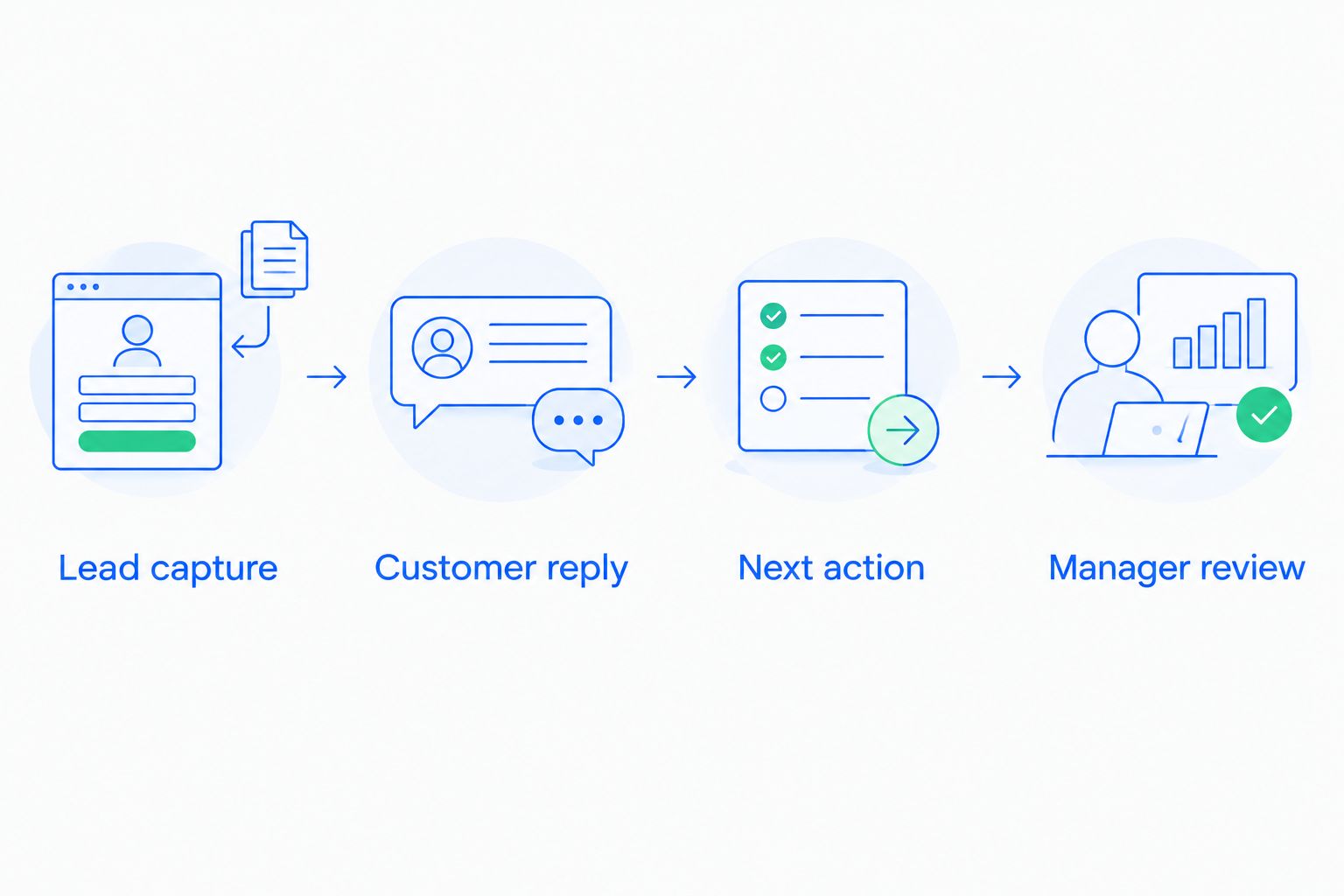
Run a controlled pilot with 10 sample leads, 3 workflows, and 2 sales representatives. These are recommended test parameters, not performance benchmarks. Use fictional records or appropriately protected data, and include awkward cases rather than only clean examples.
Lead capture
Create an inquiry and confirm that the right owner receives it. Include a duplicate contact and a lead with incomplete information. Record what the representative must correct manually and who resolves exceptions.
Customer reply
Test a positive reply, a request to reconnect later, and a message that does not indicate buying intent. Confirm which replies create tasks or change stages. A response is evidence of engagement, not automatic proof that an opportunity has advanced.
Next action
Leave an opportunity without a scheduled activity and check how the team identifies it. Then reassign the opportunity and confirm that responsibility remains clear. The acceptance test is an accountable next step, not simply a notification.
Manager review
Ask a manager to identify unassigned leads, overdue actions, and opportunities awaiting a customer response. Compare the result with the underlying test records. A clean dashboard is not enough if it hides an exception.
Industry-specific selling adds another acceptance test. In event sales, CRM for event coordinators needs to be evaluated around the handoff from inquiry to event planning, not only the movement of a generic deal. Apply the same discipline to your business: include the information the next person needs to act.
For your 2026 pilot, keep a written pass-or-fail record for each requirement. Separate a missing capability from an unfinished configuration; those problems need different decisions. Do not move the active pipeline until ownership, conversation context, and next actions survive the test.
When staying with Salesforce is the right call
Keep Salesforce when its current configuration supports your required work and your team can maintain it. Existing integrations, familiar reporting, and established workflows are part of the decision, not sunk details to ignore.
Before replacing the platform, test whether removing unused fields, correcting routing rules, or clarifying follow-up ownership solves the problem. If the process is unclear, a new CRM simply gives that confusion a different interface.
Switch when a tested alternative fits your requirements better. Stay when the case for changing rests on preference rather than a demonstrable improvement in the sales workflow.
FAQ
What's the best Salesforce alternative for a small business in 2026?
Arches CRM is the strongest fit here for small businesses prioritizing automated follow-ups and connected customer conversations. Choose according to your main requirement: Pipedrive for deal-focused sales work, HubSpot for connected marketing and sales, or Zoho CRM for configurable processes.
Is Salesforce too complicated for a small business?
Salesforce is not automatically too complicated for a small business. The deciding factors are your required workflows, existing configuration, and ability to maintain the system.
Is Pipedrive better than Salesforce for a small sales team?
Pipedrive is the better shortlist choice when visual deal management and sales activities define your requirements. Salesforce remains relevant when your team depends on its existing custom processes and reporting.
Should I choose HubSpot or Salesforce?
Choose HubSpot for evaluation when connected marketing and sales work drives the purchase. Keep Salesforce in consideration when established configurations and integrations already support the customer journey you need.
Can I keep my sales history when switching CRMs?
Make preservation of sales history an explicit migration requirement. Test contacts, opportunities, ownership, notes, and activity relationships in a sample migration before approving the full move.
How do I test CRM follow-up automation?
Test a new inquiry, a customer reply, an overdue task, and an ownership change. Confirm that each event produces the intended next action without creating duplicate outreach or an incorrect stage change.
When should a small business stay with Salesforce?
Stay with Salesforce when its workflows, reporting, and integrations meet your requirements and someone can maintain them. Correct a process problem before assuming that replacing the software will solve it.
One last thing
The revealing CRM test is not whether a deal moves forward. It is whether the system handles a customer saying they are not ready without losing the relationship or triggering inappropriate follow-up.
Make that reply part of your final demonstration. The right CRM preserves context and assigns the next action even when the sale does not advance.