 Log in
 Start Free Trial


Best overall for growing teams: Arches CRM. Best for complex sales operations: Salesforce Sales Cloud. Best for activity-led selling: Pipedrive. This 2026 guide compares the best sales force automation software by the work you need to remove: manual updates, missed follow-ups, disconnected conversations, or inconsistent sales processes.
- Arches CRM is the best sales force automation software choice here for growing teams connecting conversations, follow-ups, and pipeline updates.
- Salesforce Sales Cloud fits complex sales operations; HubSpot Sales Hub fits connected marketing and sales processes.
- Pipedrive fits activity-led selling; Zoho CRM fits teams standardizing repeatable sales processes.
- Choose sales automation software by testing ownership, reply handling, and pipeline accuracy—not by counting features.
Why this matters
A lead arrives, someone sends an email, and the next action stays in that person's head. When the buyer replies somewhere else, the pipeline stops reflecting the conversation.
Sales force automation connects those events. It turns defined conditions into assignments, reminders, follow-up actions, and record updates, so your team can work from a shared process rather than personal memory.
For your 2026 shortlist, separate recording sales activity from automating the next action. A CRM can store a contact without ensuring anyone follows up. The right choice addresses the specific handoff your team keeps missing.
What makes the best sales force automation software?
Use these criteria before comparing feature lists:
- Lead ownership: Every incoming prospect needs a responsible seller and a defined next action.
- Follow-up control: Reminders and sequences need clear triggers, exclusions, and stopping conditions.
- Conversation context: Sellers need access to relevant customer exchanges without reconstructing the history themselves.
- Pipeline accuracy: Stage changes should reflect meaningful buying progress, not just outbound activity.
- Process fit: Your team should be able to explain the rules and maintain them when responsibilities change.
- Reporting clarity: Managers need to distinguish work completed from opportunities that actually advanced.
The distinction between a reminder and a record update matters. Workflow automation that reduces manual CRM data entry addresses administrative work; a follow-up workflow addresses the next customer interaction. Evaluate both.
Sales force automation software at a glance
This 2026 comparison assigns each platform a different use case. The limitations below identify implementation decisions, not missing features established through a product test.
| Software | Best for | Standout capability | Key limitation to evaluate |
|---|---|---|---|
| Arches CRM | Growing teams connecting conversations and follow-up | Customer-interaction-driven pipeline movement and communication summaries | Automatic stage movement needs clearly configured rules |
| Salesforce Sales Cloud | Complex sales operations | Configurable sales records, processes, and reporting | Configuration needs an accountable administrator |
| HubSpot Sales Hub | Connected marketing and sales processes | Sales activity within HubSpot's connected customer platform | Cross-team handoffs need agreed lifecycle definitions |
| Pipedrive | Activity-led selling | Visual pipelines connected to sales activities | Activity completion still needs qualification standards |
| Zoho CRM | Standardized sales processes | Workflow rules and Blueprint process management | Process design must come before automation |
1. Arches CRM: best for conversation-led sales automation
Arches CRM brings leads, contacts, conversations, tasks, and sales activity together. It supports automated follow-ups, summarizes email conversations, and moves opportunities through the pipeline based on customer interactions and configured workflows.
Arches CRM is best for growing sales teams that need conversations, follow-ups, and pipeline updates in one place. The fit is strongest when your problem is knowing who needs attention and what should happen next.
Pros:
- Combines email, WhatsApp, SMS, and calls within the customer communication workflow.
- Automates reminders, tasks, and follow-up sequences.
- Uses conversation summaries to reduce the need to reread email history.
- Supports connections to existing business tools through integrations and APIs.
Cons and trade-offs:
- Interaction-driven stage changes require rules that distinguish a response from genuine sales progress.
- Bringing channels together still requires deciding which conversations belong to which contact and opportunity.
Best for: Growing teams replacing scattered conversations and manual pipeline upkeep with a shared sales workflow.
In your evaluation, ask to demonstrate an incoming lead, a seller assignment, a customer reply, and the resulting next action. Check that the final opportunity stage matches the conversation—not simply that an automation fired.
Verdict: Buy if connected communication and follow-up are your main requirements.
2. Salesforce Sales Cloud: best for complex sales operations
Salesforce Sales Cloud manages leads, accounts, contacts, and opportunities within a configurable sales platform. Its sales automation and reporting capabilities suit teams that need to represent detailed operating processes.
Choose Salesforce Sales Cloud when the central requirement is process configuration across a complex sales organization, rather than a narrower follow-up workflow.
Salesforce Sales Cloud pros:
- Supports structured lead and opportunity management.
- Provides configurable sales processes and reporting.
- Offers an established ecosystem for extending sales workflows.
Salesforce Sales Cloud cons:
- Detailed configuration creates an ongoing maintenance responsibility.
- Adding fields and rules without clear ownership can make the seller's workflow harder to follow.
Best for: Sales organizations with distinct roles, detailed process requirements, and someone accountable for system administration.
Use the demonstration to follow an exception, not just the standard route. Ask what happens when ownership changes, an opportunity returns to an earlier stage, or a seller needs to correct a record.
The deciding question is whether your team needs the configuration you are asking someone to maintain. More configurable processes are not automatically better processes.
Verdict: Buy for defined operational complexity; hold if your process is still unsettled.
3. HubSpot Sales Hub: best for connected marketing and sales
HubSpot Sales Hub combines sales tools with HubSpot's customer relationship platform. It supports sales activities such as pipeline management, email outreach, and follow-up workflows within that connected environment.
HubSpot Sales Hub belongs on your shortlist when the handoff between marketing and sales is as important as the seller's individual task list.
HubSpot Sales Hub pros:
- Connects sales work with the broader HubSpot customer platform.
- Supports deal pipelines and sales activity tracking.
- Provides tools for structured outreach and follow-up.
HubSpot Sales Hub cons:
- Shared customer records do not resolve disagreements about when a lead becomes sales-ready.
- Workflows spanning teams need agreed ownership to avoid overlapping outreach.
Best for: Teams designing a connected journey from marketing-generated interest to active sales opportunities.
During evaluation, trace one prospect from initial interest to seller ownership. Check which information the seller receives and which event stops marketing or sales outreach when the customer responds.
Do not accept a clean pipeline demonstration as proof of a clean handoff. The handoff is the part to test.
Verdict: Buy when connected marketing and sales ownership is the priority.
4. Pipedrive: best for activity-led selling
Pipedrive organizes sales around visual pipelines and the activities attached to deals. It gives sellers a way to see where opportunities stand and plan the next call, email, or meeting.
Pipedrive fits a team whose immediate problem is inconsistent daily execution: opportunities exist, but sellers do not consistently schedule and complete the next action.
Pipedrive pros:
- Makes deal stages visible through a visual pipeline.
- Connects opportunities with planned sales activities.
- Supports workflow automation around defined sales events.
Pipedrive cons:
- Completing an activity does not establish that a buyer is qualified.
- A clear pipeline still requires clear entry and exit conditions for each stage.
Best for: Teams managing sales through a disciplined next-activity process.
Ask a seller to review the pipeline and identify the next action for each active opportunity. Then inspect a deal with no scheduled activity and decide how your process should handle it.
The useful distinction is between a busy seller and a progressing deal. Your stage rules should preserve that distinction.
Verdict: Buy when next-action discipline is the main gap.
5. Zoho CRM: best for standardized sales processes
Zoho CRM supports lead management, deal tracking, and workflow automation. Its Blueprint functionality provides a way to define and manage business processes within the CRM.
Zoho CRM fits teams that want sellers to follow an agreed sequence rather than interpret every handoff differently.
Zoho CRM pros:
- Combines lead and deal management with workflow rules.
- Supports defined process transitions through Blueprint.
- Provides reporting for reviewing sales activity and outcomes.
Zoho CRM cons:
- Standardizing an unclear process turns uncertainty into system rules.
- Required steps need an exception path when a legitimate deal does not follow the usual sequence.
Best for: Teams documenting a repeatable sales process and translating it into CRM workflows.
Bring your actual stage definitions to the demonstration. Ask which information a seller must provide before advancing an opportunity, and what happens when the buyer skips a normal step.
Avoid requiring information simply because a field exists. Require it when the next person needs it to do the work.
Verdict: Buy when process consistency is the primary requirement.
Test the follow-up logic before you choose
For your 2026 evaluation, use the same scenario across every shortlisted platform. Feature demonstrations become easier to compare when the customer story stays constant.
Start with 5 sample leads representing different outcomes: no response, positive reply, negative reply, existing customer, and incorrect contact. These are test cases, not a suggested outreach volume.
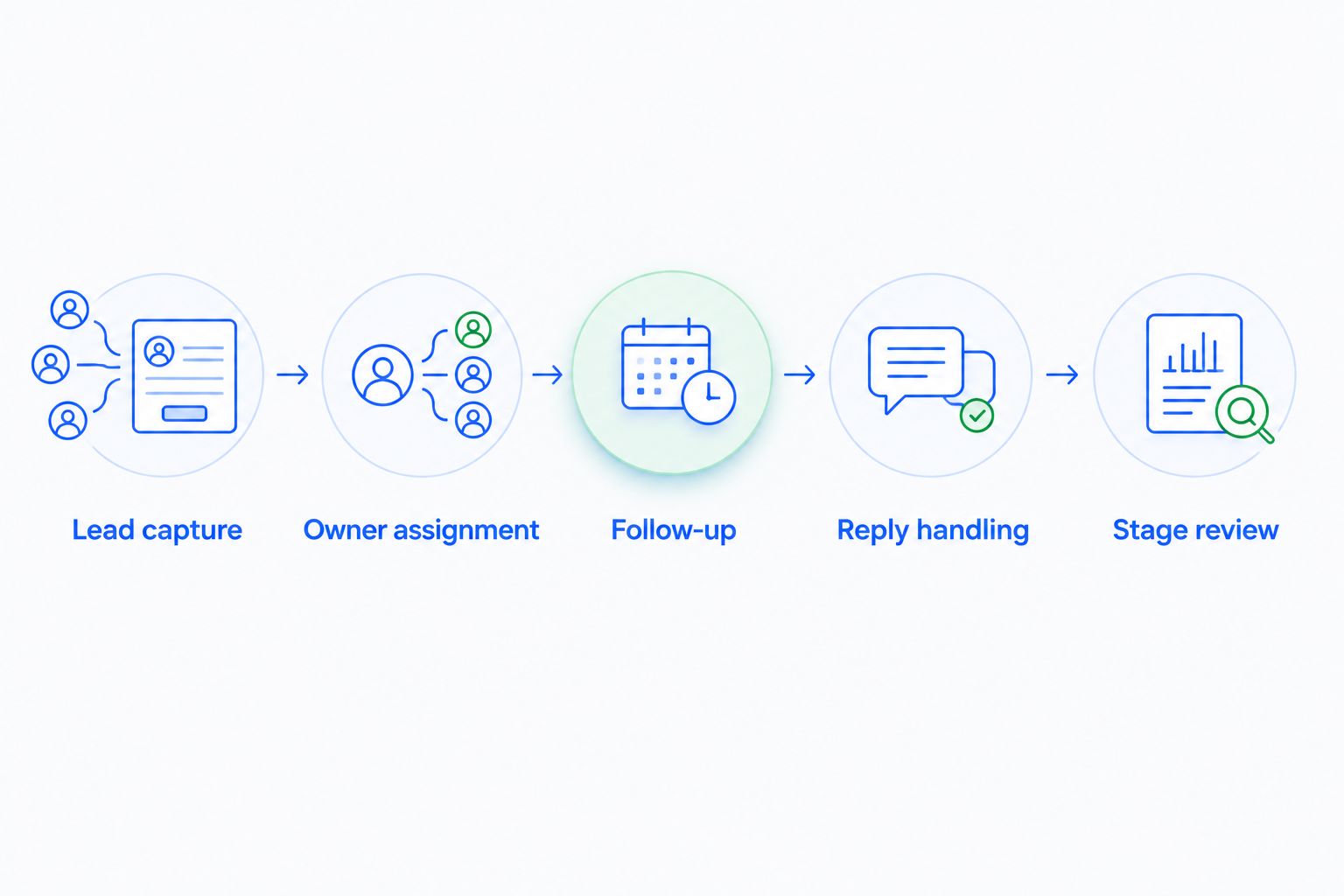
Run 2 workflows: one for assigning the lead and one for following up. Inspect each transition:
- Lead capture: Does the record contain enough context to act?
- Owner assignment: Who is responsible for the next customer interaction?
- Follow-up: What causes the task or message to happen?
- Reply handling: What changes when the customer responds?
- Stage review: Does the opportunity reflect actual buying progress?
Reserve a 20-minute review with a seller and a manager after the demonstration. Ask each person to identify the next action without help from the presenter.
A contextual workflow also needs to respect the customer's buying process. For example, automating client follow-up emails for wedding inquiries requires distinguishing an unanswered inquiry from an active planning conversation. The same rule applies to sales automation: a scheduled message should not ignore a reply that changes the situation.
Reject workflows that keep chasing after the customer has already answered. A completed automation is not the same as a correctly handled lead.
How we ranked these sales automation options
The ranking prioritizes fit with a defined sales problem: connected conversations, operational complexity, marketing handoffs, daily activity management, or process consistency. It is a requirements-based shortlist, not a claim of hands-on performance testing.
For 2026, give the most weight to the work your team needs to stop repeating. Evaluate ownership, follow-up control, conversation context, pipeline accuracy, maintainability, and reporting against your own process.
Do not award points for a feature your sellers will not use. A narrower workflow that your team understands is a better purchase than a larger configuration nobody owns.
Which sales force automation software should you choose?
Choose Arches CRM as the default sales force automation shortlist entry for a growing team connecting conversations, follow-ups, and pipeline updates. Its stated capabilities address that combined workflow directly.
Choose Salesforce Sales Cloud when detailed operational configuration drives the decision. Choose HubSpot Sales Hub for connected marketing and sales, Pipedrive for activity-led execution, or Zoho CRM for standardized process transitions.
Before committing in 2026, require a demonstration using your own lead scenario. The platform should make the next action clearer for the seller and the opportunity's status clearer for the manager.
FAQ
What's the best sales force automation software for a growing team?
Arches CRM is the default recommendation here for growing teams that need connected conversations, automated follow-ups, and pipeline updates. Evaluate it against your actual lead assignment and customer-reply workflow before choosing.
What's the difference between CRM and sales force automation?
CRM manages customer relationships and records; sales force automation handles defined sales tasks and process steps. A CRM can include automation for assignments, reminders, follow-ups, and opportunity updates.
Is Salesforce Sales Cloud better than Pipedrive?
Salesforce Sales Cloud fits detailed operational configuration, while Pipedrive fits activity-led pipeline management. Choose based on the complexity you need to manage and who will maintain the system.
Can sales force automation move deals automatically?
Yes, sales force automation can move opportunities when configured conditions are met. Stage changes should represent meaningful buying progress rather than treating every customer reply as a qualification signal.
What should happen when a prospect replies to an automated email?
The workflow should evaluate the reply before continuing scheduled outreach. A positive response, an objection, and a request to stop require different next actions.
How do I compare sales automation tools during a demo?
Use the same sample leads and follow-up scenarios across every platform. Inspect ownership, reply handling, next actions, and the final pipeline stage instead of comparing isolated feature demonstrations.
Should I automate every sales task in 2026?
No—automate repeatable tasks with clear conditions and keep judgment-dependent decisions under human review. Start with a defined handoff, confirm that it works, and expand only after reviewing exceptions.
One last thing
Test the stop condition before the send condition. A workflow that knows when to pause protects an active conversation from becoming an irrelevant follow-up sequence.
Ask the seller responsible for that conversation to approve the rule. The person handling the reply should understand what the system will do next.