
 Log in
 Start Free Trial


HubSpot brings marketing, sales, and customer service tools around shared customer records. That breadth stops being the deciding advantage when your immediate problem is missed follow-up rather than coordinating departments. The best HubSpot alternative in 2026 is Arches CRM if you need sales workflow automation and connected conversations; Pipedrive if you need a visual, activity-led sales pipeline.
- For HubSpot alternatives for small business, shortlist Arches CRM for follow-up automation and connected customer conversations.
- Choose Pipedrive for visual pipeline management and activity-led selling.
- Choose Zoho CRM when configurable sales processes and the wider Zoho ecosystem matter.
- Keep HubSpot when shared marketing, sales, and service workflows already support your business.
Why this matters
A lead arrives, someone replies, and the next action never gets assigned. Changing CRM software only helps if the replacement closes that gap.
Your shortlist should start with the work that breaks: assigning ownership, preserving conversation history, scheduling follow-up, or updating deal stages. A longer feature list does not tell you whether a salesperson can finish those jobs without reconstructing the customer story.
For a small business choosing in 2026, the practical question is simple: Which system makes the next sales action clear, without creating unnecessary administration? Keep that question beside every comparison below.
HubSpot alternatives at a glance
These options serve different operating needs. HubSpot remains in the table because replacing a working system requires a better fit, not just a different interface.
| Tool | Best for | Standout capability | How it differs from HubSpot |
|---|---|---|---|
| Arches CRM | Growing sales teams focused on follow-up execution | Workflow automation, conversation summaries, and interaction-based pipeline movement | Centers the evaluation on sales conversations, tasks, and deal progression |
| Pipedrive | Teams organizing selling around deals and activities | Visual pipelines linked to sales activities | A sales-focused alternative to HubSpot's broader departmental platform |
| Zoho CRM | Businesses that need configurable sales processes | Customization and connections across the Zoho ecosystem | Fits teams considering CRM alongside other Zoho business applications |
| HubSpot | Businesses coordinating marketing, sales, and service | Connected customer records across departmental tools | The benchmark to retain when those cross-team connections already work |
Treat the table as a shortlist, not a purchase order. Workflow depth, integrations, permissions, and feature access require inspection against your actual requirements.
1. Arches CRM: best for follow-up automation
Arches CRM is a sales CRM and workflow automation platform for growing teams that need to capture leads, manage pipelines, and keep customer conversations together. It brings contacts, conversations, tasks, and sales activity into one place, with email, WhatsApp, SMS, and calls among its communication channels.
Its strongest fit is a team whose sales process stalls between interactions. Configured workflows and customer interactions can drive opportunity movement, while conversation summaries help salespeople understand what happened and what needs attention next.
Where the platform shines
- Connected context: Keep customer conversations and sales work together instead of treating the pipeline as a separate reporting exercise.
- Follow-up execution: Automate reminders, tasks, and follow-up sequences around your sales process.
- Less manual updating: Use interaction-based opportunity movement rather than relying entirely on manual stage changes.
- Existing-tool connections: Integrations and APIs support connections with other business tools.
Where the platform falls short
- Automation needs operating rules. Your team still has to define ownership, stage criteria, and the events that should trigger action.
- Sales fit is not departmental parity. The described sales capabilities do not establish a replacement for every marketing or service workflow you run in HubSpot.
- Integration suitability needs verification. The presence of integrations and APIs is not proof that your particular connection supports every required field or action.
Head-to-head with HubSpot
| Dimension | This alternative | HubSpot |
|---|---|---|
| Primary evaluation angle | Sales execution and follow-up workflows | Connected marketing, sales, and service operations |
| Pipeline work | Opportunity movement based on interactions and configured workflows | Deal management within the broader HubSpot platform |
| Customer context | Contacts, conversations, tasks, and sales activity together | Shared customer records across connected departmental tools |
| Decision test | Can your team complete its follow-up process with fewer manual updates? | Are cross-department workflows central to how your business operates? |
Best for: Growing sales teams that need customer conversations to translate into assigned work and pipeline movement.
Before selecting a replacement in 2026, demonstrate a lead arriving, a customer replying, and the correct next action appearing. Use the guide to reducing manual CRM data entry with workflow automation to frame that evaluation around work removed, not automation labels.
Verdict: Buy for a sales-first workflow once your required channels, connections, and stage rules pass a practical test.
2. Pipedrive: best for activity-led pipeline management
Pipedrive organizes sales work around deals, visual pipelines, and activities. It belongs on your shortlist when the immediate requirement is clear deal ownership and a visible next step.
The buying question is not whether Pipedrive has a pipeline board. It is whether the board and its linked activities give your team a clearer daily routine than your current HubSpot setup.
Where Pipedrive shines
- Visual deal management: Organize opportunities by sales stage and inspect where work stands.
- Activity-led selling: Connect calls, meetings, and other sales activities to the selling process.
- Sales-centered evaluation: Keep the selection focused on how salespeople manage opportunities.
Where Pipedrive falls short
- A sales pipeline is not a departmental replacement. Map marketing and customer-service requirements separately before leaving HubSpot.
- Visibility does not enforce follow-up. Your team still needs ownership rules and a consistent activity discipline.
- Connected workflows need checking. Confirm the exact behavior of communication tools and integrations rather than assuming equivalence.
Pipedrive vs. HubSpot
| Dimension | Pipedrive | HubSpot |
|---|---|---|
| Core orientation | Sales pipeline and activity management | Marketing, sales, and service tools around customer records |
| Strongest selection reason | Your team wants to work from deals and scheduled activities | Your business needs connected departmental workflows |
| Main evaluation risk | Selecting a clear pipeline without checking surrounding workflows | Retaining breadth that does not address the team's daily sales problem |
Best for: Small sales teams that organize work around opportunity stages, scheduled activities, and clear accountability.
For a 2026 evaluation, ask a salesperson to find a stalled opportunity, identify the last interaction, and schedule the next action. Watch the sequence, not the presentation.
Verdict: Buy when activity-led pipeline management is your main requirement and the surrounding workflows pass inspection.
3. Zoho CRM: best for configurable sales processes
Zoho CRM supports sales automation and customization within the wider Zoho business software ecosystem. It is a relevant alternative when your business needs its CRM to reflect specific fields, processes, and operational relationships.
That flexibility brings a management responsibility. Decide who will maintain the configuration before treating customization as an advantage.
Where Zoho CRM shines
- Process configuration: Adapt the CRM around defined sales requirements.
- Sales automation: Build workflows around recurring sales tasks and events.
- Ecosystem fit: Evaluate CRM alongside other Zoho applications your business uses or is considering.
Where Zoho CRM falls short
- Configuration requires ownership. Someone must maintain fields, rules, and process changes.
- More options do not guarantee clearer work. Avoid building screens and workflows that salespeople do not need.
- Ecosystem membership is not proof of fit. Demonstrate each required application connection and handoff.
Zoho CRM vs. HubSpot
| Dimension | Zoho CRM | HubSpot |
|---|---|---|
| Strongest selection reason | Configurable CRM processes and Zoho ecosystem fit | Connected marketing, sales, and service operations |
| Configuration question | Who will own the customized process? | Which existing departmental workflows must remain connected? |
| Practical proof | Show the required fields, rules, and application handoffs | Show the complete customer journey across the tools you use |
Best for: Businesses with defined customization requirements and someone responsible for maintaining the sales system.
Verdict: Buy when configurable processes solve a documented need; skip customization for its own sake.
Why people switch from HubSpot
A sound switching reason names a broken workflow. It does not assume that HubSpot is unsuitable for every small business.
Use these decision conditions to separate a genuine replacement need from a configuration problem:
- Follow-up is the central job. Your team primarily needs to assign leads, act on replies, and maintain next steps rather than coordinate multiple departments.
- The selling routine is activity-led. Salespeople need to organize their day around opportunities, calls, and meetings.
- The process needs specific configuration. Required fields, rules, or application handoffs drive the selection.
- The current setup obscures ownership. You cannot consistently identify who owns an opportunity and what should happen next.
The last condition deserves extra scrutiny. Unclear ownership can survive any migration; document the rule before expecting a new platform to enforce it.
Test the workflow before you move the pipeline
For your 2026 shortlist, run the same sales scenario in every candidate. Use 10 sample leads across a 5-business-day pilot; these are suggested test boundaries, not performance benchmarks.
Lead capture
Create a sample inquiry and check which details arrive in the customer record. Confirm that the salesperson can identify the source and distinguish the contact from the opportunity.
Owner assignment
Assign responsibility and inspect what the owner sees. A record existing in the CRM is not the same as someone knowing they must act.
Customer reply
Add a realistic reply and inspect the conversation context. Check whether another salesperson can understand what was discussed without searching unrelated tools.
Next action
Run 3 scenarios: an unanswered inquiry, an interested reply, and a request to stop contact. Verify the expected task, sequence behavior, and owner for each scenario.
Pipeline update
Check whether the opportunity belongs in its resulting stage. A reply acknowledges contact; it does not automatically prove qualification or buying intent.
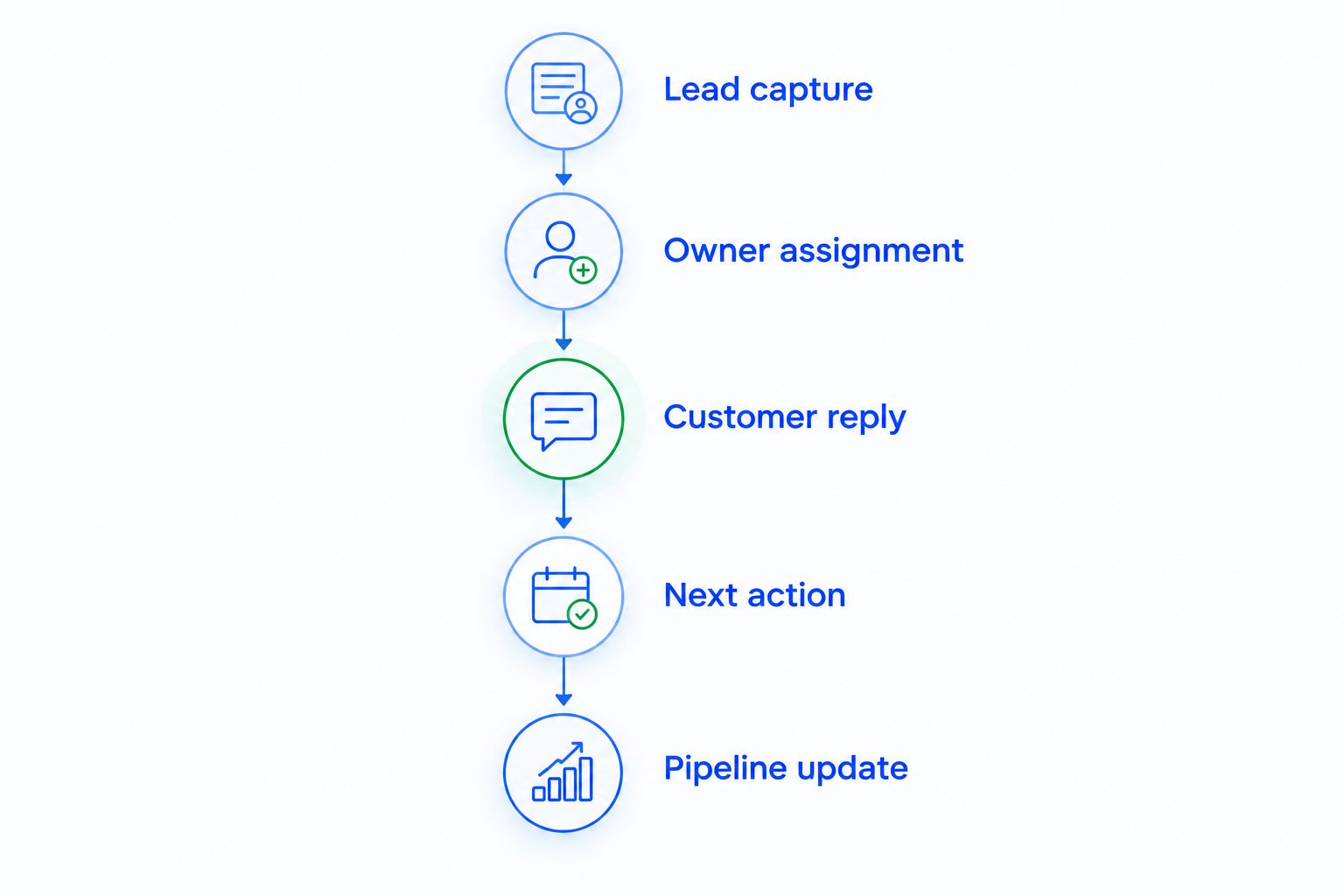
Record pass or fail against each requirement. Separate software limitations from missing configuration, and keep a failed mandatory requirement visible even when the rest of the demonstration looks good.
Before moving active opportunities, map contact fields, deal stages, owners, open tasks, and required history. Decide which system is the source of truth during the transition so your team does not work competing versions of the same pipeline.
When staying with HubSpot is the right call
Keep HubSpot when its connected marketing, sales, and service workflows already support your business and the sales team uses them consistently. Replacing functioning cross-team processes to obtain a different pipeline view introduces work without establishing a better outcome.
First inspect the configuration. Simplifying fields, clarifying stage definitions, and assigning ownership directly address process problems; a migration does not automatically fix them.
For a 2026 decision, require a challenger to demonstrate a specific improvement in your actual workflow. If no candidate does that, keep the existing system and repair the process.
FAQ
What's the best HubSpot alternative for a small business?
Arches CRM is best for growing sales teams prioritizing follow-up automation and connected customer conversations. Pipedrive fits activity-led pipeline management, while Zoho CRM fits businesses with defined customization requirements.
Is Pipedrive better than HubSpot for a small sales team?
Pipedrive is the more relevant shortlist option when your main requirement is visual pipeline and activity management. HubSpot remains a strong fit when your business depends on connected marketing, sales, and service workflows.
Should I replace HubSpot just to automate follow-ups?
No, first check whether your current HubSpot configuration can support the required follow-up process. Consider switching when a replacement demonstrates a better fit for your actual ownership, communication, and next-action requirements.
Can a CRM move opportunities automatically when customers reply?
Arches CRM supports opportunity movement based on customer interactions and configured workflows. Define stage criteria carefully because a customer reply does not necessarily mean an opportunity is qualified.
How do I compare HubSpot alternatives without relying on demos?
Run the same sample sales workflow in every candidate and record pass or fail against your requirements. Include lead capture, ownership, customer replies, next actions, and pipeline updates.
What should I check before migrating away from HubSpot?
Check contact fields, deal stages, ownership, open tasks, required history, and application connections. Define the source of truth during the transition before moving active opportunities.
One last thing
Do not automate an ambiguous sales stage. If your team disagrees about what “qualified” means, automatic stage movement makes the disagreement harder to see rather than resolving it.
Write the entry condition for each stage in plain language. Then choose the CRM that can apply those rules while keeping ownership and the next action visible.