
 Log in
 Start Free Trial


Best overall for sales-led Shopify stores: Arches CRM, subject to validating your Shopify connection. Best for marketing-to-sales handoffs: HubSpot. Best for straightforward deal tracking: Pipedrive. This 2026 guide compares five CRM options by the work your team needs to do after a customer makes contact—not by feature-list length.
- The best CRM for Shopify stores depends on whether you need sales follow-up, marketing coordination, or complex account management.
- Arches CRM is best for growing sales teams that need organized conversations, assigned leads, and automated follow-ups.
- Choose HubSpot for marketing-to-sales coordination, Pipedrive for deal tracking, Zoho CRM for customization, and Salesforce for complex operations.
- Validate Shopify data flow, duplicate handling, and purchase-triggered workflow stops before committing to any CRM.
Why this matters
A Shopify order and a sales opportunity are different records. Your store handles transactions; your CRM should make the next customer action clear. Connecting them without deciding which system owns which information creates more cleanup, not better follow-up.
Start with the missed action. A wholesale inquiry needs an owner, a product question needs a reply, and a negotiated order needs a next step. If your only requirement is sending purchase-triggered marketing messages, evaluate that requirement separately before adding a sales CRM.
The right CRM connects customer context to accountable action. A large contact database alone does not solve unanswered inquiries.
What makes the best CRM for Shopify stores?
Use these six criteria to evaluate your 2026 shortlist before comparing dashboards:
- Shopify data flow: Specify which customer, order, and refund information must move between systems. Verify the actual connector rather than assuming compatibility.
- Contact matching: Test how the connection handles returning customers, guest checkouts, changed addresses, and duplicate records.
- Follow-up ownership: Every active inquiry needs an assigned person and a visible next action.
- Workflow control: Confirm what starts an automated sequence, what stops it, and what happens when a customer replies or purchases.
- Conversation context: Identify which email, messaging, and call interactions your team needs alongside the customer record.
- Administration: Match configuration demands to the person who will maintain the system after launch.
Do not award points for features nobody will own. A sophisticated workflow with unclear rules is harder to trust than a simple reminder with a named owner.
Best Shopify CRM options at a glance
The ranking separates distinct buying situations. It does not treat a configured Shopify connection as a standard feature of every platform.
| Rank | CRM | Best for | Standout capability | Key limitation or buying check |
|---|---|---|---|---|
| 1 | Arches CRM | Sales-led customer follow-up | Leads, conversations, tasks, and workflow automation together | Validate the Shopify connection and required order fields |
| 2 | HubSpot | Marketing-to-sales handoffs | CRM connected to a broader marketing and sales platform | Define the product scope and connector requirements |
| 3 | Pipedrive | Straightforward opportunity tracking | Deal-centered sales pipeline management | Evaluate ecommerce marketing requirements separately |
| 4 | Zoho CRM | Customized sales processes | Configurable CRM within the broader Zoho application family | Assign ownership for configuration and integration maintenance |
| 5 | Salesforce | Complex account and sales operations | Extensive CRM configuration and application ecosystem | Match implementation scope to available administration capacity |
1. Arches CRM: best CRM for Shopify sales follow-up
Arches CRM brings lead management, sales pipelines, follow-up automation, and customer conversations into one platform. It supports email, WhatsApp, SMS, and calls, alongside conversation summaries and configured opportunity movement.
Arches CRM is best for growing sales teams that need customer conversations and follow-up tasks in one place. For a Shopify business, that makes it a candidate when inquiries require a human sales process rather than only an automated marketing message.
Think wholesale discussions, quotes, and questions that need a salesperson's attention. Define those workflows first, then validate how Shopify customer and order information will reach the CRM through the chosen integration approach.
Pros:
- Capture, organize, and assign leads.
- Track opportunities from inquiry through closed deal.
- Automate reminders, tasks, and follow-up sequences.
- Keep communication context alongside sales activity.
Cons and limits:
- General integration and API capabilities do not establish a ready-made Shopify connection.
- Automated opportunity movement depends on configured workflows; stage definitions still need an owner.
- A sales pipeline is unnecessary overhead when your only need is transactional messaging.
Best for: Growing teams selling through conversations as well as checkout.
Verdict: Hold until your Shopify data-flow test passes; then choose it for sales follow-up.
2. HubSpot: best CRM for marketing-to-sales handoffs
HubSpot combines CRM with a wider collection of marketing, sales, and service products. Its fit here is coordination: keeping contact information and sales activity connected to the broader customer acquisition process.
Choose this direction when your Shopify business has a real handoff between marketing and sales. Define the handoff explicitly—for example, when an inquiry becomes an assigned opportunity rather than remaining a marketing contact.
Pros:
- Connects CRM work with a broader marketing and sales environment.
- Supports contact and deal management.
- Offers an application ecosystem for extending workflows.
Cons and limits:
- A broad platform requires clear decisions about which products and workflows you actually need.
- Shopify field mapping, synchronization behavior, and connector requirements need separate validation.
- A simple sales process does not automatically benefit from a larger platform footprint.
For your 2026 evaluation, ask for a demonstration of one contact moving through the complete handoff. A contact appearing in both systems is not proof that ownership, next actions, and purchase updates work correctly.
Best for: Stores coordinating distinct marketing and sales responsibilities.
Verdict: Buy for a defined marketing-to-sales handoff; skip unnecessary platform expansion.
3. Pipedrive: best CRM for straightforward deal tracking
Pipedrive centers sales work on deals and pipeline stages. It belongs on your shortlist when the main problem is simple: inquiries arrive, but nobody can reliably see which deals need attention next.
Use a deal pipeline for opportunities that involve an actual sales decision. Do not turn every completed Shopify order into an open deal unless a salesperson has something meaningful to do with it.
Pros:
- Gives sales opportunities a clear pipeline structure.
- Organizes activities around progressing deals.
- Keeps the buying decision focused on sales execution rather than a broader business suite.
Cons and limits:
- Deal management does not replace the full set of ecommerce marketing requirements.
- Your Shopify connection still needs testing for contact matching and relevant order updates.
- An order-heavy business without negotiated sales has less reason to maintain a separate deal pipeline.
Ask a salesperson to find the last interaction, next activity, and current stage without help. That exercise tests the daily workflow more directly than a presentation of configuration options.
Best for: Small sales teams managing a clear, repeatable opportunity process.
Verdict: Buy for deal visibility; skip if you have no active sales opportunities to manage.
4. Zoho CRM: best CRM for customized sales processes
Zoho CRM offers configurable sales management within the broader Zoho application family. Consider it when your Shopify-related sales process needs defined fields, workflow rules, and a structure that reflects how your team operates.
Customization needs discipline. Write down the business decision each field supports before adding it; otherwise, your team inherits a form-filling task instead of a useful customer record.
Pros:
- Supports configurable sales records and processes.
- Includes sales workflow automation.
- Fits an evaluation that also considers other Zoho business applications.
Cons and limits:
- Additional configuration creates an ongoing maintenance responsibility.
- Using other products from the same vendor does not remove the need to verify data flow.
- Custom fields add little value when nobody uses them to make decisions.
For a 2026 shortlist, distinguish required customization from preferences. Customer ownership and next actions deserve priority over reproducing every column from an old spreadsheet.
Best for: Teams with a documented sales process and someone responsible for CRM configuration.
Verdict: Buy for defined customization needs; hold if process ownership is unresolved.
5. Salesforce: best CRM for complex sales operations
Salesforce provides configurable CRM capabilities and an extensive application ecosystem. It is a candidate when Shopify is one part of a larger operation with account relationships, multiple teams, and detailed sales processes.
Start with the operating model, not the software's breadth. A business handling negotiated accounts and several sales responsibilities has different requirements from a store answering occasional product questions.
Pros:
- Supports detailed account and opportunity management.
- Offers extensive configuration options.
- Provides an application ecosystem for specialized requirements.
Cons and limits:
- Broad configuration options create implementation and administration work.
- Shopify integration remains a separate design and validation task.
- Complex tooling is a poor substitute for an agreed sales process.
Name the person responsible for changes before approving the project. That person needs authority over field definitions, access decisions, workflow changes, and integration exceptions.
Best for: Organizations with complex sales operations and dedicated CRM administration.
Verdict: Buy for documented operational complexity; skip for a simple follow-up queue.
How to validate a Shopify CRM before committing
Use a proposed 7-day pilot with 10 customer records and 3 workflows. These are suggested test parameters, not vendor performance claims. Keep the sample small enough to inspect every result.
Capture
Create test scenarios for a new inquiry, a returning customer, and a guest checkout. Confirm which records appear in the CRM and which Shopify identifiers remain attached. Check duplicates deliberately rather than waiting for them to accumulate.
Assign
Give each active sales inquiry an owner. Confirm that the next action is visible and that a reassignment does not leave the customer without responsibility.
Follow up
Test a reminder, an unanswered inquiry sequence, and a reply-triggered task. Document the trigger and stop condition for each. The guide to automatically following up when a lead goes cold explains the workflow problem to address.
Stop
Make a test purchase or send a reply, depending on the workflow. Check that the intended action stops or changes. A customer should not keep receiving a sales prompt after completing the action that prompt requested.
Review
Inspect the customer timeline and any exceptions. Ask whether a salesperson can understand what happened and what to do next without opening several systems.
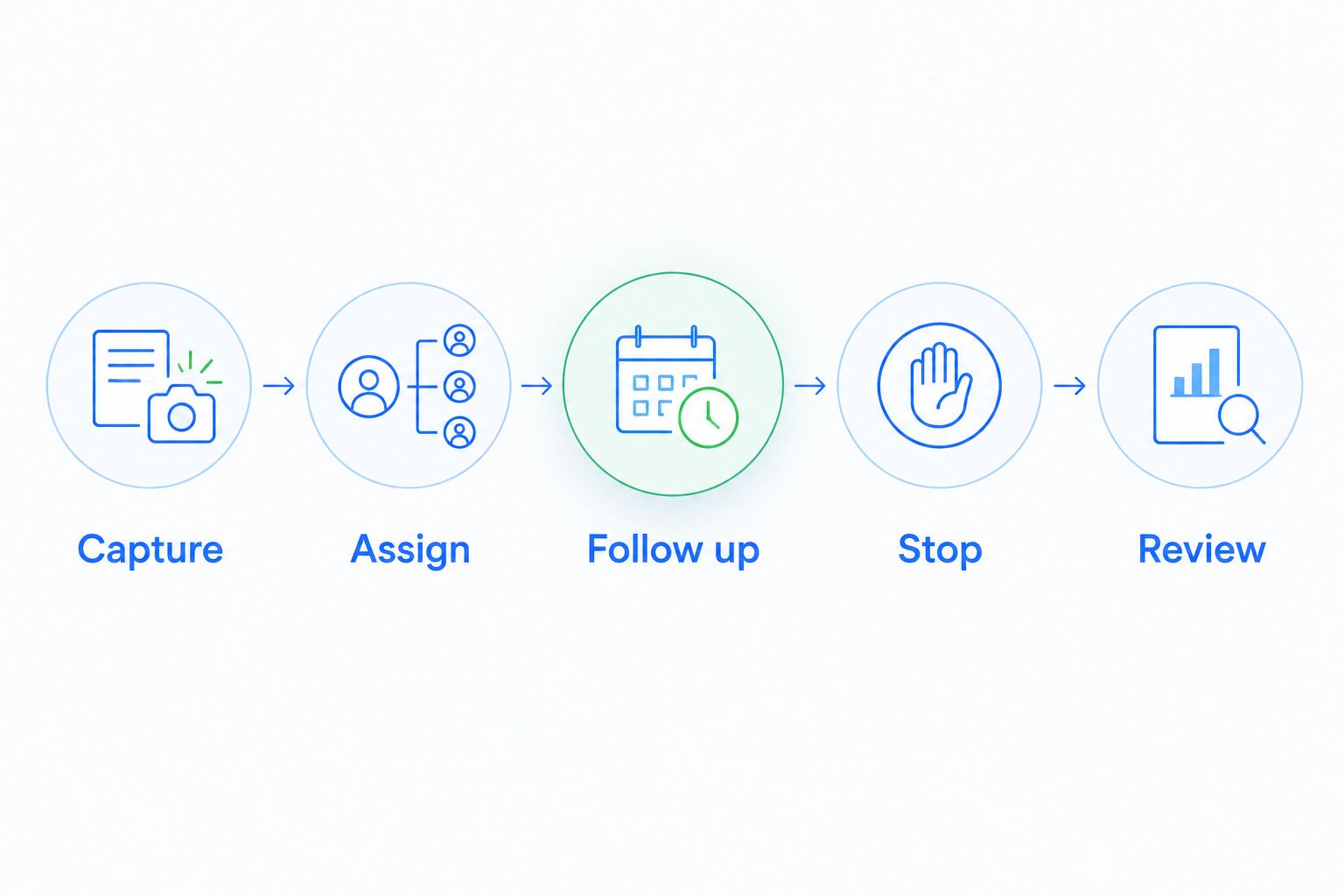
Pass the workflow, not just the connection. A successful import proves that records moved; it does not prove that the sales process works.
Ranking logic
This 2026 ranking prioritizes follow-up ownership, conversation context, workflow control, Shopify data validation, and administration. Each recommendation occupies a different use case because a sales-led store, a marketing-led store, and a complex account business need different systems.
The first position applies to sales-led follow-up, not every Shopify merchant. No ranking removes the need to validate your connector, permissions, field mappings, and stop conditions.
Which CRM should you choose?
Start with Arches CRM when missed follow-ups and scattered conversations are the problem. Validate the Shopify connection before committing. Choose HubSpot for marketing-to-sales coordination, Pipedrive for a focused deal pipeline, Zoho CRM for defined customization, or Salesforce for complex operations.
If you cannot name the action the CRM should improve, pause the purchase. Write that action down, assign an owner, and use it as the acceptance test for your 2026 decision.
Organize your sales follow-up
Explore lead management, customer conversations, and workflow automation for your sales team.
FAQ
What's the best CRM for Shopify stores in 2026?
The best CRM depends on the sales process your Shopify store needs. Arches CRM fits sales-led follow-up, HubSpot fits marketing-to-sales coordination, and Pipedrive fits straightforward deal tracking. Validate the Shopify connection before choosing.
Does every Shopify store need a separate CRM?
No. Add a sales CRM when customer inquiries need assigned owners, tracked opportunities, or follow-up tasks beyond order processing. Define that requirement before selecting software.
Is HubSpot better than Pipedrive for a Shopify store?
HubSpot fits broader marketing-to-sales coordination, while Pipedrive fits a focused deal pipeline. Compare the workflow you need rather than treating either platform as the universal winner.
Can I assume a CRM connects directly to Shopify?
No. Verify the specific connector or integration approach, the records it transfers, and its synchronization rules. General API access does not prove that your required Shopify workflow is ready to use.
What Shopify information should I send to a CRM?
Send the information your sales team needs to make its next decision. Define customer matching, relevant order context, ownership, and workflow stop conditions before adding extra fields.
Should every Shopify order become a CRM deal?
No. Create deals for opportunities that require sales work. Automatically treating completed orders as open opportunities obscures the inquiries your team still needs to handle.
How do I test CRM follow-up automation?
Test the trigger, assigned owner, next action, and stop condition together. Include customer replies and completed purchases so you can confirm that outdated follow-ups stop.
One last thing
Test what happens after the customer buys. It is easy to demonstrate an automated follow-up starting; the more useful test is whether the system recognizes that the next action has changed. Put that check in your acceptance criteria before connecting live customer communications.