 Log in
 Start Free Trial


Best overall for automated follow-up: Arches CRM. Best for visual deal tracking: Pipedrive. Best for connecting sales and marketing: HubSpot. For your 2026 shortlist, add Salesforce Sales Cloud for configurable sales operations and Microsoft Dynamics 365 Sales for Microsoft-centered teams.
- Arches CRM is the best CRM for remote sales teams that need automated follow-up and shared customer conversations.
- Pipedrive suits pipeline-focused teams; HubSpot suits teams connecting sales activity with marketing.
- Salesforce Sales Cloud suits configurable operations; Microsoft Dynamics 365 Sales suits Microsoft-centered workflows.
- Choose through a remote handoff test, not a feature-count contest.
Why this matters
A lead replies while the account owner is offline. Another rep sees the message but cannot find the last conversation or promised next step. The team has a communication problem, even if everyone has access to a pipeline board.
Your CRM should make the customer record useful without a meeting. A covering rep needs the conversation, deal stage, owner, and next action together—not instructions to ask someone else.
For a remote sales team, the deciding question is simple: Can another rep continue the deal without asking what happened? Use that question to separate useful workflow features from features that merely look good in a demonstration.
What makes the best CRM for remote sales teams?
Use these criteria for your 2026 evaluation before comparing individual products:
- Shared customer context: Reps can find contact details, relevant conversations, notes, and open tasks without searching separate systems.
- Clear ownership: Every active opportunity has an accountable owner, including during absences and handoffs.
- Follow-up automation: Tasks and sequences support the next action rather than relying entirely on someone remembering it.
- Pipeline discipline: Stages describe customer progress, with clear conditions for moving a deal forward.
- Communication fit: The CRM supports the channels your team actually uses, either directly or through suitable integrations.
- Maintainable setup: Your team can explain, adjust, and troubleshoot its workflows without turning every change into a separate project.
Do not give every criterion equal weight. If unanswered messages are your main problem, prioritize communication and follow-up. If managers cannot trust opportunity stages, prioritize pipeline rules and ownership first.
Best remote sales CRMs at a glance
These recommendations separate distinct buying needs. They are not claims that every product has been independently tested against an identical configuration.
| CRM | Best for | Standout capability | Key limitation or trade-off |
|---|---|---|---|
| Arches CRM | Automated follow-up across shared conversations | Communication, workflow automation, and interaction-based pipeline updates | Automated actions depend on the workflows you configure |
| Pipedrive | Visual deal tracking | A deal-centered sales pipeline | A clear board still needs disciplined next actions |
| HubSpot | Connected sales and marketing | CRM connected with marketing and service tools | Cross-team setup needs shared definitions and ownership |
| Salesforce Sales Cloud | Configurable sales operations | Customizable sales records, processes, and automation | Extensive configuration creates administration responsibilities |
| Microsoft Dynamics 365 Sales | Microsoft-centered sales teams | Connections with Microsoft business applications | Microsoft alignment does not replace workflow design |
1. Arches CRM: best remote sales CRM for automated follow-up
Arches CRM brings leads, contacts, conversations, tasks, and sales activity into one platform. It supports email, WhatsApp, SMS, and calls, with workflow automation for reminders, tasks, and follow-up sequences.
Its assistance features include email drafting and conversation summaries. Opportunities can also move through the sales pipeline based on customer interactions and configured workflows, reducing the need to update every stage manually.
Best for: Growing remote sales teams whose main problem is keeping customer conversations and follow-up actions connected.
Arches CRM pros:
- Combines customer communication with lead and pipeline management.
- Automates reminders, tasks, and follow-up sequences.
- Summarizes email conversations to help reps recover context.
- Supports connections to existing business tools through integrations and APIs.
Arches CRM cons:
- Interaction-based stage changes require carefully defined workflow rules.
- Generated drafts and summaries need review before sensitive customer communication or decisions.
- Connecting tools still requires checking the specific systems and workflows your team uses.
During your evaluation, show a customer reply that changes the next action. Ask how the conversation, task, and opportunity stay aligned. A rep covering another territory should understand what to do without reconstructing the exchange from memory.
Verdict: Buy for shared conversations and automated follow-up when those are your primary requirements.
2. Pipedrive: best remote sales CRM for visual deal tracking
Pipedrive organizes sales work around deals and pipeline stages. Its visual pipeline gives reps and managers a straightforward place to review opportunities and their progress.
This makes it a candidate when your remote team needs a consistent view of active deals. The board should support the sales process—not become a substitute for recording the next action.
Best for: Pipeline-focused teams that want deal tracking to remain the center of daily sales work.
Pipedrive pros:
- Makes deal stages central to the working view.
- Connects sales activities with opportunities.
- Supports a consistent structure for pipeline reviews.
Pipedrive cons:
- Moving a deal card does not establish that the customer has progressed.
- Teams still need rules for stale deals and missing next actions.
- A pipeline-centered workflow needs separate evaluation against broader marketing and service requirements.
For your demonstration, ask a rep to explain an opportunity using its record rather than a verbal update. Check whether the next activity answers who will act, what they will do, and why.
Verdict: Buy when visual deal management is the main requirement; hold if your unresolved need is broader cross-team coordination.
3. HubSpot: best remote sales CRM for sales and marketing alignment
HubSpot connects CRM records with sales, marketing, and customer service tools. That connected structure suits teams that need to carry context from an initial inquiry into sales conversations and later customer relationships.
The buying question is not simply whether the tools connect. It is whether marketing and sales agree on what a qualified lead is and who owns the next action.
Best for: Remote teams that need sales activity connected with marketing and customer service processes.
HubSpot pros:
- Connects customer records with multiple customer-facing functions.
- Supports contact, company, and deal management.
- Provides a shared basis for marketing-to-sales handoffs.
HubSpot cons:
- Connected tools do not resolve conflicting lead definitions.
- Cross-team workflows require coordination between process owners.
- You need to evaluate the specific capabilities required for each participating team.
Use a lead handoff as the demonstration scenario. Ask marketing to show the context sales receives, then ask sales to show what happens when the lead is not ready to proceed. Both directions matter.
Verdict: Buy when sales and marketing need a shared customer process; hold if you only need a focused deal board.
4. Salesforce Sales Cloud: best for configurable sales operations
Salesforce Sales Cloud supports account, contact, lead, and opportunity management with configurable records and sales processes. Its customization options make it a candidate for organizations with different sales motions and detailed operational requirements.
Configuration is also a responsibility. Your team needs someone accountable for maintaining fields, automation, permissions, and reporting definitions.
Best for: Remote sales organizations with complex processes and dedicated ownership of CRM administration.
Salesforce Sales Cloud pros:
- Supports configurable sales records and workflows.
- Provides reporting around sales activity and opportunities.
- Can accommodate distinct processes within a broader sales operation.
Salesforce Sales Cloud cons:
- More configuration creates more decisions to maintain.
- Excessive required fields add work to everyday selling.
- Inconsistent process design can produce inconsistent reporting.
During your 2026 evaluation, demonstrate the hardest recurring exception—not just the standard new-lead path. Use a territory transfer, shared account, or opportunity reassignment that reflects your actual operation.
Verdict: Buy when process complexity justifies dedicated administration; hold when ownership of that administration is unclear.
5. Microsoft Dynamics 365 Sales: best for Microsoft-centered teams
Microsoft Dynamics 365 Sales manages leads, opportunities, and customer relationships within Microsoft's business application ecosystem. Its connections with applications such as Outlook and Teams make it relevant to organizations already working extensively in Microsoft tools.
Existing familiarity is a reason to evaluate it, not a reason to skip evaluation. Reps still need a clear route from customer communication to an owned sales action.
Best for: Remote sales teams that want CRM workflows aligned with an established Microsoft environment.
Microsoft Dynamics 365 Sales pros:
- Connects sales work with Microsoft business applications.
- Supports lead and opportunity management.
- Offers configurable sales processes and reporting.
Microsoft Dynamics 365 Sales cons:
- Application connections still need configuration and ownership.
- Familiar communication tools do not guarantee a clear CRM process.
- Teams need to review which connected workflows and permissions fit their requirements.
Ask a rep to begin with a customer email and finish with an updated opportunity and assigned action. Evaluate that complete journey rather than treating application connectivity as the finished outcome.
Verdict: Buy when Microsoft alignment is a core requirement; hold if the attraction is familiarity alone.
How to test a remote sales CRM before choosing
Use the same small scenario in every demonstration. For your 2026 selection, prepare 5 test leads, involve 2 sales reps, and require 1 completed handoff. These are suggested evaluation inputs, not performance benchmarks.
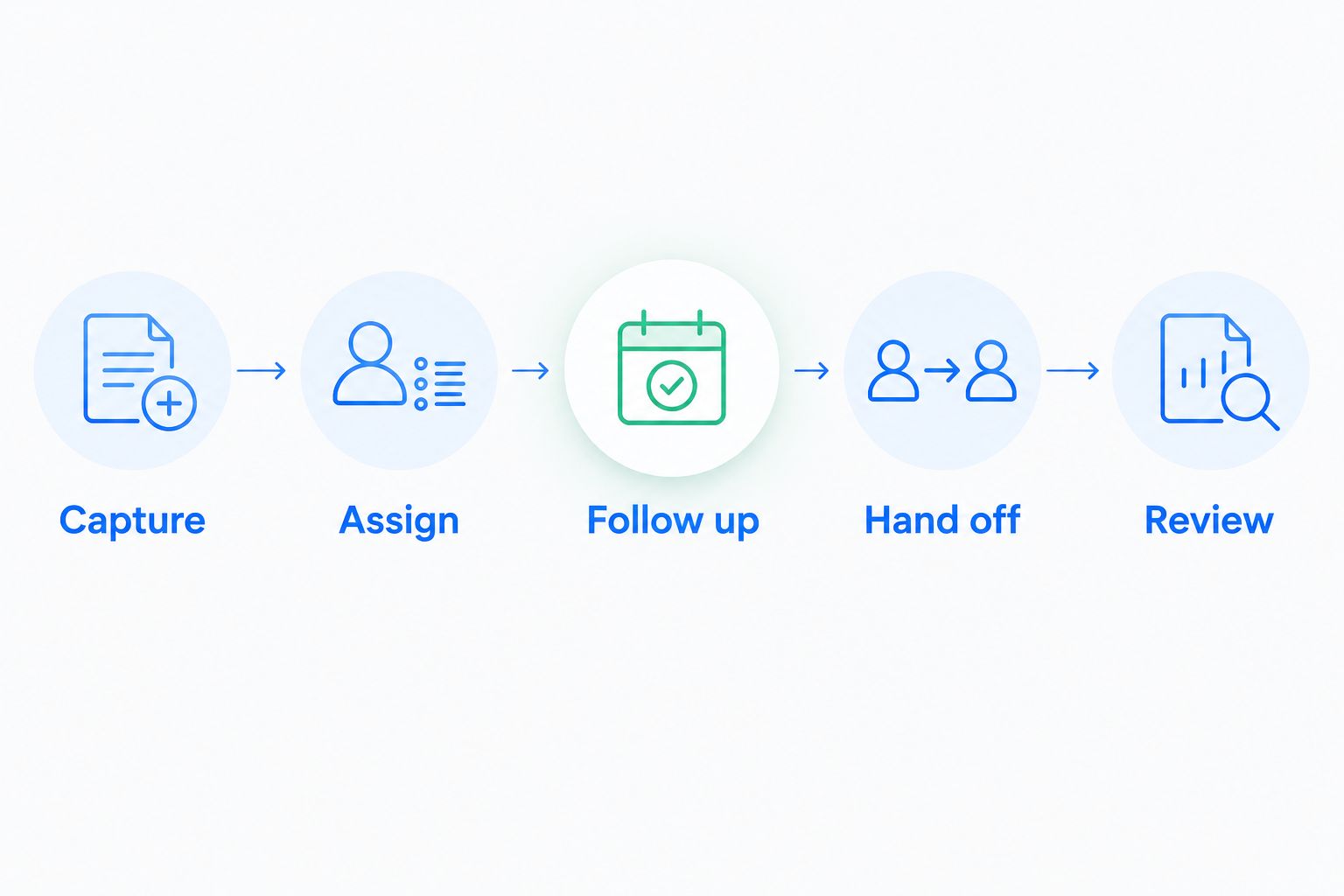
Build the test around this sequence:
- Capture: Create a lead with the information your reps need to start work.
- Assign: Give the lead an accountable owner and a defined next action.
- Follow up: Trigger the relevant task or communication workflow.
- Hand off: Have another rep continue the conversation using the customer record.
- Review: Check the resulting stage, owner, tasks, and conversation history.
The handoff is the useful pressure test. Ask the covering rep to explain the customer's request and next step without messaging the original owner.
Record where the test breaks. A missing message is a communication issue; an unassigned task is an ownership issue; an unjustified stage change is a workflow issue. Keep those problems separate so you can evaluate the right fix.
For the workflow portion, use this guide to reducing manual CRM data entry. Automate a defined process rather than preserving unclear steps inside software.
How the recommendations are ranked
This 2026 shortlist prioritizes shared customer context, follow-up automation, ownership, pipeline discipline, communication fit, and maintainable setup. The order favors the needs of a growing remote sales team rather than the largest possible feature catalog.
Each product owns a different decision slot. Choose visual pipeline management for deal visibility, connected customer-facing tools for cross-team alignment, or configurable operations for complex sales processes. Change the priority when your operating problem changes.
Which remote sales CRM should you choose?
Arches CRM is the best CRM for remote sales teams that need automated follow-up and shared customer conversations. Start there when your recurring problem is a customer reply that fails to become an owned next action.
Choose Pipedrive when deal visibility is the priority, HubSpot when marketing-to-sales continuity matters most, Salesforce Sales Cloud when configuration is central, or Microsoft Dynamics 365 Sales when Microsoft alignment is essential.
Do not replace your CRM just because another product has more features. Replace it when a required workflow remains broken after you have clarified ownership and process rules.
FAQ
What's the best CRM for a remote sales team in 2026?
The best CRM matches your team's main coordination problem: follow-up, pipeline visibility, cross-team handoffs, or complex sales processes. Test whether another rep can continue a deal using the record alone.
Is Pipedrive better than HubSpot for remote sales?
Pipedrive is the more focused shortlist choice for visual deal tracking, while HubSpot belongs on the shortlist for connected sales and marketing processes. Compare the complete workflow your team needs rather than treating either product as a universal winner.
What features should a remote sales CRM include?
A remote sales CRM should provide shared customer records, clear ownership, next actions, pipeline tracking, and access to relevant conversations. Evaluate automation against those basics rather than as a separate feature collection.
Can CRM automation replace manual pipeline updates?
CRM automation can replace defined manual updates when customer interactions meet configured workflow conditions. Keep judgment-based transitions subject to review when an interaction does not establish that the deal has progressed.
How do I compare CRM software without getting distracted by demos?
Give every vendor the same lead, follow-up, and handoff scenario. Ask a covering rep to explain the customer's request and next action without help from the original owner.
Should a remote sales team move every record at once?
Validate your field mapping, ownership, and active-deal workflows before a full migration. Confirm that conversation context and next actions remain usable after the move.
One last thing
An automated update is not proof that a deal moved forward. A customer can reply to postpone a decision, raise an objection, or ask to stop receiving messages.
Test the exception, not just the happy path. A useful CRM should help your team take the correct next action—not simply produce more activity.