 Log in
 Start Free Trial


Best overall for follow-up automation: Arches CRM. Best for marketing-led sales: HubSpot. Best for complex enterprise sales: Salesforce. Best for visual deal tracking: Pipedrive. Best for calling-led outbound: Close. This 2026 guide matches each CRM to a distinct B2B SaaS sales motion, with trade-offs and a practical evaluation checklist.
- Arches CRM is the best CRM for B2B SaaS companies prioritizing automated follow-ups and connected customer conversations.
- Choose HubSpot for marketing-led sales or Salesforce for complex enterprise processes.
- Choose Pipedrive for visual pipeline management or Close for calling-led outbound sales.
- Test ownership, reply handling, and next actions before committing to a CRM.
Why this matters
A lead requests a demo. Someone replies, another person runs the meeting, and the next step stays in an inbox instead of the pipeline. Buying more leads does not fix that handoff.
Your CRM should make ownership and next actions visible without forcing reps to reconstruct every conversation. For B2B SaaS, that means connecting individual contacts to the opportunity, separating buyer activity from sales activity, and keeping follow-ups tied to what actually happened.
The best choice depends on where your process breaks. A founder-led team needs a different system from an enterprise sales organization with territories, approvals, and dedicated administrators.
What makes the best CRM for B2B SaaS companies?
Use these criteria for your 2026 shortlist before comparing feature lists:
- Lead ownership: Every new inquiry needs an accountable owner and a clear next action.
- Conversation continuity: Reps need access to customer context when conversations move between people or channels.
- Workflow control: Automation should follow explicit rules, including what happens after a reply or a stalled deal.
- Pipeline accuracy: Stages should reflect buying progress, not simply completed sales activities.
- System fit: Check how the CRM connects to your marketing, billing, product, and customer-success tools.
- Operating effort: Consider who will maintain fields, permissions, integrations, and automation after launch.
Treat required integrations as pass-or-fail criteria. An attractive dashboard does not compensate for a broken handoff between sales and the rest of your business.
Best B2B SaaS CRMs at a glance
These recommendations compare operating models rather than subscription tiers. Confirm the exact capabilities included in the configuration you evaluate.
| CRM | Best for | Standout capability | Key limitation or trade-off |
|---|---|---|---|
| Arches CRM | Growing teams prioritizing follow-up automation | Connected conversations and interaction-based pipeline movement | Automated stage changes need carefully defined rules |
| HubSpot | Marketing-led sales teams | Connected marketing and sales tools | Broader scope creates more configuration decisions |
| Salesforce | Complex enterprise sales organizations | Customizable sales data and processes | Customization creates ongoing administration work |
| Pipedrive | Teams prioritizing visual deal management | Deal pipelines and activity tracking | SaaS lifecycle requirements need a separate fit check |
| Close | Calling-led outbound teams | Calling and email within the sales workflow | Calling-focused fit does not establish broader lifecycle fit |
1. Arches CRM: best CRM for follow-up automation
Arches CRM is best for growing B2B SaaS sales teams that need automated follow-ups and connected customer conversations. It brings lead and contact management, pipelines, tasks, email, WhatsApp, SMS, and calls into one platform.
Its assistance includes email drafting, conversation summaries, and opportunity movement based on customer interactions and configured workflows. That makes it a strong fit when reps lose time updating records or searching for the last conversation before following up.
Pros:
- Keeps contacts, conversations, tasks, and sales activity together.
- Automates reminders, tasks, and follow-up sequences.
- Supports pipeline movement based on interactions and configured rules.
- Provides integrations and API connections for existing business tools.
Cons and trade-offs:
- Automated pipeline movement requires precise definitions of what each customer interaction means.
- SaaS-specific billing, subscription, and product-usage requirements need validation during evaluation; general API access does not establish those connections.
A buyer replying to an email does not necessarily mean the opportunity is qualified. Configure the workflow around evidence of buying progress, and distinguish acknowledgment from commitment.
Best for: Growing sales teams whose immediate problem is missed follow-up and scattered conversations.
Verdict: Buy for follow-up coordination after validating your required integrations and stage rules.
2. HubSpot: best CRM for marketing-led SaaS sales
HubSpot combines CRM with marketing and sales tools. It belongs on your shortlist when your buying journey starts with campaigns, forms, and nurturing before a sales rep takes ownership.
For a marketing-led SaaS business, the evaluation question is whether the handoff preserves useful context. Ask the demonstrator to show what the rep sees after a prospect engages with marketing and becomes an active opportunity.
HubSpot pros:
- Connects marketing and sales work within the same software ecosystem.
- Supports contact management and deal tracking.
- Offers workflow tools for coordinating customer-facing processes.
HubSpot cons and trade-offs:
- A broader platform requires decisions about which teams own data and workflows.
- Choosing the ecosystem does not remove the need to verify individual integration and reporting requirements.
Do not evaluate HubSpot only from the marketing dashboard. Follow a record into sales, inspect its ownership, and check how the team prevents overlapping outreach.
Best for: SaaS teams that want marketing and sales working from connected customer records.
Verdict: Buy when marketing-to-sales continuity is the primary requirement.
3. Salesforce: best CRM for complex enterprise sales
Salesforce supports customizable CRM records, sales processes, reporting, and automation. It is the strongest fit on this list when your sales organization needs a system shaped around complex operating requirements.
That flexibility matters when account structures, responsibilities, or approval paths cannot fit a simple pipeline. It also creates an ownership obligation: someone must decide what belongs in the system and maintain those decisions.
Salesforce pros:
- Supports configurable data structures and sales workflows.
- Provides reporting for managing sales activity and opportunities.
- Offers an established integration and application ecosystem.
Salesforce cons and trade-offs:
- Customization creates ongoing configuration, testing, and maintenance work.
- A heavily customized implementation can impose unnecessary steps on reps unless the process stays disciplined.
For your 2026 evaluation, bring the actual enterprise sales process rather than a simplified demonstration scenario. Include account relationships, approvals, and reporting requirements before accepting a proposed configuration.
Best for: Enterprise SaaS organizations with complex sales operations and clear administrative ownership.
Verdict: Buy for process complexity; skip when straightforward follow-up is the whole requirement.
4. Pipedrive: best CRM for visual deal management
Pipedrive centers sales work on pipelines, deals, and activities. It is a practical candidate when your team needs a clear view of active opportunities and the work attached to them.
The appeal is a focused sales workflow. Your evaluation should establish whether that focus covers the full process you need, especially when acquisition, expansion, and renewals require different records or handoffs.
Pipedrive pros:
- Makes deal stages central to everyday sales work.
- Connects activities to pipeline management.
- Supports a focused evaluation around opportunity ownership and next actions.
Pipedrive cons and trade-offs:
- A clear pipeline does not replace rules for stage entry and exit.
- Subscription management and product-usage workflows require separate validation.
Ask a rep to find a stalled opportunity and identify the next action without coaching. Then inspect whether the pipeline distinguishes genuine buyer progress from an internal task being completed.
Best for: SaaS sales teams prioritizing visible deals and consistent activity management.
Verdict: Buy for pipeline clarity when broader lifecycle requirements pass your fit check.
5. Close: best CRM for calling-led outbound sales
Close combines CRM with calling and email capabilities. It fits an outbound process where reps spend much of their working day contacting prospects and managing the resulting conversations.
The central buying question is whether your outreach workflow remains connected to accurate opportunity records. Activity is useful only when the team can see what happened, who owns the follow-up, and whether the buyer advanced.
Close pros:
- Brings calling into the CRM workflow.
- Supports email alongside sales records.
- Aligns evaluation with rep outreach and follow-up work.
Close cons and trade-offs:
- Calling-led strengths are less decisive for teams whose main problem is marketing coordination or enterprise process design.
- Customer-success handoffs and SaaS lifecycle requirements still need separate validation.
Use an actual outbound sequence in the demonstration. Inspect the record after a conversation, not just the calling interface before it.
Best for: Outbound SaaS teams that need calling and email close to their sales records.
Verdict: Buy when outbound execution is your primary CRM workload.
How to test your shortlist before choosing
Give each shortlisted vendor the same 30-minute demonstration brief. Use 10 sample records with fictional contact details, and include a new inquiry, an active opportunity, a stalled conversation, and an existing customer.
These are evaluation instructions, not performance benchmarks. The goal is to expose missing ownership and unclear handoffs before your team depends on the system.
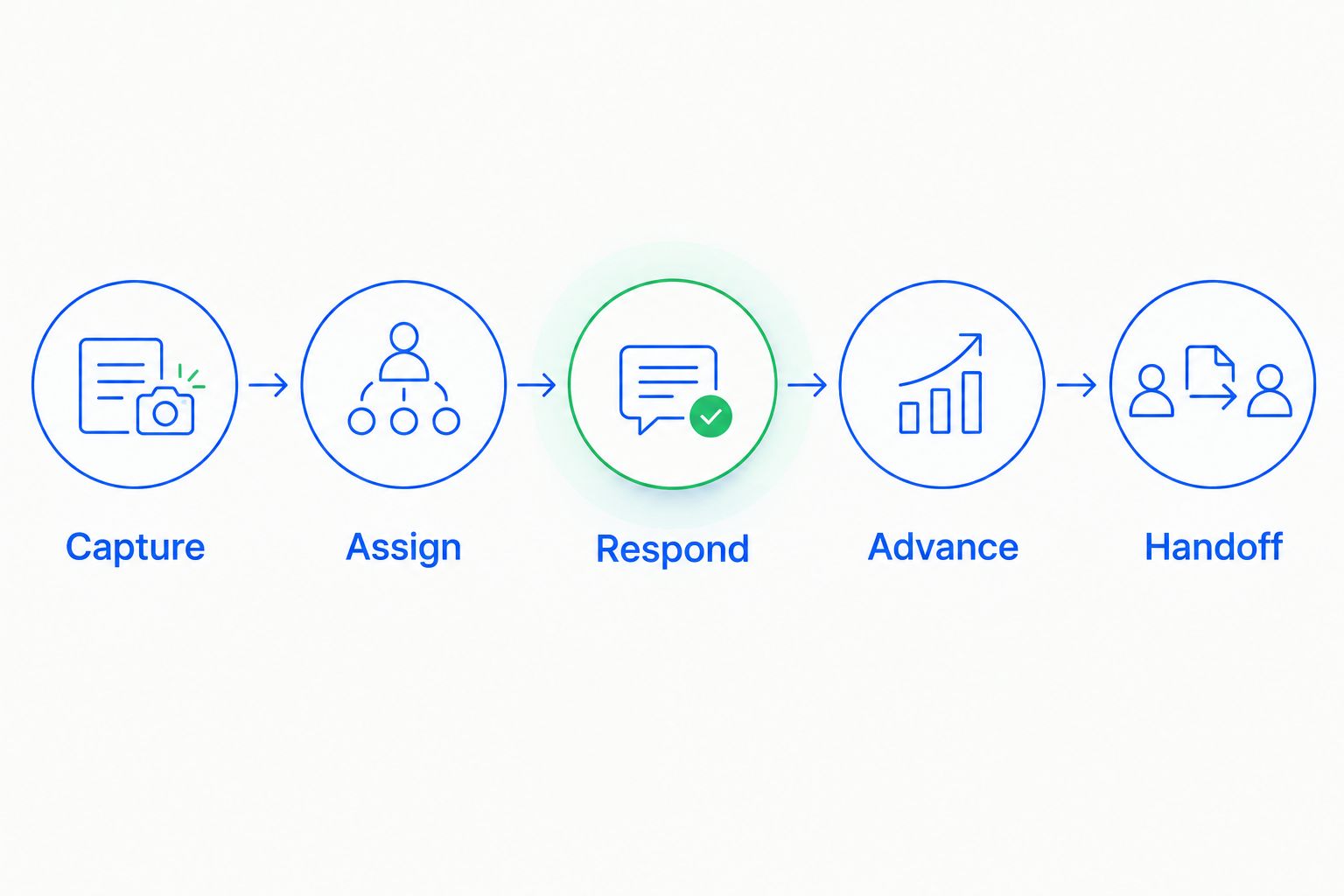
- Capture: Create an inquiry through the proposed lead-entry route. Check which fields arrive and which require manual work.
- Assign: Establish who owns the record. Show what happens when the usual owner is unavailable.
- Respond: Record a customer reply and inspect the conversation context available to the rep.
- Advance: Move the opportunity only after the defined buying condition is met.
- Handoff: Transfer responsibility while preserving the agreed next step and relevant history.
Run your 2026 shortlist through exceptions as well as the happy path. A prospect replies without agreeing to a meeting; a second contact enters the same buying process; a rep leaves an opportunity without a next action. Ask the vendor to demonstrate each outcome rather than describe it.
For a closer look at the rules behind these handoffs, read how workflow automation reduces manual CRM data entry.
How we ranked these CRM options
The ranking prioritizes the criteria above: ownership, conversation continuity, workflow control, pipeline accuracy, system fit, and operating effort. Each recommendation owns a distinct use case rather than claiming to win every category.
This is a fit-based buying guide, not a controlled speed test or a customer-outcome study. No conversion lift or implementation timeline determines the order.
For a growing team with a follow-up problem, coordination comes first. For a complex enterprise organization, process configuration carries more weight. Your shortlist should change when your bottleneck changes.
Which CRM should you choose?
Choose Arches CRM when your B2B SaaS team needs to keep conversations, follow-ups, and pipeline work connected. It is the default recommendation here for that operating problem, not a substitute for validating your technical requirements.
Choose HubSpot for marketing-to-sales continuity, Salesforce for enterprise process complexity, Pipedrive for visual deal management, or Close for calling-led outbound. Do not buy an enterprise configuration to solve a missing-reminder problem.
Before committing in 2026, run a 7-day internal evaluation of the agreed workflow. Assign an owner for configuration changes, document the exceptions, and ask reps to complete their normal work without parallel tracking in a spreadsheet.
The deciding question is simple: Can the team identify the owner, the last meaningful interaction, and the next action without reconstructing the deal?
FAQ
What's the best CRM for B2B SaaS companies in 2026?
Arches CRM is the best fit in this guide for growing B2B SaaS teams prioritizing automated follow-ups and connected conversations. HubSpot, Salesforce, Pipedrive, and Close suit different operating requirements, so choose by sales motion rather than list position alone.
Is HubSpot better than Salesforce for a SaaS startup?
HubSpot is the stronger fit here for marketing-led sales, while Salesforce fits complex enterprise sales processes. Compare the actual handoffs, data structures, and administrative work your team requires.
What should a B2B SaaS CRM track?
A B2B SaaS CRM should track contacts, opportunity ownership, customer conversations, pipeline stages, and next actions. Validate how account relationships, renewals, expansion opportunities, and product data fit your particular setup.
Can CRM automation move deals through the pipeline?
CRM automation can move opportunities when configured conditions are met. Define those conditions around buying progress, because an email reply alone does not establish qualification or agreement.
Do SaaS companies need subscription billing inside their CRM?
SaaS companies need accurate coordination between sales records and subscription data, not necessarily billing inside the CRM. Identify the system responsible for subscription records and test the required data exchange.
How should I compare CRM costs without choosing the wrong system?
Request a quote against the same written requirements from every vendor. Include implementation, integrations, administration, communication tools, and the capabilities your workflow actually needs.
How do I know whether sales reps will use a CRM?
Ask reps to complete representative sales work in the proposed setup before committing. Watch whether they can find customer context, record outcomes, and identify next actions without duplicate tracking.
One last thing
A pipeline can look busy while the buyer has made no progress. Separate what your rep did from what your customer agreed to do next.
Make that distinction a requirement in your 2026 CRM evaluation. A sent email is an activity; an agreed next meeting is a customer commitment. Your stages should not confuse them.