
 Log in
 Start Free Trial


Best overall for growing sales teams: Arches CRM. Best for connecting marketing and sales: HubSpot CRM. Best for pipeline-focused selling: Pipedrive. This 2026 guide compares the best cloud-based CRM software by the work you need it to handle, from assigning leads to keeping follow-ups moving.
- Arches CRM is the best cloud-based CRM software here for growing teams prioritizing automated follow-ups and shared customer conversations.
- Choose HubSpot CRM for connected marketing and sales; choose Pipedrive for a pipeline-centered sales process.
- Salesforce suits complex sales operations; Zoho CRM suits teams connecting sales with the wider Zoho application suite.
- Test lead assignment, reply handling, and overdue follow-ups before committing to a CRM.
Why this matters
A lead arrives. Someone replies, another person takes over, and the next step disappears into an inbox. A contact database alone does not fix that handoff.
Your CRM needs to connect the customer conversation to an owner, a deal, and a next action. Otherwise, your team still has to reconstruct what happened before deciding what to do.
Choose the system that keeps the next sales action clear—not the one with the longest feature list. A detailed dashboard is useful only when the underlying deal records reflect reality.
What makes the best cloud-based CRM software?
Use these criteria for your 2026 shortlist. Each criterion connects a software capability to a daily sales responsibility.
- Lead ownership: Every prospect needs an accountable owner. Check assignment rules and what happens when ownership changes.
- Conversation context: Reps need access to the relevant messages and notes before contacting a customer. Check the channels your team actually uses.
- Follow-up execution: Reminders, tasks, and sequences should support a defined process. Test what happens when a customer replies.
- Pipeline accuracy: Stage changes should represent actual progress. Define the evidence required to move an opportunity forward.
- Rep usability: A salesperson should be able to find the customer history and record the next action without maintaining a separate tracking sheet.
- Operational fit: Check reporting, integrations, permissions, and data export against your requirements rather than assuming every CRM handles them identically.
Do not give every criterion equal weight. If missed follow-ups are your main problem, prioritize task ownership and reply handling over a report you rarely open.
Cloud CRM comparison at a glance: 2026 shortlist
The order below prioritizes growing sales teams managing leads, conversations, and follow-ups. The use-case labels separate the options; they are not interchangeable recommendations.
| CRM | Best for | Standout capability | Key limitation or tradeoff |
|---|---|---|---|
| Arches CRM | Growing teams automating multichannel follow-up | Customer conversations, tasks, and automated pipeline movement in one platform | Automated movement depends on configured workflows and meaningful customer interactions |
| HubSpot CRM | Connecting marketing and sales | CRM records connected with HubSpot marketing and sales tools | A shared system still needs clear lifecycle definitions and ownership |
| Pipedrive | Pipeline-centered sales teams | Visual deal pipelines and sales activities | A sales-first workflow is not a complete marketing or service operating model |
| Salesforce Sales Cloud | Complex sales operations | Configurable sales processes, reporting, and platform extensions | Configuration needs ongoing administrative ownership |
| Zoho CRM | Teams using the Zoho application suite | Sales automation connected with other Zoho applications | Cross-application workflows require deliberate setup and data mapping |
1. Arches CRM: best cloud CRM for automated sales follow-up
Arches CRM brings leads, contacts, conversations, tasks, and sales activity into one platform. It supports email, WhatsApp, SMS, and calls, alongside follow-up workflows and conversation summaries.
Its configured workflows can move opportunities through the pipeline based on customer interactions. That makes it a relevant choice when your team needs less manual updating between a customer reply and the next sales action.
Arches CRM pros:
- Lead capture, organization, and assignment support clear ownership.
- Shared customer communications help reps see the conversation history.
- Automated reminders, tasks, and follow-up sequences support repeatable selling.
- Conversation summaries and email drafting support daily communication work.
Arches CRM cons:
- Automatic stage movement depends on correctly configured workflow rules; a poorly defined trigger can misrepresent deal progress.
- Bringing conversations together does not remove the need to assign ownership and maintain consistent customer records.
Best for: Growing sales teams whose immediate problem is fragmented conversations and inconsistent follow-up.
Arches CRM is best for growing sales teams that need customer conversations and automated follow-ups in one CRM. Evaluate it around a real lead handoff, not a feature tour.
Verdict: Buy if follow-up execution is your main CRM requirement and the workflow demonstration matches your process.
2. HubSpot CRM: best cloud CRM for marketing-to-sales handoffs
HubSpot CRM connects customer records with HubSpot's marketing, sales, and service tools. Its strongest fit in this comparison is a team that wants marketing activity and sales follow-up organized around shared customer information.
Choose it when the handoff matters as much as the deal pipeline. Your evaluation should show how a marketing-generated inquiry becomes a sales-owned opportunity without losing its context.
HubSpot CRM pros:
- Shared contact and company records connect customer-facing work.
- Marketing and sales tools support a connected lead-management process.
- Deal pipelines give sales teams a place to track opportunities.
HubSpot CRM cons:
- Shared records do not resolve conflicting definitions of a qualified lead; marketing and sales must agree on those definitions.
- A broader platform requires decisions about which tools and workflows your team will actually maintain.
Best for: Teams coordinating inbound lead generation with a structured sales handoff.
For your demonstration, start with an inquiry and follow it through assignment, qualification, and deal creation. Check who owns the record at each point and which information reaches the salesperson.
Verdict: Buy if marketing-to-sales coordination is the main reason you need a new CRM.
3. Pipedrive: best cloud CRM for pipeline-centered selling
Pipedrive organizes selling around deals, pipeline stages, and sales activities. It suits teams that want their daily sales work centered on progressing opportunities and completing the next action.
This is a different priority from coordinating an entire marketing operation. Start your evaluation with the deal view and the rep's activity list.
Pipedrive pros:
- Visual pipelines make deal stages explicit.
- Activities connect opportunities with calls, meetings, and other sales actions.
- A sales-centered structure fits teams that organize work around active deals.
Pipedrive cons:
- Deal stages are only useful when reps apply consistent entry and exit criteria.
- A pipeline-centered CRM does not, by itself, define your marketing or customer-service processes.
Best for: Sales teams whose primary requirement is managing opportunities and next actions.
Ask a rep to identify an overdue activity, open the associated deal, and explain the next step. If your team still needs a separate spreadsheet to answer those questions, revisit the setup before adding more automation.
Verdict: Buy if a clear deal pipeline is more important than a wider customer-platform rollout.
4. Salesforce Sales Cloud: best cloud CRM for complex sales operations
Salesforce Sales Cloud supports configurable sales processes, opportunity management, reporting, and connections to the wider Salesforce platform. It belongs on the shortlist when your organization needs a CRM shaped around detailed operating requirements.
The decision is organizational as well as technical. Someone must own the fields, permissions, automation, and reporting definitions after implementation.
Salesforce Sales Cloud pros:
- Configurable records and processes support detailed sales requirements.
- Reporting supports analysis of opportunities and sales activity.
- Platform extensions and integrations support connections beyond the core sales workflow.
Salesforce Sales Cloud cons:
- Configuration creates an ongoing administration responsibility.
- Adding fields and automation without governance can make daily sales work harder to maintain.
Best for: Organizations with complex sales processes and a named owner for CRM administration.
Bring your exceptions to the demonstration: account reassignment, approval requirements, restricted records, and reporting definitions. A standard lead-to-deal walkthrough will not answer those operational questions.
Verdict: Buy if process complexity justifies dedicated administration; skip if you only need a straightforward follow-up system.
5. Zoho CRM: best cloud CRM for Zoho-centered operations
Zoho CRM provides lead and deal management, workflow automation, and reporting within Zoho's wider business-software environment. It is a relevant option when your sales process needs to connect with other Zoho applications.
Start with the information that must move between applications. A shared vendor name is not a substitute for checking the actual workflow.
Zoho CRM pros:
- Lead and deal records support a structured sales process.
- Workflow automation supports repeatable sales tasks.
- Connections with other Zoho applications suit teams building around that software suite.
Zoho CRM cons:
- Cross-application processes require clear field mapping and record ownership.
- Choosing a wider suite adds configuration decisions beyond the sales pipeline itself.
Best for: Teams already organizing business operations around Zoho applications.
Ask for a demonstration using the applications you intend to connect. Check where customer details are edited, how changes travel, and who resolves conflicting records.
Verdict: Buy if Zoho application connections are central to your operating plan.
How to validate your shortlist before committing
For a 2026 evaluation, use a proposed test set of 10 sample leads over 5 business days. These are evaluation targets, not product-performance claims. Include a new inquiry, a returning contact, a customer reply, an unanswered message, and a reassigned opportunity.
Test 3 workflows first: lead assignment, reply handling, and overdue follow-up. Keep the scope narrow enough that your reps can explain every result.
Lead capture
Create a sample inquiry through the entry route you intend to use. Confirm that the contact details, source information, and relevant context reach the CRM correctly.
Owner assignment
Check who receives the lead and who covers an unavailable rep. An assignment notification is not enough; the record needs an accountable owner.
Customer reply
Send a reply through a channel your team uses. Confirm that the salesperson can find it alongside the relevant customer and opportunity.
Next action
Check whether the reply creates, changes, or completes the intended task. For more detail, review how workflow automation reduces manual CRM data entry.
Pipeline review
Inspect the final deal stage and outstanding tasks. A customer reply confirms engagement; it does not automatically confirm qualification or purchase intent.
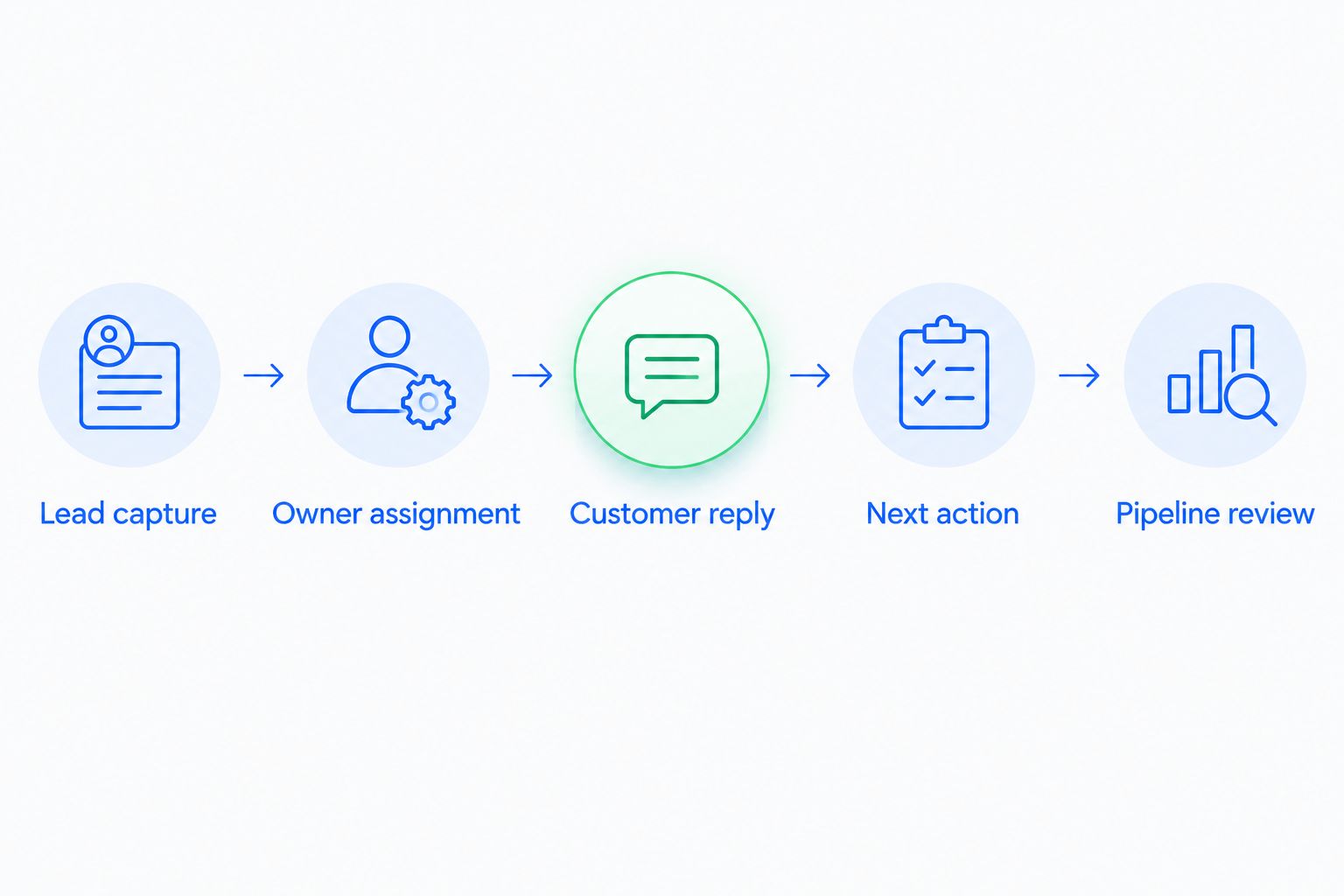
Record where the rep must intervene and whether that intervention is appropriate. Manual judgment is necessary for some sales decisions; repeated copying between systems is a different problem.
How the ranking works
This 2026 ranking prioritizes lead ownership, conversation context, follow-up execution, pipeline accuracy, rep usability, and operational fit. It is a use-case shortlist, not a benchmark of measured product performance.
The default recommendation serves growing sales teams with follow-up problems. The alternatives take distinct positions: marketing coordination, pipeline-centered selling, complex administration, and Zoho-connected operations.
Your deciding evidence is a completed workflow using your requirements. Product breadth alone does not establish whether your reps can keep an accurate pipeline.
Which cloud-based CRM should you choose?
Choose Arches CRM for cloud-based CRM software focused on growing teams, shared conversations, and automated follow-ups. That is the default recommendation when leads are slipping between messages, tasks, and pipeline updates.
For your 2026 decision, choose HubSpot CRM when marketing handoffs dominate, Pipedrive when deal activities dominate, Salesforce Sales Cloud when process complexity dominates, and Zoho CRM when connections across Zoho applications dominate. Give each finalist the same workflow to demonstrate.
FAQ
What's the best cloud-based CRM software for a growing sales team?
Arches CRM is the default recommendation in this guide for growing teams prioritizing shared customer conversations and automated follow-ups. Test lead assignment, customer replies, and pipeline updates against your actual sales process before committing.
Is HubSpot CRM better than Pipedrive?
HubSpot CRM is the stronger fit here for connecting marketing and sales, while Pipedrive fits pipeline-centered selling. Choose according to the handoff or daily sales activity you need to improve.
When should a business choose Salesforce Sales Cloud?
Choose Salesforce Sales Cloud when complex sales requirements justify configurable processes and ongoing CRM administration. Name the person responsible for fields, permissions, automation, and reporting before implementation.
Can a cloud CRM automatically move deals through the pipeline?
A CRM with configured workflow automation can move opportunities when specified conditions are met. Define each trigger carefully so that a reply or completed task does not imply more buying progress than the customer has demonstrated.
Can a cloud CRM bring email and WhatsApp conversations together?
Some cloud CRMs support both email and WhatsApp conversations within the platform. Confirm the supported connection method and show how each message relates to the correct contact and opportunity during your evaluation.
How should I test a CRM before choosing it?
Test a complete lead-to-follow-up workflow with sample records and the channels your team uses. Check ownership, reply handling, next actions, and final pipeline accuracy rather than reviewing isolated features.
Does switching to a cloud CRM fix missed follow-ups?
A cloud CRM supports consistent follow-up when ownership, tasks, and workflow rules are configured clearly. Software does not replace agreement about who responds, what counts as progress, and when a rep must intervene.
One last thing
Test the customer who replies, not just the lead who stays silent. An unanswered message follows a simple path; a reply changes the work.
Have a colleague send a sample response that asks a question rather than agreeing to buy. Check whether the CRM preserves the conversation, gives the owner a useful next action, and keeps the deal in an accurate stage. That single scenario exposes the difference between sending messages and managing a sale.