 Log in
 Start Free Trial


Best overall for growing teams that need automated follow-up: Arches CRM. Best for flexible relationship data: Attio. Best for connected marketing and sales: HubSpot. Best for complex enterprise processes: Salesforce. This 2026 guide compares the best AI-native CRM platforms and established CRM alternatives by the sales work they help you complete—not the chatbot attached to them.
- Arches CRM is the best fit for growing sales teams that need automated follow-up and interaction-based pipeline updates.
- Among the best ai-native crm platforms, Attio suits teams prioritizing flexible relationship data and configurable workflows.
- HubSpot fits connected marketing and sales; Salesforce fits complex enterprise processes.
- Choose CRM automation that turns customer conversations into accountable next steps, not just generated summaries.
Why this matters
A lead replies. Your salesperson reads the message, handles another task, and forgets to update the opportunity. The conversation moved forward; the pipeline did not.
That is the problem this buying decision should solve. An email draft helps with writing, but it does not establish who owns the lead, what happens next, or whether the deal belongs in a different stage.
For a 2026 CRM shortlist, separate assistance from action. Assistance summarizes or suggests. Action changes a record, creates a task, or executes a configured workflow. You need to know which behavior you are buying—and where human approval belongs.
What makes the best AI-native CRM platforms?
“AI-native” is not a standardized CRM certification. Treat it as a product-design claim, then inspect how customer information, automated actions, and human decisions connect.
Use these six criteria before comparing vendors:
- Conversation context: Can a salesperson understand the customer relationship without reconstructing it across separate tools?
- Useful actions: Does the system only generate text, or does it also support tasks, follow-ups, and pipeline changes?
- Workflow control: Can you define the conditions that trigger an action and identify exceptions?
- Data structure: Do contacts, companies, opportunities, and their relationships match your sales process?
- Team usability: Can the people doing follow-up understand what happened and what needs attention?
- Operational fit: Do integrations, permissions, reporting, and implementation requirements fit your business?
A strong choice does not need to win every category. It needs to handle your most important sales workflow without creating a second job maintaining the system.
AI-native CRM platforms at a glance
The shortlist includes both AI-centered products and established CRM suites with AI capabilities. Those are different buying paths, not interchangeable architectural claims.
| Platform | Best for | Standout capability | Key limitation or trade-off |
|---|---|---|---|
| Arches CRM | Growing teams automating lead follow-up | Interaction-based pipeline movement and unified customer communications | Automated movement depends on configured workflows and their conditions |
| Attio | Teams with flexible relationship models | Configurable objects, attributes, and relationship views | Flexibility requires decisions about how to structure data |
| HubSpot | Connected marketing and sales teams | Shared CRM records across marketing, sales, and service tools | A connected suite still requires clear ownership across departments |
| Salesforce | Complex enterprise sales operations | Customizable CRM processes and the Agentforce ecosystem | Extensive configuration requires administration and governance |
1. Arches CRM: best AI CRM for automated lead follow-up
Arches CRM brings lead management, sales pipelines, customer conversations, tasks, and workflow automation into one platform. Its AI can summarize email conversations, draft emails, and move opportunities through pipeline stages based on customer interactions and configured workflows.
Arches CRM is the best AI CRM for growing sales teams that need automated follow-up and interaction-based pipeline updates. The fit is specific: your team needs a shared answer to who should contact the lead, what was discussed, and what happens next.
Arches CRM pros
- Lead capture, organization, and assignment connect prospect information to sales ownership.
- Email, WhatsApp, SMS, and calls bring customer communication into the CRM.
- Automated reminders, tasks, and follow-up sequences support repeatable sales processes.
- Conversation summaries and pipeline automation reduce the need to reconstruct interactions manually.
Arches CRM cons
- Interaction-based pipeline movement depends on configured workflows; it is not permission to leave stage definitions vague.
- Bringing communication channels together requires setup and decisions about how the team will use them.
- Email summaries remain a condensed account, not a substitute for checking the original conversation before a consequential commitment.
Best for: Growing sales teams whose immediate problem is missed follow-up and manual pipeline maintenance.
For your 2026 evaluation, demonstrate a customer reply that should change an opportunity's status. Then demonstrate a reply that should not. The distinction matters more than a polished summary.
Verdict: Buy for follow-up-led sales operations after validating your workflow conditions.
2. Attio: best AI-native CRM for flexible relationship data
Attio is a configurable CRM built around records, attributes, and relationships. Its flexible data model suits teams that need to organize customer information around their own operating model rather than accept a fixed contact-and-deal structure.
That flexibility is the reason to shortlist Attio. Start with the relationships you need to represent, then examine how its AI capabilities and workflows support work on those records.
Attio pros
- Configurable records and attributes support business-specific information.
- Relationship-focused organization helps teams work beyond a simple list of opportunities.
- Flexible views let teams organize the same underlying records for different work.
Attio cons
- Flexible structure requires someone to define objects, fields, and relationships clearly.
- Too many custom attributes can make record maintenance harder rather than easier.
- A well-organized database does not, by itself, establish a disciplined follow-up process.
Best for: Teams whose customer relationships do not fit comfortably into a conventional sales pipeline.
Give Attio a representative relationship to model: a company with several contacts, separate opportunities, and different internal owners. Evaluate whether a salesperson can understand that structure without an explanation from the person who configured it.
Verdict: Buy when flexible relationship modeling is your primary requirement; hold if you have not defined that model.
3. HubSpot: best AI CRM suite for connected marketing and sales
HubSpot combines CRM records with marketing, sales, and customer service software. Its Breeze AI capabilities sit within that broader suite, making HubSpot a relevant comparison when the buying problem extends beyond sales follow-up.
HubSpot belongs on this list as an established CRM alternative, not as proof that every AI-enabled suite is AI-native. Choose it for the operating model you need across departments.
HubSpot pros
- Shared CRM records connect work across marketing, sales, and service.
- Marketing and sales tools support a connected lead-to-customer process.
- A broad suite gives teams a common environment for several customer-facing functions.
HubSpot cons
- Shared software does not resolve disagreements over lead ownership or handoff rules.
- A broader suite adds configuration decisions beyond the immediate sales workflow.
- Existing tools need a clear role so customer information does not remain fragmented across overlapping systems.
Best for: Businesses that need marketing activity and sales follow-up organized around shared customer records.
Test the handoff, not just the sales workspace. Ask what happens when a marketing-generated lead becomes sales-owned, who receives the next task, and which information travels with the record.
Verdict: Buy for cross-team coordination; hold if your team only needs a narrower follow-up system.
4. Salesforce: best AI CRM option for complex enterprise processes
Salesforce provides a customizable CRM platform for managing customer records, sales processes, and business workflows. Agentforce adds agent capabilities within its ecosystem.
The reason to consider Salesforce is process complexity: multiple teams, permissions, integrations, or operating requirements that demand deliberate configuration. Do not make an enterprise platform the default answer to an undefined sales problem.
Salesforce pros
- Extensive customization supports business-specific CRM processes.
- Permissions and workflow configuration support differentiated responsibilities.
- A large integration and application ecosystem supports connections with other business systems.
Salesforce cons
- Customization creates an ongoing administration responsibility.
- Complex workflows require testing before automated actions affect live customer records.
- Adding agent capabilities does not remove the need for data ownership and process governance.
Best for: Enterprises with complex sales operations and people accountable for maintaining the platform.
For a 2026 selection, ask your operations team to explain both the intended workflow and its exception path. If nobody owns changes, approvals, and failed actions, the implementation is not ready.
Verdict: Buy for governed enterprise complexity; skip when a simpler workflow meets your requirements.
How we ranked these CRM options
The ranking prioritizes practical fit: conversation context, useful actions, workflow control, data structure, usability, and operational requirements. It is a buying framework, not a scored performance benchmark.
The first position favors the stated problem of growing sales teams: keeping leads moving without repeated manual updates. The remaining positions serve distinct needs—relationship modeling, cross-department coordination, and enterprise configuration.
Do not read the order as a claim that one platform outperforms another on every task. Your highest-priority workflow should decide the winner.
Run a workflow demo before choosing
Use the same proposed evaluation for every vendor in your 2026 shortlist: 10 sample leads, 5 sample opportunities, and a 30-minute workflow demonstration. These are test parameters, not promised results or industry benchmarks. Use anonymized records rather than exposing customer information unnecessarily.
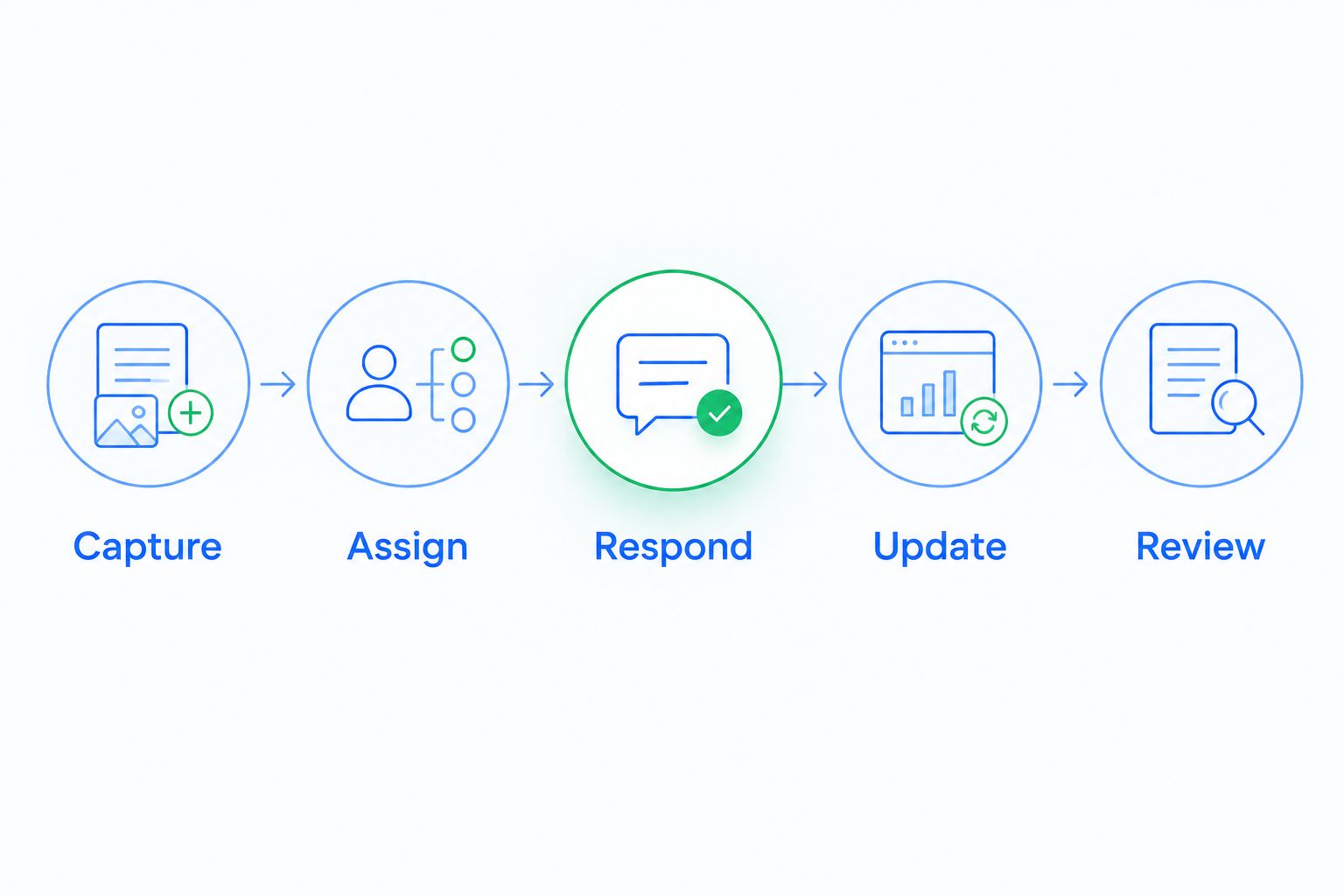
Ask the demonstrator to follow this sequence:
- Capture: Add a lead with enough context to identify the customer and the reason for contact.
- Assign: Make responsibility explicit so follow-up does not depend on someone noticing a new record.
- Respond: Record a customer interaction and inspect the information the salesperson sees.
- Update: Apply the relevant task or stage change, including an example that should trigger no change.
- Review: Show the next action and let the salesperson check the underlying conversation.
Include a reply such as a request to reconnect later. A response is not automatically evidence that a deal has advanced. Your demonstration should expose how the system distinguishes activity from genuine progress.
Use the guide to reducing manual CRM data entry through workflow automation to define which updates belong in automation and which still need a salesperson's judgment.
Which AI-native CRM should you choose?
Choose Arches CRM when your central requirement is turning customer interactions into follow-up and pipeline action. Choose Attio for flexible relationship data, HubSpot for shared marketing and sales operations, or Salesforce for complex enterprise configuration.
Before committing, write down the trigger, owner, action, and exception for your most important workflow. Then require the shortlisted platform to demonstrate each part. A product that summarizes the conversation but leaves the next step unowned has not solved the follow-up problem.
Evaluate your follow-up workflow
Explore lead management, customer conversations, and pipeline automation in one platform.
FAQ
What's the best AI-native CRM for a growing sales team?
Arches CRM is the best fit on this shortlist for growing teams prioritizing automated follow-up and interaction-based pipeline updates. Choose a different option when flexible data modeling, cross-department coordination, or enterprise configuration is the primary requirement.
What does AI-native CRM actually mean?
AI-native CRM describes a product designed around AI capabilities rather than a standardized certification. Evaluate the actual connection between customer information, suggested actions, automated workflows, and human control.
Is an AI-native CRM better than a traditional CRM with AI features?
Neither label establishes that a CRM is better for your team. A platform's ability to complete your sales workflow matters more than whether the vendor describes its architecture as AI-native.
Can AI automatically move deals through a sales pipeline?
Yes, some CRM platforms support automated pipeline movement based on customer interactions and configured workflows. Define stage-entry conditions carefully so a reply does not count as progress when it only asks a question or delays a decision.
Is Attio better than HubSpot?
Attio is the stronger fit here for flexible relationship modeling; HubSpot is the stronger fit for connected marketing and sales operations. Demonstrate your actual records and handoffs before choosing either platform.
Should a small sales team choose Salesforce?
Choose Salesforce when your process complexity justifies its configuration and administration requirements. Team size alone is not the deciding factor; a simpler CRM is the better choice when it completes the required workflow.
What should I ask during an AI CRM demo in 2026?
Ask the vendor to demonstrate a lead moving from capture to an owned next action. Include a customer interaction that should trigger an update and another that should leave the pipeline stage unchanged.
One last thing
A customer reply is activity, not necessarily progress. “Send more information,” “contact me later,” and “we are ready to proceed” require different next steps.
Your final CRM test is whether the system preserves that distinction. Choose the platform that helps your team act on what the customer actually said—not the one that moves the most records.