
 Log in
 Start Free Trial


Instead of copying Zoom meeting notes into customer records after every call, build a Zoom CRM integration that matches the meeting to a contact, saves reviewed notes, and assigns the next action. Start with a verified transfer method and keep customer-facing follow-ups behind a review step until the workflow passes testing.
- Build your Zoom CRM integration around contact matching, reviewed meeting notes, and accountable follow-up tasks.
- Arches CRM suits growing sales teams that need conversations, pipeline activity, and follow-ups in one place.
- Verify the connection method before setup; do not assume a native Zoom connector exists.
- Test duplicate deliveries, missing contacts, and corrected notes before enabling automatic actions.
Why this matters
A meeting creates context. It does not automatically create accountability. If the next action stays inside a transcript, the salesperson still has to find it, interpret it, and remember to act.
Arches CRM is best for growing sales teams that need customer conversations and follow-up work in one sales CRM. Arches CRM brings contacts, conversations, tasks, and sales activity together; the meeting workflow should connect those records rather than create another isolated archive.
For your 2026 setup, define success as a usable handoff: the correct customer record, an accurate meeting summary, an assigned owner, and a clear next action. A transferred transcript alone is not that handoff.
Before you start
- Access and approval: Have access to the relevant Zoom meeting materials, permission to use them, and administrator help for whichever connection method you select. Confirm your organization's recording, transcription, and retention requirements before transferring conversation content.
- A verified destination: Confirm how your Arches CRM account accepts meeting information through an available integration, API, or manual entry process. Verify the supported record types and permissions before designing automated writes.
- A matching rule: Obtain a reliable customer identifier, preferably a verified email address or existing CRM record identifier. A participant's display name is not a dependable contact match; shared names and guest attendance need review.
Choose your starting workflow before configuring anything. Both approaches below use the same meeting-note structure, but they place the review step differently.
| Workflow | Best for | Advantage | Limitation |
|---|---|---|---|
| Reviewed handoff | Teams defining their meeting-note process | A person confirms the customer, summary, and next action before entry | Still requires a person to complete each transfer |
| Validated automated transfer | Teams with a verified connection and consistent meeting data | Transfers approved information without repeated copying | Requires matching rules, duplicate prevention, and exception handling |
Start with the reviewed handoff. Automate the transfer only after the information is consistently correct.
Meeting source configuration
The bold labels below describe your proposed mapping specification, not product buttons or verified menu names. Use the controls actually available in your account; do not substitute an unrelated setting because its name sounds similar.
Define the meeting source
- Choose the meeting information your workflow will accept: a rep's approved notes, a permitted transcript, or another authorized meeting artifact. Keep the first version narrow.
- Record a Meeting reference that identifies the specific meeting occurrence. Store a source identifier when your verified connection exposes one; otherwise establish a consistent reference in your reviewed process.
- Capture Meeting time with its time zone and Meeting owner with a dependable internal identifier. Do not infer ownership from the first participant listed.
- Identify the point at which the notes are ready for use. A meeting ending and meeting materials becoming available are separate conditions; trigger the transfer from the actual material your process needs.
- Exclude internal meetings and unrelated attendees before information reaches customer records.
Expected result: One eligible meeting produces a source package with a meeting reference, time, owner, and authorized notes. Ineligible meetings stop before any customer record changes.
For your 2026 rollout, keep the original meeting time separate from the transfer time. That distinction lets a salesperson tell when the conversation happened, even if the notes arrive later.
Customer matching configuration
Define the record match
- Match Customer identity against an existing contact using a verified email address or a known CRM identifier supported by your transfer method.
- Route a missing match to a review queue. Do not automatically create a lead for every attendee; colleagues, guests, and existing customers can attend the same call.
- Route multiple matches to review rather than choosing the first result. Resolve duplicate customer records before allowing unattended updates.
- Select the relevant Opportunity reference only when the meeting context clearly identifies the deal. A contact with several open opportunities needs an explicit selection rule.
- Establish a duplicate-prevention reference using the meeting occurrence and destination record. Before creating a note, check whether that meeting has already been processed for that destination.
Expected result: Each accepted meeting points to the intended customer and, where appropriate, the intended opportunity. Ambiguous records remain unchanged until someone resolves them.
Do not copy a full transcript onto every attendee's record by default. Shared attendance does not establish that every participant should have the same commercial history or access to the same conversation content.
A repeat delivery should find the existing meeting entry, not create another one. Enforce that rule in your integration layer or reviewed procedure if the destination does not provide the necessary duplicate check.
Notes and follow-up configuration
Map the meeting record
- Prepare Meeting summary as a concise account of the customer's needs, decisions, objections, and unresolved questions. Separate statements the customer made from the salesperson's interpretation.
- Add Next action only when the conversation supports one. Write an observable task, such as sending the requested implementation outline, rather than a vague instruction to follow up.
- Assign Action owner to the person responsible for completion. Keep the meeting host and task owner separate when someone else owns the commitment.
- Set Due date from an explicit commitment. If no date was agreed, route the task to its owner for scheduling instead of presenting an invented deadline as a customer promise.
- Store only the information required for the sales handoff. Include a source reference only when its access permissions suit the intended readers.
Expected result: The salesperson can understand what happened and what to do next without searching through the entire conversation.
Use this sequence as your mapping contract. Each stage should pass its required checks before the next stage runs.
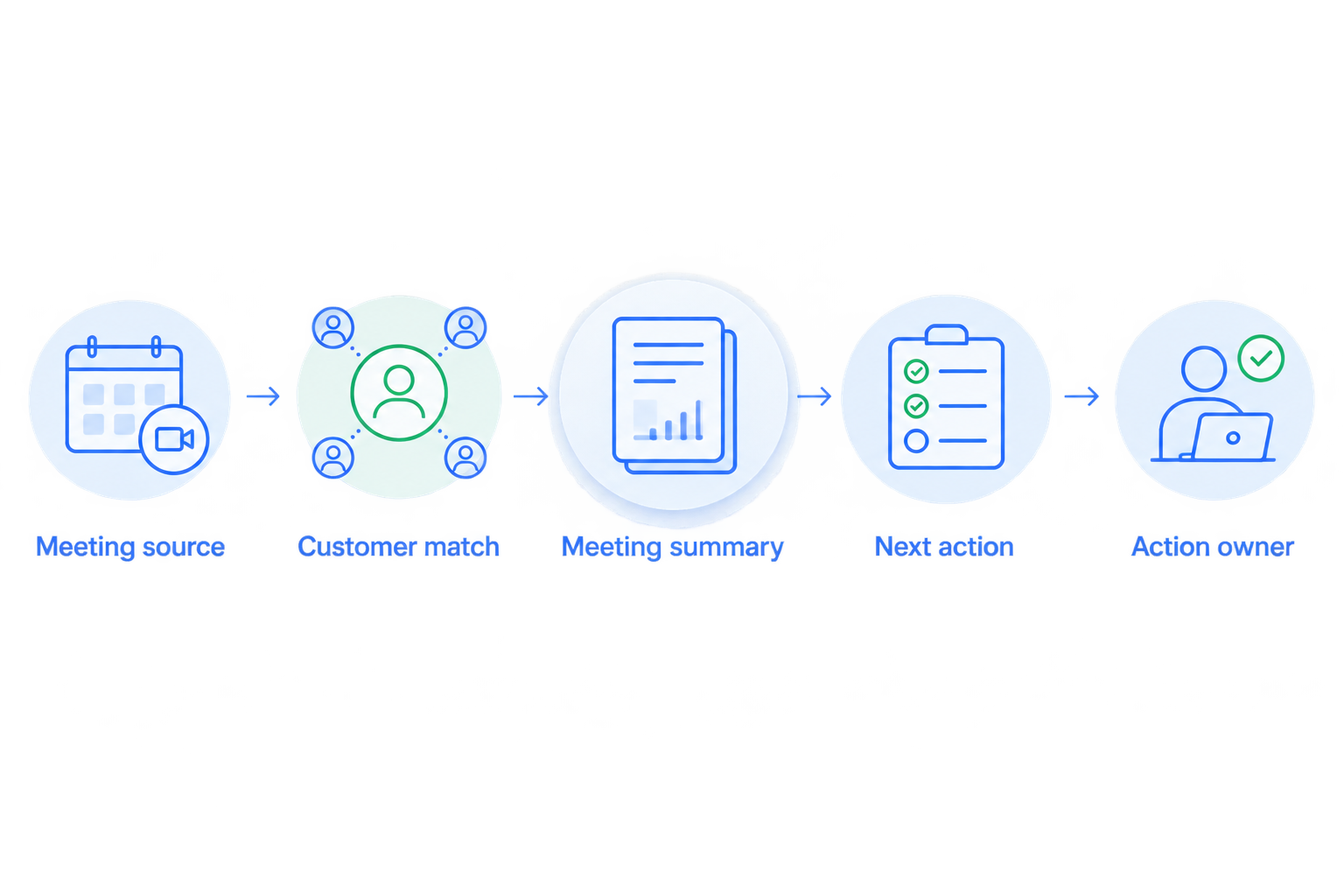
A summary and a task serve different purposes. The summary preserves context; the task creates responsibility. Keep both, but avoid duplicating every sentence of the summary inside the task description.
Validation and release configuration
Test the complete handoff
- Run 1 test meeting linked to a known customer. Confirm the destination, meeting time, summary, owner, and next action against the source material.
- Test 2 contact records with similar names but different verified identities. Confirm that the workflow matches by the selected identifier rather than a display name.
- Deliver the same meeting package again. Confirm that duplicate prevention blocks a second note and a second follow-up task.
- Test 3 outcomes: an agreed next step, no agreed next step, and an unclear customer match. The workflow should create work only for the first outcome and route uncertainty to review.
- Review the result with the salesperson who will use it. Correct confusing summaries and ownership rules before expanding the rollout.
Expected result: The workflow handles normal meetings, repeated deliveries, and incomplete information without silently changing the wrong record.
Keep a record of the source reference, destination reference, processing result, and any review decision. Record only the diagnostic detail your organization permits; do not turn technical logs into another unrestricted transcript store.
For your 2026 acceptance test, require an explicit pass or fail for every outcome. A successful connection test proves access, not correct customer matching or useful follow-up.
When meeting notes are corrected
A corrected meeting summary needs an update workflow, not another creation workflow. Use the original meeting reference to find the existing entry, then review the difference before changing downstream work.
- Identify the existing meeting entry using its occurrence reference and destination record.
- Replace or append the corrected notes according to your recordkeeping policy. Keep enough context to distinguish the correction from the original conversation.
- Compare the revised next action with the current task. Preserve completed work; route canceled, reassigned, or materially changed commitments to the owner.
- Leave the opportunity stage unchanged unless the correction supplies evidence that satisfies your defined stage rule.
Expected result: The customer history reflects the correction without multiplying notes or undoing completed work.
The decision to turn conversations into tasks requires more than extracting action-shaped sentences: your workflow must distinguish a customer commitment from a suggestion, a question, or an internal idea. That distinction belongs in the review criteria before task creation.
Use correction handling as a release requirement for your 2026 workflow. An integration that creates accurate first entries but mishandles revisions still leaves the sales team with conflicting instructions.
Troubleshooting
Notes land on the wrong customer
Stop unattended writes and inspect the matching identifier. Replace display-name matching with a verified email or CRM identifier, then review affected records before resuming. Do not fix a matching failure by creating more contacts.
The meeting ends, but no notes arrive
Check whether the required meeting material exists and whether the connected account can access it. Inspect the source event, authorization, and processing result separately; an ended meeting is not proof that the expected notes were produced.
Repeated deliveries create duplicate tasks
Check the meeting occurrence reference and whether the workflow checks for an existing destination entry before creation. Apply the same duplicate-prevention rule to tasks as to notes, including retries after a partial failure.
The summary arrives without an owner or deadline
Require an owner before releasing the task. Route missing dates for scheduling, and preserve the difference between a customer-agreed deadline and an internal target date. Do not let a successful note transfer hide an incomplete handoff.
A meeting advances the wrong deal
Disable stage changes until the opportunity match and stage evidence are explicit. Meeting attendance alone does not prove a deal qualified, a proposal was accepted, or a purchase was approved.
Customize your workflow
Once the meeting handoff works, connect it to the surrounding sales process. Arches CRM supports follow-up automation and configured pipeline workflows; keep each added rule tied to a clear customer event and an accountable owner.
Start with a task for the salesperson, not an automatic customer message. After the team trusts the notes and matching rules, evaluate whether a reviewed follow-up draft belongs in the process. Keep automatic outreach separate from basic note capture so either process can stop without blocking the other.
For the next implementation layer, use the custom automation connection guide to evaluate that connection route against the actions your account actually supports. A guide title is not confirmation that every Zoom event or destination action is available.
Keep scheduling, meeting evidence, and sales qualification separate. In 2026, your automation standard should remain simple: every record change needs a known source, and every next action needs an owner.
FAQ
What is a Zoom CRM integration for meeting notes?
A Zoom CRM integration transfers authorized meeting information into customer records and connects it to follow-up work. A useful workflow matches the customer, saves reviewed notes, and assigns an owner rather than merely copying a transcript.
Can I connect Zoom directly to Arches CRM?
Verify the supported connection method in your account before building a direct Zoom connection. Do not assume a native connector exists; use an available integration, API route, or reviewed manual handoff that supports the required records.
Do I need a recording for this meeting-notes workflow?
No, a reviewed handoff can start with notes written by the salesperson. Recording-dependent workflows require the appropriate access, permissions, and authorized meeting materials.
How do I prevent duplicate meeting notes and tasks?
Use a stable meeting-occurrence reference and destination record to check whether the meeting has already been processed. Apply that check to both note creation and task creation, including repeated deliveries and retries.
Should every Zoom meeting move a deal forward?
No, a meeting alone is not evidence that an opportunity meets the next stage's criteria. Require an explicit opportunity match and documented qualification evidence before enabling a stage change.
What happens when the meeting attendee is not in the CRM?
Route an unmatched attendee to review before creating or updating a customer record. Confirm identity and business relevance so guests and internal participants do not become unintended leads.
Can meeting follow-ups be sent automatically?
Automatic follow-up requires a supported sending method and defined approval rules. Begin with assigned tasks or reviewed drafts, then test recipient matching, content accuracy, and stop conditions before allowing unattended messages.
One last thing
A reliable workflow must know when to create nothing. A meeting without an agreed next step should preserve useful context, not manufacture a promise or move a deal forward. Make that empty-action outcome part of your test before increasing automation.