
 Log in
 Start Free Trial

Yes, switching CRM providers is risky for an active sales pipeline when deal ownership, conversation history, next actions, or live workflows break during the move. You control that risk by testing a representative migration, assigning one system to handle live activity, and verifying each active deal before retiring the old CRM.
- Is switching CRM providers risky for an active sales pipeline? Yes: protect deal ownership, follow-up tasks, and customer conversations.
- Test a representative migration before moving live sales activity; a successful import alone does not prove continuity.
- Choose one system for live updates and outbound automation during the handoff.
- Arches CRM suits growing sales teams that need shared conversations, pipeline tracking, and automated follow-ups.
Is switching CRM providers risky for an active sales pipeline?
The risk is losing the next sales action, not simply losing a contact record. An opportunity can arrive in the new CRM with the correct company name while its promised callback, assigned salesperson, or latest reply remains behind.
Use this comparison to choose how you will handle the transition. These are operating approaches, not guarantees about a provider's migration capabilities.
| Approach | Best for | Advantage | Main drawback |
|---|---|---|---|
| Single cutover | Teams with tested mappings and a clear handoff | Establishes one live workspace immediately | Unresolved errors affect live work immediately |
| Phased handoff | Teams that can separate work by owner or pipeline | Limits the scope of each transition | Requires clear boundaries between systems |
| Controlled pilot | Teams validating unfamiliar workflows | Exposes problems before broader rollout | Adds validation work before the main move |
For a 2026 CRM switch, choose the approach after testing your records and workflows, not before. Use the CRM onboarding guide to separate team readiness from the technical transfer: importing records and preparing salespeople are different jobs.
Why this matters
A lead replies while your team is switching systems. The old CRM records the reply, the new CRM shows an unanswered task, and a salesperson sends an outdated follow-up. That is a handoff failure even if every contact imported correctly.
Your migration plan needs to answer a practical question: where does the salesperson find the current conversation and the next commitment? If the answer depends on asking an administrator, the new workspace is not ready for independent use.
Treat pipeline continuity as the acceptance standard. Record totals help verify the transfer, but salespeople also need usable relationships between contacts, opportunities, messages, and tasks.
Why CRM switching risk varies
The amount of work depends on what your team has built around the existing CRM. Evaluate these factors before choosing a cutover date:
- Record relationships: Contacts, companies, opportunities, and activities need to remain connected, not merely appear as separate lists.
- Stage definitions: Similar stage names do not prove that both systems use the same qualification rules.
- Customer communication: Email, WhatsApp, SMS, and call activity need an explicit continuity plan wherever your team uses them.
- Workflow dependencies: Assignment rules, reminders, sequences, and automatic stage changes need separate testing.
- Access permissions: A successful administrator check does not prove that the assigned salesperson can see or edit the record.
- Work in progress: New replies, tasks, and deal changes created during migration need a defined destination.
Do not use company size alone to judge complexity. Build the plan around the records, channels, and rules your team actually uses.
How do you switch CRM providers without losing pipeline control?
Use the following sequence as your 2026 migration checklist. Each step has an observable completion condition; none depends on assuming that the import tool handled everything.
1. Record the current pipeline
Export the records and supporting information you need before changing the live setup. Confirm what the source system includes in its exports, particularly attachments, activity history, custom fields, and record relationships.
Create a baseline for open opportunities: owner, stage, associated contact, next action, and relevant dates. Keep the source record identifier wherever the destination supports it, so you can trace a questionable record back to its origin.
Completion condition: you can identify the source record and the expected next action for each active opportunity. Store exports with appropriate access controls rather than circulating customer data through personal inboxes.
2. Map the meaning
Write down how each source field and stage translates into the destination. Separate fields that transfer directly from fields that need conversion, manual review, or a different destination structure.
For example, a source stage called Proposal does not establish whether a proposal was drafted, sent, or discussed. Preserve the business meaning before assigning the destination stage.
Document how you will handle blank values, inactive owners, duplicate contacts, and opportunities linked to multiple people. Resolve these decisions before the full import rather than asking salespeople to interpret them afterward.
Completion condition: the sales lead approves the mapping based on how the team sells, not just how the columns align.
3. Test representative records
Choose records that exercise your real workflow: an opportunity awaiting a reply, a scheduled follow-up, a reassigned lead, and a record with connected conversation history. Include awkward cases rather than selecting only tidy records.
Run 3 checks on each test opportunity: record accuracy, salesperson access, and next-action continuity. These are recommended acceptance checks, not a claim about migration success rates.
Open the result as the assigned salesperson. Confirm that the person can find the contact, understand the latest exchange, and complete the next task without reconstructing the deal from memory.
Completion condition: the test records support the next real sales action, and every exception has an owner.
4. Define the handoff
Specify which system handles new leads, replies, task changes, and outbound messages during the transition. If you use a phased move, state the boundary clearly: by salesperson, pipeline, or another division your team can follow.
Do not leave 2 systems authorized to send the same follow-up. Choose one active sender for each workflow, and document when responsibility changes.
Completion condition: salespeople know where to work, and administrators know which integrations and automations remain active.
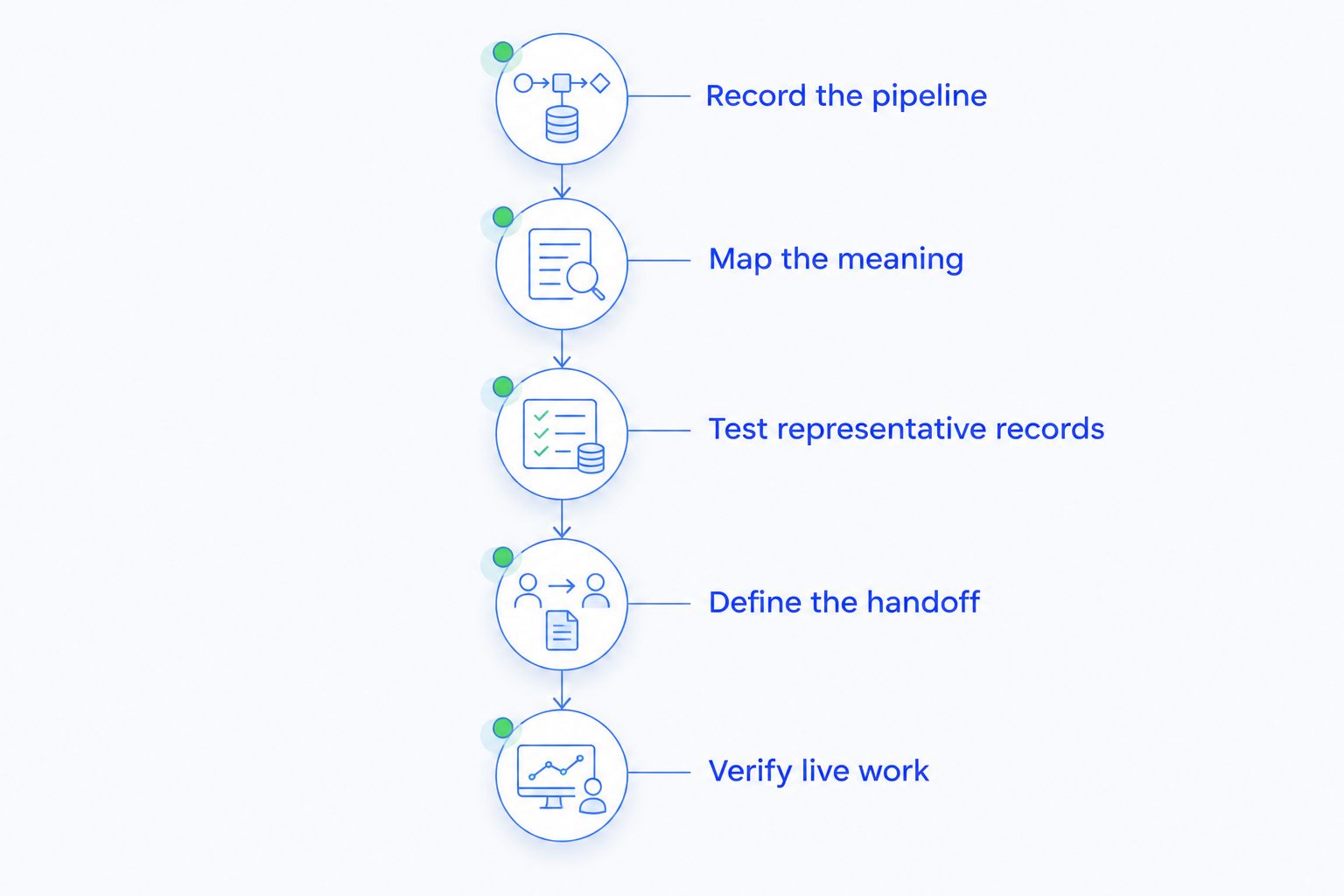
5. Verify live work
After the handoff, test the path from a newly captured lead to an assigned owner and a visible next action. Check the channels your team actually uses rather than assuming that an imported conversation proves a live connection works.
Review active opportunities against the baseline. Investigate missing relationships, unexpected stage changes, unassigned tasks, and messages that appear in the wrong place.
Completion condition: new activity reaches the right workspace, and existing opportunities retain a clear owner and next step. Keep a named person responsible for resolving migration exceptions until the review is complete.
How should you protect follow-ups and automation?
Treat every workflow as a separate migration item. Moving a contact does not establish that its reminders, message sequence, or stage-change rules behave correctly in the destination.
For each live workflow, document the trigger, eligibility conditions, action, stop condition, and owner. Then test the behavior you want and the behavior you must prevent.
A reply-based workflow, for example, needs more than a successful message delivery. Verify that the reply attaches to the correct record and that any subsequent task or stage change matches the intended rule.
Before enabling a workflow in 2026, check:
- Whether imported records qualify immediately or only after a new event.
- Whether previous communication preferences remain usable.
- Whether a customer reply stops an inappropriate follow-up.
- Whether ownership changes affect reminders or assignments.
- Whether an error becomes visible to someone responsible for fixing it.
Start with a controlled test before enabling broader automation. Do not mistake silence for success: a workflow that sends nothing can be as disruptive as one that sends the wrong message.
How do you preserve the context behind each deal?
Preserve what the salesperson needs to make the next decision: who is involved, what was discussed, what was promised, and what remains unresolved. A contact list alone does not provide that context.
The same distinction applies when migrating client data between planning systems: moving names and dates is different from preserving the commitments attached to them. For a sales pipeline, verify that the opportunity still connects to its relevant conversations, tasks, and decision-makers.
Create an exception list for information that cannot move directly. Assign each exception a resolution: transfer it another supported way, preserve accessible source history, or reconstruct the necessary context with the account owner.
Do not silently discard history because the destination import has no matching field. Decide what the team needs for current work and how authorized users will retrieve the rest. Review retention and access requirements before deleting source information.
What should salespeople verify before accepting the new CRM?
Ask salespeople to complete real tasks, not simply confirm that they can log in. A usable workspace lets them answer the customer's question without switching between systems to rebuild the conversation.
Use a short acceptance exercise:
- Find an active opportunity and identify its owner.
- Read the latest relevant conversation and locate the promised next step.
- Complete or reschedule the next task.
- Record a new interaction and verify where it appears.
- Confirm that the opportunity remains in the correct stage.
This 5-step exercise checks working continuity rather than interface familiarity. Ask each participant to report specific blockers, such as missing context or an inaccessible record, instead of a general satisfaction rating.
Keep your 2026 training focused on daily decisions: where new leads arrive, how ownership works, where follow-ups appear, and how exceptions get escalated. Teach optional features after the team can reliably manage active work.
Where does Arches CRM fit in a pipeline migration?
Arches CRM suits growing sales teams that need shared conversations, pipeline tracking, and automated follow-ups. The platform brings contacts, conversations, tasks, and sales activity together; its stated features include workflow automation, email summaries, and opportunity movement based on customer interactions and configured workflows.
That makes Arches CRM relevant when disconnected follow-ups and manual pipeline updates are the problems you want to address. It does not remove the need to validate your source data, stage mapping, communication connections, or workflow conditions.
The trade-off is configuration work: your team still needs to define what should trigger a task or move an opportunity. Assess the CRM against your representative records and daily sales actions rather than treating its feature list as proof that your migration is complete.
When should you delay the switch?
Delay the cutover when a failed acceptance check threatens current customer commitments. Examples include inaccessible active opportunities, missing next actions, unclear ownership, or outbound workflows whose behavior has not been verified.
Write the rollback conditions before the transition. Specify who can stop the move, which system becomes authoritative, and how activity created after the handoff will be preserved if work returns to the old CRM.
A rollback plan must account for new activity, not just the original export. Restoring an earlier dataset without reconciling subsequent replies and task changes leaves the team with another version of the same continuity problem.
Do not retire the source system merely because the destination looks populated. Retire it after authorized users can complete their work and the required history remains accessible under your retention plan.
FAQ
Can I switch CRM providers while deals are still open?
Yes, you can switch CRM providers with open deals when you preserve ownership, stage meaning, conversation context, and next actions. Test representative active opportunities before moving live work.
Will switching CRMs delete my customer conversations?
Conversation continuity depends on what the source exports and what the destination supports. Verify message history and live channel connections separately before retiring the source system.
Should my sales team use both CRMs during migration?
Use both only with explicit boundaries for live work. Assign one system responsibility for each workflow so salespeople do not create conflicting updates or duplicate follow-ups.
What should I check first after importing open opportunities?
Check ownership, stage, linked contacts, and the next action first. Then verify that the assigned salesperson can access the relevant conversation and complete the task.
Can Arches CRM automate follow-ups after a switch?
Arches CRM includes workflow automation for reminders, tasks, and follow-up sequences. Validate your imported records and workflow conditions before enabling live automation.
How long should I keep my old CRM?
Keep required source information accessible until the new workspace passes your acceptance checks and your retention requirements are addressed. Base retirement on verified continuity rather than an arbitrary deadline.
What is the biggest mistake when switching CRM providers?
Treating a successful import as a completed migration leaves live sales work unverified. Confirm that new leads, replies, ownership changes, and follow-ups work after the handoff.
One last thing
Before approving your 2026 cutover, ask a salesperson to handle an active deal using only the destination workspace. Have them identify the customer's latest request and complete the next promised action.
If they need the old CRM to understand what to do, the migration still has an unresolved dependency. Make the next sales action your final acceptance test.