
 Log in
 Start Free Trial

Yes—getting a sales team to use a CRM is hard when it adds data entry without helping reps handle conversations, prioritize leads, or complete follow-ups. Make adoption easier by starting with a narrow sales workflow, removing duplicate updates, and using the CRM during pipeline reviews instead of treating it as a separate reporting task.
- Is it hard to get a sales team to use a CRM? Yes, when reporting creates extra work without sales value.
- Start CRM adoption with lead ownership, next actions, and follow-up—not a full feature rollout.
- Archescrm supports growing sales teams with CRM workflow automation and shared customer conversations; configured rules still need review.
- Measure whether opportunities have owners and next actions, not just whether reps log in.
Is it hard to get a sales team to use a CRM?
CRM adoption becomes difficult when the system competes with the work your team already needs to do. A rep should be able to find the customer conversation, understand the opportunity, and take the next action without recreating information elsewhere.
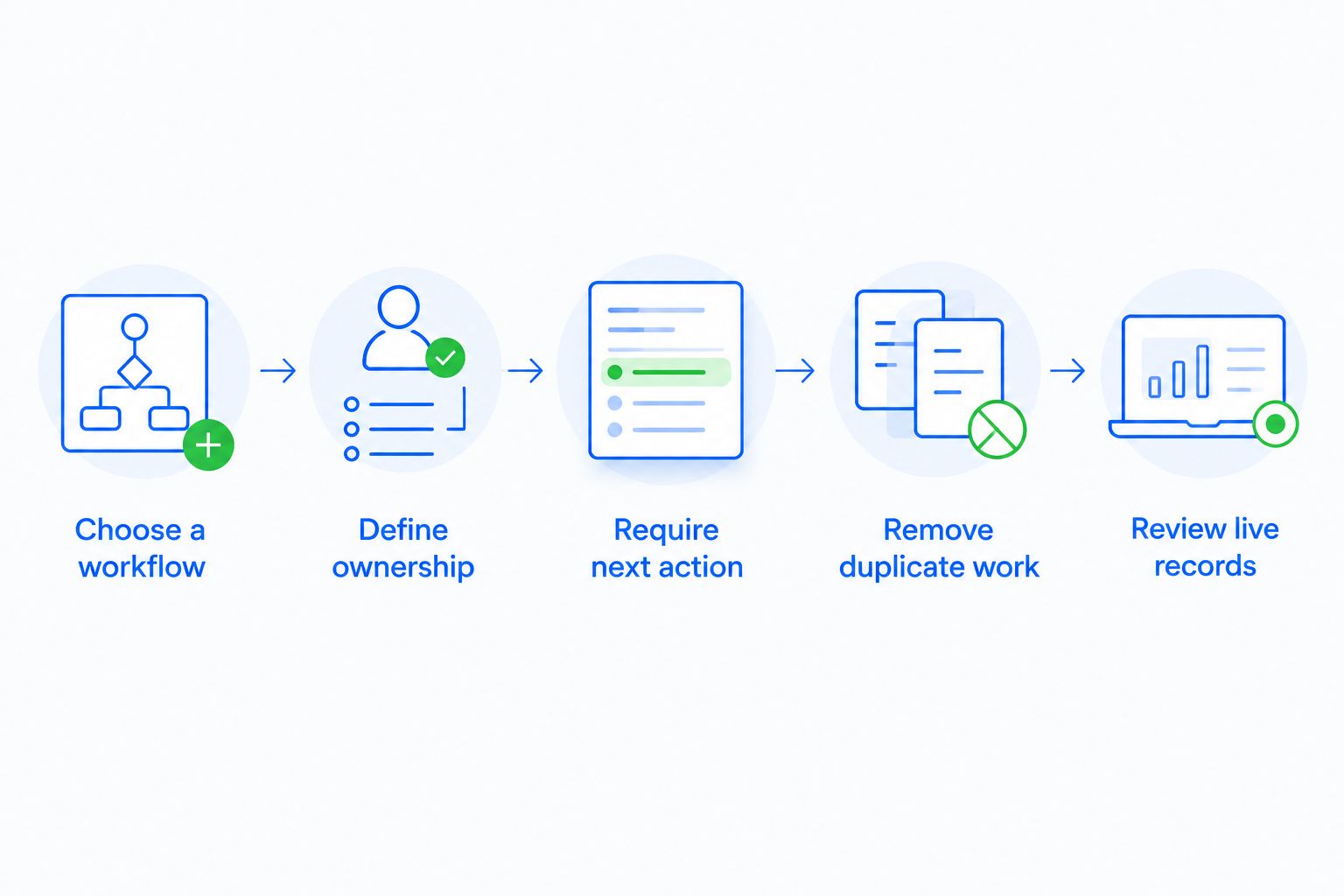
Start with this sequence:
- Choose a workflow. Pick a recurring task, such as responding to a new inquiry.
- Define ownership. Specify who takes responsibility when the lead arrives.
- Require a next action. Give every active opportunity a clear follow-up.
- Remove duplicate work. Stop maintaining a separate version of the same pipeline.
- Review live records. Run sales conversations from the CRM rather than asking for a second report.
For an example centered on work reps already recognize, use the Gmail-to-closed-deals CRM workflow as a starting point.
The test for your 2026 rollout is practical: does the CRM help the rep decide what to do next? If the answer is no, more training does not fix the underlying workflow.
Why this matters
A lead arrives. Someone replies, another person takes a call, and the next step stays in a private inbox or someone's memory. The opportunity exists, but the team cannot reliably see who owns it or what happens next.
That is the problem your CRM adoption plan needs to solve. A populated database is not the finish line; a usable record of customer work is.
Separate the adoption problem from the accountability problem. A rep who cannot find a conversation needs a workflow fix. A rep who understands the workflow but repeatedly leaves opportunities without next actions needs a clear management expectation.
Do not respond to every adoption problem with another training session. First identify whether the obstacle is unnecessary work, unclear rules, or an expectation nobody enforces.
Start with a workflow, not every feature
For a 2026 CRM rollout, choose 1 workflow that matters to the team's daily selling. New inquiry to first follow-up is a useful starting point because it connects lead capture, ownership, conversation history, and the next task.
Ask a rep to walk through a real opportunity. Watch where information gets copied, where ownership becomes unclear, and where the rep leaves the CRM to find context. Those points become your setup priorities.
Define the minimum useful record
Start your pilot with 3 required fields: owner, stage, and next action. Add other requirements only when they support a decision, a handoff, or a genuine business obligation.
- Owner: Who is accountable for moving this opportunity forward?
- Stage: What has actually happened in the buying process?
- Next action: What should happen next, and when?
This is a starting configuration, not a universal data standard. Your business still needs the contact details and records required to conduct its work.
Define what changes a stage
Write stage rules in terms of observable events. A meeting being booked is different from a rep hoping to book one. A proposal being sent is different from a rep planning to prepare it.
Ask reps to apply the same rules to sample opportunities. When their answers differ, clarify the rule before using stage reports to assess pipeline health.
Define where the work happens
Decide where reps read conversations, record next actions, and review opportunities. If the same update is required in a spreadsheet, a chat message, and the CRM, remove the duplicate requirement wherever your process allows it.
A CRM cannot become the working record while management keeps requesting a competing version.
Which rollout approach fits your team?
Choose the rollout approach based on what your reps need to change. For a 2026 rollout, the following comparison is a decision framework, not a performance ranking.
| Approach | Best for | Advantage | Trade-off |
|---|---|---|---|
| Workflow-first rollout | Teams establishing a shared selling process | Connects CRM use to a recognizable sales task | Other workflows remain outside the initial scope |
| Training-first rollout | Teams with a defined process but unfamiliar software | Gives reps guided practice with the interface | Training alone does not remove duplicate work |
| Reporting-first rollout | Teams with established records that need consistent management review | Makes reporting expectations explicit | Reps still need a reason to maintain useful records |
Choose workflow-first when the process itself is unclear. Use training to support that process, not to substitute for it.
A reporting-first approach has a place when reps already maintain dependable records. It is a poor starting point when managers want dashboards but the team has not agreed on ownership, stages, or next actions.
Why CRM adoption difficulty varies
CRM adoption depends on the work you ask people to change. These factors give you a practical diagnostic list:
- Duplicate entry: Reps must repeat information across systems instead of completing the task once.
- Unclear ownership: Leads enter the pipeline without an accountable person.
- Stage ambiguity: Different reps use the same stage to describe different events.
- Scattered conversations: Customer context remains split across email, messaging, calls, and personal notes.
- Automation quality: Rules create useful tasks only when their triggers and conditions match the process.
- Management habits: Leaders either use CRM records to run sales reviews or request separate updates.
Work through the list with actual opportunities. Ask the rep to show the obstacle rather than describe the CRM as generally difficult.
That distinction matters. A confusing field needs a clearer label or purpose. A missing conversation needs a communication workflow. An ignored task needs a decision about relevance, timing, or responsibility.
Where automation helps—and where it needs supervision
Archescrm is best for growing sales teams that need CRM workflow automation and shared customer conversations in one place. Its stated capabilities include lead and contact management, sales pipelines, follow-up workflows, and communication across email, WhatsApp, SMS, and calls.
Archescrm also supports email conversation summaries and automatic opportunity movement based on customer interactions and configured workflows. These capabilities address manual updates and scattered context, but they do not decide what your business should consider a qualified opportunity or a completed sales step.
The benefit is practical: reps can work with contacts, conversations, tasks, and sales activity together. The trade-off is configuration responsibility. Your team still needs to define triggers, ownership rules, and the conditions for moving opportunities.
Do not treat a customer reply as proof that a deal is ready for the next stage. A reply might ask a question, reject the proposal, or request a later conversation. Configure the workflow around the meaning your process requires, and review the resulting records.
For your 2026 rollout, automate a clearly defined action before expanding to more consequential changes. A reminder is easier to inspect than a chain of stage changes that nobody understands.
Connect follow-up to your pipeline
Explore lead management, shared conversations, and sales workflow automation.
How do you train sales reps without creating more busywork?
Train reps on the workflow they are expected to complete, using an actual opportunity with appropriate access controls. Have each rep find the customer context, confirm ownership, record the next action, and explain the current stage.
Avoid making feature tours the main event. Knowing where every menu lives is different from knowing how to move a customer conversation forward.
Build role-specific practice:
- Sales reps: Find the conversation, complete the follow-up, and record the next step.
- Sales managers: Review stalled opportunities and resolve unclear ownership.
- Administrators: Maintain fields, permissions, and workflow rules.
End the session with the rep completing the task without prompts. If the rep gets stuck, fix the unclear step before adding more functionality.
Keep instructions close to the task. A short explanation of what belongs in the next-action field is more useful during work than a long document describing every available setting.
How do you know whether the team is actually using the CRM?
Check whether active opportunities have 1 accountable owner and a useful next action, then examine whether the records match customer conversations. Login activity alone does not tell you whether the pipeline is usable.
For a 2026 adoption review, use operational questions rather than an unsupported industry target:
- Can another authorized teammate understand the opportunity without asking the owner for a separate briefing?
- Does the next action describe a real task rather than a vague instruction to follow up?
- Does the stage match the event your team agreed it represents?
- Are overdue tasks reviewed and resolved rather than silently carried forward?
Track your own baseline before setting improvement targets. Define what counts as an active opportunity so the denominator stays consistent when you compare results.
Measure usable records, not performative activity. A rep opening the CRM repeatedly is not the same as a team maintaining a dependable pipeline.
Should you make CRM use mandatory?
Make the agreed sales workflow mandatory, including ownership and next actions, rather than demanding activity for its own sake. Explain what the record must contain and use that same record during management reviews.
Managers need to follow the rule too. When a leader accepts a private spreadsheet as the authoritative pipeline, the team receives conflicting instructions about where the real work belongs.
Keep exceptions explicit. If a customer interaction cannot be captured through the normal process, define how the rep records the essential context instead of leaving each person to invent a workaround.
Enforcement comes after a workable process, clear training, and accessible tools. Otherwise, you are enforcing friction rather than a useful sales standard.
FAQ
Is it hard to get a sales team to use a CRM?
Yes, when the CRM adds reporting work without helping reps manage customer conversations and follow-ups. Start with a useful sales workflow, clear ownership, and a next action for every active opportunity.
What's the best way to get sales reps to adopt a CRM?
Start with a workflow your reps already need to complete, such as handling a new inquiry. Remove duplicate updates and use the CRM record during pipeline reviews.
Should I make CRM use mandatory for my sales team?
Make the agreed workflow and record requirements mandatory, not arbitrary login activity. Managers should use the same CRM records rather than requesting a separate pipeline report.
How long does it take a sales team to adopt a CRM?
Judge adoption by demonstrated work rather than a fixed deadline. Reps should be able to find customer context, confirm ownership, and complete the next action without a separate briefing.
Can CRM automation fix low adoption?
CRM automation can remove repetitive tasks, but it does not fix unclear sales rules. Define the trigger, responsible owner, and intended action before enabling a workflow.
Can Archescrm reduce manual CRM updates?
Archescrm supports automatic opportunity movement based on customer interactions and configured workflows, along with email conversation summaries. Your team still needs to configure and review the rules that guide those actions.
What should I measure instead of CRM logins?
Measure whether active opportunities have accountable owners, accurate stages, and useful next actions. Check those records against customer conversations to assess whether the pipeline reflects actual work.
One last thing
Before adding another required field, ask what decision changes when someone fills it in. If nobody can answer, remove it from the adoption pilot unless a genuine business obligation requires it.
Then inspect the manager's workflow. If your pipeline review still needs a second spreadsheet, the rollout is not finished. Make the CRM useful enough to run the meeting before asking reps to maintain more information.