
 Log in
 Start Free Trial

CRM software is safe for storing customer data when the provider protects the service and your team controls access, integrations, and retention. A CRM subscription alone does not establish those protections: verify them before importing customer records. For a 2026 buying decision, judge documented controls and your actual configuration—not a security claim on a sales page.
- Is CRM software safe for storing customer data? Yes, when verified security controls match your data and workflows.
- Arches CRM fits growing sales teams managing leads and follow-ups; evaluate security separately from workflow features.
- Require strong authentication, restricted permissions, recovery procedures, and clear rules for connected apps.
- Store only necessary customer information, and test access restrictions before importing live records.
Is CRM software safe for storing customer data?
Yes—but approve the controls, not the category. Customer names, contact details, conversations, and deal notes belong behind access restrictions that match how your team works. Sensitive records require a separate assessment rather than automatic inclusion in your sales database.
If you are moving from spreadsheets to a CRM, review what you collect before moving it. A migration should not carry every old note, attachment, and unnecessary personal detail into the new system.
Use these 6 checks before approving a CRM for customer information in 2026:
| Security check | Evidence to request | Approval requirement |
|---|---|---|
| Authentication | Supported sign-in methods and enforcement settings | Each person has an identifiable account protected against unauthorized access |
| Permissions | Role settings, record restrictions, and export controls | Users access only the records and actions their work requires |
| Encryption | Documentation covering stored data and data transmission | Protection covers the information and connections you intend to use |
| Recovery | Backup scope, restoration process, and responsibilities | Your team knows what can be recovered and how to request recovery |
| Data handling | Retention, deletion, processing, and subprocessor terms | Contractual terms match your obligations and intended use |
| Accountability | Activity logs and incident-response procedures | You can investigate access and know whom to contact during an incident |
A security document is a starting point, not the entire review. Check whether the documented controls apply to the service you will use and whether an administrator must enable them.
Why this matters
A lead arrives. Someone adds a contact, connects an inbox, and starts a follow-up sequence. That ordinary sales workflow now involves customer information, employee access, and a connected communication service.
The practical question is not whether you trust your sales team. It is whether the system prevents unnecessary access and gives you a way to investigate mistakes.
Keep follow-up fast without making customer data broadly accessible. Assign ownership, limit permissions, and document which information belongs in each workflow. Your 2026 CRM rollout should treat those decisions as setup work, not cleanup work after launch.
What should you check before uploading customer records?
Authentication: protect each individual account
Require individual accounts rather than a shared sales login. Shared credentials make it harder to remove access cleanly or connect an action to a particular person.
Ask whether the CRM supports multifactor authentication and whether administrators can require it. Review account recovery as well: a protected login is not enough if an attacker can bypass it through a poorly controlled reset process.
Check how departing employees lose access. Include active sessions, connected applications, and administrator privileges in that process—not just the password.
Permissions: restrict viewing, editing, and exporting
Start with the work a role must perform. A salesperson who needs assigned leads does not automatically need access to every account, every attachment, or a complete database export.
Test permissions using an ordinary user account. Confirm what the person can search, open, edit, delete, download, and share; an administrator's view does not demonstrate the restrictions that other users experience.
Treat bulk export as a separate permission. Viewing assigned records and downloading the entire customer database are different responsibilities.
Encryption: check storage and transmission separately
Ask how the provider protects stored customer data and connections between your browser, the CRM, and connected services. Confirm the scope rather than accepting the word encryption without an explanation.
Encryption does not replace permissions. An authorized account can still retrieve information through the application, so account protection and access restrictions remain essential.
Recovery: establish what restoration means
Ask what the backup process covers, how restoration works, and who initiates it. Confirm how the provider handles an accidentally deleted record compared with a wider service incident.
Do not treat a downloaded spreadsheet as a complete recovery plan. Check whether a recovery method includes relationships between contacts, conversations, tasks, attachments, and opportunities—not just rows of contact details.
Data handling: understand the full lifecycle
Review what happens when you delete a contact, close your account, or disconnect an integration. Ask how retention rules apply to active systems, backups, logs, and copies held by other processors.
Before signing, identify who handles data requests and incident communications. A sales contact and a security incident contact serve different purposes; your team should know the correct route before a problem occurs.
Is a CRM safer than spreadsheets or shared inboxes?
A CRM is not automatically safer than another storage method. Compare the controls available in each system and the way your team configures them.
| Approach | Best for | Practical benefit | Security limitation to address |
|---|---|---|---|
| CRM | Shared lead ownership and sales follow-up | Keeps customer records and sales activity together | Centralized access requires careful permissions and integration controls |
| Spreadsheet | A simple, limited tracking task | Makes a small dataset easy to review | Downloaded and copied files need their own access and retention controls |
| Shared inbox | Team handling of customer messages | Keeps a shared communication history | Mail access does not by itself establish record-level sales permissions |
Do not select a system solely because it puts everything in one place. Centralization helps you define a common process, but it also makes access decisions more consequential.
For a 2026 review, compare the same tasks across your options: remove an employee, restrict an export, recover a deletion, and investigate an unexpected change. Choose the system whose verified controls support your requirements.
Why CRM data safety varies
CRM safety depends on the provider's controls and the choices your business makes. These factors determine what you need to examine:
- Data sensitivity: Contact details, confidential correspondence, and regulated records require different handling decisions. Classify information before importing it.
- User access: Administrator rights, shared accounts, and broad export permissions change who can retrieve or alter records.
- Connected services: Email, messaging, phone systems, and integrations introduce additional places where customer information is processed.
- Workflow configuration: A notification, assignment rule, or automated message can expose information to the wrong recipient if configured incorrectly.
- Retention decisions: Keeping unnecessary records expands the information your team must protect and eventually remove.
- Operational ownership: Access reviews, employee departures, incident handling, and recovery need named owners rather than informal assumptions.
These are separate checks. Strong authentication does not prove that retention is appropriate, and a backup process does not prove that integrations have limited permissions.
How do you set up a safer CRM workflow?
Use this 5-step sequence before connecting live customer communication. The goal is to discover permission and routing mistakes with test records rather than customer information.
- Classify data. List the fields, attachments, and message types your sales process needs. Exclude information without a defined business purpose, and flag sensitive categories for separate approval.
- Assign access. Define administrator, manager, and salesperson responsibilities. Give each role the access it needs, then test those boundaries from the user's account.
- Review connections. Record each integration's purpose, permissions, owner, and disconnection process. Remove connections that have no current business use.
- Test workflows. Use fictional contacts to check assignment rules, notifications, follow-ups, and exports. Confirm both the intended action and the intended recipient.
- Plan recovery. Document who handles suspicious activity, access removal, provider escalation, and restoration requests. Make that information accessible outside the CRM as well.
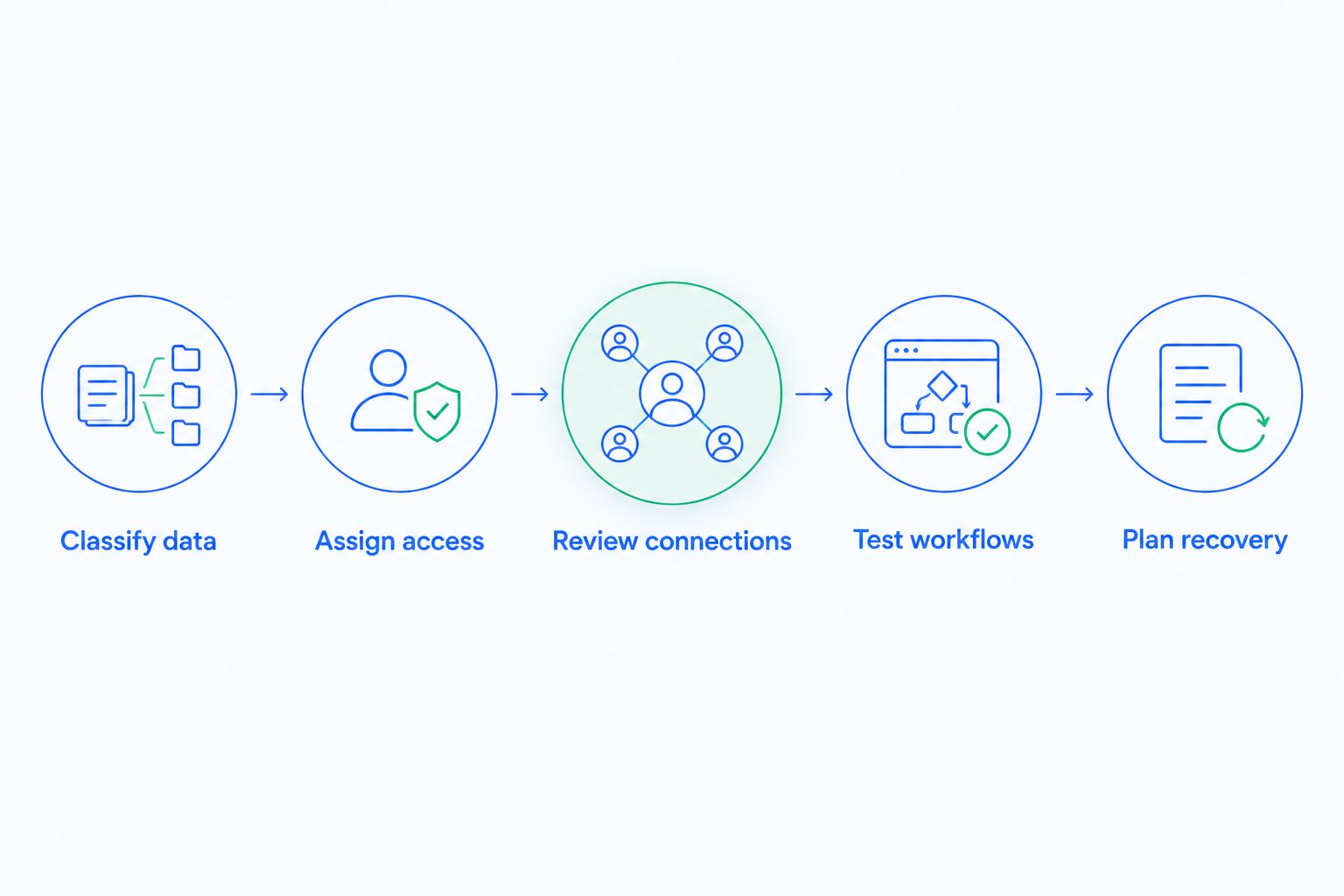
Repeat the relevant checks whenever you add a communication channel or change a workflow. A successful initial setup does not approve every later integration automatically.
Keep a short decision record for your 2026 rollout: what information is allowed, which roles can access it, and who approved each connection. That gives administrators a usable reference when the sales process changes.
What should you ask about automated features?
Automated summaries, email drafting, and pipeline updates require their own data-handling review. Ask what customer information each feature processes, which service processes it, how long it is retained, and whether administrators can control its use.
Separate generating a suggestion from sending a message or changing a record. Those actions have different consequences and need appropriate review points.
For example, test whether an automated follow-up includes information that should remain in an internal note. Check whether a pipeline change triggers another action, such as a notification or customer message. Review the entire chain, not just the first step.
Automation should follow your access and data rules, not bypass them. If you cannot explain where information goes and what triggers the next action, resolve that uncertainty before enabling the workflow.
Where does Archescrm fit?
Archescrm is best for growing sales teams that need lead management and follow-up automation in one CRM. Its stated capabilities include contact management, sales pipelines, workflow automation, and email, WhatsApp, SMS, and call communication.
The operational benefit is a shared place for contacts, conversations, tasks, and sales activity. The trade-off is that combining those workflows makes permissions, connected-service access, and retention decisions part of the implementation—not optional extras.
Evaluate Archescrm against the same security checklist you apply to any CRM. Workflow features establish what the platform helps your team do; security documentation, contractual terms, and tested settings establish whether a particular use is appropriate.
Can I store sensitive customer information in a CRM?
Store sensitive customer information only after approving the specific data category, provider arrangements, and access controls. A CRM used for sales contact details is not automatically approved for health records, financial documents, identity documents, or other restricted information.
Use a purpose-built system when the information requires controls your CRM cannot demonstrate. Keep only the sales reference your team needs rather than copying the underlying sensitive document into a contact record.
Does CRM software make my business compliant?
CRM software does not make your business compliant by itself. Compliance also depends on your purpose for collecting information, applicable obligations, contracts, configuration, and day-to-day handling.
Ask your legal or privacy adviser to assess the intended use. Evaluate the actual customer information and workflows—not a general claim that software supports compliance.
What happens to customer data when I leave a CRM?
Your exit process must cover usable exports, connected services, retention, and deletion. Confirm these arrangements before importing live records, while you still have a straightforward choice about the provider.
Test whether you can retrieve the information your business needs in a usable form. Then identify who requests deletion, how completion is confirmed, and what retention exceptions remain under the agreement.
FAQ
Is CRM software safe for storing customer data in 2026?
CRM software is safe for storing customer data when verified provider controls and your configuration match the information you store. Check authentication, permissions, encryption, recovery, integrations, and data-handling terms before importing live records.
What's the first security feature I should check in a CRM?
Check individual account protection and whether administrators can enforce multifactor authentication. Then test permissions, because a protected account still needs limits on the information it can access.
Is a cloud CRM safer than a spreadsheet?
A cloud CRM is not automatically safer than a spreadsheet. Compare actual access restrictions, export controls, recovery procedures, and the copies your team creates outside each system.
Can every salesperson see all customer records?
Salespeople should see only the records their work requires. Verify the CRM's permission settings and test search, viewing, editing, and export access from an ordinary user account.
Does encryption stop employees from exporting customer data?
Encryption does not stop an authorized employee from exporting data through an application. Restrict export permissions separately and review the activity records available for investigation.
What should I ask Archescrm before importing contacts?
Ask Archescrm for documentation covering authentication, permissions, encryption, recovery, retention, connected services, and incident handling. Match the answers to the customer information and communication workflows you intend to use.
Should I connect every app to my CRM?
Connect only applications with a defined business purpose and an accountable owner. Review requested permissions, data handling, and the process for removing access before authorizing a connection.
One last thing
Test an employee departure before your first customer import. Use a test account to verify that access removal covers sign-in, sessions, connected applications, and any credentials the person controlled.
This exercise turns a security promise into a concrete administrative task. Include Archescrm in your 2026 evaluation on that basis: confirm how your team will protect customer records while keeping legitimate follow-up work moving.