
 Log in
 Start Free Trial


Instead of copying Instagram messages into contact records, build an Instagram DM CRM integration that matches each inquiry to a lead, assigns an owner, and creates the next action. For Arches CRM, first verify an authorized Instagram messaging connection and compatible CRM write access; then use the workflow below to test capture, routing, and follow-up before enabling automation.
- Build your Instagram DM CRM integration only after verifying messaging permissions and CRM write access.
- Arches CRM suits growing sales teams that need lead management and workflow automation; validate the Instagram connection separately.
- Match contacts using a stable source identifier, not a display name.
- Start with internal follow-up tasks; enable outbound messages only after checking permissions and stop rules.
Why this matters
A message sitting in an Instagram inbox is not an assigned sales opportunity. Your team needs to know who owns the conversation, what the prospect asked, and what should happen next. Copying the message into a CRM solves only the storage problem.
A successful integration creates an accountable next action, not just another contact record. For your 2026 rollout, separate message capture from permission to send replies. Receiving an event, updating a lead, and sending an Instagram message are different operations that need separate verification.
The workflow below treats Instagram as the inquiry source and your CRM as the sales record. It does not assume a native Instagram connector, a particular automation service, or an outbound messaging feature.
Before you start
- Account access: Have someone authorized to manage the Instagram account and approve the messaging connection. Confirm the account meets the selected connection method’s current eligibility requirements.
- CRM access: Have permission to create and update contacts, assign leads, and configure tasks or workflows. For an automated route, verify the required operations through supported integrations or APIs.
- The gotcha: CRM API access does not grant Instagram messaging access. Verify the source connection can receive the message types you need and, separately, whether it can send replies under current platform rules.
Prepare a test sender, a responsible sales owner, and a written definition of a qualified inquiry. Keep production replies disabled during initial testing. A workflow that writes the wrong owner is easier to correct than one that sends the wrong message.
Choose your connection approach
Use the simplest approach that passes your access checks. Do not select a route because it promises automation; select it because you can verify the complete handoff.
| Approach | Best for | Advantage | Limitation |
|---|---|---|---|
| Assisted handoff | Teams validating their Instagram sales process | Lets a person check identity and buying intent before creating the CRM action | Still requires manual capture and consistent inbox coverage |
| Authorized messaging connection plus CRM integration or API | Teams with verified permissions and technical support | Supports a repeatable event-to-record workflow | Requires mapping, error handling, permission maintenance, and testing |
Start with assisted handoff when access is unresolved. That means a person reviews the DM, finds or creates the contact, assigns an owner, and records the next action. It is a fallback operating process, not an automated integration.
Choose the automated route only when the source can deliver the required events and the destination can accept the required updates. Neither route removes the need for sales ownership.
Message capture configuration
The instructions below describe configuration logic, not product-specific screen labels. Use the controls documented for your selected connection method; do not treat the mapping terms as exact interface labels.
- Authorize the source. Connect the intended Instagram account through the supported authorization process. Confirm the account identity before granting access.
- Define eligible inquiries. Include inbound messages that require sales attention. Exclude your team’s test traffic and explicitly identified non-sales messages from production routing.
- Inspect a real test event. Send a plain-text inquiry from an authorized test sender. Check which sender, message, conversation, and timestamp values the connection actually supplies.
- Record event identity. Preserve the source message identifier when supplied. Use it to recognize a repeated delivery instead of creating the same activity again.
- Limit stored content. Send only the message content and metadata needed for the sales handoff. Do not copy unrelated conversation history into every update.
Expected result: A test inquiry reaches the connection layer with enough information to identify the sender and distinguish the message from a repeated delivery. If either condition fails, stop before enabling CRM writes.
For a 2026 deployment, record the authorization method and the person responsible for maintaining it. Keep credentials out of contact notes and message summaries.
Contact identity configuration
A display name is not a reliable contact key. Two people can use the same name, and an existing prospect can contact your business through a different channel.
- Define the lookup key. Use the stable sender identifier supplied by the messaging connection, scoped to the relevant business account where necessary. Confirm its documented behavior before relying on it.
- Search before creating. Look for an existing record associated with that source identity. Update the matching record rather than creating a new contact for every message.
- Preserve verified details. Do not overwrite an existing email address or phone number with a value inferred from a username or message signature.
- Route uncertain matches for review. If a prospect says they already spoke to your team, ask the owner to verify the relationship before merging records.
- Keep source attribution. Store Instagram as the inquiry source and retain the available source identifier in a suitable supported field or external mapping store.
Expected result: A returning sender updates the correct contact, while a new sender creates a separate lead. An uncertain match stays separate until a person checks it.
Use a proposed acceptance test of 3 identity cases: a new sender, a returning sender, and a sender claiming to be an existing email contact. These are test cases for your rollout, not platform performance figures.
Ownership and next-action configuration
Arches CRM provides lead management, sales pipelines, and workflow automation. Those capabilities support the destination-side sales process; the Instagram connection still needs its own verified capture and mapping route.
- Set assignment. Choose an accountable owner for each eligible inquiry. Define a backup owner or review queue for unmatched routing conditions.
- Create the next action. Write a task that tells the owner what to do, such as reviewing the inquiry and replying in the authorized channel. Include relevant message context.
- Define response coverage. Set a response target your team can staff. For example, use a 15-minute target during staffed hours as an internal test setting, not a claimed benchmark or guaranteed result.
- Protect the pipeline. Create an opportunity only when the inquiry meets your qualification rule. A question about an existing order should not automatically become a new sales deal.
- Add follow-up controls. Require a check for customer replies, owner action, and closed status before creating another reminder.
Expected result: Every eligible test inquiry has an owner and a next action. Non-sales messages do not inflate the sales pipeline.
The core sequence is Message capture, Contact identity, Assignment, and Follow-up. Validate each stage independently before connecting the full sequence.
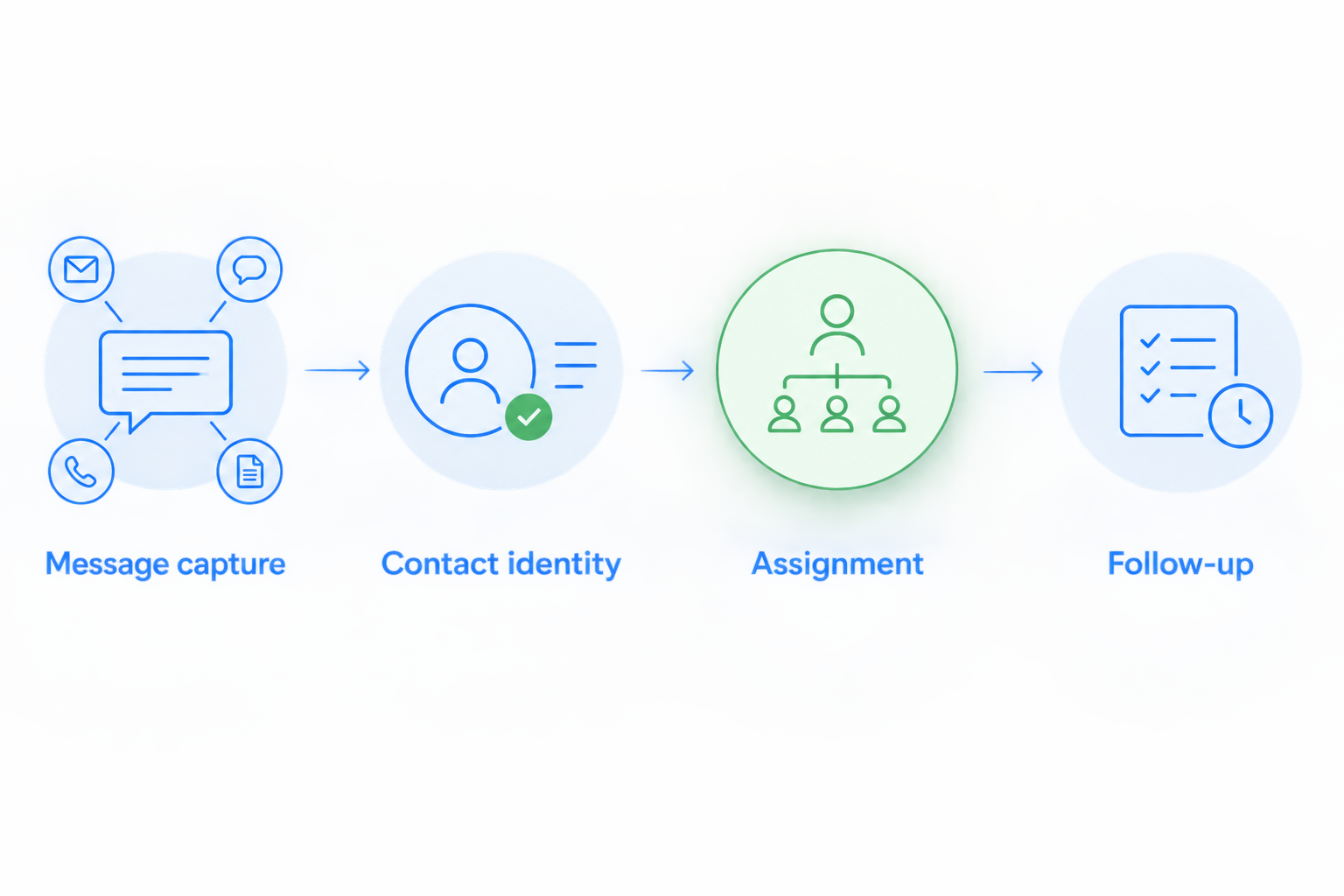
Do not equate an acknowledgment with a completed sales response. If automation confirms receipt, keep the human response task open until the owner handles the inquiry.
Release validation configuration
Test failure handling before handing the workflow to sales. A successful demonstration proves little if a repeated message creates another lead or a failed write disappears without notice.
- Run the complete handoff. Send an inquiry, inspect the contact match, confirm ownership, and verify the next action.
- Repeat a delivery. Reprocess the same test event where your connection supports replay. Confirm that the workflow does not duplicate the contact or activity.
- Interrupt the destination. Use a controlled test failure to check how an unsuccessful CRM write is recorded and retried. Do not disable a production account to perform this test.
- Inspect access boundaries. Confirm that people outside the intended sales group cannot see message content through the workflow’s storage or logs.
- Define recovery ownership. Assign someone to inspect failures and recover missed inquiries. Document how to pause processing without deleting records.
Expected result: Successful events create the intended sales action, repeated events remain identifiable, and failed events reach a recoverable exception process.
Before the 2026 launch, retain 5 test messages covering a new inquiry, a returning sender, a repeated event, a non-sales message, and a failed write. Keep the expected outcome beside each test so future changes can be checked against the same cases.
Update the lead whenever a new reply arrives
The adjacent workflow handles replies from an existing prospect instead of treating every message as a new lead. Use this variant only when the connection exposes the necessary inbound events and the CRM supports the intended updates.
- Find the contact using the verified source identity.
- Add the new message context without replacing previous sales notes.
- Notify the current owner or create the appropriate review task.
- Stop or reassess pending no-response reminders before they execute.
- Change the opportunity stage only when the reply meets a defined sales condition.
A reply is evidence of activity, not proof of qualification. A prospect asking to stop contact should not advance to a sales stage. A request for a proposal should reach the owner with enough context to act.
Arches CRM supports opportunity movement based on customer interactions and configured workflows. Apply that capability only after confirming how the Instagram event reaches the record and which condition authorizes the stage change.
Troubleshooting
Messages arrive in Instagram but not in the workflow
Check the connected account, authorization status, event configuration, and supported message types. Send a fresh test inquiry and inspect the source connection before changing CRM mappings. If no source event exists, destination changes will not fix capture.
Every message creates a new contact
Inspect the lookup step and the sender identifier used for matching. Make contact creation conditional on a failed lookup, and separate message identity from contact identity. A message identifier identifies an event, not a person.
Leads exist but nobody responds
Check whether assignment completed and whether the owner received an actionable task. Add a fallback for routing failures and inspect overdue work. A record without ownership is an unfinished handoff.
Reminders continue after the prospect replies
Check whether the reply event reaches the matching record before the reminder runs. Recheck the current conversation state immediately before the follow-up action, rather than relying only on the state when the reminder was scheduled.
An outbound reply fails
Verify that outbound messaging is supported and authorized for that conversation under current Instagram rules. Do not treat incoming-message access as permission to send. Keep an internal task for the owner rather than retrying indefinitely.
Customize your workflow
Expand the workflow after the basic handoff passes its tests. Add qualification questions, separate sales from service inquiries, or define different owners by documented routing criteria. Change one rule at a time so the cause of a routing error stays visible.
For your 2026 operating review, track received inquiries, successful CRM writes, assigned inquiries, and completed response tasks. Define each measure before comparing results; a captured message and a handled inquiry are not the same outcome.
Use the guide to automatically create tasks from customer replies when extending the next-action logic. Keep outbound messaging permissions separate from internal task automation.
FAQ
Can I connect Instagram DMs to Arches CRM?
Verify an authorized Instagram messaging route and compatible CRM write operations before building the connection. Arches CRM provides integrations and APIs, but those capabilities alone do not establish a native Instagram connector or permission to send Instagram replies.
What is the safest first step for an Instagram DM CRM integration?
Validate message capture before allowing CRM writes or automated replies. Inspect a test event, confirm sender identity, and check that repeated delivery can be recognized.
Can every Instagram DM automatically become a sales lead?
Create sales leads only for messages that meet your inquiry rules. Route service requests and other non-sales messages separately so they do not inflate the pipeline.
How do I prevent duplicate contacts from Instagram messages?
Search for the sender’s verified source identity before creating a contact. Keep message identifiers separate from contact identifiers, and review uncertain cross-channel matches manually.
Can the workflow send an automatic Instagram reply?
Enable automatic replies only when your selected connection supports outbound messaging and the conversation meets current platform rules. Start with internal response tasks while you verify those conditions.
Should a new Instagram reply move the deal forward?
Move the deal only when the reply meets a defined sales condition. Acknowledgments, service questions, and requests to stop contact should not automatically advance an opportunity.
What should I test before launching the workflow in 2026?
Test new and returning senders, repeated events, non-sales messages, and failed CRM writes. Confirm ownership, next actions, and reminder stop rules before enabling production processing.
One last thing
Test the stop rule before the send rule. Have a test prospect reply just before a scheduled reminder, then verify that the workflow reassesses the action. Your 2026 rollout is not ready if it captures every inquiry but ignores what the prospect says next.