
 Log in
 Start Free Trial

The cost to switch CRM providers depends on your migration scope: data cleanup, workflow rebuilding, integrations, training, and the transition between systems. For a 2026 switching budget, separate the subscription commitment from the work required to keep leads assigned, conversations accessible, and follow-ups running.
- How much does it cost to switch CRM providers? Budget the migration work, not just the replacement subscription.
- Arches CRM fits growing sales teams that need lead management, follow-up automation, and customer conversations together.
- Define what must transfer before requesting a CRM migration estimate.
- Approve the cutover only after testing lead ownership, conversation history, and follow-up workflows.
How much does it cost to switch CRM providers?
Your switching budget should cover 6 workstreams: contract transition, data migration, configuration, integrations, training, and cutover. Ask for each workstream separately so you can distinguish provider charges from your team's internal effort.
If you're evaluating Arches CRM, use the same migration scope you give every other shortlisted provider. A useful comparison starts with identical requirements, not different assumptions about which records, conversations, and workflows will transfer.
| Workstream | What to include in the estimate | What to confirm before approval |
|---|---|---|
| Contract transition | Existing commitments and replacement subscription obligations | Renewal terms, cancellation requirements, and overlap |
| Data migration | Exporting, cleaning, mapping, importing, and checking records | Included record types, attachments, and historical activity |
| Configuration | Pipelines, fields, ownership rules, permissions, and reports | Which settings are recreated and who builds them |
| Integrations | Reconnecting business tools and communication channels | Required connections and responsibility for testing |
| Training | Administrator preparation and role-specific practice | Included sessions, materials, and internal preparation |
| Cutover | Final data transfer, reconciliation, and launch support | Acceptance criteria, fallback procedure, and ownership |
Treat this table as a scope checklist, not a prediction of what any provider includes. Get written confirmation of deliverables before you approve the switch.
Why this matters
A lead arrives during the transition. If the new system does not assign an owner or create the next task, moving the contact record has not preserved the sales process.
Budget for continuity, not just a successful import. A completed transfer is useful only when your team can find the conversation, understand the opportunity, and act on the next step.
For a 2026 CRM switch, define success in operational terms: incoming leads reach an owner, active opportunities retain their context, and scheduled follow-ups remain actionable.
Build the budget around the work you actually need
Separate external charges from internal labor in your planning sheet. Your team still spends time reviewing exports, resolving duplicates, approving field mappings, and practicing the new workflow even when a provider handles the import.
Use these calculation rules with your own estimates:
- Internal migration effort: assigned hours multiplied by your internal labor rate.
- External implementation work: the documented scope agreed with the provider or implementation partner.
- Transition obligations: commitments you must honor while replacing the existing system.
- Post-launch work: agreed support plus any internally assigned corrections and improvements.
Do not count the same work twice. If a provider's implementation scope includes field mapping, identify your team's contribution as review and approval rather than assuming another full mapping exercise.
Keep assumptions next to each line item. An estimate based on contacts alone does not describe a migration that also requires deals, notes, tasks, attachments, and communication history.
Why CRM switching costs vary
The work changes with the structure of your current system and the operating requirements of the replacement. Use these factors to explain differences between estimates rather than assuming the larger estimate is unnecessary.
- Data quality: Decide who resolves duplicates, incomplete records, inconsistent labels, and outdated ownership before import.
- Historical context: Specify whether the scope includes contacts alone or related opportunities, activities, notes, and conversations.
- Workflow complexity: List triggers, conditions, actions, exceptions, and reminders that must be recreated or retired.
- Connected tools: Identify each integration, the data it exchanges, and the person responsible for confirming it works.
- Team requirements: Define access permissions, reporting needs, administrator responsibilities, and training by role.
- Transition requirements: Establish how new activity is handled between the initial export and the final cutover.
For your 2026 scope, mark every requirement as essential at launch, suitable for later, or ready to retire. That decision gives the implementation team a clear boundary without quietly removing something sales depends on.
Define the migration scope before requesting estimates
A provider cannot assess your requirements accurately from a contact count alone. Give every provider the same inventory and ask them to identify exclusions explicitly.
Inventory your records
List the record types you use and explain how they connect. A contact linked to a company, an open deal, and a pending task needs more than a row copied into a new database.
Document the relationships you need to preserve. Include ownership, activity timestamps, pipeline stages, and custom fields wherever they are part of your current process.
Separate essential history from clutter
Ask sales representatives which historical information they need during an active conversation. Retain the context that supports follow-up, account management, and your applicable recordkeeping requirements.
Do not delete records simply to simplify the transfer. Agree on retention and archive decisions with the people responsible for the information before changing anything.
Define acceptance before implementation starts
Write down how you will judge the migration. Checking that records exist is different from confirming that the right people can access them and use them correctly.
Require 3 acceptance checks: record reconciliation, relationship validation, and workflow testing. These are checks to build into your plan, not claims about a provider's standard migration service.
Follow a controlled CRM switching process
Use this sequence to turn the scope into assigned work. Each step should have an owner and a clear completion condition.
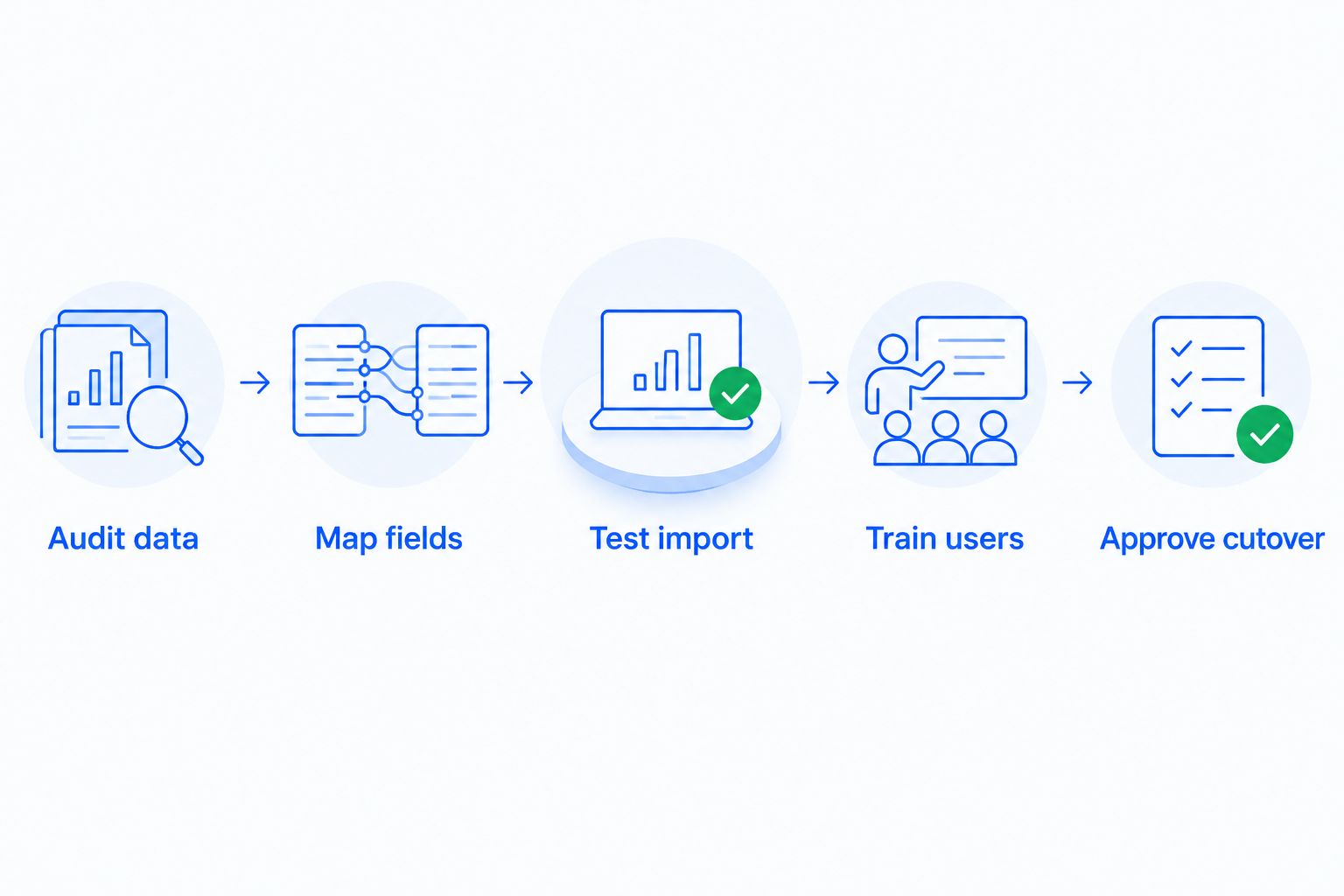
- Audit data. Export an inventory and identify duplicate records, missing ownership, and fields that need review.
- Map fields. Document how source fields and relationships correspond to the destination structure.
- Test import. Use representative records to check data, relationships, permissions, and required workflows.
- Train users. Have each role practice the actions they perform during a normal sales conversation.
- Approve cutover. Confirm acceptance checks, final-transfer responsibilities, and the fallback procedure.
A representative test should include difficult records, not just complete contacts. Include an open opportunity with several activities, a reassigned lead, and a record that uses custom fields if those situations exist in your current CRM.
Keep the initial import separate from the final transfer. Document what happens to records created or changed after the test export so that recent sales activity does not fall between systems.
What should you test before switching off the old CRM?
Test the actions your team needs to perform, not just the appearance of imported records. A familiar-looking pipeline does not prove that assignments, reminders, or connected channels work.
Use a practical acceptance checklist:
- Submit a lead through each intake route your team uses and confirm ownership.
- Open a migrated opportunity and check its linked contact, notes, activities, and next task.
- Trigger a follow-up workflow and check both its intended action and its stop condition.
- Verify that users have appropriate access to records and reports.
- Confirm that connected tools send information to the expected destination.
- Reconcile final transfers against the agreed export scope.
For a 2026 cutover, assign 2 approval owners: a sales owner and a system owner. The sales owner confirms that representatives can work their leads; the system owner confirms the agreed data and configuration checks.
Do not close the old system solely because the import finished. Follow the agreed retention, access, and contract requirements before removing access or deleting information.
Where does Arches CRM fit in the switching decision?
Arches CRM fits growing sales teams that need lead management, follow-up automation, and customer conversations together. Its stated capabilities include contact and lead management, sales pipelines, workflow automation, reporting, and communication across email, WhatsApp, SMS, and calls.
Its AI assistance can summarize email conversations and move opportunities through the pipeline based on customer interactions and configured workflows. Those capabilities are relevant when your requirements center on reducing manual updates and keeping the next action visible.
The implementation work still needs a clear scope. Automatic stage movement depends on configured workflows, so define which interactions justify a change and test the exceptions before enabling those rules for live opportunities.
Evaluate the fit against your actual process. Ask how your existing records, required connections, permissions, and follow-up rules will be handled rather than assuming that a feature list includes the migration work.
Can you switch CRM providers without disrupting follow-ups?
Protect follow-ups by assigning responsibility for leads and pending tasks throughout the transition. The cutover plan should explain where representatives work and which system controls outgoing activity at each stage.
Before launch, decide how to handle scheduled messages and reminders in the old system. Prevent duplicate outreach by identifying which workflows stop, which remain active temporarily, and which start only after approval.
Give representatives a clear rule for finding the latest customer activity. If both systems remain accessible during the transition, specify where updates belong so conversation history does not split again.
Should you rebuild every existing CRM automation?
Rebuild the automations that support your current sales process, not every rule that happens to exist. Review each workflow's purpose, owner, trigger, action, and stop condition before including it in the scope.
Retire obsolete rules through an explicit approval process. An unused workflow and a rarely triggered but essential exception are not the same thing.
For your 2026 launch, prioritize lead assignment, active-deal follow-up, and required customer communication. Add secondary workflows after the essential process passes its acceptance checks.
FAQ
How much does it cost to switch CRM providers?
The total depends on data migration, configuration, integrations, training, and the transition between systems. Request an itemized scope that separates subscription commitments, implementation work, and your team's internal effort.
Does a new CRM subscription include migration?
Confirm migration inclusion in the provider's written scope rather than assuming it comes with the subscription. Specify the record types, historical activity, configuration, and testing you expect.
Can I move my CRM data myself?
Self-managed migration requires you to handle export preparation, field mapping, import checks, and related configuration. Choose that approach only when your team can own and validate the required work.
Will all my emails and notes transfer to the new CRM?
Confirm email and note transfer separately from contact migration. Include historical activity, attachments, ownership, timestamps, and record relationships in the written requirements.
Can I cancel my old CRM as soon as the import finishes?
Wait until the agreed acceptance checks and transition requirements are complete before removing access. Review contract obligations, retention requirements, and the handling of recent activity first.
How do I avoid duplicate follow-up messages during a CRM switch?
Assign responsibility for outgoing messages and define when each system's workflows stop or start. Check scheduled outreach before enabling replacement automations.
Is Arches CRM relevant for a team switching providers?
Arches CRM is relevant when your requirements include lead management, sales pipelines, automated follow-ups, and connected customer conversations. Assess migration scope and required integrations separately from those product capabilities.
One last thing
Test a stop condition, not just a trigger. A workflow that sends the planned follow-up still needs to stop when a customer replies, an opportunity closes, or another configured exception applies.
Include that check in migration acceptance. Preserving the next action also means preventing the wrong action.