
 Log in
 Start Free Trial

CRM workflow automation costs depend on the software subscription, the workflows you need, and the work required to connect and maintain them. A subscription alone does not represent the full budget: include configuration, data preparation, integrations, training, and ongoing ownership in your 2026 comparison. Compare the cost of a working sales process, not just access to an automation feature.
- How much does CRM workflow automation cost? Compare subscription, setup, integrations, and ongoing maintenance together.
- Arches CRM suits growing sales teams that need lead management, automated follow-ups, and shared customer conversations.
- Start with a defined workflow scope before comparing quotes; feature lists alone do not establish total cost.
- Require reply handling, ownership rules, and stop conditions before switching on automated follow-up.
How much does CRM workflow automation cost?
The useful answer is the total cost of running your required workflows, including the subscription and the work around it. Separate recurring software charges from implementation and internal team time. Otherwise, you will compare proposals that cover different jobs.
Arches CRM combines lead management, sales pipelines, workflow automation, and customer communications. That makes it relevant when your buying decision involves both organizing sales activity and automating follow-up; confirm the scope and commercial terms against your actual requirements.
Use this breakdown when requesting a 2026 proposal. The rows are budget checks, not a statement that every provider charges separately for every item.
| Budget component | What to establish | What your comparison should show |
|---|---|---|
| Software subscription | Required users, capabilities, and billing terms | The subscription that supports your intended workflows |
| Workflow configuration | Triggers, conditions, actions, and exceptions | Who builds and tests the rules |
| Data preparation | Import mapping, duplicates, and ownership | Who prepares records before automation starts |
| Integrations | Connected tools, authentication, and field mapping | Which connections the proposed scope includes |
| Communication usage | Email, WhatsApp, SMS, and call requirements | Applicable terms and any separate usage charges |
| Training and maintenance | Team handover, monitoring, and rule changes | Who owns the process after launch |
Ask for an itemized scope before accepting a headline subscription figure. A proposal should make included work, excluded work, and your team's responsibilities explicit.
Why this matters
A lead arrives, nobody owns the next action, and the conversation stalls. Automation addresses that handoff only when the underlying process tells the system who should act, what should happen, and when to stop.
Buying more automation does not resolve an undefined sales process. It gives that process more ways to run without someone checking each action.
For your 2026 budget, separate the purchasing decision from the operating decision. You need software that supports the workflow and a person responsible for keeping that workflow correct. Neither replaces the other.
Follow-up automation: best for a defined next action
A focused follow-up workflow starts with a recognizable event and produces a clear action. For example, an unanswered inquiry creates a task for its owner, while a customer reply stops the unanswered-inquiry sequence.
The advantage is a contained scope: you can explain the purpose, test the behavior, and decide whether it works. The limitation is coverage. A reminder does not automatically resolve lead assignment, conversation history, or pipeline accuracy.
Before requesting a quote, write down:
- The event that starts the workflow.
- The condition that makes a lead eligible.
- The action the workflow performs.
- The event that stops or changes the sequence.
- The person responsible when something fails.
Best for: a team with a specific follow-up gap and an agreed sales process. Start here when you can name the missed action, rather than asking a vendor to automate sales in general.
Pipeline automation: best for explicit stage rules
Pipeline automation changes records or creates work as an opportunity progresses. That requires agreement about what each stage means and which customer interactions justify a change.
The benefit is less manual stage administration. The limitation is that a recorded interaction does not always establish commercial intent: a reply asking to unsubscribe is not evidence that a deal has advanced.
Ask the implementation owner to distinguish activity from qualification. A message received, a meeting requested, and a buying decision are different events; your rules should preserve those differences.
Best for: a team that already uses consistent pipeline definitions. If representatives disagree about when a deal belongs in a stage, settle that before configuring automatic movement.
Connected workflows: best for cross-tool handoffs
Connected workflows move information or actions between your CRM and other business tools. Scope the handoff precisely: identify the source record, destination record, fields, and failure response.
The benefit is continuity between systems. The limitation is additional dependency: a changed field, disconnected account, or rejected update needs a defined response instead of silent failure.
Do not treat an integration name as proof that your intended workflow is included. Ask someone to demonstrate the exact trigger and action with representative records.
Best for: a team whose sales process depends on information held outside the CRM. Specify the required connection before comparing implementation proposals.
| Workflow scope | Best for | Main advantage | Main limitation |
|---|---|---|---|
| Follow-up automation | A defined next action | Keeps reminders and follow-up rules focused | Does not cover the entire sales process |
| Pipeline automation | Consistent stage definitions | Reduces manual opportunity updates | Depends on accurate qualification rules |
| Connected workflows | Cross-tool handoffs | Carries information between systems | Requires connection and error ownership |
Why CRM workflow automation costs vary
The scope of the work drives the comparison. Use these factors to explain differences between proposals rather than assuming that a longer feature list represents better value.
- Workflow logic: List the triggers, branches, actions, and exceptions you require. Ask whether the quoted implementation covers all of them.
- User responsibilities: Identify who needs to build workflows, manage records, review reports, or simply receive tasks. Confirm the access terms for those roles.
- Data readiness: Decide who will map fields, resolve duplicates, and assign record owners before importing or activating rules.
- Connected tools: Specify each required integration and the information it must exchange. Confirm responsibility for setup and troubleshooting.
- Communication scope: Separate drafting an email, sending a message, logging a call, and coordinating channels. Ask which capabilities and usage terms apply.
- Ongoing changes: Name the owner for monitoring failures, updating rules, and training new users. Establish which changes require additional work.
Keep this list beside every 2026 quote. If a proposal leaves a responsibility unresolved, request clarification before treating it as a complete budget.
How do you build a budget you can compare?
Build the scope before asking for the final proposal. Use the same workflow brief with every provider so differences in the responses reflect the offer, not different assumptions.
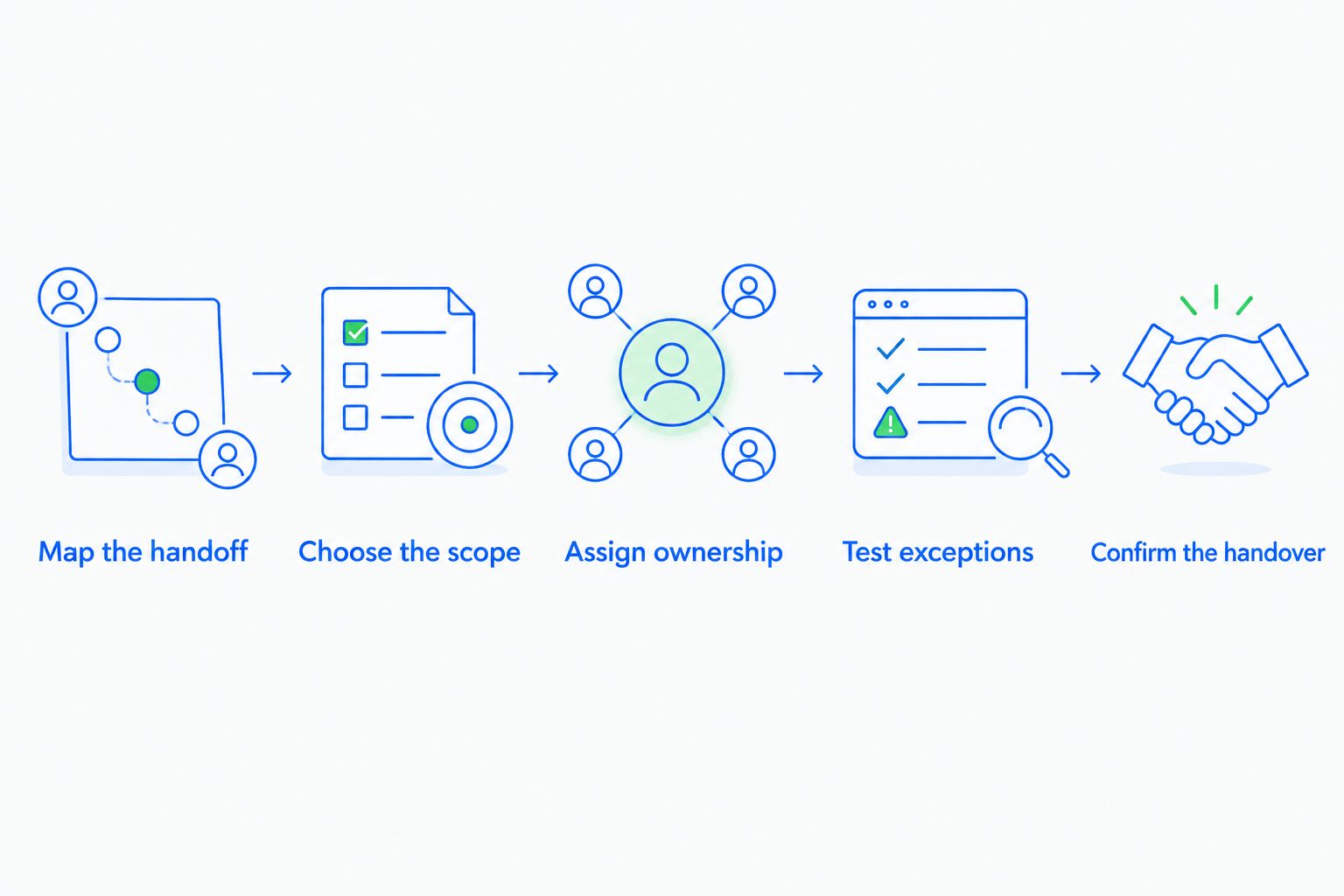
1. Map the handoff
Write the customer event, current owner, next action, and desired record update. Use a real sales situation with sensitive information removed, not an abstract request for better productivity.
For example, describe what should happen after an inquiry arrives and what changes after the prospect replies. Keep the business rule separate from the software setting used to implement it.
2. Choose the scope
For an initial rollout, consider 3 workflows: lead assignment, unanswered-inquiry follow-up, and reply handling. This is a suggested starting scope, not a required package or a claim about vendor limits.
Choose fewer if your team cannot explain the rules. A workflow you cannot describe clearly is not ready for automatic execution.
3. Assign ownership
Give each workflow 1 accountable owner. That person approves the business rule, checks exceptions, and decides when the workflow needs to change.
Separate accountability from technical access. The person who can edit a rule is not necessarily the person who should approve its effect on prospects and customers.
4. Test exceptions
Require 5 test cases before activation: a valid inquiry, a duplicate contact, a customer reply, an opted-out contact, and a missing owner. These are recommended checks, not a guarantee that they cover every business requirement.
For each case, record the expected task, message behavior, owner, and pipeline result. Investigate any difference before applying the workflow to active leads.
5. Confirm the handover
Ask for the workflow rules, connected-account responsibilities, and troubleshooting steps in writing. Include the internal time needed to review results and approve changes in your budget.
For a separate look at implementation planning, read how long CRM workflow automation takes to set up. Treat timing and scope as connected decisions, rather than negotiating them independently.
What should a CRM automation proposal include?
A useful 2026 proposal explains what will work at handover and what your team must supply to get there. Require acceptance criteria, not just a list of automation capabilities.
For each workflow, request the trigger, conditions, actions, stop rules, and failure handling. For each integration, request the source, destination, field mapping, and connection owner.
Then ask for a demonstration against your test cases. A feature checkbox does not establish that your workflow is configured, tested, and ready.
Arches CRM workflow automation supports reminders, tasks, follow-up sequences, and opportunity movement based on customer interactions and configured workflows. It is best for growing sales teams that want lead management and customer conversations in the same platform. The purchasing check is still specific: confirm the required rules, connections, and terms rather than assuming that the platform description defines your implementation.
Is doing the setup yourself cheaper?
Doing the setup yourself places configuration, testing, and maintenance work with your team. Compare that internal workload with the implementation scope in a provider's proposal, rather than counting only the external invoice.
Choose internal setup when your team understands the process and can own the rules. Request implementation help when the team needs assistance defining or connecting the workflow; verify the deliverables before committing.
Neither route removes the need for business ownership. Someone still has to decide what should happen when a prospect replies, changes direction, or asks to stop receiving messages.
How do you judge whether automation is worth the cost?
Judge automation against the operational problem it is supposed to fix. Track whether leads have owners, follow-up tasks receive attention, customer replies stop inappropriate sequences, and pipeline changes match your rules.
Use your own baseline rather than adopting an unrelated conversion claim. Record the starting process, define success, and review the same measures after launch.
For your 2026 review, distinguish execution from outcomes. Sending the intended message is evidence that a rule executed; it is not, by itself, evidence that the workflow increased revenue.
FAQ
How much does CRM workflow automation cost for a small sales team?
CRM workflow automation costs depend on the subscription, required workflows, setup, integrations, and ongoing ownership. Request an itemized proposal for your team's actual process rather than comparing subscription figures alone.
Does a CRM subscription include workflow setup?
Confirm workflow setup separately in the proposal. Access to an automation feature does not establish who will configure rules, prepare records, test exceptions, or train your team.
What hidden costs should I check before buying CRM automation?
Check data preparation, integration work, communication usage terms, training, and ongoing maintenance. Ask which responsibilities are included and which remain with your team.
Can I start with just one automated follow-up workflow?
Yes, a focused follow-up workflow is a practical starting scope. Define its trigger, owner, action, and stop condition before extending automation to other parts of the sales process.
Is Arches CRM suitable for sales follow-up automation?
Arches CRM is suited to growing sales teams that need lead management, automated follow-ups, sales pipelines, and shared customer communications. Confirm your required workflow rules and commercial terms before choosing it.
How can I compare CRM automation proposals fairly?
Give each provider the same workflow brief and acceptance tests. Compare subscription scope, implementation deliverables, integration responsibilities, and ongoing ownership together.
Should automated follow-ups stop when a lead replies?
An unanswered-inquiry sequence should stop or change when the lead replies. Define what happens next, including ownership and any review required before changing the opportunity stage.
One last thing
Test the stop rule before celebrating the send rule. A follow-up sequence that starts correctly but keeps running after a reply has not passed the workflow test.
Ask the person demonstrating the system to submit an inquiry, trigger the follow-up, and then reply as the prospect. Watch what stops, what changes, and who gets the next task. That demonstration gives you a clearer acceptance standard than a longer automation feature list.